


Wix SEO Wiz Setup Guide for 2026


Wix SEO Wiz Setup: Quick "Starts, Doesn't Finish" Verdict
Running the wix seo wiz setup guide process takes about 15–20 minutes, and it genuinely improves your site's technical foundation. But it will not, on its own, get you ranking. Here's the honest breakdown:
What it finishes: meta titles, meta descriptions, sitemap generation, basic indexing requests, and connecting Google Search Console.
What it starts but doesn't complete: keyword targeting — it suggests keywords but doesn't build a strategy around them.
What it never touches: content depth, backlinks, Core Web Vitals, internal linking, and schema markup.
The real risk: owners run the wizard once, see a green checklist, and assume "SEO is done." It isn't.
The fix: treat the SEO Wiz as step one of ten, not the whole plan.
If you want page-1 visibility, the wizard is your starting checklist — not your ranking strategy.
Introduction
There's a common myth floating around small business forums: run the Wix SEO Wiz, tick every box, and Google will start sending traffic. This wix seo wiz setup guide exists to correct that myth. The SEO Wiz is a genuinely useful onboarding tool — it handles meta tags, sitemap submission, and basic indexing steps that many site owners skip entirely. That part is real and worth doing properly.
What it cannot do is the part that actually moves rankings: choosing the right keywords for your specific market, writing content deep enough to outrank competitors, earning backlinks, and fixing the technical issues — like slow Wix website speed or missing schema — that quietly cap your visibility. This guide walks through the exact dashboard steps, then draws a clear line between "wizard territory" and "manual SEO territory" so you know exactly what to do after the checklist turns green.

What the SEO Wiz Actually Does (The Honest List)
The Wix SEO Wiz is a guided onboarding flow inside your Wix dashboard (SEO Settings → SEO Wiz) that automates the technical basics most beginners forget. It's genuinely useful for what it covers — the problem is scope, not quality.
What does the SEO Wiz set up automatically?
The wizard automatically generates your meta titles, drafts meta descriptions, creates and submits your XML sitemap, and sets basic robots.txt indexing rules. It also prompts you to add your business name, location, and a primary keyword per page, feeding that data straight into your page settings.
Which on-page basics does it handle well?
It handles image alt text prompts, page title structure, and URL cleanup reasonably well for small sites. It also nudges you to connect Google Search Console and Google Analytics, which most DIY site owners never do on their own — this alone is worth the 20 minutes.
How far does the wizard get a new site?
For a brand-new site, the wizard gets you from "technically invisible" to "technically indexable." That's a real milestone — but it's the floor of SEO, not the ceiling. It won't tell you which keywords your competitors already rank for.
What the SEO Wiz Cannot Do (The Bigger List)
The gap between "indexed" and "ranking" is where most of the real SEO work happens, and it's entirely outside the wizard's scope.
What can the SEO Wiz not do?
The wizard cannot research your competitive keyword landscape, cannot write unique page content, cannot build backlinks, and cannot fix slow load times. It fills in fields — it doesn't create strategy or authority.
Which ranking factors does it ignore?
It ignores domain authority, backlink profile, content depth, dwell time, and Core Web Vitals — all factors Google weighs heavily for competitive queries. A perfectly wizard-completed page can still load slowly and rank nowhere.
Why isn't the wizard enough on its own?
It isn't enough because ranking is comparative — Google ranks your page against competitors who likely have deeper content and more backlinks. The wizard fixes your own house; it does nothing about the houses next door that are ranking above you.
Comparison Table: What the Wix SEO Wiz Covers vs What It Leaves to You
SEO Task | Handled by SEO Wiz | Requires Manual Work |
Meta titles & descriptions | ✅ Drafted automatically | Needs manual rewriting for CTR |
XML sitemap | ✅ Generated & submitted | — |
Google Search Console connection | ✅ Prompted | Needs ongoing monitoring |
Keyword research | ⚠️ Basic suggestion only | ✅ Full strategy required |
Content depth | ❌ Not addressed | ✅ Required |
Backlinks | ❌ Not addressed | ✅ Required |
Core Web Vitals / speed | ❌ Not addressed | ✅ Required |
Schema markup | ❌ Not addressed | ✅ Required |
Internal linking | ❌ Not addressed | ✅ Required |

Step-by-Step: Running the Wix SEO Wiz Dashboard Walkthrough
Here's the exact path inside Wix, so there's no guesswork.
How do you run the SEO Wiz step by step?
Go to your Wix dashboard → Marketing & SEO → SEO (SEO Wiz).
Select your business type and confirm your target location.
Choose up to one primary keyword per key page (homepage, services, contact).
Let the wizard scan and generate meta titles/descriptions per page.
Review and edit any auto-generated meta text before publishing.
Connect Google Search Console when prompted.
Submit your sitemap and request indexing for key pages.
Review the final checklist — every green tick is a completed technical task, not a ranking guarantee.
Which dashboard settings matter most?
The keyword-per-page field and the Google Search Console connection matter most — everything else is largely cosmetic housekeeping compared to these two.
What should you check after each step?
After each step, check that the meta title actually contains your target keyword naturally and isn't truncated. Wizard-generated text is a draft, not a final version — always edit before publishing.

Meta Tags, Titles and Descriptions: What the Wizard Sets Up
Meta tags are the wizard's strongest contribution — but they still need a human pass.
How does the wizard set meta titles and descriptions?
It pulls your page name, business type, and location keyword into a templated sentence structure. It's functional but generic — it rarely includes a compelling reason to click.
Where do you edit them manually?
Edit them in Page Settings → SEO (Google) for each individual page. This is where you rewrite the wizard's draft into something with a real hook — a number, a benefit, or a specific outcome.
What makes a meta tag actually earn clicks?
A meta tag earns clicks when it answers "what's in it for me" in the first few words, includes your keyword naturally, and stays under 155 characters. Templated wizard text almost never does this — it states the topic, it doesn't sell the click.
Sitemap, Indexing and Google Search Console Connection
This is the unglamorous plumbing work that the wizard genuinely nails.
How does the wizard handle your sitemap?
The wizard auto-generates and submits your XML sitemap to Google without you needing to build one manually — this alone saves a technical step most DIY builders skip.
How do you connect Wix to Google Search Console?
You connect it through the wizard's prompt, or manually via Marketing & SEO → SEO Tools → Verify Ownership, using the HTML tag method Wix provides. Once verified, submit your sitemap URL directly inside GSC too.
What indexing settings should you verify?
Verify that no important page is set to "noindex" by accident, and that your sitemap actually lists every live page — new pages sometimes need manual resubmission after the initial wizard run.
Keyword Strategy: The Work the Wizard Leaves to You
This is the single biggest gap between running the wizard and actually ranking.
Why can't the wizard do keyword research?
It can't do keyword research because it has no visibility into search volume, competitor rankings, or buyer intent — it only lets you assign one keyword per page from your own guess.
How do you choose keywords for a Wix site?
Choose keywords by checking what real people search using Search Console's Performance report, free tools, and by mentally simulating who's already ranking for that phrase — narrow, specific phrases beat broad ones for a new site.
What keyword strategy does ranking actually need?
Ranking needs a keyword map: one primary phrase per page, supported by 3–5 related long-tail phrases woven into headings and body copy — not one keyword stuffed into a title field.
Content Depth and On-Page SEO: Where Rankings Actually Come From
Meta tags get you indexed. Content depth gets you ranked.
How does content depth affect rankings?
Content depth affects rankings because Google rewards pages that fully answer a searcher's question with pages that address related sub-questions too — thin, wizard-optimized pages with 200 words rarely outrank 1,000-word competitors.
What on-page work does the wizard skip?
It skips heading structure, internal linking, answer-first paragraphs, and topical coverage — all of which require actually writing more and better content, not adjusting a settings field.
How do you write content that outranks competitors?
Write content that directly answers the exact question in the H2/H3, in the first sentence, then expand with specifics — this is precisely the approach covered in our Wix Studio for small business guide.

Backlinks and Authority: Why the Wizard Can't Help Here
Backlinks are the ranking factor the wizard has zero mechanism to influence.
Why does the wizard not address backlinks?
It doesn't address backlinks because they're earned off-site — through other websites linking to yours — and no dashboard tool can manufacture third-party trust signals for you.
How do Wix sites build authority?
Wix sites build authority through local directory listings, supplier/partner links, guest content, and digital PR — the same channels any platform relies on, since backlinks are platform-agnostic.
What link-building works for small businesses?
What works best is claiming free local citations, getting listed on industry-specific directories, and asking existing suppliers or partners for a website link — slow, but compounding. This gap is closely related to why some owners see Wix site impressions but no clicks — visibility without authority still underperforms.
Technical SEO the Wizard Doesn't Touch (CWV, Schema, Internal Links)
Beyond meta tags and sitemaps, several technical factors sit entirely outside the wizard's reach.
What technical SEO does the wizard ignore?
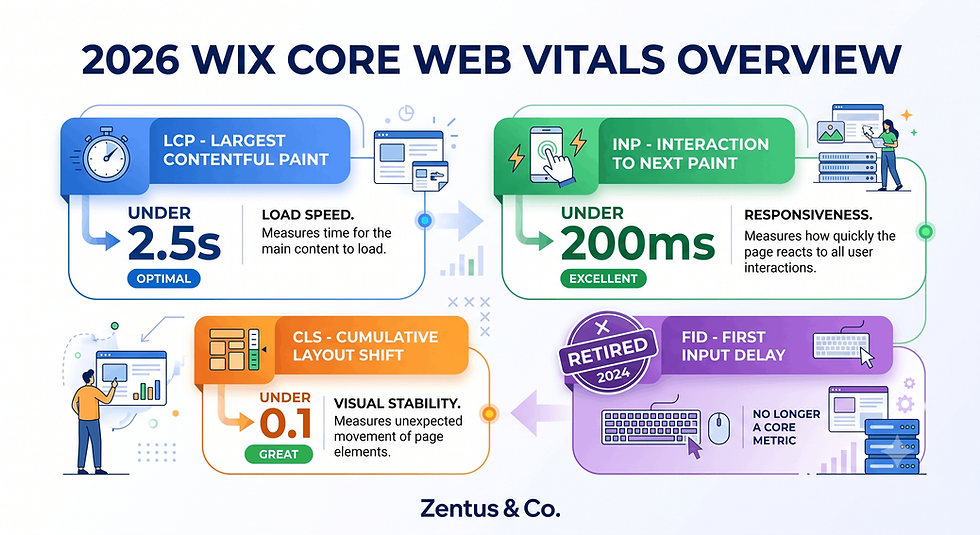
It ignores Core Web Vitals, structured data (schema), and internal linking architecture — three factors Google explicitly uses as ranking and rich-result signals.
How do CWV, schema and internal links affect rankings?
Slow Wix website speed hurts both rankings and conversions; missing schema means you miss out on rich snippets; weak internal linking means Google can't understand which pages matter most on your site.
What should you fix after running the wizard?
After the wizard, run a full Wix Core Web Vitals Checklist 2026 audit and review your Wix Studio services options if speed or schema issues need a professional fix.
When Running the SEO Wiz Is the Right First 30 Minutes of SEO
For most new or relaunched Wix sites, running the wizard first is genuinely the correct sequence — it just isn't the whole sequence.
When is the wizard the right starting point?
It's the right starting point for any brand-new site with zero SEO setup, since it prevents the common early mistakes — missing meta tags, no sitemap, no GSC connection — in one guided pass.
What should follow the wizard's 30 minutes?
What should follow is keyword mapping, a content plan for your top 5–10 pages, and a Core Web Vitals check — the wizard clears the runway, it doesn't fly the plane.
In a Wix Studio build, the setup detail that changes the outcome is rarely the wizard's checklist itself — it's whether the meta text it drafts gets rewritten with an actual click-worthy hook before publishing.
The Keyword, Content and Backlink Work the SEO Wiz Quietly Skips
This is where most owners lose momentum — the checklist is green, so the work feels finished.
Why do owners think the wizard is all the SEO they need?
Owners assume this because the dashboard shows a completed checklist with green ticks, which reads as "done" — but a completed technical checklist and a completed SEO strategy are two different things entirely.
What is the cost of stopping after the wizard?
The cost is months of flat traffic while competitors who invested in content and backlinks continue climbing — the wizard doesn't decay, but it also doesn't compound the way real content and links do.
How does the gap between setup and ranking trip people up?
It trips people up because there's no dashboard warning telling them the job isn't finished — the wizard simply stops offering tasks once its own scope is complete, leaving strategy work invisible unless you know to look for it.
The platform behaviour that surprises many business owners is that Wix will happily tell you your technical SEO score is "excellent" while your actual keyword competitiveness and content depth remain untouched — the score reflects wizard-scope tasks only.
Meta, Sitemap and Indexing Checks After You Run the Wizard
Before you consider SEO setup finished, run this verification pass.
What should you double-check in meta tags after the wizard runs?
Double-check that no two pages share the same meta title, that none are truncated past 60 characters, and that each one contains a natural (not stuffed) keyword.
How do you confirm your sitemap and indexing are actually working?
Confirm this inside Google Search Console's Coverage/Indexing report — look for "Discovered, not indexed" pages, which signal Google found the page but didn't prioritize crawling it.
Post-Wizard Verification Checklist:
☐ Every page has a unique meta title and description
☐ Sitemap includes all live pages (check page count matches)
☐ No key page is accidentally set to "noindex"
☐ Google Search Console shows verified ownership
☐ Core Web Vitals report reviewed for mobile speed issues
☐ At least one keyword assigned per priority page
☐ Internal links added between related blog posts and service pages

What Wix SEO Actually Costs: Wiz Time vs Manual SEO Effort in 2026
Running the wizard itself is free and included in every Wix plan — the real cost is the manual work afterward.
How much time does the wizard save vs manual setup?
The wizard saves roughly 2–3 hours of manual meta-tag and sitemap configuration, compressing it into a 20-minute guided flow — genuinely useful time savings for a solo owner.
Task | Wiz Time | Manual/DIY Time | Typical Agency Cost (July 2026) |
Meta tags + sitemap setup | 20 min (wizard) | 2–3 hrs | Included in most setup packages |
Keyword mapping (10 pages) | Not covered | 4–6 hrs | $150–$400 / £120–£320 |
Content depth rewrite (per page) | Not covered | 2–4 hrs | $80–$200 / £65–£160 per page |
Core Web Vitals fix | Not covered | 3–8 hrs | $200–$600 / £160–£480 |
Ongoing backlink outreach | Not covered | Ongoing monthly | $250–$700/mo / £200–£560/mo |
Prices checked for July 2026. Always verify current Wix and tool pricing before you buy — platform pricing can change.
For a small business owner, the important setting is not the label on the checklist — it is whether the hours saved by the wizard get reinvested into the keyword and content work that actually produces rankings. See current website design pricing if you'd rather have this handled professionally.
Frequently Asked Questions About the Wix SEO Wiz
How does the Wix SEO Wiz work step by step?
It works through a guided dashboard flow: select business type and location, assign one keyword per page, let it draft meta titles/descriptions, connect Google Search Console, then submit your sitemap. The whole process takes 15–20 minutes and covers only technical on-page basics, not strategy.
What does the Wix SEO Wiz do automatically?
It automatically generates meta titles and descriptions, creates and submits your XML sitemap, sets basic indexing rules, and prompts you to connect Google Search Console and Analytics. These are genuinely useful technical wins for a brand-new site.
What can the Wix SEO Wiz not do?
It cannot do keyword research, content writing, backlink building, or technical speed fixes. It fills in fields based on your input — it has no ability to analyze competitors or build off-site authority for you.
Is Wix SEO Wiz enough to rank?
No, it is not enough on its own — it gets your site indexable and technically tidy, but ranking depends on keyword strategy, content depth, and backlinks, none of which the wizard addresses.
How do I set up meta tags and sitemap on Wix?
Set them up through Marketing & SEO → SEO (SEO Wiz), or manually per-page via Page Settings → SEO. The sitemap is auto-generated by Wix at yoursite.com/sitemap.xml and submitted automatically once you connect Search Console.
Do you still need backlinks after running Wix SEO Wiz?
Yes, backlinks are completely unaffected by running the wizard. They're an off-site authority signal that requires outreach, directory listings, or partnerships — no on-site tool, including the wizard, can generate them for you.
How do I do keyword research for a Wix site?
Do it by reviewing Search Console's existing query data, using a free keyword tool for search volume, and choosing specific, narrower phrases over broad, high-competition terms — this pairs directly with our SEO for small business guide.
What is the difference between Wix SEO Wiz and real SEO?
The wizard covers technical on-page setup; real SEO includes ongoing keyword strategy, content creation, link building, and performance monitoring. One is a 20-minute checklist; the other is a continuous process.
Can Wix SEO Wiz get me to page 1?
On its own, rarely — it can help you get indexed and technically sound, which is a prerequisite for ranking, but page-1 positions are won through content depth and backlinks the wizard doesn't provide.
What technical SEO does Wix handle automatically?
Wix automatically handles mobile responsiveness, HTTPS/SSL, clean URL structures, and basic crawlability at the platform level — separate from anything the SEO Wiz specifically configures.
How do I connect Wix to Google Search Console?
Connect through Marketing & SEO → SEO Tools → Verify Ownership, using the HTML tag verification method Wix auto-inserts into your site's code — no manual file upload required.
Should I hire SEO help after running the Wix SEO Wiz?
It's worth considering if you lack time for ongoing keyword research, content writing, and link building — a professional Wix Studio services engagement can pick up exactly where the wizard's scope ends.

Conclusion & Action Checklist
The Wix SEO Wiz is a genuinely useful 20-minute starting point — not a finish line. This week, run through this checklist:
☐ Complete the SEO Wiz and manually rewrite every auto-generated meta title
☐ Verify your sitemap and Google Search Console connection are live
☐ Build a simple keyword map for your top 5–10 pages
☐ Audit one page for content depth — does it fully answer the searcher's question?
☐ Check your Core Web Vitals score and flag any slow pages
☐ List 3 realistic backlink opportunities (directories, partners, suppliers)
If the technical and content workload feels like more than a DIY afternoon, book a free consultation and we'll map out exactly what your site needs beyond the wizard.

Comments