


Wix Site Impressions But No Clicks: A Google Search Console CTR Fix Guide


Your Wix site is showing up in Google search results. Impressions are climbing in Google Search Console. But clicks? Flat. Zero. Nothing.
This is one of the most common and most misunderstood problems Wix website owners face in 2026. Impressions tell you Google is aware of your pages. Clicks tell you people chose your result over everyone else's. When one rises without the other, something is stopping searchers from choosing your link.
This guide explains exactly what that something is. You will learn how to read your GSC data correctly, which pages to fix first, how to update title tags and meta descriptions inside Wix, and how to test whether your changes are working. No generic SEO theory — just a practical, Wix-specific fix path.
CTR Fix Summary
Problem: Wix site getting impressions in Google but very few or zero clicks.
Root causes: Weak title tags, generic meta descriptions, query-to-page mismatch, wrong position range, or snippet intent mismatch.
Fix path: Identify your high-impression / low-click pages in GSC → rewrite titles and meta descriptions → match the query intent to the right page → wait 2–4 weeks → measure.
Cost: Low. Most CTR fixes require no paid tools. Time investment: 2–5 hours depending on how many pages need attention.
Wix-specific note: You update title tags and meta descriptions inside the Wix SEO Settings panel on each page. After updating, resubmit the URL in Google Search Console using the URL Inspection tool.
1. Wix Site Impressions But No Clicks: Quick Diagnosis
The first thing to understand is that impressions and clicks measure two different things, and a gap between them is normal up to a point.
An impression is recorded when your page appears in a search result — even if the searcher never sees it, because it loaded below the fold. A click is recorded only when someone actually selects your result. So a page ranking in position 15 might collect hundreds of impressions from searches where your result technically appeared, but almost nobody scrolled far enough to see it, let alone click it.
The problem becomes meaningful when you have pages ranking in positions 1 through 10 — on the first page — with high impression counts but very low or zero clicks. That is the scenario this guide addresses.
Why does a Wix page get impressions but no clicks?
A Wix page gets impressions without clicks when one or more of these conditions are true: the title tag does not match what the searcher was hoping to find, the meta description does not give a reason to click, the page is ranking for a query it was not designed to answer, or the search result looks generic compared to stronger competing listings.
The impression is earned by relevance signals. The click is earned by the quality of what Google shows as your result — your title, your meta description, and sometimes your URL. If any of those three look weak or mismatched, the searcher will choose a different result.
Is low CTR always a ranking problem?
Low CTR is not always a ranking problem — and confusing the two leads to fixing the wrong thing.
If your pages rank in positions 8 through 20, low CTR is partly a position problem. Pages outside the top five receive significantly fewer clicks regardless of how good the title is. In that case, improving the content, internal linking, and on-page signals to push the ranking higher will often lift clicks more effectively than rewriting the title alone.
If your pages rank in positions 1 through 5 and still have very low CTR, the problem is almost certainly your title tag and meta description. That is where to start.
2. Why Google Shows Impressions Without Clicks
Google shows your page in search results based on relevance signals it has collected: your content, internal links, title tag, structured data, and the overall authority of your domain. It does not require clicks to show your result. Clicks are what searchers decide to give — and they make that decision in under two seconds based on what your result looks like.
This means you can be indexed, visible, and even ranking without receiving a single click. It happens constantly on sites that have good content but weak or mismatched search result presentations.
The other factor worth understanding is position range. A page sitting in positions 11 to 20 — the second page of results — will generate a large number of impressions on any moderately searched query, because Google is counting your appearance across many searches. But second-page click-through rates are typically below 1%. The impressions accumulate. The clicks do not.
3. Which Low-CTR Pages Should You Fix First?
Not every low-CTR page deserves your attention immediately. Prioritising the right pages saves time and produces measurable results faster.
Which GSC pages should you prioritise first?
Open Google Search Console and navigate to the Performance report. Set the date range to the last 90 days. Click the Pages tab and sort by impressions descending. Then add a CTR column and look for pages where impressions are high but CTR is below 2%.
These are your priority pages. They are already visible to Google. You are not fighting an indexing problem. You are fighting a presentation problem, which is much easier to fix.
Pages with fewer than 100 impressions in 90 days are not worth optimising yet — they have too little data to measure improvement reliably.
Should you fix page-one impressions before page-three rankings?
Yes. Always fix page-one issues first.
A page sitting in positions 1 through 10 with low CTR is leaving real traffic on the table right now. A page sitting in positions 21 through 30 needs ranking improvements before CTR improvements will have any effect — you cannot click on what you cannot find.
Use this triage logic to focus your effort:
Position Range | CTR Benchmark | What to Fix |
1–3 | 15–35%+ | Title / meta mismatch or snippet intent problem |
4–10 | 5–15% | Title tag weakness, generic meta, no strong hook |
11–20 | 1–4% | Both ranking and title need improvement |
21–50 | Below 1% | Fix content and internal links before touching title |
50+ | Near zero | Not a CTR problem — an indexing or authority problem |

4. Title Tags and Meta Descriptions in Wix
This is the most practical section in this guide. Everything above tells you what to diagnose. This section tells you what to change and exactly where to change it inside Wix.
How do you change title tags in Wix?
Inside Wix or Wix Studio, go to the page you want to update. Open the Page Settings or use the SEO Settings panel — in Wix Studio this is accessible from the Pages & Menu panel by selecting any page and going to the SEO tab. You will see a field for Page Title (SEO) and a field for Meta Description.
The page title you type here is what Google will typically display as your blue headline in the search result. Keep it between 50 and 60 characters. Include the main keyword the page is targeting, ideally near the front. Add a differentiator — a specific outcome, number, year, or audience — that makes the result look more useful than a generic competitor title.
For blog posts, the title you type in Wix SEO Settings overrides the post title as the search result headline. Change the SEO title without changing the visible post title if you want to keep both clean.
After saving, go to Google Search Console, use the URL Inspection tool, and request indexing for that page. This prompts Google to recrawl the updated metadata faster — usually within a few days to two weeks.
What makes a meta description worth clicking?
A meta description worth clicking does three things in 120 to 155 characters: it confirms the topic matches what the searcher wants, it gives a specific reason to choose your result over others, and it implies the answer or action they will find on the page.
Weak meta description: "We offer Wix website design services for small businesses across the UK and USA."
Strong meta description: "Your Wix site ranking but not getting clicks? This guide shows you what to fix in title tags, meta descriptions, and query matching — in under an hour."
The strong version tells the searcher exactly what they will get, uses the problem they typed into Google, and creates a reason to click before they finish reading it.
Google does sometimes rewrite meta descriptions when it judges your version as a poor match for the search query. If Google keeps rewriting yours, it usually means your meta description is not closely enough aligned with the query that triggered the impression. Update the meta to match the dominant query the page is receiving in GSC.

5. Query-to-Page Mismatch in Search Console
This is the CTR problem that causes the most confusion, because it looks like a ranking problem but is actually a targeting problem.
How do you match queries to the right page?
In Google Search Console, go to Performance and click the Queries tab. Then filter by a specific page using the Pages filter. You will see a list of all the queries that triggered an impression for that page.
Look carefully at the top queries. If the queries showing the most impressions are different from what you intended the page to rank for, you have a mismatch. The page is attracting search intent it was not designed to serve, which means searchers see the result, sense it is not quite right for their query, and skip it.
The fix is either to update the page to better serve the dominant query, or to create a more specific page that directly serves that query and internally links to the existing page.
In a Wix Studio build, the detail that changes the outcome is how closely the first 100 words of a page match the dominant query it is attracting. If those opening sentences are about a different angle from what the query demands, Google may rank the page but searchers will not click it.
When does a blog post compete with a hub page?
A blog post competes with a hub page when both pages target the same keyword intent without clear differentiation. This is sometimes called cannibalisation, and it is a common problem on Wix websites where blog posts and service pages overlap on the same commercial keywords.
For example, if your blog post about Wix website costs and your pricing page both target "Wix website cost," Google may choose one over the other inconsistently. Sometimes it shows the blog post for a query where the pricing page would convert better. The result: impressions on the wrong page, lower CTR, and confused searchers.
The fix is to make each page's intent unmistakably clear. The blog post should serve informational intent — explaining factors, ranges, and decisions. The pricing page should serve commercial intent — showing your specific packages and a clear call to action. If you are working through this issue on your own Wix site, the how to hire a Wix designer UK and small business website cost guide posts on this site show how we separate the two intent types clearly.

6. Cost, Time and Testing Timeline
Fixing low CTR is one of the most cost-effective SEO improvements a small business can make. It requires no paid tools, no developer, and no major content overhaul in most cases.
How long does Google take to test CTR changes?
After you update a title tag or meta description in Wix and request reindexing in GSC, Google typically recrawls the page within a few days. However, you will not see reliable CTR data for 2 to 4 weeks after the change, because GSC averages data across the date range you have selected.
Set a reminder to check your performance data 4 weeks after any title or meta update. Compare the CTR for the specific page in the 4 weeks before the change versus the 4 weeks after. This gives you a clean comparison without date-range bleed.
Do not make multiple changes to the same page within the same 4-week window. If you change the title and the meta description at the same time, that is fine — treat them as one test. But do not then also restructure the H1 and intro in the same window, or you will not know which change produced the result.
What low-cost CTR fixes should small businesses try first?
Start with the changes that cost nothing and can be done today inside your Wix dashboard:
Rewrite the title tag of your top 3 high-impression / low-click pages — add specificity, include the target keyword near the front, and add 2026 where natural.
Rewrite the meta description — make it problem-aware and action-oriented.
Check whether the dominant query in GSC matches what the page is actually about.
Submit the updated URLs using the GSC URL Inspection tool.
If you need help restructuring multiple pages or building a proper SEO content architecture across your Wix Studio site, our Wix Studio services cover this as part of a full site build or SEO audit package. You can also review our website design pricing for a sense of scope and investment.

7. The Query-to-Page Mismatch Most CTR Guides Ignore
Most CTR improvement guides stop at title and meta description advice. That is useful as far as it goes. But it misses the deeper problem that causes many Wix sites to stay stuck even after multiple title rewrites: the page is not the right answer for the query that is sending impressions.
Why do generic CTR guides miss search intent?
Generic CTR guides treat all low-CTR pages the same: "rewrite the title, add a number, use power words." But search intent has three layers — the query, the intent behind the query, and the expected format of the answer. A searcher typing "Wix site impressions but no clicks" wants a diagnostic guide, not a service page. If you send them to a service page, no amount of title optimisation will fix the click problem.
The platform behaviour that surprises many Wix business owners is that Google often ranks the wrong page for a query because it is the most relevant page available — even if the intent does not match perfectly. The fix is not to make that page sound more clickable. The fix is to create a page with the right intent, then make that page sound clickable.
How do you spot a wrong-page ranking problem?
In GSC, open the Pages tab and filter for a page that has high impressions but very low CTR. Switch to the Queries tab and look at what queries are driving those impressions. If the top queries are clearly informational but the page is a service or sales page — or vice versa — you have a wrong-page ranking problem.
The wrong-page ranking problem is worth fixing before you invest time in rewriting the title. If you are unsure whether your content structure is creating this issue, the should I hire a web designer post explores the decision-making process for exactly this kind of audit.

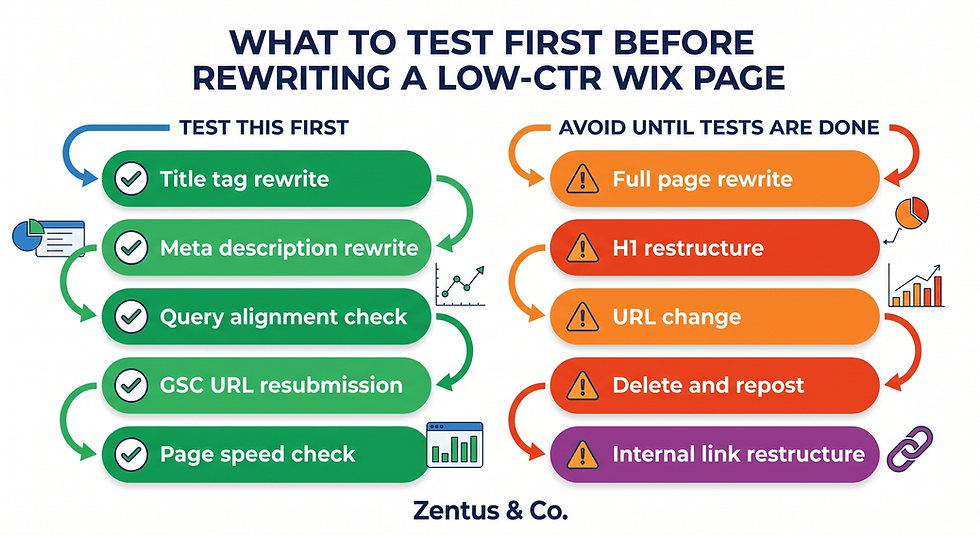
8. CTR Tests to Run Before Rewriting the Whole Page
Before you restructure an entire blog post or service page in response to low CTR, run a smaller set of targeted tests. Full rewrites take time, disrupt existing rankings, and can cause more harm than good if the problem is actually just a weak title.
What should you test before rewriting content?
Test 1: Title tag only. Leave everything else the same. Change only the SEO title in Wix to be more specific — include the primary keyword closer to the front, remove filler words, and add a year or outcome. Wait 4 weeks and check CTR.
Test 2: Meta description only. If you changed the title in a previous test and CTR improved but is still below your benchmark, then rewrite only the meta description. Make it problem-aware and specific. Wait another 4 weeks.
Test 3: Query alignment check. If title and meta changes produced no improvement, go back to GSC and recheck the dominant queries. If they have shifted or are clearly mismatched to the page's content, you may need to either update the opening section of the page or create a new more specific page.
A slow page speed can also suppress CTR indirectly — if your page loads slowly, Google may favour faster competing results in the search presentation. Check your Wix website speed guide to make sure core web vitals are not contributing to your CTR problem before assuming the title is the only issue.
How do you measure whether CTR improved?
Use this simple measurement process inside GSC:
Note the exact date you submitted the updated page in GSC.
Wait 28 days.
In GSC Performance, set a comparison date range: last 28 days vs the 28 days before the change date.
Filter by the specific page URL.
Look at CTR, clicks, impressions, and average position together — not in isolation.
If impressions stayed roughly the same but CTR rose, your title/meta fix worked. If impressions dropped, Google may have shifted the page's ranking — check the average position column to confirm. If position improved but CTR did not, the title still needs work.
9. Frequently Asked Questions About Wix Site Impressions But No Clicks
What is a good CTR in Google Search Console?
A good CTR depends entirely on your page's average position. Position 1 typically earns 25–35% CTR for navigational queries and 15–25% for informational ones. Positions 2–3 average 8–15%. Positions 4–10 typically range from 2–8%. If your page is in the top five and CTR is below 2%, that is a clear signal to rewrite your title and meta description.
Why are my impressions going up but clicks staying flat?
Impressions rising without a corresponding rise in clicks usually means your page is ranking for more queries — often at lower positions — but the ranking gains are in positions 10 through 30 where CTR is naturally very low. It can also mean your title tag is attracting impressions for queries where it does not look like the right answer. Check your average position in GSC alongside impressions to see whether the growth is coming from page-one queries or deeper results.
Should I resubmit Wix pages after changing titles?
Yes. After updating the SEO title or meta description in Wix, open Google Search Console, go to the URL Inspection tool, paste the page URL, and click Request Indexing. This tells Google to recrawl the page sooner than its normal schedule. Without this step, it can take weeks for Google to notice the change. You can resubmit the same URL after each meaningful change.
Can Google rewrite my title tag?
Yes. Google rewrites title tags when it judges that your version does not accurately represent the page content, is too long, stuffed with keywords, or poorly matches the search query that triggered the impression. If Google keeps overriding your title with something different, it is a signal that your title and your content are not aligned. Fix the alignment first — make sure the first 100 words of your page clearly reflect the title — before rewriting the title again.
Do meta descriptions affect rankings?
Meta descriptions are not a direct ranking factor. Google has confirmed this. However, meta descriptions affect CTR, which is the number of people who click your result. Higher CTR sends a positive engagement signal to Google over time. More importantly, a well-written meta description simply gets more people to visit your page — which is the point. Write meta descriptions for the searcher, not the algorithm.
How many days should I wait before changing titles again?
Wait at least 28 days before making another change to the same page's title or meta description. GSC data has a lag, and making multiple changes within a few weeks makes it impossible to measure which change — if any — produced a result. Set a calendar reminder the day you submit the updated URL, and do not revisit that page's SEO metadata until the 28 days are up.

Conclusion
Impressions without clicks are not a failure — they are a diagnosis. They tell you that Google can see your pages and considers them relevant enough to show, but something in your search result presentation is stopping people from choosing your link.
For most Wix websites, the fix is specific and achievable without any paid tools or developer work. Update your title tags to be specific and keyword-aligned. Rewrite your meta descriptions to match the searcher's actual intent. Use GSC to confirm which queries are driving your impressions, and check whether those queries are landing on the right page.
If you are working through this process and realise the problem is broader — overlapping page intents, a content structure that needs rethinking, or a Wix site that was never built with SEO architecture in mind — that is where getting expert help pays off.
You can explore how we structure Wix Studio sites to avoid these problems from the start, or book a free consultation to talk through your specific GSC situation.


Comments