


Wix Core Web Vitals Checklist 2026

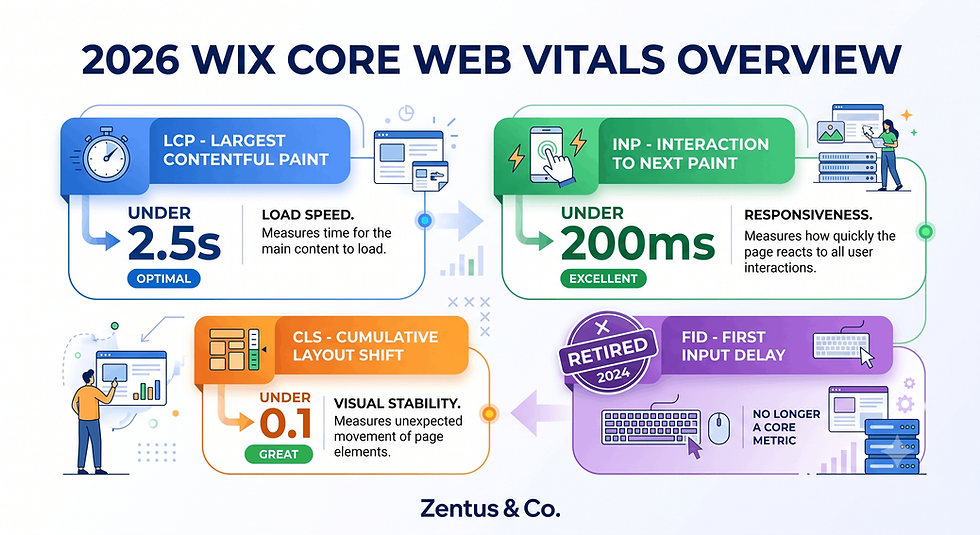
Wix Core Web Vitals 2026: Quick LCP, INP, CLS Verdict
Here's the direct answer before the detail:
LCP, INP and CLS are the only three field-data Core Web Vitals in 2026 — FID has not counted since March 2024, so any guide still mentioning it is outdated.
A green PageSpeed Insights lab score does not guarantee a real-user pass. Check Google Search Console's Core Web Vitals report or CrUX field data before you celebrate.
Most Wix CWV failures trace back to hero image weight, unhinted web fonts, third-party chat/marketing widgets, scroll animations and unbounded embeds — not Wix's core rendering engine.
Wix Studio generally ships leaner markup than Classic Wix Editor, but switching platforms alone won't fix a page loaded with heavy widgets.
Expect 4–8 weeks of real-user data collection after a fix before Google's dashboards confirm a genuine pass.
Read the full breakdown below, including the field-data-vs-lab-data trap that misleads almost every Wix site owner.
Introduction
"Are Wix websites slow?" is one of the most repeated myths in web design forums, and it's mostly out of date. The bigger issue is that most wix core web vitals checklist 2026 advice online is still written for a 2022 internet — it talks about FID, a metric Google retired in March 2024, and hands you generic "compress your images" tips that ignore what actually breaks Wix pages. If you're chasing a passing PageSpeed Insights score and still failing Google's real-user Core Web Vitals report, you're not imagining it. Lab data and field data measure genuinely different things, and Wix has its own specific list of culprits — chat widgets, scroll animations, Velo code, unbounded embeds — that generic speed guides never mention. This checklist covers the three 2026 metrics, explains exactly why your lab score can lie, and shows you how to test correctly before you claim victory.

The 2026 Metrics: LCP, INP and CLS (INP Replaced FID in 2024)
Core Web Vitals in 2026 measure three things: how fast your main content loads (LCP), how quickly the page responds to interaction (INP), and how visually stable it stays while loading (CLS). All three are field-data metrics pulled from real visitor sessions recorded in the Chrome User Experience Report (CrUX), not from a single simulated test.
Table 1 — 2026 Core Web Vitals Thresholds
Metric | Good | Needs Improvement | Poor |
LCP (Largest Contentful Paint) | ≤2.5s | 2.5–4.0s | >4.0s |
INP (Interaction to Next Paint) | ≤200ms | 200–500ms | >500ms |
CLS (Cumulative Layout Shift) | ≤0.1 | 0.1–0.25 | >0.25 |
What changed in Google's Core Web Vitals for 2026?
The metric set itself hasn't changed since March 2024 — LCP, INP and CLS remain the three official Core Web Vitals — but Google has widened CrUX coverage to smaller sites and custom domains through 2025–2026, meaning even lower-traffic Wix sites now generate usable field data faster than before.
Why did Google replace FID with INP?
Google retired First Input Delay (FID) because it only measured the delay before a browser began processing someone's very first click. INP measures responsiveness across every interaction during the whole visit — including repeated taps on a Wix menu, booking widget, or lightbox — which is a far more honest picture of real usability.
For a wider view of what slows sites down generally, see our guide on Wix website speed.
Field Data vs Lab Data: Why Your PageSpeed Score Lies
Lab data and field data measure the same three metrics from completely different sources, and confusing the two is the single biggest reason Wix owners believe they've "passed" Core Web Vitals when Google's own dashboard disagrees.
What is the difference between field data and lab data?
Lab data is one simulated test run by PageSpeed Insights or Lighthouse on a clean, fast connection with zero real visitors involved. Field data is an aggregate of actual visitor experiences collected over the previous 28 days through the Chrome User Experience Report (CrUX). They can — and often do — disagree.
Why does PSI show green but CrUX show red?
PSI often shows green because it tests your page once, on an idealised device profile, ignoring the slow mobile connections, older phones, and mid-scroll taps your real visitors experience. CrUX field data captures every one of those messier, real-world conditions your lab test never sees.
Which data does Google actually use for rankings?
Google's Page Experience signal is built entirely from field data in CrUX, not lab data. A perfect Lighthouse score sitting next to a failing CrUX report still counts as a fail for ranking purposes — the lab score is a diagnostic tool, not proof of anything for search.
This is exactly the kind of technical gap that also affects broader visibility — see our piece on SEO for small business for how technical health feeds into rankings.

How to Actually Test Wix Core Web Vitals (Not Just PSI)
Testing only in PageSpeed Insights gives you half the picture. A correct test combines lab data for diagnosis with field data for verification.
What's the right way to measure Wix Core Web Vitals before optimizing?
Start with PageSpeed Insights for a lab-based diagnosis of what's slow, then cross-check the same URL in Google Search Console's Core Web Vitals report, which shows real CrUX field data grouped by URL. If PSI is red and Search Console is also red, you have a genuine problem — not just a lab artefact.
What tools show real field data for a Wix site?
Google Search Console's Core Web Vitals report, the free CrUX Dashboard, and the "Field Data" panel inside PageSpeed Insights itself (when enough traffic exists) all show real-user data. Chrome's built-in DevTools "Performance Insights" panel also displays a local field-data comparison when you browse your own site.
This is a natural moment to review your wider platform choice — our Wix Studio for small business guide covers where the newer builder fits into a performance-first setup.
LCP Fixes: Hero Images, Fonts and Above-the-Fold Loading on Wix
LCP measures how long it takes your largest visible element — almost always a hero image or heading — to render.
What causes poor LCP on Wix sites?
The most common cause is an oversized, unoptimised hero image served at full resolution to mobile devices, followed closely by custom web fonts that block text rendering and slow strip-style scroll galleries placed above the fold.
How do you optimise hero images and fonts on Wix?
Use Wix's built-in image compression, upload images at the actual display size rather than the original camera resolution, and limit custom fonts to one or two weights loaded in the Wix Editor's font settings rather than stacking multiple Google Fonts imports.
What LCP score should a Wix site target?
Aim for under 2.5 seconds on mobile field data specifically, since mobile connections are almost always the bottleneck. A desktop-only green score is not sufficient — Google's Page Experience signal weighs mobile field data heavily.
INP Fixes: The Wix Culprits Behind Click and Tap Delays
INP failures on Wix are almost never about the platform's core code — they're about what business owners add on top of it.
What Wix features cause high INP?
Heavy third-party chat widgets, marketing pop-ups, and embedded booking iframes are the most common causes, because each one loads its own JavaScript that competes with the browser's main thread exactly when a visitor tries to click or tap.
How do third-party widgets create tap delays?
Each widget script runs on the same processing thread as the rest of your page. When a visitor taps a menu link while a chat widget is still initialising in the background, the browser queues the tap behind that script — creating the exact delay INP measures.
For deeper platform comparisons that affect script load, see Wix Studio vs Wix.
CLS Fixes: Layout Shifts From Ads, Embeds and Lazy-Loaded Media
CLS measures how much your page visually jumps around while it loads — a frustrating experience that Google penalises heavily.
Which Wix layout elements trigger the most CLS?
Embedded YouTube videos without a fixed aspect ratio, lazy-loaded image galleries that reserve no space until the image arrives, and dynamically injected marketing banners are the three biggest CLS triggers on Wix sites.
How do embeds and lazy media shift layout?
When an embed or image loads without a pre-defined width and height, the browser doesn't know how much space to reserve for it. As soon as the file finishes loading, the surrounding content jumps to make room — that jump is exactly what CLS scores.
What CLS score keeps your layout stable?
Target 0.1 or lower. Set explicit width and height (or aspect-ratio) values on every embed and gallery block in the Wix Editor, and avoid inserting promotional banners above content that's already visible on load.

The Wix-Specific CWV Killers: Third-Party Widgets and Animations
This is the section most generic speed guides skip entirely, because it's specific to how Wix sites are actually built.
Which Wix third-party widgets hurt CWV most?
Live chat plugins, review-collection widgets, exit-intent pop-ups and third-party booking calendars consistently cause the biggest INP and LCP damage, because they each load independent scripts that Wix's own compression settings cannot touch.
Do scroll animations slow interaction?
Yes. Wix's built-in scroll effects — parallax backgrounds, reveal-on-scroll text, and animated counters — run continuous JavaScript listeners while a visitor scrolls. Stacking several of these on one page directly increases INP because the browser is busy animating instead of responding to taps.

Wix Studio vs Wix Editor: Does the Platform Affect CWV
Platform choice matters, but it's not the whole story.
How does Wix Studio's tech stack differ from Wix Editor's?
Wix Studio was built with a more modern rendering approach and generally ships lighter baseline markup per page than the Classic Wix Editor, which carries more legacy code paths to support older sites and apps.
Which platform loads faster on mobile?
In most side-by-side field comparisons, Wix Studio sites load marginally faster on mobile, mainly because Studio encourages more deliberate section-by-section design rather than stacking pre-built strips, which tend to accumulate extra scripts over time.
Should you migrate Editor sites to Studio for speed?
Only if your current Editor site is already overloaded with widgets and apps that a rebuild would let you audit and remove. Migrating an already-lean Editor site purely for CWV gains rarely justifies the rebuild effort on its own.
How Long It Takes to Pass Core Web Vitals on Wix (and How to Track It)
Fixing the code is the fast part. Waiting for Google to confirm it is the slow part.
What's a realistic CWV improvement timeline after fixes go live?
Most sites see lab scores improve immediately, but field data needs a full 28-day rolling window of real visitor traffic to update in CrUX, so budget 4–8 weeks before Search Console confirms a genuine pass, longer on lower-traffic sites.
How do you track CWV improvements over time?
Bookmark your property's Core Web Vitals report in Google Search Console and check it every 2–4 weeks rather than daily — daily checks during the CrUX collection window just show noisy, incomplete data.
Table 2 — Typical CWV Fix Costs and Effort (July 2026)
Approach | Typical Cost | Time Required | Best For |
DIY audit + Wix Editor settings fixes | $0 | 3–6 hours | Small sites with few widgets |
Third-party CWV monitoring tool (e.g. basic tier) | $15–$40/month | Ongoing | Owners tracking trends over time |
Freelance/agency CWV audit and fix | $250–$900 one-off | 1–2 weeks | Sites with heavy widget stacks |
Full Wix Studio rebuild with performance focus | $1,500–$5,000+ | 3–6 weeks | Sites failing multiple metrics badly |
Prices checked for July 2026. Always verify current Wix and tool pricing before you buy — platform pricing can change.
If your site needs professional attention, our Wix Studio services cover performance-focused builds, and current packages are listed on our website design pricing page.

When Passing Lab Scores Still Leaves You Failing Real-User CWV
This is where most Wix owners get stuck — a clean lab report that doesn't match reality.
When is a passing lab score not enough to trust?
A lab score is not enough to trust whenever your site relies on third-party widgets, personalised content, or heavy mobile traffic, because PSI's single idealised test run cannot simulate the variety of real devices and network conditions your actual mobile visitors use.
How do you decide whether a fix needs field-data confirmation?
If the fix touches anything a real visitor interacts with — a widget, an animation, a font load — wait for field data before declaring victory. If the fix is purely structural (like image compression with no interactive element), the lab score is a more reliable early signal.
What real-user signal proves your CWV fixes actually worked?
The only proof that counts is a "Good" URL group appearing in Google Search Console's Core Web Vitals report using field data, not a green Lighthouse score. Treat lab data as your workbench and field data as your final inspection.
The Field-Data-vs-Lab-Data Confusion That Misleads Every Wix Owner
Here's the gap most guides never explain: they treat PageSpeed Insights as the finish line when it's actually only the starting point.
Why do most Wix speed guides only quote lab scores?
Because lab scores are instant, free, and easy to screenshot for a blog post — field data takes weeks to accumulate and requires enough real traffic to populate CrUX, which most generic guides simply don't wait for before publishing advice.
How does Google Search Console's CWV report differ from PageSpeed Insights?
Search Console groups field data by similar URLs (like all product pages or all service pages together) rather than testing one page at a time, giving you a site-wide pattern instead of a single snapshot — which is far more useful for prioritising fixes across a whole Wix site.
Low-traffic pages may never accumulate enough CrUX data to appear individually in Search Console at all — in that case, origin-level (whole-site) field data becomes your best available signal.
Widget, Animation and Velo Checks Before You Claim CWV Victory
Before you tell anyone your site "passed" Core Web Vitals, run these checks.
Which widget and animation checks should you run before publishing?
Disable each third-party widget one at a time and re-test LCP and INP after each removal — this isolates exactly which widget is causing the damage instead of guessing. Also check scroll-triggered animations on mobile specifically, since they behave differently than on desktop.
How do you audit Velo code for Core Web Vitals impact?
Review any custom Velo code for synchronous database calls or DOM manipulations that run on page load, since these block rendering exactly like a heavy third-party script. If you're not using Velo, this step doesn't apply — most small business Wix sites don't need it.
Pre-Publish CWV Checklist:
Hero image compressed and sized for actual display dimensions
No more than 2 font weights loaded
Each third-party widget tested in isolation
Scroll animations checked on a real mobile device
All embeds and galleries have fixed width/height set
Search Console field data re-checked after 4–8 weeks

Frequently Asked Questions About Wix Core Web Vitals 2026
What are the 2026 Core Web Vitals metrics for Wix?
The three official metrics remain LCP, INP and CLS. LCP measures loading speed of the largest visible element, INP measures interaction responsiveness across the whole visit, and CLS measures visual stability while the page loads. All three are measured using real-user field data, not just lab simulations, and all three apply equally to Wix sites as they do to any other platform.
What is the difference between INP and FID?
FID only measured the delay before a browser processed a visitor's very first interaction on a page, while INP measures responsiveness across every single interaction during an entire visit. Google retired FID in March 2024 because it gave an incomplete picture — a site could pass FID while still feeling sluggish on the tenth tap.
How do I fix Wix LCP on mobile?
Compress and correctly size your hero image, minimise custom font weights, and avoid placing heavy scroll galleries directly above the fold. Mobile LCP is usually worse than desktop because of slower connections, so test specifically on a throttled mobile profile in PageSpeed Insights rather than trusting the desktop score alone.
How do I reduce Wix INP delays?
Remove or delay-load non-essential third-party widgets like chat plugins and pop-ups, and limit the number of active scroll animations running at once. INP delays are almost always caused by competing JavaScript, so the fewer scripts running during an interaction, the faster your page responds.
What causes CLS on Wix sites?
The biggest causes are embedded videos without a fixed aspect ratio, lazy-loaded images that don't reserve space in advance, and dynamically injected banners or pop-ups. Setting explicit dimensions on every embed and gallery block in the Wix Editor prevents most CLS issues before they start.
How do I read field data vs lab data in PageSpeed Insights?
The top section of a PageSpeed Insights report labelled "Discover what your real users are experiencing" shows field data from CrUX, while the score and diagnostics below it are lab data from a single simulated test. If the field data section says "not enough data," your site doesn't yet have enough traffic for Google to judge it that way.
Which Wix features slow down Core Web Vitals?
Third-party chat and marketing widgets, scroll-triggered animations, unoptimised hero images, uncompressed custom fonts, and unbounded embeds are the most common culprits. Wix's own core rendering engine is rarely the bottleneck — it's almost always the extras layered on top of a site.
How do I test Wix Core Web Vitals correctly?
Use PageSpeed Insights for an initial diagnosis, then confirm real performance using Google Search Console's Core Web Vitals report, which reflects actual visitor field data rather than a single lab test. Never rely on a lab score alone before declaring a fix successful.
Does Wix Studio perform better than Wix Editor for CWV?
Wix Studio generally ships lighter baseline markup and tends to load marginally faster on mobile than Classic Wix Editor, but the difference is small compared to the impact of third-party widgets and heavy media. Platform choice alone will not fix a page loaded with unnecessary scripts.
How long does it take to pass Core Web Vitals on Wix?
After implementing fixes, expect 4–8 weeks before Google Search Console's field data confirms a pass, since CrUX requires a rolling 28-day window of real visitor traffic. Lower-traffic Wix sites may take longer to accumulate enough data to show a confirmed status at all.
Do Core Web Vitals affect Wix SEO rankings?
Yes, Core Web Vitals are part of Google's Page Experience signal, which factors into ranking, though it is one of many factors and rarely outweighs strong content and relevance. Passing CWV won't guarantee a top ranking, but consistently failing it can hold back an otherwise strong Wix page.
What is a good INP score for a Wix website?
A good INP score is 200 milliseconds or under, measured from real-user field data rather than a lab test. Scores between 200–500ms are rated "needs improvement," and anything above 500ms is rated "poor" and likely to affect both user experience and Google's Page Experience signal.

Conclusion: Your Action Checklist This Week
You don't need to fix everything today — you need to fix the right things in the right order. This week: run PageSpeed Insights on your homepage and top landing page, then cross-check both against Google Search Console's Core Web Vitals field data. Disable third-party widgets one at a time to isolate INP problems, compress and correctly size your hero images for LCP, and set fixed dimensions on every embed and gallery for CLS. Re-check field data in 4–8 weeks — not tomorrow. If your Wix site is failing across multiple metrics at once, a structured audit is usually faster than guessing. Book a free consultation and we'll walk through what's actually slowing your site down.


Comments