


Wix Paid Plans and Member Areas Explained


Wix Paid Plans and Member Areas: Quick Gated-Content Verdict
If you want to gate pages, videos, PDFs or entire resource libraries behind a login and charge for access, you need Wix Paid Plans and Member Areas — not Wix Bookings memberships, which only control appointment and class access.
Quick decision framework:
Selling access to content (courses, downloads, community pages) → Use Paid Plans + Member Areas
Selling access to appointments or classes → Use Bookings memberships or class passes
Selling both content AND appointments → Run Paid Plans and Bookings memberships side by side on the same site
Want different prices for logged-in members vs guests → Combine Member Areas with member-only pricing on Wix Stores
Want content to unlock gradually → Use content dripping inside a Paid Plan, not a one-time unlock
Getting this split right before you build saves a full re-do later — the rest of this guide walks through exactly how each piece works.
Introduction
Many Wix users assume "membership" means one single feature — but Wix actually splits membership functionality into two separate products, and confusing them is the single biggest mistake service businesses make when they try to build recurring revenue. Wix Paid Plans and Member Areas are built for gated content: locking pages, videos, files and entire resource libraries behind a login and a subscription. Wix Bookings memberships and class passes are built for something else entirely — controlling how many appointments or classes a client can book each month. If you're searching for wix paid plans and member areas because you want to sell a course, a resource library, a private community, or content that unlocks over time, you're looking at the right tool. This guide separates the two systems clearly, then walks through gated-content setup, content dripping, member-only pricing, tiered access and the recurring-revenue math that decides whether a membership business is actually worth running on Wix in 2026.

Member Areas vs Bookings Memberships: The Confusion Most Owners Hit
The confusion starts because Wix uses the word "membership" for two unrelated systems, and the dashboard doesn't make the split obvious until you're already halfway through setup. Getting this wrong means building the wrong structure and re-doing the entire member experience later.
What is the difference between Bookings memberships and Member Areas?
Bookings memberships control how many sessions, classes or appointments a client can use within a billing period — they live inside the Wix Bookings app and are tied to your calendar. Member Areas, powered by Wix Paid Plans, control access to pages, content and files anywhere on your site and have nothing to do with a calendar. If you're gating a video library rather than a class credit, you need Member Areas, not a Bookings membership.
Which product do you need for gated content?
You need Wix Paid Plans and Member Areas specifically, because gated content means restricting pages and files, not appointment slots. Read our Wix Bookings pricing and memberships breakdown first if you're unsure which side of the split your business sits on — service businesses selling session credits belong there, while businesses selling content, courses or community access belong here.
Can a site run both together?
Yes — a single Wix site can run Bookings memberships and Paid Plans simultaneously, because they're separate apps that don't conflict. A yoga studio, for example, can sell class credits through Bookings while also gating a private video library through Member Areas — check our Wix Bookings deposits guide for how deposit rules interact with membership billing on the booking side.
What You Can Actually Sell With Paid Plans (It's More Than Memberships)
Most people think Paid Plans only sells "a membership" — a single flat subscription. In reality it's a flexible gating engine that can sell several content products, and treating it as one product type undersells what your site can generate.
What can you sell with Wix Paid Plans?
You can sell recurring subscriptions, one-time content unlocks, free-trial-then-paid access, and multiple pricing tiers — each Paid Plan is really just a pricing rule attached to a set of gated pages. A single site can run three or four plans at once, each unlocking a different slice of content, so you're not limited to one flat membership fee.
Can Paid Plans gate courses, files and videos?
Yes — Paid Plans can gate entire pages, embedded video, downloadable PDFs, audio files and member-only blog posts. Anything placed on a gated page becomes invisible to non-members, so a course made of ten video lessons and three workbooks can sit behind one plan with zero extra apps needed.
How does Paid Plans differ from Wix Stores?
Wix Stores sells physical or digital products as a one-time or subscription purchase with checkout and shipping logic; Paid Plans sells access rather than a file delivered once. A downloadable eBook sold once fits Stores, while a growing library that adds lessons every month fits Paid Plans. Many gated-content businesses use both, an approach covered further in our Wix Studio for small business overview of stacking Wix apps correctly.
Gated Content Setup: Pages, Files, Videos and Resource Libraries
Gating content on Wix is a page-level permission, not a file-level one — understanding that distinction avoids the most common setup mistake.
How do you gate a page or file on Wix?
In the Wix dashboard, open Members Area settings, create or edit a Paid Plan, then assign specific pages to that plan under Permissions. Any page assigned becomes restricted; files and media embedded on that page inherit the same restriction automatically, so you gate the page once rather than each file individually.
Can Wix host a resource library for members?
Yes — a resource library is simply a gated page (or set of pages) containing a file list, embedded PDFs, or a repeater displaying downloadable items. Wix doesn't have a dedicated "library" app, so resource libraries are built using standard page elements placed behind a Paid Plan, keeping setup inside the core platform.
How do video and download access work for members?
Videos embedded on a gated page only play for logged-in members with the correct plan; download links should route through a gated page rather than a public file URL, because a public URL can be shared and bypasses the login wall entirely. The safest pattern is: page is gated → files sit inside it → no direct public links exist anywhere else.

Content Dripping: Unlocking Content Over Time to Reduce Refunds
Content dripping releases material on a schedule instead of all at once, and it solves a real refund problem that instant-access courses create.
What is content dripping and why does it cut refunds?
Content dripping unlocks lessons or resources gradually — week 1, week 2, week 3 — instead of granting access to everything the moment someone pays. It cuts refunds because a member who binges an entire course and requests a refund the next day is far more common than a member who's three weeks into a twelve-week drip with nine weeks of value still ahead.
How do you set a drip schedule on Wix?
Inside Paid Plan permissions, pages can be set to become visible on a fixed date or a number of days after signup, configured per page. A twelve-lesson course becomes twelve gated pages, each with its own release rule, so lesson 1 shows immediately and lesson 12 shows eleven weeks later.
When should content unlock instantly vs over time?
Instant unlock suits reference material members need immediately — templates, checklists, swipe files — while drip unlock suits sequential learning where lesson 4 assumes lessons 1–3 are complete. A hybrid works well for most gated-content businesses: unlock a welcome resource instantly to prove value, then drip the core curriculum weekly.

Member-Only Pricing: Different Prices for Members vs Non-Members
Member-only pricing is a Wix Stores feature that most site owners never activate, and it's one of the highest-leverage settings for a gated-content business that also sells products.
How does member-only pricing work on Wix Stores?
Wix Stores lets you set a discounted price visible only to logged-in members of a specific Paid Plan, while guests see the standard price. The discount applies automatically once a shopper is recognised as a member — no coupon code needed, removing the friction of members forgetting to apply one.
Can members see different product prices?
Yes — the same product page shows two different prices depending on login status: a guest sees the full price, a logged-in member of the correct plan sees the member price, and the switch happens instantly without a page reload.
How does member pricing affect conversion?
Member-only pricing gives paying subscribers a tangible reason to renew every month — the discount is proof the membership pays for itself, which reduces churn more effectively than gated content alone. Businesses that only gate content rely purely on content value; adding member pricing gives a second, more obvious reason to stay subscribed.

Tiered Memberships: Free, Basic, Pro and VIP Access Levels
Multiple tiers let you capture buyers at different budget levels instead of forcing everyone into one price point, and Wix supports this natively through multiple simultaneous Paid Plans.
Can Wix handle multiple membership tiers?
Yes — a Wix site can run several Paid Plans at once, each with its own price and gated pages, effectively creating tiers like Free, Basic, Pro and VIP. A member on Basic sees only Basic pages, while a Pro member sees both if you assign the same pages to both plans.
How do you structure free vs paid tiers?
A free tier works well as a lead magnet — gate a small resource behind free signup to capture emails, then upsell to Basic or Pro for the full library. The free tier should give one genuine win, not a teaser, or members won't upgrade.
What access should each tier unlock?
Each tier should unlock a clearly different depth — Basic might unlock the core course, Pro might add templates and Q&A recordings, VIP might add direct feedback pages. Overlapping tiers too heavily is the most common reason members downgrade instead of upgrading.
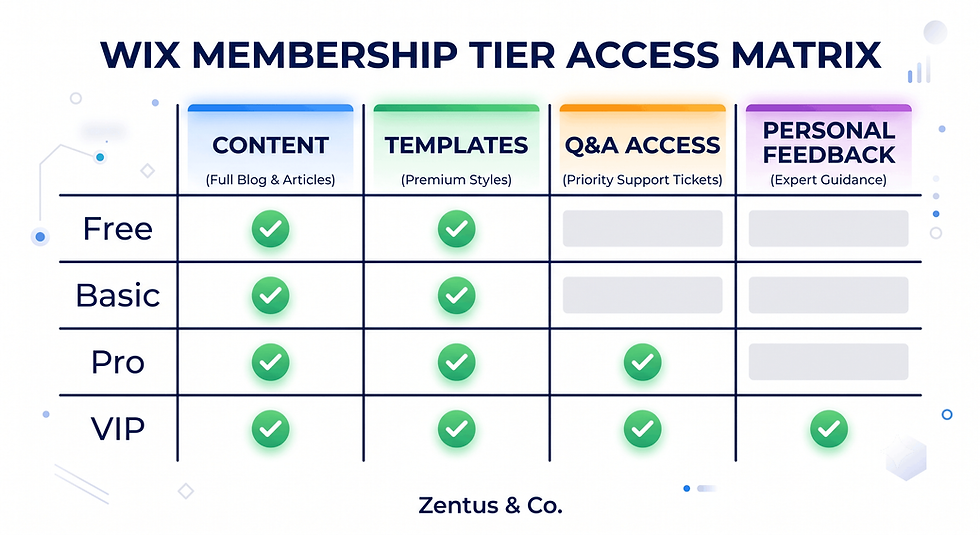
The Member Login and Access Experience on Wix
The login experience is what members interact with every time they return, and a clunky one quietly increases cancellations even when the content is good.
How does the Wix member login work?
Wix Member Areas gives every member a login widget and a personal My Account page where they see their active plan, update payment details, and access a member-only site menu. Once logged in, previously gated pages simply appear in the site navigation.
Can members self-manage their subscription?
Yes — members can update card details, view billing history and cancel their own subscription directly from My Account, without contacting the site owner. This removes the admin burden of manually processing cancellations and refund requests.
What happens to access when a member cancels?
Access is revoked automatically at the end of the current billing period, not immediately — a member cancelling on day 5 of a 30-day cycle keeps access until day 30. This automatic revoke-on-expiry behaviour is why Paid Plans functions as genuine recurring revenue.
Recurring Revenue Math: How Many Members Make a Plan Profitable
Before building a gated-content business, run the numbers on what a Wix plan costs monthly against what your membership needs to earn — most owners skip this and only find out after months of running at a loss.
Plan | Price (this month) | Paid Plans / Member Areas Access | Best For |
Light | $17/mo (~£13/mo) | Member Areas login only, no paid gating | Personal sites, no monetisation |
Core | $29/mo (~£22/mo) | Paid Plans included, limited automations | First membership or resource library |
Business | $36/mo (~£27/mo) | Paid Plans + Stores + member-only pricing | Growing gated-content business |
Business Elite | $159/mo (~£119/mo) | Full Paid Plans, multi-tier, priority support | Established membership brand with Stores |
Prices checked for July 2026. Always verify current Wix and tool pricing before you buy — platform pricing can change.
How many members make a Paid Plan profitable?
The break-even point is your monthly Wix plan cost divided by your membership price — on a $36/month Business plan charging $12/month per member, three paying members cover the platform cost, since Wix doesn't take a percentage cut of Paid Plans revenue.
What pricing model works best for gated content?
A single mid-priced recurring plan ($10–$25/month) outperforms a high one-time fee for most gated-content businesses because it matches how members budget. Explore our Wix website for coaches UK post and SEO for small business guide for how coaches price recurring content alongside one-off consulting.
How does churn affect recurring revenue?
Even a 5% monthly churn rate means losing roughly half your member base within a year if new signups don't keep pace. If you want a Wix Studio build structured to reduce churn from day one, our Wix Studio services and website design pricing pages outline what a gated-content-ready setup includes.
When Gated Content Beats Selling Courses on a Separate Platform
Choosing between Wix Paid Plans and a dedicated course platform comes down to how much you value owning your website traffic versus needing course-specific features out of the box.
When is gated content better than a standalone course platform?
Gated content on Wix wins when your course is one part of a broader website that also needs a homepage, service pages, a blog and SEO visibility — everything shares the same domain authority instead of splitting traffic. A standalone platform wins only when you need advanced quiz engines, certificates, or drip logic more complex than date-based unlocks.
Which businesses should pivot from free content to gated?
Coaches, consultants and creators who've built an audience on free blog content or social media are the strongest candidates for gating content, because they already have proof people want what they teach — the pivot is turning the best 20% of that content into a deeper, paid version.
How does the media-to-membership model work?
The model works by keeping your best free content as the funnel and reserving depth, templates and personal feedback for the gated Member Area — free content proves expertise, gated content monetises it. This is the structural gap most "Wix membership" content ignores: it treats gating as all-or-nothing instead of a funnel where free and paid content reinforce each other.
The Member-Only Pricing Trick Most Wix Stores Never Use
Most Wix Stores sites never touch member-only pricing because it's buried under Stores settings rather than Paid Plans settings, so owners who set up gated content never discover it exists.
Why do most Wix stores ignore member-only pricing?
Member-only pricing lives inside Wix Stores' pricing rules, not the Paid Plans dashboard, so an owner who only interacts with Member Areas to gate content never sees the setting — it requires deliberately cross-connecting the two apps.
How does member pricing increase average order value?
When members see a visibly lower price than guests, they're more likely to add extra items to the cart to maximise the discount they're already getting, which lifts average order value beyond the discount alone.
What is the revenue lift from member-only discounts?
There's no universal figure, but the mechanism is straightforward: a member paying a monthly fee who also gets 10–15% off products has a second, tangible reason to keep the subscription active during months they don't use the gated content itself.
Access, Drip-Schedule and Member-Login Checks Before You Launch Gated Content
A handful of settings mistakes account for most gated-content support tickets — checking them before launch is faster than fixing angry member emails after.
What access and drip tests should you run before launch?
Log in as a test member on each plan tier and confirm you can see exactly the pages that tier should unlock — no more, no less — including checking free-tier members can't access Pro-only pages through a direct URL.
How do you test member login and cancellation flows?
Create a real test signup, complete checkout, confirm the welcome email arrives, then cancel from My Account and confirm access is revoked only at the end of the paid period. Test this on mobile as well as desktop.
What pricing and tier checks protect gated content?
Confirm member-only pricing shows the correct discounted price per tier, and check gated pages are excluded from Google indexing with a noindex tag so content doesn't leak into search results for non-members.

Frequently Asked Questions About Wix Paid Plans and Member Areas
What is the difference between Wix Paid Plans and Bookings memberships?
Wix Paid Plans gates pages, videos and files anywhere on your site, while Bookings memberships only control how many appointments or classes a client can use inside the Wix Bookings calendar each billing cycle. The two apps don't talk to each other and solve different problems: Paid Plans restricts content, Bookings memberships restrict session credits. If you're building a course, resource library or private community, you need Paid Plans and Member Areas, not a Bookings membership, even though Wix uses the word "membership" for both.
How do I set up gated content on Wix?
Setting up gated content starts in Members Area settings, where you create a Paid Plan and assign specific pages to it under Permissions. Any page you assign becomes invisible to non-members automatically, and files or videos embedded on that page inherit the same restriction. There's no need to gate each file separately — gate the page once, and everything inside it is protected for members of that plan only.
Can Wix drip content to members over time?
Yes, Wix can drip content to members over time by setting individual gated pages to unlock on a fixed date or a set number of days after signup, configured inside Paid Plan permissions. This means a twelve-lesson course can be built as twelve separate gated pages, each releasing on its own schedule, rather than granting access to the entire library the moment someone pays.
How does member-only pricing work on Wix?
Member-only pricing works through Wix Stores' pricing rules, which let you set a lower price on a product visible only to logged-in members of a specific Paid Plan. Guests and non-members see the standard price automatically, with no coupon code needed, and the discounted price displays instantly once a shopper logs in as a recognised member.
Can Wix Member Areas replace a course platform?
Wix Member Areas can replace a basic course platform for creators who need gated video lessons, PDFs and a drip schedule, but it lacks built-in quizzes, certificates and advanced completion tracking found in dedicated platforms. For a course that's part of a broader business website with a blog and service pages, Member Areas is usually the stronger choice because it keeps your content and SEO authority on one domain.
How do I build a resource library with Wix Paid Plans?
Building a resource library means creating one or more gated pages containing a file list, embedded PDFs, or a repeater of downloadable items, then assigning those pages to a Paid Plan. Wix doesn't offer a dedicated library app, so the library is built from standard page elements protected by the Member Areas permission system, keeping everything native to the platform.
What can I sell with Wix Paid Plans besides memberships?
Beyond memberships, Wix Paid Plans can sell one-time content unlocks, free trials that convert to paid access, and multiple simultaneous tiers each gating a different set of pages. A single site can offer a free lead magnet, a paid basic tier, and a premium VIP tier, all managed through the same Paid Plans dashboard.
How do Wix member logins and access work?
Wix member logins work through a login widget and a personal My Account page, where members see their active plan, update payment details, and access gated pages that appear automatically once signed in. Access is tied to the specific plan a member is subscribed to, so a Basic-tier member only sees Basic-tier pages unless a page is also assigned to their tier.
Can Wix handle tiered membership levels?
Yes, Wix can handle multiple membership tiers by running several Paid Plans at once, each with its own price and assigned pages, functioning as Free, Basic, Pro and VIP levels. A Pro-tier member can be given access to both Basic and Pro pages by assigning the same pages to both plans, letting tiers build on each other.
How much does Wix Paid Plans cost per month?
Wix Paid Plans is included from the Core plan upward, priced at roughly $29 per month, with Business and Business Elite plans adding more automations and priority support at higher price points. The Light plan does not include paid gating, only a basic Member Areas login, so a gated-content business needs at least the Core plan to charge for access at all.
What happens to access when a member cancels?
When a member cancels, access is revoked automatically at the end of the current billing period, not the moment they cancel — a member cancelling on day 5 of a 30-day cycle keeps access until day 30. This automatic, self-service revoke process means site owners don't need to manually remove access for every cancellation.
Should I use gated content or sell courses separately?
Choosing between gated content on Wix and a separate course platform depends on whether you need advanced quizzes and certificates (a dedicated platform wins) or want your paid content to share the same domain and SEO authority as the rest of your business site (Wix wins). Most service businesses and coaches with an existing website benefit from keeping content gated on Wix rather than splitting their audience.

Conclusion: Your Gated-Content Launch Checklist
Before you launch a gated-content business on Wix, work through this checklist this week:
Confirm you need Paid Plans and Member Areas, not Bookings memberships, based on whether you're gating content or appointments
Pick a Wix plan (Core minimum) that includes Paid Plans, and check current pricing before committing
Build your gated pages first, then assign them to a Paid Plan under Permissions
Set a drip schedule if your content is sequential, to protect retention and cut refund requests
Activate member-only pricing on any related Wix Stores products to give members a second reason to renew
Test the full member journey — signup, login, cancellation — before sending traffic to the page
A Wix Studio build that separates content, pricing and access correctly from day one avoids the rebuild most gated-content sites need after their first year. If you want help structuring this correctly, book a free consultation and we'll map the right setup for your content business.


Comments