


Wix Email Marketing vs Mailchimp: 2026 Comparison


Wix Email Marketing vs Mailchimp: Quick Tool Verdict
If you already run a Wix Studio website, Wix Email Marketing (Ascend) is the right starting point for most small businesses — it's built into your dashboard, it uses your existing contacts, and it costs nothing extra until your list grows. Mailchimp, Brevo and ConvertKit win once you need deeper automation, advanced segmentation, or you're managing a list that already lives outside Wix.
Choose Wix Email Marketing if you want simple newsletters, promo emails and basic automation without adding another login
Choose Mailchimp if you need mature automation workflows and broad e-commerce integrations beyond Wix
Choose Brevo if SMS, transactional email and unlimited contacts at a flat send-based price matter more than a polished interface
Choose ConvertKit if you sell digital products, courses or run a creator business built around a paid newsletter
Run both if your contact list is growing fast and native automation is starting to feel limited — many Wix owners keep Ascend for transactional-style updates and add a third-party tool for serious campaigns
Introduction
Choosing between Wix email marketing vs Mailchimp is really a decision about how much complexity your business needs right now, not which platform has more features on paper. If your site is already built on Wix, the native Wix Email Marketing app (part of the Wix Ascend suite) sits one click away from your contacts, forms and store data — no export, no sync, no second dashboard. Mailchimp, Brevo and ConvertKit each do something Wix's native tool doesn't do as well: deeper automation branching, larger free sending tiers, or creator-specific monetisation tools. This guide breaks down pricing, contact limits, automation depth and integration quality so you can decide whether to stay native or add a dedicated email platform — and what it actually costs either way in 2026.

What Wix Email Marketing (Ascend) Actually Includes
Wix Email Marketing is the native email tool built into every Wix site, found under the Marketing tab in your dashboard, and it pulls contacts directly from your site's forms, bookings and store checkout without any manual import.
What is Wix Ascend email marketing?
Wix Ascend is Wix's bundled marketing suite that includes email marketing, automations, coupons and basic CRM tools inside your existing Wix dashboard. Email Marketing is the campaign-sending piece — drag-and-drop templates, subscriber lists pulled from your site, and basic send-time scheduling, all without connecting a separate app.
Is Wix email marketing included in my Wix plan?
Yes, in a limited form — every Wix site gets access to the Email Marketing app with a free tier covering a capped number of contacts and monthly sends. Paid tiers unlock higher contact limits and remove Wix branding, billed separately from your website plan through the Wix App Market.
What can Wix native email do that surprises most owners?
Most owners don't realise it can trigger automatically from Wix Bookings, Wix Stores and Wix Forms without any code. A booking confirmation, an abandoned cart, or a new form submission can all fire a follow-up email automatically because the data already lives inside the same platform.
What Mailchimp, Brevo and ConvertKit Each Do Best
Each third-party tool has a clear specialism, and picking the wrong one for your business model is more common than picking the wrong price tier.
What does Mailchimp do better than Wix email?
Mailchimp offers a more mature automation builder with multi-step branching logic, predictive send-time optimisation, and a much wider library of third-party integrations beyond Wix. It suits businesses running email as a serious, standalone marketing channel rather than a support feature of the website.
When is Brevo the right choice over Wix email?
Brevo (formerly Sendinblue) wins when you need SMS alongside email, transactional email at scale, or unlimited contacts on a plan priced by emails sent rather than list size. That contact model makes it cheaper for businesses with large, low-engagement lists.
Which businesses should choose ConvertKit over Wix?
ConvertKit (now branded Kit) is built for creators, coaches and course sellers who monetise a newsletter directly — paid subscriptions, tagging by content interest, and landing pages designed around lead magnets. A product-based small business rarely needs this layer; a solo creator often does.

The Core Decision: Native Wix Email vs an Integrated Third-Party Tool
This is the decision that actually matters more than any feature comparison: do you need one dashboard, or do you need one specialist tool doing one job exceptionally well?
When is native Wix email enough?
Native Wix email is enough when your list is under a few thousand contacts, your automations are simple (welcome emails, booking reminders, basic promotions), and you value not logging into a second platform. Most local service businesses, clinics and small retailers fit this profile comfortably through their first two to three years.
When should you integrate a third-party tool?
Integrate a third-party tool once you're running multi-step nurture sequences, need advanced segmentation by behaviour or purchase history, or your list has outgrown Wix's native contact tiers. The tipping point is usually automation complexity, not list size alone.
Can you run native Wix email AND a third-party tool together?
Yes — a common hybrid setup uses Wix Email Marketing for transactional-style messages (booking confirmations, order updates) while Mailchimp or Brevo handles marketing campaigns and nurture sequences. This avoids double-paying for contact storage while still getting advanced automation where it matters.
Pricing Comparison: Wix Ascend vs Mailchimp vs Brevo vs ConvertKit
Pricing across all four platforms is contact-based or send-based, and every provider changes tiers often — so treat the figures below as a snapshot, not a guarantee.
Plan / Tool | Price (this month) | What it unlocks | Best for |
Wix Email Marketing — Free | $0 | Up to 500 contacts, limited monthly sends, Wix branding | New sites testing email |
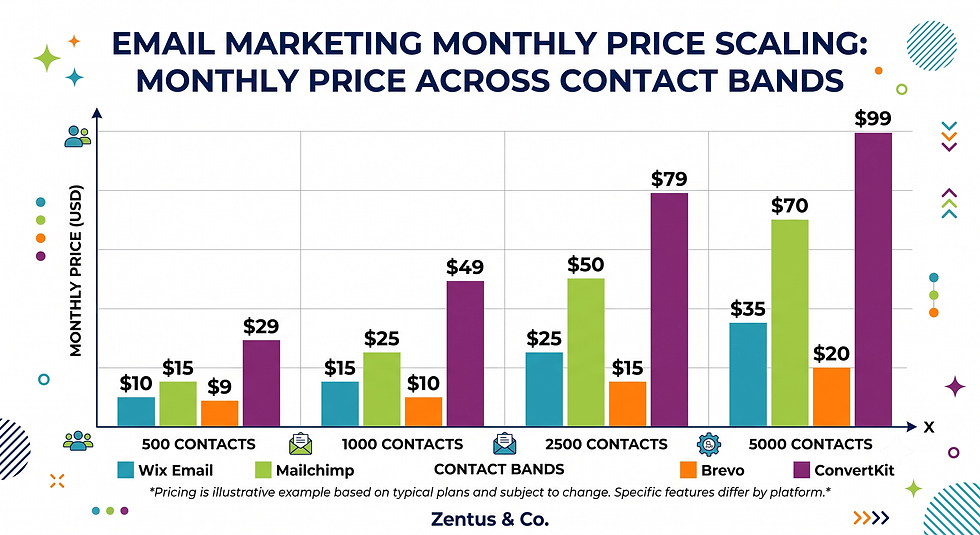
Wix Email Marketing — Bronze/Silver | approx. $10–$25/mo | Higher contact caps, branding removed | Growing small businesses |
Mailchimp — Free | $0 | Up to 500 contacts, ~1,000 sends/mo | Very early-stage lists |
Mailchimp — Essentials/Standard | approx. $13–$45/mo | Full automation builder, A/B testing | Marketing-led businesses |
Brevo — Free | $0 | 300 emails/day, unlimited contacts | Large, low-frequency lists |
Brevo — Starter/Business | approx. $9–$65/mo | SMS, higher sends, automation | Transactional + marketing mix |
ConvertKit (Kit) — Free | $0 | Up to 10,000 subscribers, basic features | Solo creators starting out |
ConvertKit — Creator/Creator Pro | approx. $9–$50/mo | Paid newsletters, advanced tagging | Course sellers, newsletter creators |
Prices checked for July 2026. Always verify current Wix and tool pricing before you buy — platform pricing can change.
How much does Wix email marketing cost vs Mailchimp?
At small list sizes both offer a free tier, but Wix Email Marketing typically stays cheaper as you scale past 1,000–2,000 contacts because pricing is bundled with your existing Wix account rather than a separate contract. Mailchimp's paid tiers climb faster once automation features are unlocked.
Which tool is cheapest at scale?
Brevo is usually cheapest at scale because it prices by emails sent, not contacts stored — a large, infrequently-emailed list costs far less than on Mailchimp or ConvertKit, where every stored contact counts toward your tier.
What are the hidden costs in each email platform?
The hidden cost is almost always automation gating — features like multi-step workflows, advanced segmentation or removing platform branding sit behind a higher tier than the advertised starting price. Always check what a workflow actually requires before assuming the entry-level plan covers it.
For a wider view of what a complete Wix build should cost beyond email, our website design pricing page breaks down typical package ranges, and our Wix Studio services page covers what's included in a full marketing setup.
Contact Limits and Sending Volume: Where Each Tool Caps Out
Contact limits are the single most common reason small businesses switch email tools mid-year, so check this before your list grows past a threshold.
What are the contact limits on each platform?
Wix Email Marketing and Mailchimp both cap free tiers at roughly 500 contacts, with paid tiers scaling in fixed bands (1,000 / 2,500 / 5,000, and so on). Brevo is contact-unlimited even on its free plan, capping by daily sends instead. ConvertKit offers the most generous free tier by subscriber count, up to 10,000 before payment is required.
How many emails can you send per month on each?
Wix and Mailchimp free tiers allow roughly 1,000–3,000 sends per month depending on the current promotion; Brevo's free plan allows 300 emails per day (around 9,000/month); ConvertKit's free tier has no hard send cap but limits automation and advanced features instead.
When do contact limits force an upgrade?
Contact limits force an upgrade the moment your list crosses the current tier boundary — even by one contact, most platforms auto-bill the next tier. Businesses collecting emails through Wix Bookings or checkout should monitor list growth monthly rather than being surprised by a forced upgrade.

Automation Comparison: Workflows, Triggers and Sequences
Automation depth is where the gap between native and third-party tools becomes most visible.
How do Wix email automations compare to Mailchimp?
Wix's native automations cover single-trigger sequences well — a form submission, a booking, an abandoned cart — but branching logic (if this, then that) is limited compared to Mailchimp's visual automation builder, which supports multi-condition paths and delays measured in hours or days.
Which tool has the best workflow builder?
Mailchimp generally has the most flexible workflow builder among the three third-party tools, followed by Brevo. ConvertKit's automation ("Visual Automations") is strong specifically for tagging subscribers by interest and routing them into different content paths — ideal for content-driven businesses rather than transactional ones.
Can Wix Ascend handle abandoned cart and booking sequences?
Yes — Wix Ascend can trigger an abandoned-cart email or a post-booking follow-up automatically because the store and booking data live on the same platform, which is one of native email's genuine strengths. It cannot, however, branch that sequence based on multiple conditions the way Mailchimp can.
Our guide to Wix Automations lead follow-up covers these native triggers in more depth if automation is your main priority.

Integration With Wix: Forms, Bookings and Store Data
Integration quality decides how much manual admin you'll do every week, regardless of which tool wins on features.
How does Wix email connect to Wix Forms and Bookings?
Wix Email Marketing connects natively — a submission through Wix Forms vs Jotform vs Typeform-style forms or a completed booking through our Wix Bookings deposits guide setup automatically adds the contact to your list with zero manual export.
Do Mailchimp and Brevo integrate natively with Wix?
Both connect through official Wix App Market integrations that sync contacts and, in some cases, e-commerce data, but the sync isn't always instant and can require re-authorising the connection after major Wix updates. It's reliable, not seamless.
Which tool uses Wix store and booking data best?
Native Wix Email Marketing uses this data most directly since there's no sync layer involved — segments based on purchase history or booking type update in real time, which third-party tools can only approximate through periodic syncing.
Deliverability and Reporting: What Each Platform Tells You
Deliverability and reporting quality affect whether your emails are actually read, not just sent.
How does deliverability compare across platforms?
All four platforms use standard authentication (SPF, DKIM) and generally perform similarly for well-maintained lists, but Mailchimp and Brevo offer more granular sender reputation tools for businesses sending high volumes. Wix's native tool is solid for typical small-business volumes but offers less deliverability diagnostics.
What email reporting does each platform provide?
Wix Email Marketing shows open rates, click rates and basic contact activity inside the same dashboard as your site analytics. Mailchimp and Brevo add more detail — click-map heatmaps, comparative campaign reports, and audience growth trends over time.
Which tool gives better open and click insights?
Mailchimp generally gives the deepest open and click insight, including time-of-day performance and device breakdowns, which matters more once you're running multiple campaigns per month and need to compare performance rather than just check it.
When Native Wix Email Beats Adding a Third-Party Tool
Native Wix email is the right call for a specific, common profile of business — not a compromise, a genuinely better fit for that stage.
If your business sends fewer than four campaigns a month, your automations are one or two steps at most, and your list sits under roughly 2,000 contacts, adding Mailchimp or Brevo adds a login, a monthly bill and a sync layer without a proportional benefit. In a Wix Studio build, the setup detail that changes the outcome is whether your forms, bookings and store are already feeding the same contact list — if they are, native email captures that value automatically.
Native email also wins for businesses prioritising simplicity over sophistication: a single dashboard for the website, bookings, store and email means one login, one support channel, and one place to check performance. For a service business managing its own marketing without a dedicated team, that operational simplicity often outweighs a more powerful automation builder that goes unused.
The clearest sign you belong in this category: you're currently not using automation at all, or your "automation" is really just a monthly newsletter sent manually. In that case, a third-party tool's advanced features are pure overhead. Start native, and treat outgrowing it as a good problem — it means your list and your marketing maturity have both grown.
Our overview of Wix Studio for small business covers how email marketing fits into a wider first-year setup if you're building from scratch.
The Contact-Limit and Automation Trade-Off Most Wix Owners Miss
Most comparisons treat contact limits and automation depth as separate decisions. They aren't — they compound.
The gap most Wix owners miss is this: your contact list and your automation complexity tend to grow at the same time, but Wix's native pricing tiers are built around list size, not automation sophistication. A business with 1,800 contacts running one welcome email pays the same as a business with 1,800 contacts running a five-step nurture sequence — until that second business hits the ceiling of what native automation can actually branch into, at which point no pricing tier fixes the limitation. The practical issue is that upgrading your Wix Email Marketing plan buys you more contacts, not more automation logic.
This is why some businesses that "shouldn't need" Mailchimp yet — based on list size alone — still switch early. The trigger isn't contacts, it's workflow complexity: multiple customer segments, conditional follow-ups based on purchase behaviour, or re-engagement sequences for inactive subscribers. None of that is about how many people are on your list; it's about how many decision branches your emails need to make automatically.
The practical fix is auditing automation needs separately from contact count before choosing a plan. If you only need more contacts, upgrade Wix's native tiers. If you need more branching logic, no amount of native upgrading solves it — that's the moment to integrate Mailchimp or Brevo specifically for the automation layer, even if your list is still small enough to stay on Wix's free tier.
Deliverability, Automation and Integration Checks Before You Commit to an Email Tool
Before committing budget and admin time to any of these four tools, run these checks.
What deliverability checks should you run before choosing?
Send a test campaign to a seeded list including Gmail, Outlook and Yahoo addresses, and check spam placement before committing to a paid tier — a tool with excellent features but poor deliverability into your specific audience's inboxes isn't worth the switch.
How to test automation triggers before committing?
Build one real automation (a booking follow-up or form-response email) in a free or trial tier and confirm it fires correctly within the expected time window. Automation that fails silently is far more costly than automation that's simply basic.
What integration and data-flow checks matter for Wix?
Confirm that contact fields (name, email, purchase history, booking type) actually map correctly between Wix and the third-party tool — a common failure point is custom form fields not syncing, which silently breaks segmentation until you notice campaigns going to the wrong audience.
Checklist before switching or adding a tool:
☐ Confirm current contact count and monthly growth rate
☐ List every automation you actually use today (not theoretical ones)
☐ Test deliverability with a seeded inbox list
☐ Confirm Wix data fields map correctly to the new tool
☐ Compare pricing at your list size 12 months from now, not just today
☐ Decide: full switch, or hybrid (native + third-party) setup
When configuring this workflow in Wix, the practical issue is that switching tools mid-year often means re-tagging your entire contact list manually if field mapping wasn't planned upfront — audit this before, not after, you commit.

Frequently Asked Questions About Wix Email Marketing vs Mailchimp
Is Wix email marketing good enough for small business?
For most small businesses sending simple newsletters, promotions and basic automated follow-ups, Wix Email Marketing is genuinely good enough — it handles the core job without a separate subscription. It becomes limiting once you need multi-step automation branching or a list beyond a few thousand contacts.
Should I use Wix email or Mailchimp?
Use Wix email if your site is already on Wix and your automation needs are simple; use Mailchimp if you need advanced workflow branching, deeper reporting, or plan to run email as a dedicated marketing channel separate from your website's day-to-day operations.
How much does Wix email marketing cost?
Wix Email Marketing starts free for up to roughly 500 contacts with limited monthly sends, then moves to paid tiers around $10–$25/month as contact counts grow. Exact tier pricing changes periodically, so always confirm current rates in your Wix dashboard.
Can Wix email marketing replace Mailchimp?
It can replace Mailchimp for businesses with simple, single-trigger automations and moderate list sizes, but it cannot fully replace Mailchimp's multi-condition workflow builder or its deeper third-party integration ecosystem for businesses running complex, segmented campaigns.
What is Wix Ascend email?
Wix Ascend is Wix's built-in marketing suite, and its email component is the native campaign and automation tool found under your dashboard's Marketing tab. It uses your site's existing contacts without requiring an export or a separate integration.
Are Wix email automations as powerful as Mailchimp's automations?
No — Wix's native automations handle single-trigger sequences well but lack Mailchimp's multi-condition branching logic. For straightforward follow-ups this rarely matters; for complex, segmented nurture sequences, Mailchimp's builder is noticeably more capable.
Which email tool integrates best with Wix?
Wix Email Marketing integrates most directly since there's no sync layer — it reads your site's forms, bookings and store data natively. Among third-party tools, Mailchimp and Brevo both offer official Wix App Market integrations with reliable, if slightly delayed, contact syncing.
Can I use ConvertKit with a Wix website?
Yes, ConvertKit can be connected to a Wix site through embedded sign-up forms or Zapier-style automation, though it doesn't have the same native dashboard integration as Wix Email Marketing. It suits creators monetising a newsletter more than typical service businesses.
How many emails can I send with Wix email marketing?
Free-tier sending is capped at a limited number of monthly emails tied to your contact count, typically in the low thousands. Paid tiers raise this cap significantly, with limits scaling alongside the contact tier you select.
Do all Wix plans include Wix email marketing access?
Every Wix site can install the Wix Email Marketing app regardless of website plan, but the app itself has its own separate free and paid tiers billed independently — it isn't automatically unlocked in full by upgrading your website plan.
Which is cheaper, Wix email or Brevo?
At small contact counts, pricing is comparable or Wix may be cheaper if it's already included in your workflow. At larger list sizes with low email frequency, Brevo is usually cheaper because it bills by emails sent rather than contacts stored.
Should I switch from Mailchimp to Wix email?
Switch only if your Mailchimp automations are simple enough to rebuild natively and your priority is consolidating tools into one dashboard. If you rely on Mailchimp's advanced branching or reporting, switching to native Wix email would be a downgrade in capability, not just a cost change.

Decision Recap
If you're running a straightforward Wix site with simple newsletters and basic automated follow-ups, start with native Wix Email Marketing — it's already connected to your forms, bookings and store, and it avoids paying for a second platform you don't yet need. Move to Mailchimp or Brevo once your automation needs involve multiple conditions or your list outgrows Wix's native tiers, and consider ConvertKit specifically if your business model is a monetised newsletter rather than a product or service site. Many growing Wix businesses land on a hybrid setup — native email for transactional messages, a dedicated tool for marketing campaigns — rather than an all-or-nothing switch.
For help deciding which setup fits your specific workflow, book a free consultation and we'll walk through your current contact flow together.



Comments