


Wix CMS Dynamic Pages for Service Area SEO

Updated: Jun 29

Most Wix CMS tutorials cover the mechanics: create a collection, build a dynamic template, connect your fields, publish. That is all technically correct, but it skips the part that matters most for service-area SEO. When a local business creates location pages using Wix dynamic pages, the structural question is not how to build them — it is how to build them so they rank without triggering Google's doorway-page guidelines.
This guide covers Wix CMS dynamic pages SEO from a service-area perspective. You will find the exact collection fields that add search value, the internal linking logic that distributes authority across city pages, the schema setup that signals local relevance, and the Google Search Console checks that confirm pages are indexed and generating impressions. Whether you serve five postcodes or fifty cities, the principles here apply.
We work remotely with service businesses across the UK, USA, and beyond — and the architecture decisions that separate high-quality location pages from thin doorway pages are consistent across every industry. Google Business Profile Website Button:
Quick Verdict
Wix CMS dynamic pages can work well for service-area SEO, but only when each page contains genuinely unique, locally relevant content.
A dynamic template alone does not make a page rankable. The collection fields, the local proof points, the internal links, and the indexation controls are what separate a useful location page from a doorway page Google will ignore or penalise.
Start with a small set of high-priority cities, build real content for each one, and scale only once those pages generate impressions in Search Console.
Wix CMS Dynamic Pages SEO: Quick Verdict
Wix dynamic pages powered by CMS collections are a legitimate and scalable way to build service-area location pages — provided each page delivers genuinely different, locally useful content. Google's position on doorway pages has not changed: pages that exist primarily to funnel users toward another page, with no unique value of their own, are a rankings liability.
The good news is that Wix Studio gives you enough control to do this properly. You can set unique title tags, meta descriptions, canonical URLs, and slug structures per CMS item. You can control indexability at the item level. You can add location-specific fields that feed into the dynamic template. The platform is capable. The question is whether the content inside each page justifies indexing it.
The practical rule: if you can swap a city name into a template and nothing else changes, the page is not ready to publish.

How Wix Dynamic Pages Work for Local SEO
A Wix CMS collection is a structured database. Each row in the collection becomes a separate, publicly accessible page through a dynamic page template. For service-area SEO, one collection row typically represents one city, town, borough, or county.
The dynamic template pulls field values from the collection and displays them in the right places on the page. If the collection includes a "city name" field, a "local intro paragraph" field, and a "service-specific FAQ" field, those values appear on the page for each location automatically. This is what makes the system scalable.
Service businesses across the UK and USA — from Glasgow and Birmingham to Charlotte and Denver — often serve a dozen or more local areas. Building manual pages for each city is time-intensive. A CMS collection allows the structural work to be done once and the content to be managed in a centralised table. Our UK Wix agency hub and USA Wix agency hub both reflect this service-area structure at a regional level.
Can Wix dynamic pages rank on Google?
Yes. Wix dynamic pages are fully crawlable and indexable by Google when the CMS collection items are set to "public." Google treats them like standard web pages. They can receive impressions, earn clicks, and appear for local search queries including "[service] in [city]" and "[trade] near [location]."
The ranking potential of a dynamic page depends on the same factors as any page: content quality, topical relevance, internal links, schema, and the overall authority of the domain. Dynamic structure does not help or hurt rankings on its own. Content quality does.
The platform behaviour that surprises many business owners is that Wix generates a canonical URL for each dynamic page based on the CMS item slug. This means each city page has its own distinct, indexable URL — not a filtered version of one URL. Google sees them as separate pages, which is the correct technical foundation for a multi-location SEO strategy.
How does a Wix CMS collection create location pages?
You create a collection with one row per location. Each row includes fields that define the content for that page: city name, service description, local proof point, FAQ pairs, testimonial reference, meta title, meta description, and internal link target. The dynamic page template reads these fields and renders a unique page for each row.
The URL structure is typically /[dynamic-page-name]/[slug], where the slug is pulled from the collection item. For example, /services/birmingham or /locations/glasgow. You can customise the slug in the CMS item settings. Keeping slugs short, clean, and consistent across all location items is important for crawl clarity.
Service Area Pages vs Doorway Pages
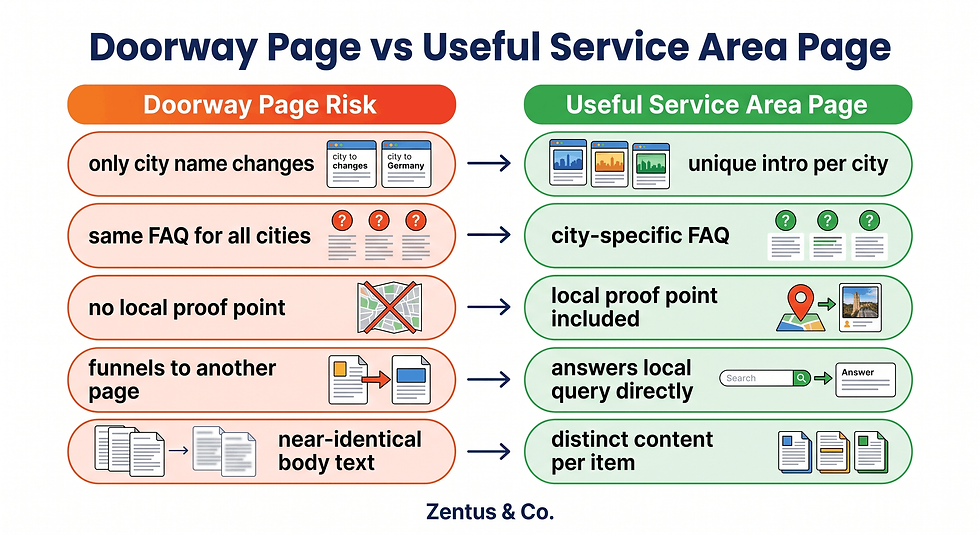
The difference between a useful service-area page and a doorway page is not the platform — it is the purpose and the content. Google's documentation defines doorway pages as pages that are created primarily for search engines and that funnel visitors toward relevant content rather than providing useful content directly.
A service area page earns its place in the index by being genuinely useful to someone in that city who is searching for a specific service. It should answer questions that are locally specific: what areas within the city are served, what the local pricing context is, how long the service takes to arrive or be delivered in that area, and what relevant proof exists for that location.
A doorway page, by contrast, changes only the city name and repeats the same boilerplate for every location. If you have fifty city pages that are structurally identical with only the place name swapped, that is doorway content — regardless of whether it is built manually or with a CMS.
What makes a service area page useful instead of thin?
A useful service-area page directly addresses the local searcher's intent. It includes content that would be different for Birmingham than for Glasgow: local landmarks that define the service area, a note about typical response times or booking availability for that city, a locally specific FAQ, and ideally a reference to a real local project or result without fabricating a case study.
The key signal is specificity. If a page contains at least three to five genuinely unique data points for that city — not just a swapped place name — it has a stronger claim to being indexed and ranked. Those unique points should appear in the collection fields, not injected by JavaScript after the page loads.
Are repeated city pages considered doorway pages?
They can be, yes. Repetition alone is not the trigger — thin, near-identical content is. If a business creates thirty location pages that all share the same paragraph structure, the same service description, the same generic FAQs, and only differ by city name, Google is likely to either ignore most of them or treat the set as low-quality doorway content.
The practical test: read two of your location pages out loud. If someone could not tell them apart except for the city name, they are not ready to publish. A legitimate multi-location strategy requires a meaningful content difference between pages — not just field swaps.
CMS Fields Every Location Page Needs
The Wix CMS collection is only as useful as the fields you design into it. Most default collection setups include a title, a slug, and a rich-text body. For service-area SEO, that is not enough.
A well-structured location collection should include fields that support both search visibility and genuine local usefulness. When configuring this in Wix Studio, the practical issue is that developers often build the template before deciding what the content fields need to do. Start with the content requirements and build the collection fields to match them.
What fields should a Wix CMS location page include?
The following fields are recommended for a service-area CMS collection built for local SEO:
Field Name | Field Type | Purpose |
City / Location Name | Text | Display name in H1, headings, schema |
URL Slug | Text | Clean, unique URL per city |
Meta Title | Text | Unique title tag per page (50–60 characters) |
Meta Description | Text | Unique meta description per page (120–155 characters) |
Local Intro Paragraph | Rich Text | Unique 80–120-word intro for this city |
Service Area Description | Rich Text | What areas within the city are covered |
Local Proof Point | Text | A locally specific detail, result, or context note |
FAQ Question 1 + Answer 1 | Text × 2 | Location-specific FAQ for schema and snippet |
FAQ Question 2 + Answer 2 | Text × 2 | Second local FAQ |
Internal Link Target | URL | Link to the main service page or related city page |
Indexable | Boolean | Toggle to control whether Google can index this item |
Schema Type Override | Text | LocalBusiness or Service schema variant for this city |
These fields give the dynamic template everything it needs to produce genuinely unique pages. The meta title and meta description fields are particularly important — they must be connected to the SEO settings in the Wix dynamic page editor, not left as auto-generated values.
Should each location page have unique proof and FAQs?
Yes, and this is the step most businesses skip. Generic FAQs that apply to all cities — "What is the cost?" or "How do I book?" — do not add local value. City-specific FAQs should address questions that are genuinely local: delivery radius for that city, whether a deposit is required for that area, what the typical wait time is, or which nearby towns are also covered.
The proof point field does not need to be a full case study. It can be a locally specific context note: "We typically cover Birmingham B1 to B45 postcode areas" or "Charlotte-area bookings usually process within two business days." That level of specificity is enough to differentiate the page from thin content.

Internal Linking for Wix Service Area Pages
Internal linking is the mechanism that signals to Google how your service-area pages relate to each other and to your main service page. Without it, location pages sit as isolated nodes with no authority flowing through them. A strong internal linking architecture does two things: it helps Google understand the relationship between pages, and it helps users navigate between relevant locations and services.
How should service pages link to location pages?
Your main service page — the one that describes what you do — should link to your key location pages with descriptive anchor text. For example, a page about Wix website design services might include a section listing the cities served, with each city linking to its dedicated location page. Anchor text should be natural: "Wix web design in Birmingham" or "our Glasgow service area" rather than keyword-stuffed exact-match anchors.
You can see how this pattern works in practice by looking at how city-specific posts interlink within a topic cluster. Our Glasgow Wix web design guide, Birmingham Wix development guide, and Leeds Wix development guide each function as location-specific nodes that support the wider service architecture. The Charlotte Wix designer guide follows the same pattern for the USA market.
Should city pages link back to the main service page?
Yes. Each location page should include at least one contextual link back to the main service page, and where relevant, a link to one or two geographically adjacent city pages. This creates a two-directional authority flow: the service page distributes authority to city pages, and city pages return some authority to the service page.
A simple internal linking rule for service-area CMS pages:
Service page → all city pages (via a locations section or in-body links)
Each city page → main service page (one contextual link in the body)
Adjacent city pages → each other (where geography makes it natural)
All pages → contact or booking page (soft CTA at the bottom)
In the Wix CMS collection, use the "Internal Link Target" field to store the URL of the related service page. The dynamic template can then render this as a consistent contextual link without manually editing each page.
Cost, Time and Complexity of CMS Location Pages
Building a Wix CMS location system is not a one-afternoon task, but it is significantly more efficient than building manual pages for every city. The time investment is front-loaded: designing the collection schema, building and styling the dynamic template, writing unique content for each location, and connecting meta fields to SEO settings all happen before a single page is published.
Once the system is live, adding a new city takes a fraction of the time it would require for a standalone page — assuming the content is ready. The content is always the bottleneck, not the CMS setup.
Effort comparison: manual pages vs Wix CMS dynamic pages
Factor | Manual Pages | Wix CMS Dynamic Pages |
Initial setup time | Low (per page) | Medium–High (system build) |
Adding a new location | Medium (full page build) | Low (new collection item) |
Consistency of design | Manual per page | Automatic via template |
Meta title/description control | Manual per page | Centralised in collection fields |
Content quality risk | Varies per page | Same risk applies to each item |
Indexation control | Manual per page | Toggle in collection item |
Schema setup | Manual per page | Set once in template or per item |
Scalability beyond 20 cities | High effort | Low effort |
For a service business targeting five to fifteen cities, the setup cost is justified from around the eight-to-ten-city mark. Below that, a hybrid approach — a few high-priority manual pages supported by a lightweight CMS system — often works better.
If you are planning a multi-location Wix setup, our Wix Studio services page outlines what is involved in a full build. The right architecture decision depends on how many locations you serve, whether that number is likely to grow, and how much unique content you can realistically produce per city. Verify current Wix platform plan costs before committing, as pricing can change.
How long does a Wix CMS location setup take?
A clean Wix Studio CMS location system — collection schema, dynamic template, meta field connections, schema markup, internal linking logic, and initial content for ten cities — typically takes between fifteen and thirty hours of professional build time, depending on the complexity of the design and the content available.
Content production is separate. If you are writing genuinely unique local content for each city, budget at least one to two hours per location, even for shorter pages.
Is a CMS location system cheaper than manual pages?
Over time, yes. The per-location cost of adding a new city drops significantly once the system is built. But the upfront investment is higher than simply publishing one or two manual pages. For businesses that are confident they will target more than ten cities, the CMS system almost always saves time and money in the medium term.

When Dynamic Service Area Pages Make Sense
Dynamic service-area pages are a strong choice in specific situations. They are not the right solution for every local business, and recommending them without considering the business context does not serve the owner well.
Which businesses benefit from dynamic service area pages?
The clearest fit is a service business that genuinely operates across multiple distinct geographic areas and can produce meaningfully different content for each one. Examples include:
Trades and home services (plumbers, electricians, cleaners, landscapers) serving ten or more towns or postcodes
Clinics and health practices operating across multiple locations or catchment areas
Estate agents and property services covering multiple boroughs, counties, or city zones
Legal, accounting, and consulting firms serving clients across a region or country
Restaurants and catering businesses with multiple branches or delivery zones
A clean Wix Studio setup usually separates the CMS collection design from the template design, because the collection fields define what content is possible and the template defines how it is displayed. Getting the collection right first prevents template redesigns later.
When should a business avoid dynamic location pages?
A business with genuine physical premises in each location is better served by individual Google Business Profiles and manually crafted location pages, not a CMS-generated set. The dynamic approach suits service-area businesses — those that travel to the customer or serve a region — more than multi-site retail or hospitality businesses with distinct addresses.
Avoid dynamic location pages if:
You serve fewer than five distinct cities and can write strong manual pages for each
You cannot produce genuinely unique content per location
Your CMS collection would end up with only city-name differences between items
You want to index all pages immediately without a content quality review process
The Doorway-Page Problem Wix CMS Tutorials Skip
Most Wix CMS tutorials stop at "connect your fields and publish." They show you how to build a dynamic page system, not how to make those pages worth indexing. The doorway-page risk is real, and it is the detail that separates a useful service-area strategy from one that either gets ignored by Google or actively penalised.
Why do generic Wix CMS tutorials miss SEO quality?
Tutorials are built to demonstrate platform capabilities, not SEO strategy. Showing how a CMS collection powers fifty city pages in minutes is impressive from a development perspective. It is also exactly how businesses end up with fifty thin, near-identical pages that Google treats as a single low-quality document at best, and a doorway-page pattern at worst.
The platform behaviour that surprises many business owners is that Google does not penalise dynamic pages as a format — it penalises pages with thin, duplicate, or manipulative content regardless of how they were built. A hand-coded doorway page and a CMS-generated doorway page carry the same risk.
The practical SEO issue with a template-driven system is that it makes thin content faster to produce. You can create a hundred city pages in an afternoon. That speed is also the risk. A hundred pages with no genuine local content gives Google a hundred reasons to ignore your site.
What local content makes a dynamic page worth indexing?
A dynamic page earns its index entry when it answers something that a generic service page does not. For each city, the collection item should include at least one of the following:
A specific description of which areas, postcodes, or districts are served within that city
A locally relevant detail about availability, pricing context, or service conditions for that area
At least one FAQ that is specific to that city — a question a local customer would actually ask
A reference to a local landmark, neighbourhood, or geographic feature that defines the service boundary
A unique opening paragraph that would not read correctly if the city name were swapped
If none of those are possible for a given city, that city page is not ready to be indexed. Use the indexability toggle in the Wix CMS item settings to set it to noindex until the content is strong enough.

Service-Area SEO Checks Before You Publish
Before any location page goes live and gets indexed, it should pass a short quality review. The checks below apply to both individual pages and the full CMS collection.
How do you test if Wix location pages are indexed?
Use the site:yourdomain.com/[dynamic-page-path] operator in Google Search to check whether a specific dynamic page has been crawled and indexed. If the page does not appear, it may be set to noindex in the CMS item settings, blocked in the robots.txt file, or simply not yet crawled.
After publishing, submit the page URL directly in Google Search Console using the URL Inspection tool. This requests indexing and shows whether Googlebot can crawl the page, whether canonical tags are set correctly, and whether any structured data was detected.
In a Wix Studio build, the setup detail that changes the outcome is making sure the dynamic page template itself is not set to noindex at the template level. If the template is noindexed, every item in the collection is blocked regardless of the item-level setting.
What should you check in Google Search Console?
For a Wix CMS location page system, the GSC checks that matter most are:
Pre-publish checks:
Each CMS item slug is unique, lowercase, and hyphenated
Each item has a unique meta title (not auto-generated from the page title)
Each item has a unique meta description connected to the collection field
The dynamic page template is set to indexable
The canonical URL for each page points to itself, not to the template URL
Post-publish checks (after 2–4 weeks):
URL Inspection tool shows "URL is on Google" for priority city pages
Performance > Pages report shows impressions for location page URLs
Performance > Queries report shows city-based queries matched to location pages
No "Duplicate without user-selected canonical" errors in the Coverage report
LocalBusiness schema detected in the Rich Results Test for at least three pages

Frequently Asked Questions About Wix CMS Dynamic Pages SEO
Are Wix dynamic pages good for local SEO?
Wix dynamic pages are a capable tool for local SEO when each page contains genuinely unique, locally relevant content. They allow service businesses to scale location pages efficiently without rebuilding the template for every city. The SEO quality depends entirely on the content inside each CMS item — not on the dynamic page structure itself. Pages with only city-name differences will not rank well regardless of the platform used.
Can Wix CMS pages have unique title tags?
Yes. Wix CMS collections support a dedicated text field for the meta title and meta description of each item. When connected to the SEO settings of the dynamic page template, each location page gets its own unique title tag and meta description — separate from every other item in the collection. This is a critical step that many Wix CMS setups miss because it requires manual field connection in the editor.
How many service area pages is too many?
There is no fixed number, but a useful rule is: publish only as many pages as you can supply with genuinely unique content. For most small service businesses, between five and twenty strong location pages will outperform fifty thin ones. Indexation breadth without content quality is a liability, not an asset. Start with your highest-priority cities, confirm they generate impressions in Search Console, and expand from there.
Should Wix service area pages use LocalBusiness schema?
Yes, LocalBusiness schema (or a relevant sub-type such as Plumber, MedicalBusiness, or LegalService) should be added to each location page using JSON-LD. The schema should include the service area name, business name, contact details, and the geographic area served. Because Wix does not auto-generate location-specific schema for dynamic pages, this typically needs to be added via a custom code embed or a structured data field in the CMS collection.
Do dynamic pages need internal links to rank?
Internal links are not a technical requirement for indexation, but they are practically important for ranking and authority distribution. A location page that has no internal links pointing to it is an orphaned page — Google may crawl it, but it will receive no authority from the rest of the site. Every location page should receive at least one link from the main service page and one from a contextually related page. Orphaned CMS pages are a common issue in Wix location setups.
Can duplicate location pages hurt SEO?
Yes. If your Wix CMS collection generates pages with near-identical content across multiple cities, Google may treat them as duplicate content, ignore most of them, or in severe cases apply a quality penalty to the site. The risk is highest when businesses create large collections — twenty or more cities — without investing in unique content per item. Using the noindex toggle on low-quality items is safer than publishing everything and waiting for Google to penalise the pattern.

Conclusion
Building location pages with Wix CMS dynamic pages is a practical and scalable approach to service-area SEO — but only when the content inside each page justifies indexing it. The collection schema, the unique local fields, the internal linking architecture, and the indexation controls all matter more than the dynamic template itself. Wix Automations for Lead Follow-Up:
Start small. Build strong pages for your five most important cities. Check Google Search Console after three to four weeks. Confirm those pages generate impressions before scaling to thirty cities. The businesses that get the most from a Wix CMS location system are the ones that treat it as a content system first and a technical shortcut second.
If you are planning a multi-location Wix setup and want help with the architecture, content structure, or technical configuration, book a free consultation with the Zentus team. We work remotely with service businesses across the UK, USA, and beyond.


Comments