


Wix Mobile Speed Optimization: Fix Slow Mobile Loading


Wix Mobile Speed Optimization: Quick Mobile-First Verdict
Google has ranked your mobile site since 2019 — not your desktop site. If your Wix pages load slowly on a phone, that's the version Google measures, indexes, and ranks with, regardless of how fast your desktop build looks.
Mobile-first indexing means your mobile Core Web Vitals ARE your SEO — desktop speed is now a secondary signal.
Desktop and mobile PageSpeed scores are rarely the same — a 90 on desktop can easily be a 45 on mobile.
Every extra second of mobile load time reduces conversions — mobile shoppers abandon faster than desktop visitors.
Pop-ups, sticky bars, and unoptimised hero images are the most common mobile speed killers on Wix sites.
Wix Studio generally handles mobile responsiveness more efficiently than the classic Wix Editor, but platform choice alone won't fix bad image or app decisions.
If you only fix one thing this month, fix mobile — not desktop.
Introduction
More than 60% of search traffic to most small business websites now arrives on a phone, and Google's crawlers evaluate your site the same way — as a mobile visitor on a mobile connection. Wix mobile speed optimization has stopped being a "nice to have" technical detail and become the single biggest lever most Wix site owners are ignoring, because they're still staring at a desktop PageSpeed score that has nothing to do with how Google actually ranks them. Search Console questions like "why is my Wix website so slow" and "are Wix websites slow" almost always trace back to one root cause: the site was designed, tested, and judged on a laptop screen, then shipped to a mobile-majority audience. This post separates desktop speed from mobile speed, shows you exactly which Wix elements are dragging mobile load times down, and gives you a practical, current-month plan to fix it — because mobile speed doesn't just affect your ranking. It affects whether the visitor becomes a customer.

Mobile-First Indexing: Why Mobile Speed Is Your SEO Now
Mobile-first indexing is the reason your mobile Wix site is no longer a "second version" of your business — it's the primary version Google sees.
What is mobile-first indexing?
Mobile-first indexing means Google predominantly uses the mobile version of your content for indexing and ranking. Since 2023, this applies to virtually all sites Google crawls, Wix included. If your mobile Wix pages hide content, load slowly, or render differently than desktop, Google evaluates the site based on what the mobile crawler actually sees and experiences — not what looks good on your studio monitor.
How does mobile-first indexing change which version Google ranks?
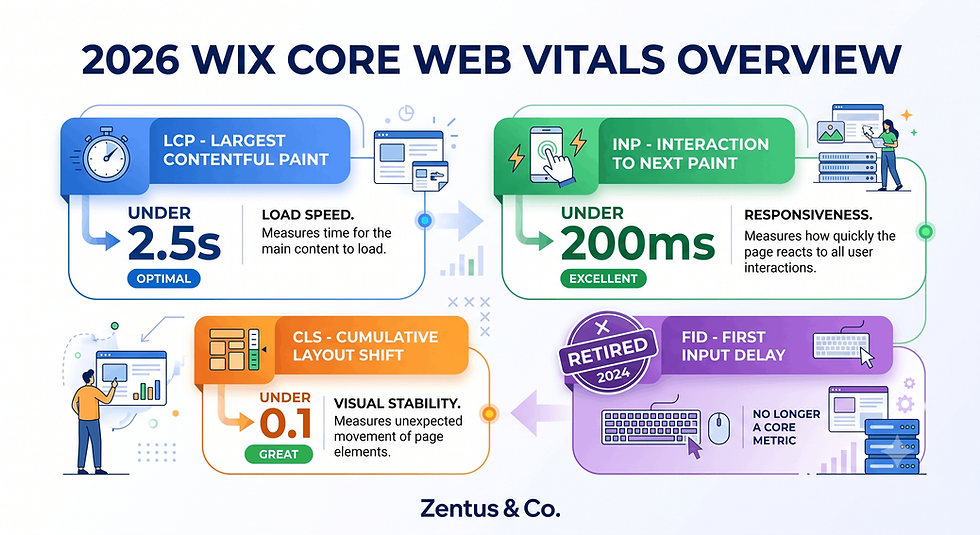
Google's crawler visits your site as a smartphone user agent by default. It measures mobile Core Web Vitals — Largest Contentful Paint, Interaction to Next Paint, and Cumulative Layout Shift — on the mobile render. A fast desktop layout with a bloated mobile version won't save your rankings, because the desktop version is essentially irrelevant to how Google scores you now.
Why does mobile speed now directly influence Wix SEO rankings?
Mobile speed is a ranking factor through Core Web Vitals, and it's also an indirect factor through bounce rate and dwell time. A slow mobile page pushes visitors back to the results page faster, which signals low relevance to Google. Fixing mobile speed improves both the technical signal and the behavioural signal simultaneously — a rare double win in SEO.
The Desktop-vs-Mobile Score Gap: Why They're Not the Same Score
Desktop PageSpeed scores flatter almost every Wix site. Mobile scores tell the truth, because phones have less processing power, smaller bandwidth, and stricter Core Web Vitals thresholds applied to them.
Why is my mobile PageSpeed score lower than my desktop score?
Your mobile score is lower because mobile devices process JavaScript and render images slower than desktop machines, and Google's mobile testing simulates a mid-range phone on a throttled 4G connection — not your office wifi and quad-core laptop. The same Wix page can score 92 on desktop and 51 on mobile purely because of hardware and network simulation differences, not because anything on the page actually changed.
What causes the desktop-vs-mobile PSI gap on Wix sites?
The gap is caused by render-blocking scripts, large hero images not resized for mobile viewports, and heavier CPU work (animations, sliders, embedded widgets) that a simulated mobile CPU struggles to process quickly. Wix's own editor tools and third-party apps often load the same asset weight regardless of device, widening this gap further.
Which score should you actually optimize for, desktop or mobile?
Optimize for mobile first, always — it's the score Google uses for ranking, and it's the experience most of your visitors actually have. Treat the desktop score as a secondary, "nice to check" number. If you only have time to fix one, mobile wins every time under mobile-first indexing.

Mobile Speed and Conversion Rate: The Revenue Connection
Mobile speed isn't only an SEO metric — it's a direct revenue lever, because slow mobile pages lose visitors before they ever see your offer.
How does mobile speed affect conversion rate?
Mobile speed affects conversion rate because each additional second of load time increases the probability a visitor abandons the page before it finishes rendering. Mobile users have shorter patience thresholds than desktop users, partly due to smaller screens and partly due to variable connection quality — a slow mobile experience reads as unreliable, and unreliable-feeling businesses lose bookings and sales.
What is the revenue cost of a slow mobile Wix site?
The revenue cost compounds across every stage of your funnel: fewer mobile visitors reach your service page, fewer complete a booking form, and fewer return after a frustrating first visit. For a service business relying on mobile enquiries, a consistently slow mobile experience can quietly cap growth without ever showing up as an obvious "problem" in Wix Analytics.
How many seconds of mobile load time before visitors leave?
Most mobile visitors begin to disengage as load time crosses the 2–3 second mark, with abandonment climbing sharply after that. This isn't a hard cutoff — it's a curve — but it means every second you shave off mobile load time is measurably valuable, not a cosmetic improvement.

Mobile-Specific Culprits: Pop-Ups, Sticky Bars and Heavy Mobile Images
Most Wix mobile speed problems trace back to a handful of repeat offenders that look harmless on desktop and become expensive on mobile.
Do pop-ups and sticky elements slow down mobile Wix sites?
Yes — pop-ups, sticky headers, and sticky booking bars add extra rendering and layout work on a screen with far less room and processing headroom than a desktop monitor. On mobile, these elements often trigger layout shifts as they animate into position, directly hurting your Cumulative Layout Shift score and creating a visibly janky first impression.
Which mobile design elements hurt speed the most?
The worst offenders are full-screen entry pop-ups, auto-playing background video, un-resized hero images, and third-party chat or review widgets that load their own scripts before your main content renders. Each one adds render-blocking weight that a phone has to process before the visitor sees anything useful.
How do you keep conversions without slowing mobile load?
Keep the conversion mechanism but change how and when it loads: delay pop-ups by a few seconds or trigger them on scroll intent, replace sticky bars with a simpler tap-to-call or tap-to-book button, and load chat widgets after the main content paints. You keep the conversion path without making every visitor pay the loading tax upfront.

Mobile-Data Users: Designing for Slow Connections, Not Just Fast Ones
A meaningful share of your mobile visitors are on patchy 4G or throttled data plans, not fibre-speed wifi — your site needs to work for them too.
How do you design a Wix site for mobile-data users?
Design for mobile-data users by keeping total page weight low, avoiding auto-playing video, and prioritising text and critical images over decorative assets. A page that loads its core message within the first few hundred kilobytes will still function reasonably on a weak connection, while a heavy, media-rich page can stall completely.
What actually works for visitors on slow connections?
What works is progressive rendering — showing the headline, navigation, and primary call-to-action before secondary content like galleries, testimonials, or embedded maps finish loading. Wix's built-in lazy loading helps here, but only if you haven't overridden it with auto-play settings or app widgets that force early loading.
How does throttled testing reveal real mobile speed problems?
Throttled testing — simulating a slow 4G connection in Chrome DevTools or Google PageSpeed Insights — reveals problems that a fast office connection completely hides. A page that feels instant on wifi can take 8–10 seconds to become usable on throttled mobile data, which is exactly the experience a meaningful portion of your real visitors have every day.
Image Optimization for Mobile: Formats, Sizes and Lazy Loading
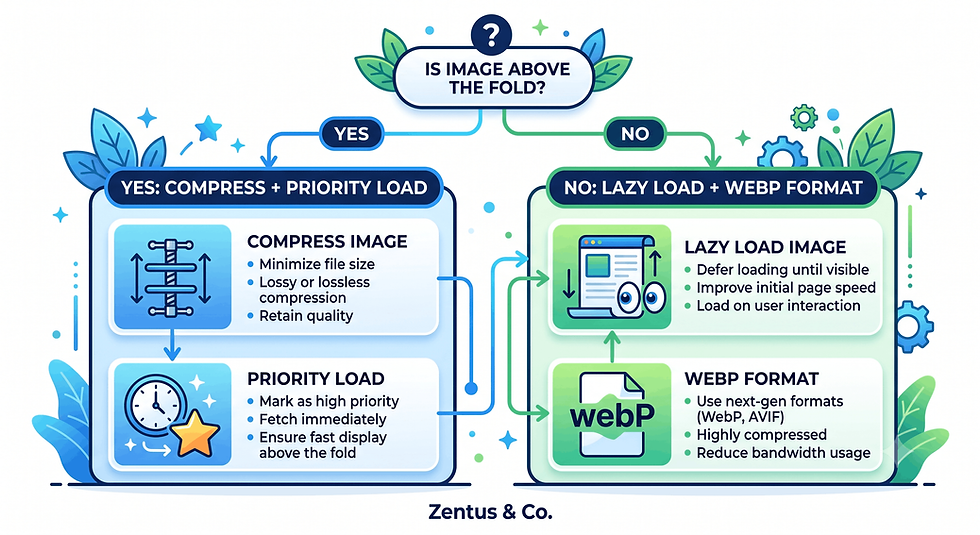
Images are the single largest contributor to Wix page weight, and mobile screens need a completely different approach to sizing than desktop does.
What mobile images cause slow Wix loading?
The images that cause slow loading are full-resolution desktop images displayed at mobile widths, uncompressed hero banners, and background images applied to sections rather than optimised image elements. Wix will scale an image visually, but it still often downloads the original file weight unless it's been properly sized and compressed first.
Which image formats load fastest on mobile Wix sites?
WebP format loads fastest on Wix, offering significantly smaller file sizes than JPEG or PNG at equivalent visual quality. Wix's Media Manager automatically serves WebP to supporting browsers in many cases, but manually uploading pre-compressed WebP files where possible gives you tighter control over the final file weight.
How does lazy loading improve mobile speed on Wix?
Lazy loading improves mobile speed by deferring images below the visible viewport until the visitor scrolls near them, so the initial page load only has to process what's actually on screen. Wix applies lazy loading by default to most image elements, but custom-coded embeds or certain third-party gallery apps can bypass this behaviour — worth checking manually.
How to Test Wix Mobile Speed Correctly (Not Desktop PSI)
Most Wix owners test speed the wrong way — on a desktop browser, on fast wifi, checking a score that has little to do with what Google or their mobile visitors actually experience.
How do you test Wix mobile speed correctly?
Test correctly by running Google PageSpeed Insights and selecting the mobile tab specifically, not the default combined view, and by physically loading your site on a real phone with wifi turned off to feel the actual experience. Numbers matter, but a real 4G load test tells you things a lab score can miss.
Which tools show real mobile performance instead of desktop scores?
PageSpeed Insights (mobile tab), Google Search Console's Core Web Vitals report, and Chrome DevTools' network throttling all show mobile-specific data pulled from real or simulated mobile conditions. Search Console is particularly valuable because it uses real Chrome User Experience Report data from actual visitors, not a lab simulation.
How do you avoid testing mobile speed the wrong way?
Avoid the common mistake of testing only on your own phone over wifi, which understates real-world load times for visitors on cellular data in weaker signal areas. Always cross-check lab results (PageSpeed Insights) against field data (Search Console Core Web Vitals) before deciding a fix has actually worked.
Wix Studio vs Wix Editor: Which Loads Faster on Mobile
Platform choice plays a real but limited role in mobile speed — it shifts the baseline, but doesn't replace good decisions about images and apps.
Does Wix Studio load faster on mobile than Wix Editor?
Wix Studio generally produces leaner, more efficiently structured mobile layouts than the classic Wix Editor, largely because it gives designers more granular responsive controls instead of relying on automatic mobile conversion. This means fewer unnecessary elements get carried over to the mobile view unchanged.
Factor | Wix Editor (Classic) | Wix Studio |
Mobile layout control | Auto-generated from desktop, limited editing | Fully independent responsive breakpoints |
Hidden elements on mobile | Often still loads in background | Can be excluded from mobile render |
Typical mobile CWV outcome | Moderate, inconsistent | Generally more consistent |
Best for | Simple sites, tight budgets | Speed-sensitive, conversion-focused builds |
Should you migrate to Wix Studio purely for mobile performance?
Migrating purely for mobile performance is rarely justified on its own — the bigger wins usually come from fixing images, pop-ups, and apps regardless of platform. If you're already planning a redesign or outgrowing the classic editor's limits, Wix Studio's mobile control becomes a strong secondary reason to make the move, not the primary one.
The Cost, Time and Effort of Fixing Wix Mobile Speed
Fixing mobile speed is one of the more affordable, high-return changes you can make to an existing Wix site — most of the work is configuration, not rebuilding.
How much does Wix mobile speed optimization cost?
Most of the direct cost sits in image re-compression, app audits, and layout adjustments, which a business owner can do manually or hand to a specialist for a scoped project. There's typically no required Wix plan upgrade purely for speed — plan tier affects features like ecommerce and storage, not raw mobile rendering speed.
Item | Typical Current Cost (July 2026) | What It Covers |
Wix Light plan | ~$17–19/month | Basic site, limited app support |
Wix Core plan | ~$29–32/month | Ecommerce basics, more storage |
Wix Business Basic | ~$36–39/month | Full ecommerce, better performance headroom |
Image compression app | Free–$10/month | Automated WebP conversion |
Wix specialist project (mobile speed audit + fixes) | Scoped per site — see current packages | Full mobile CWV remediation |
Prices checked for July 2026. Always verify current Wix and tool pricing before you buy — platform pricing can change.
How long do mobile speed fixes take to show results?
Configuration changes like image compression and pop-up delays can show PageSpeed Insights improvements within hours, while Google Search Console's field data (based on real visitor traffic) typically takes 4–8 weeks to fully reflect the change, since it's a rolling average of recent visits.
Should you hire help for Wix mobile speed optimization?
Hiring help makes sense when you've made the obvious fixes and mobile scores still lag, or when the site relies on apps and third-party embeds you're not confident editing safely. A scoped review through our Wix Studio services covers exactly this kind of mobile performance audit — see current options on website design pricing.
When Fixing Mobile Speed Lifts Conversions More Than Any Other Wix Change
Not every business gets equal value from a mobile speed project — the return is highest where mobile traffic and mobile conversion actions overlap heavily.
Which businesses benefit most from fixing mobile speed first?
Businesses that benefit most are those where mobile visitors make direct decisions on the phone — booking a table, calling a tradesperson, requesting a quote, or completing checkout on a mobile browser. If most of your traffic browses on mobile but converts later on desktop, the urgency is lower, though still worth addressing for SEO.
When does mobile speed become the highest-ROI Wix change?
Mobile speed becomes the highest-ROI change when your mobile traffic share exceeds 50–60% and your current mobile PageSpeed score sits below 50. At that combination, you're losing both search visibility (through Core Web Vitals) and direct conversions (through abandonment) simultaneously — fixing one project addresses two revenue leaks at once.
The Desktop-vs-Mobile Score Gap That Hides Real Mobile Revenue Loss
The gap between your desktop and mobile scores isn't just a technical curiosity — it's actively hiding a business problem from owners who only glance at one number.
Why do business owners optimize desktop and ignore mobile speed?
Owners optimize desktop because that's the screen they build and review the site on, so a good desktop score feels like proof the job is done. Mobile testing requires a deliberate extra step most people skip, which means the mobile experience — the one Google actually ranks — often goes completely unchecked.
How does the score gap hide real mobile revenue loss?
The gap hides revenue loss because a decent-looking overall Analytics dashboard can mask a specifically bad mobile conversion rate, since desktop conversions can offset weak mobile numbers in blended reporting. Segmenting conversion data by device is the only way to see the mobile-specific damage a slow mobile experience is quietly causing.
Pop-Up, Image and Mobile-Data Checks Before You Claim Mobile Speed Victory
Before you consider mobile speed "fixed," run these checks — it's common to improve a lab score while accidentally reintroducing a real-world mobile problem.
What pop-up mistakes cause false mobile speed regressions?
The most common mistake is adding a new promotional pop-up after your speed fixes are complete, undoing the layout shift improvements you just made. Always re-test PageSpeed after adding any new app, banner, or pop-up — even ones that seem unrelated to speed.
What image mistakes still slow mobile after "optimization"?
Even after compression, images can still slow mobile if they're displayed at a far larger size than needed for the actual mobile viewport width, forcing the browser to scale down a heavier file than necessary. Check that your image element's rendered width roughly matches its uploaded dimensions.
What mobile-data checks should you run before publishing?
Before publishing, run a throttled 4G test in Chrome DevTools and a real phone test with wifi disabled, checking that your primary call-to-action is visible and clickable within the first few seconds. This is the fastest way to catch a mobile-data failure before real visitors do.
Pre-Publish Mobile Speed Checklist:
PageSpeed Insights mobile tab score checked (not desktop)
All hero and above-the-fold images compressed to WebP
Pop-ups delayed or scroll-triggered, not instant on-load
Sticky bars tested for layout shift on mobile
Site tested on real phone with wifi disabled
Search Console Core Web Vitals report reviewed after 2–4 weeks
Third-party apps and embeds audited for mobile load impact

Frequently Asked Questions About Wix Mobile Speed Optimization
Why is my Wix site slow on mobile?
Your Wix site is likely slow on mobile because of oversized images displayed at mobile widths, render-blocking apps, or pop-ups that add layout work before the page becomes usable. Mobile devices also have less processing power than the desktop you likely built and reviewed the site on, which widens the gap between how it feels to you and how it feels to a real visitor.
How does mobile-first indexing change what Google actually ranks for my Wix site?
It means Google indexes and ranks based on your mobile render, not your desktop layout, so a fast desktop site with a slow mobile version still gets penalised in rankings. Your desktop experience essentially becomes secondary — it matters for user experience, but not for how Google evaluates your Core Web Vitals.
What is the difference between desktop and mobile PageSpeed scores?
The difference comes from simulated hardware and network conditions — mobile scores use a throttled connection and a mid-range phone CPU, while desktop scores assume faster processing and a stable connection. A page can score very differently between the two without any content changing, purely due to these simulated conditions.
How do I fix Wix mobile loading speed?
Fix it by compressing images to WebP, delaying pop-ups, auditing third-party apps, and testing on the mobile tab of PageSpeed Insights rather than relying on the desktop score. Most meaningful gains come from a handful of specific fixes rather than a full rebuild.
Can pop-ups on my Wix site hurt mobile speed even if desktop looks fine?
Yes — pop-ups often hurt mobile speed more than desktop because mobile screens have less room to render the overlay smoothly, causing visible layout shift and processing delay. A pop-up that feels instant on desktop can noticeably stutter on a phone, especially on a throttled connection.
What's the real conversion rate impact of a one-second mobile delay on Wix?
Even a one-second delay can measurably reduce conversion actions like form submissions and booking completions on mobile, because mobile users have a lower patience threshold for perceived slowness. The impact compounds across your whole funnel, not just the landing page.
Which mobile image mistakes are most common on Wix sites?
The most common mistakes are uploading full desktop-resolution images without resizing for mobile, skipping compression entirely, and using decorative background images that add weight without adding conversion value. These mistakes are easy to fix once identified through a manual image audit.
What's the fastest way to spot-check my Wix mobile speed today?
The fastest check is running your homepage through Google PageSpeed Insights on the mobile tab, then loading the live site on your own phone with wifi turned off. Together, these give you both a lab score and a real-world feel within about five minutes.
Is switching to Wix Studio alone enough to fix mobile speed problems?
No — Wix Studio gives you better responsive controls, but it won't automatically compress your images or remove a slow pop-up you've configured. Platform choice sets the ceiling for what's possible; your content and app decisions determine whether you actually reach it.
What is a good mobile speed score for Wix?
A good mobile PageSpeed score for a Wix site is generally 70 or above, with Core Web Vitals passing in the "Good" range in Search Console's field data. Scores in the 90s are achievable but not always necessary if your Core Web Vitals thresholds are already passing.
How quickly will I see mobile speed improvements after making changes?
Lab tools like PageSpeed Insights can show improvement within hours of a fix, but Google Search Console's real-visitor data typically takes four to eight weeks to fully update, since it reflects a rolling window of actual mobile visits.
When does a slow mobile Wix site need professional help instead of DIY fixes?
Professional help becomes worthwhile when you've compressed images, adjusted pop-ups, and audited apps but mobile scores still lag, or when the slowdown traces back to complex third-party integrations you're not confident editing. A scoped mobile speed audit is often faster than continued trial and error.

Conclusion & What to Do This Week
Mobile speed isn't a side issue anymore — under mobile-first indexing, it is your SEO, and under real buying behaviour, it's directly tied to your conversion rate. This week: run your homepage through PageSpeed Insights on the mobile tab, compress your top three heaviest images, and check whether any pop-up or sticky bar is triggering instantly on load. Then check your Search Console Core Web Vitals report in four weeks to confirm the field data has caught up with your fixes. For a full technical foundation before you tackle mobile speed, review our Wix Core Web Vitals Checklist 2026, and if you'd rather have a specialist run the audit, book a free consultation to scope it properly.

Comments