


WIX ACCESSIBILITY, ADA & WCAG COMPLIANCE

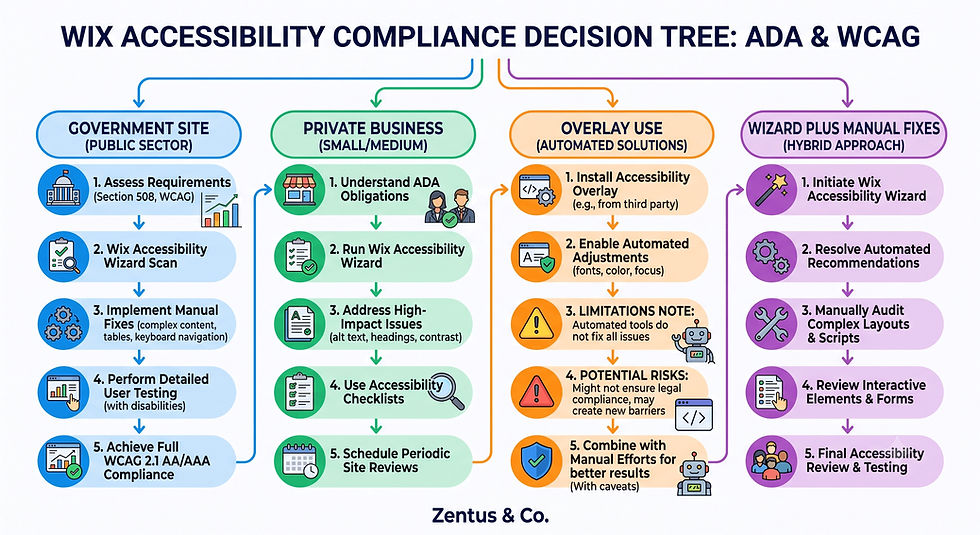
Most Wix business owners believe that installing an accessibility widget — or ticking a box in a compliance app — makes their site legally safe. It doesn't, and in 2026 that misunderstanding is actively increasing lawsuit risk rather than reducing it. Wix accessibility, ADA and WCAG compliance are three separate things that get bundled into one myth: "add an overlay, you're covered." The reality is messier. The April 2024 ADA Title II rule set a hard WCAG 2.1 AA deadline for US state and local government websites, private-sector ADA website lawsuits are filed by the thousands every year, and several accessibility overlay vendors are now defendants in their own lawsuits for making compliance claims their tools can't back up. This guide breaks down what actually changed, what the Wix Accessibility Wizard genuinely fixes, where it stops, and how to close the gap without falling into the overlay trap.
Wix Accessibility and ADA-WCAG Compliance: Quick Risk Verdict
If you only read one section, read this one.
Wix is not automatically ADA or WCAG compliant — the platform gives you the tools, but compliance depends on how you build the site, not which builder you use.
The 2024 ADA Title II rule legally mandates WCAG 2.1 AA for US state and local government websites (effective April 2024, phased through 2026–2027). It does not directly regulate private small businesses, but it has reset the legal baseline courts now reference.
Accessibility overlays (accessiBe, EqualWeb, and similar widgets) do not guarantee compliance, and several overlay vendors are themselves being sued over false accessibility claims.
The Wix Accessibility Wizard is a genuine starting point — it handles the first layer of fixes (alt text prompts, contrast checks, ARIA labelling) but leaves forms, video, keyboard traps and PDFs for manual review.
The safest 2026 approach: use the Wix Wizard, manually fix alt text, contrast and keyboard navigation, and skip the overlay entirely.

The 2024 ADA Title II Rule: What Actually Changed for Websites
In April 2024, the US Department of Justice finalised a rule under ADA Title II requiring state and local government websites and mobile apps to meet WCAG 2.1 Level AA, with compliance deadlines running into 2026 for larger entities and 2027 for smaller ones. This is the first time WCAG 2.1 AA has been written into binding federal regulation for a specific category of website.
What is the 2024 ADA Title II rule?
It's a Department of Justice regulation requiring US state and local government digital services — websites, apps, and PDFs — to conform to WCAG 2.1 AA by a phased deadline through 2026–2027, replacing the previous vague "effective communication" standard with a measurable technical benchmark.
Does it apply to private businesses?
Not directly — Title II covers government entities only. Title III (public accommodations) already applied to many private businesses before 2024, but Title II's specificity is now used by plaintiffs' lawyers as evidence of what "reasonable accessibility" looks like, which raises pressure on private-sector sites too.
What standard does it require?
WCAG 2.1 Level AA — the same mid-tier standard most ADA website settlements have referenced for a decade, now formally codified instead of implied.
The Private-Sector Lawsuit Wave: Why Small Businesses Are Now Targets
Website accessibility lawsuits against private businesses have grown every year since 2018, and small and mid-sized businesses — not just national retailers — are now the majority of new filings.
How many ADA website lawsuits are filed each year?
Federal courts have recorded well over 4,000 website-related ADA lawsuits annually in recent years, with thousands more resolved through demand letters that never reach court, and small businesses with under $5 million in revenue now make up a large share of targets.
Why are small businesses being targeted now?
Larger retailers fixed obvious issues years ago, so serial plaintiffs' firms have shifted toward smaller sites with weaker defences, thinner budgets, and no dedicated legal or IT team to respond quickly.
What is the cost of losing an accessibility lawsuit?
Settlements for small businesses commonly range from $5,000–$25,000 plus remediation costs and legal fees, even when the underlying accessibility gaps could have been fixed for a fraction of that before the claim was filed.
WCAG 2.1 AA Explained: The Standard Your Wix Site Must Hit
WCAG 2.1 AA is the technical benchmark referenced in almost every accessibility lawsuit and regulation, including ADA Title II — it's the standard your Wix site should be measured against, regardless of industry.
What is WCAG 2.1 AA in plain English?
It's a mid-level tier of the Web Content Accessibility Guidelines that requires sites to be usable by people with visual, auditory, motor, and cognitive disabilities — covering things like colour contrast ratios, keyboard operability, and readable alt text.
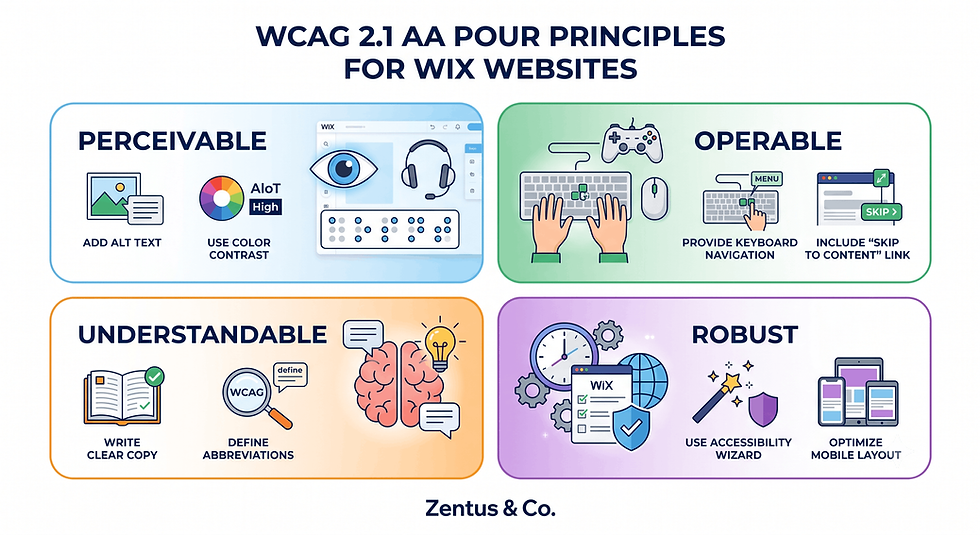
What are the four WCAG principles (POUR)?
Content must be Perceivable (readable/visible in multiple formats), Operable (usable without a mouse), Understandable (clear structure and language), and Robust (works with assistive tech like screen readers).
How does WCAG apply to a Wix site?
Every POUR principle maps to a Wix setting: alt text and captions cover Perceivable, keyboard-navigable menus cover Operable, clear headings cover Understandable, and clean semantic markup (which Wix Studio generates reasonably well) covers Robust.
The Overlay Trap: Why accessiBe and EqualWeb Get Sued Themselves
Accessibility overlay widgets promise instant compliance through a single script install — but courts and disability advocates increasingly treat that promise as false advertising rather than a fix.
What is an accessibility overlay?
It's a third-party JavaScript widget (accessiBe, EqualWeb, UserWay-style tools) added to a site that claims to automatically adjust contrast, add alt text, and improve keyboard navigation without changing the underlying code.
Why are overlays being sued?
Overlay vendors have faced their own lawsuits and FTC scrutiny for marketing "full compliance" or "ADA compliant instantly" claims that independent audits and disabled users have repeatedly disproven — the tools often break screen-reader workflows instead of improving them.
Do overlays actually make a site compliant?
No. Automated overlays cannot fix structural issues like missing form labels, broken heading order, or inaccessible custom components — they mask surface symptoms while the underlying WCAG failures remain, which is exactly what plaintiffs' lawyers now look for.
The Wix Accessibility Wizard: What It Fixes and What It Doesn't
Wix's built-in Accessibility Wizard is a legitimate, code-level tool — not a third-party overlay — but it's still only a partial solution, and treating it as a finish line is the second most common mistake after ignoring accessibility entirely.
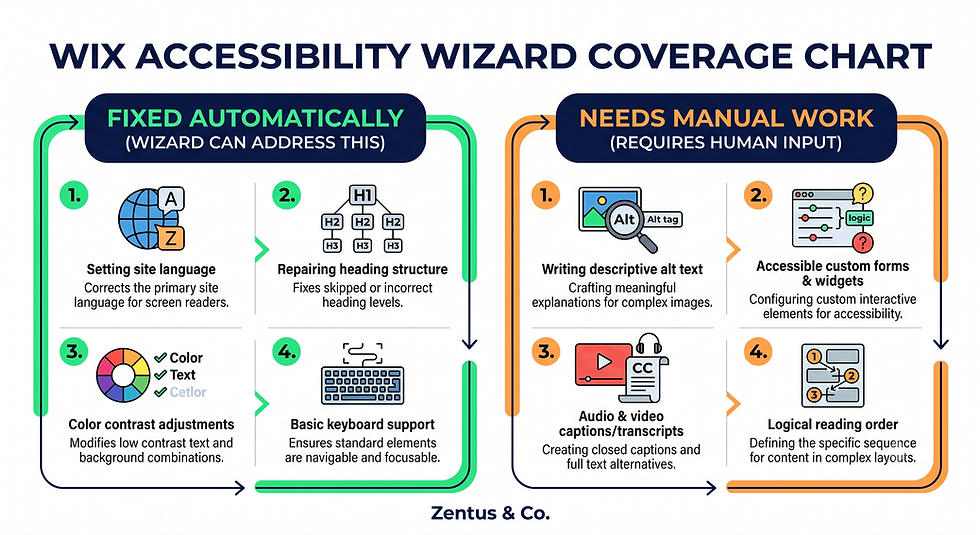
What does the wizard fix automatically?
It scans for missing alt text and flags it for input, checks colour contrast against WCAG thresholds, adds ARIA landmarks to structural elements, and improves keyboard focus order on standard Wix components.
What can the wizard not fix?
It cannot write meaningful alt text for you, cannot fix custom-coded embeds or third-party widgets (booking apps, chat tools), cannot caption your videos, and cannot make a poorly structured page logically navigable — those require human judgement.
How far does the wizard get you toward compliance?
Realistically, it closes roughly the first 60–80% of technical gaps on a standard Wix Studio site. See Wix Studio for small business for how a clean build reduces this workload from the start.
The Most Common Wix Accessibility Failures (and How to Fix Each)
Most Wix accessibility failures cluster around the same handful of preventable issues, repeated across thousands of small business sites.
What are the most common Wix accessibility failures?
Missing or generic alt text ("image123.jpg"), low-contrast text on branded colour backgrounds, decorative buttons with no accessible label, auto-playing background video with no pause control, and PDF menus or price lists with no text alternative.
How do you fix missing alt text on Wix?
Open each image's settings panel in the Wix Editor and write a specific, descriptive sentence (not a keyword string) that explains what the image shows and why it matters to the page.
How do you fix low colour contrast on Wix?
Run your brand palette through a contrast checker before applying it site-wide, and swap any text/background combination scoring below a 4.5:1 ratio for body text — a common failure on pastel or dark-brand Wix sites.
Alt Text, Colour Contrast and Keyboard Checks Before You Claim Compliance
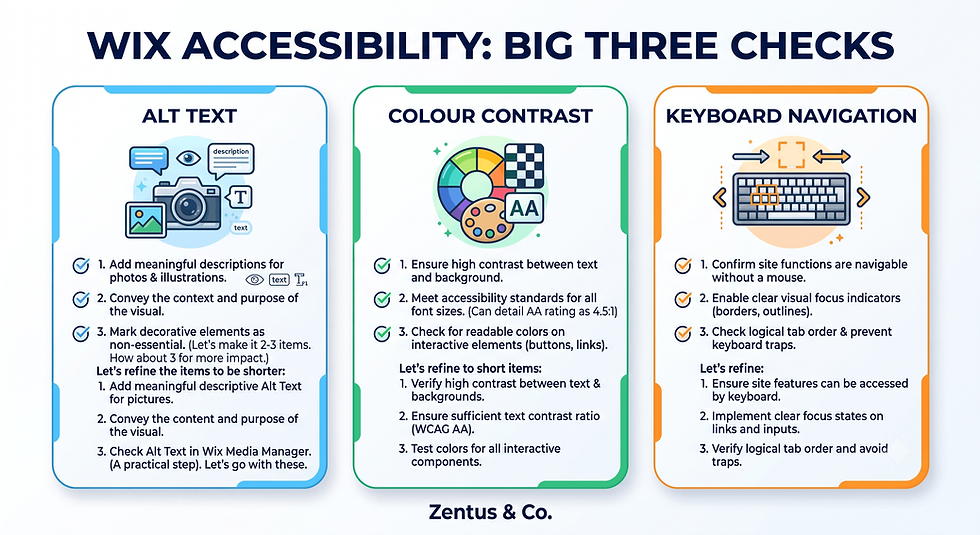
These three checks catch roughly 70% of the failures found in real Wix accessibility audits, and they're the ones a Wizard scan alone will not fully resolve.
How do you write useful alt text on Wix?
Describe the image's function, not just its content — "Navy blue Wix Studio homepage mockup showing booking button" beats "homepage image," and decorative images should carry an empty alt attribute rather than a filler phrase.
How do you test colour contrast on a Wix site?
Use a free contrast checker on every text/background pairing in your Wix theme, including hover states and button text, since brand colours often pass on white backgrounds but fail on accent-coloured sections.
How do you keyboard-test a Wix site?
Unplug your mouse and tab through the entire page — every button, menu item, and form field should get a visible focus outline and follow a logical order; if the tab order skips or traps you, that's a WCAG Operable failure.
Accessible Forms, Video and Documents on Wix
Forms, video, and documents are the assets Wix's automated tools review the least — and the ones plaintiffs' audits check the most.
How do you make Wix forms accessible?
Give every field a visible, permanent label (not just placeholder text that disappears on typing), group related fields logically, and make sure error messages are announced in text, not colour alone.
How do you add captions to Wix video?
Upload an SRT caption file through the Wix Video settings for every video with spoken content, and avoid relying on auto-generated captions without a manual accuracy check.
How do you make downloadable documents accessible?
Export PDFs with tagged headings and reading order from the source file (not a scanned image), or replace static price-list PDFs with an accessible Wix page — a fix that also helps SEO for small business.
How to Run a Real Wix Accessibility Audit (Not Just the Wizard)
A real accessibility audit combines automated scanning with manual human testing — relying on the Wizard's scan result alone is the single biggest false-confidence trap.
How do you run a full Wix accessibility audit?
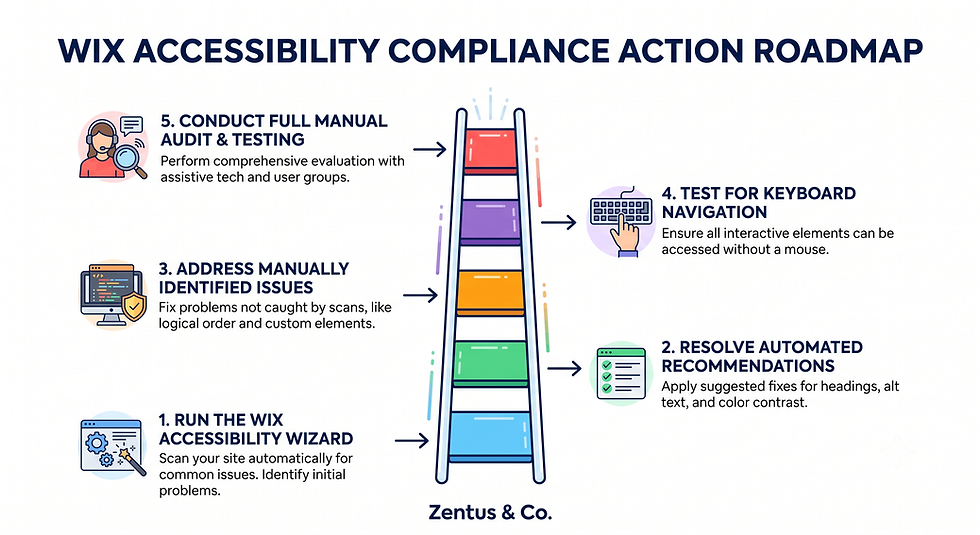
Run the Wix Accessibility Wizard first, then manually keyboard-test every page, screen-reader-test your homepage and one conversion page, and check every PDF and embedded widget by hand.
Which free tools test Wix accessibility?
Browser-based contrast checkers, free screen readers (NVDA on Windows, VoiceOver on Mac), and the Wizard's own report cover most small business needs without paid software.
When should you hire an accessibility specialist?
Bring in a specialist once your site handles bookings, payments, or client data, or if you've received any accessibility demand letter — the cost of a professional audit is far lower than a settlement.
Cost, time and effort — what accessibility work actually costs in July 2026:
Item | Price (July 2026) | What it covers | Best for |
Wix Accessibility Wizard | Included free with any Wix plan | Automated alt text prompts, contrast flags, ARIA landmarks | Every Wix site, as a starting layer |
Wix Light plan | Approx. $17/month (USD) | Basic site with Wizard access | Solo owners, low page count |
Wix Core plan | Approx. $29/month (USD) | E-commerce/bookings + Wizard access | Service businesses with online booking |
accessiBe-style overlay | Approx. $49–$490/month (range — verify current pricing) | Automated overlay scripting (not a substitute for manual fixes) | Not recommended as a standalone solution |
Manual remediation (freelancer/agency) | Approx. $500–$3,000 one-off (range) | Alt text rewrite, contrast fixes, form/video/PDF fixes | Sites with 10–40 pages needing a real fix |
Full third-party accessibility audit | Approx. $750–$5,000 one-off (range) | Manual + automated testing, written compliance report | Sites handling bookings, payments or client data |
Prices checked for July 2026. Always verify current Wix and tool pricing before you buy — platform pricing can change.
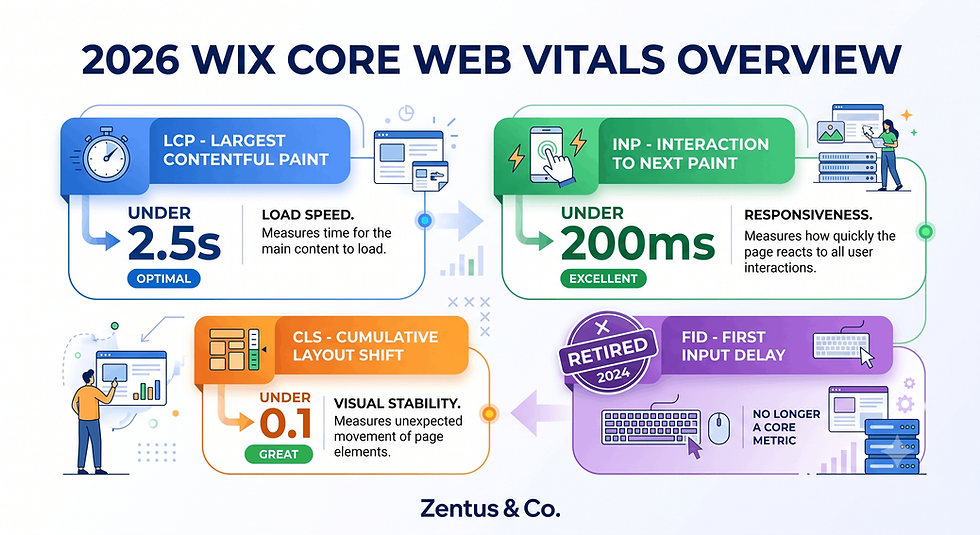
For a related setup cost comparison, see Wix Core Web Vitals Checklist 2026 and Wix website speed, since accessibility and performance fixes often overlap in the same Wix Studio build. You can also review current packages on Wix Studio services and website design pricing.
When the Wix Accessibility Wizard Gets You 80% There (and What It Can't Do)
The Wizard is the right first move for almost every Wix business owner — but knowing exactly where its coverage ends prevents a false sense of security.
When is the Wix wizard enough?
For a simple brochure site with no forms, no video, and no custom embeds, the Wizard plus a manual alt-text and contrast pass can realistically get you close to full WCAG 2.1 AA coverage.
What does the wizard leave unfixed?
Custom-coded sections, third-party booking or chat widgets, video captions, PDF documents, and any content requiring human judgement about meaning rather than markup.
How do you close the last 20% of compliance?
Manually audit every non-native Wix element (embeds, widgets, PDFs), keyboard-test the full user journey including checkout or booking, and document the fixes in case you ever need to show a good-faith compliance effort.
The Accessibility-Overlay Trap That Increases Lawsuit Risk Instead of Reducing It
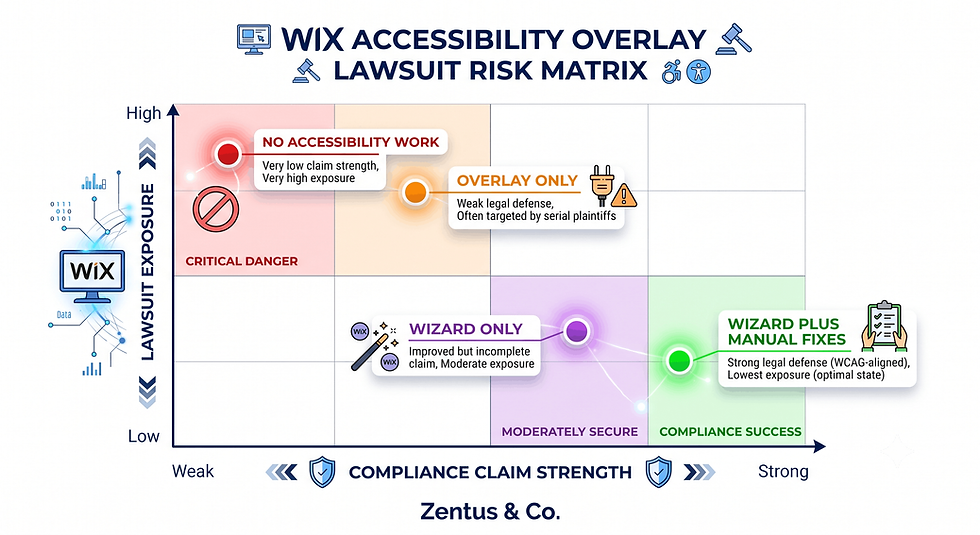
Ironically, adding an overlay can create more legal exposure than doing nothing, because it signals to plaintiffs' lawyers that you knew accessibility mattered and chose a widget over real fixes.
Why do overlays increase rather than reduce risk?
Plaintiffs' firms specifically screen for overlay scripts, since a site running one but still failing basic screen-reader tests demonstrates known awareness combined with an ineffective response — a worse legal position than never having addressed it.
What should you check before claiming compliance?
Confirm every fix was applied at the code/content level (not through a widget), keep a dated record of your Wizard scan and manual fixes, and re-test after every major design change.
How do you avoid the overlay trap?
Skip paid overlay widgets entirely, use the free Wix Accessibility Wizard as your automated layer, and pair it with the manual checks in this guide — a practical Wix Studio setup would normally treat accessibility as a build-stage task, not a bolt-on plugin.

Frequently Asked Questions About Wix Accessibility and ADA-WCAG Compliance
Is Wix ADA compliant in 2026?
No platform is "ADA compliant" by default — Wix provides the tools (Accessibility Wizard, semantic markup, alt text fields) needed to build a compliant site, but compliance depends on how each individual site is built and maintained, not on the builder itself.
What is the 2024 ADA Title II rule for websites?
It's a Department of Justice regulation requiring US state and local government websites and apps to meet WCAG 2.1 AA by phased deadlines through 2026–2027. It doesn't directly cover private businesses, but it has become the reference standard courts and plaintiffs' lawyers point to.
Why are accessibility overlays being sued?
Overlay vendors like accessiBe have faced lawsuits and regulatory scrutiny for advertising "instant compliance" claims that independent testing disproved — the widgets often mask issues rather than fix the underlying code, which courts increasingly treat as misleading marketing.
How does the Wix Accessibility Wizard work?
It scans your published site for common WCAG issues — missing alt text, low contrast, missing ARIA labels — and prompts you to fix each one directly inside the Wix Editor, applying changes to your actual site code rather than layering a script on top.
What is WCAG 2.1 AA and does Wix meet it?
WCAG 2.1 AA is the mid-tier accessibility standard covering contrast, keyboard access, and readable structure. Wix's editor and Studio output can meet it, but only when alt text, contrast, forms, and video are manually completed — the platform alone doesn't guarantee it.
How do I make my Wix site accessible?
Run the Accessibility Wizard, manually write descriptive alt text, check contrast on every colour combination, keyboard-test your navigation, caption your videos, and make sure forms have visible permanent labels — covering all four WCAG POUR principles.
Can Wix pass an accessibility audit?
Yes, a well-built Wix Studio site can pass a manual accessibility audit, but only after the Wizard's automated fixes are supplemented with human review of forms, video, embeds, and PDFs — automated scans alone typically miss 20–30% of real issues.
What are the most common Wix accessibility failures?
The most frequent issues are generic or missing alt text, low colour contrast on branded sections, unlabelled buttons and icons, auto-playing video with no controls, and inaccessible PDF menus or price lists with no page-based alternative.
Do small businesses need to be ADA compliant?
Most small businesses fall under ADA Title III if they serve the public, which courts have increasingly applied to websites, even though enforcement and case law vary by state — treating accessibility as optional carries real legal exposure regardless of business size.
How much does it cost to make a Wix site accessible?
Costs range from $0 (using the free Wix Accessibility Wizard yourself) to $500–$3,000 for a freelancer or agency remediation pass, up to $750–$5,000 for a full third-party audit with a written compliance report — see the pricing table above.
Does an accessibility overlay protect me from lawsuits?
No. Overlay widgets do not provide legal protection, and several overlay vendors are themselves defendants in accessibility lawsuits — relying on one as your only fix is currently viewed as a weaker legal position than manual remediation.
How do I add alt text and fix colour contrast on Wix?
Add alt text through each image's settings panel in the Wix Editor with a specific descriptive sentence, and check every text/background colour pairing with a free contrast checker, replacing any combination scoring below a 4.5:1 ratio for body text.
Next Steps: Your Wix Accessibility Action Checklist This Week
Accessibility isn't a one-time task — it's a build habit. This week: run the free Wix Accessibility Wizard on your live site, manually rewrite alt text on your five highest-traffic pages, contrast-check your brand palette, keyboard-test your booking or contact form, and skip any paid overlay widget entirely. If your site handles payments, bookings, or client data, a professional audit is worth the cost before a demand letter forces it. For a Wix Studio build that treats accessibility as a foundation rather than an afterthought, book a free consultation and review current options on Wix Studio services.

Comments