


Migrate Shopify to Wix: The 2026 Overkill Test


Migrating From Shopify to Wix: Quick "Is It Overkill" Verdict
Quick Reality Check: Most stores don't outgrow Shopify — they outgrow the bill. If your monthly Shopify cost (plan plus apps) has climbed past $150–$300 and your catalogue sits under 500 SKUs, you are very likely paying for enterprise infrastructure you never touch.
If you run under 1,000 SKUs with straightforward shipping, migrating Shopify to Wix usually cuts combined platform and app costs by 30–60%.
If you rely on five or more paid apps (reviews, upsells, email, shipping calculators), most of that functionality now sits natively inside Wix Stores.
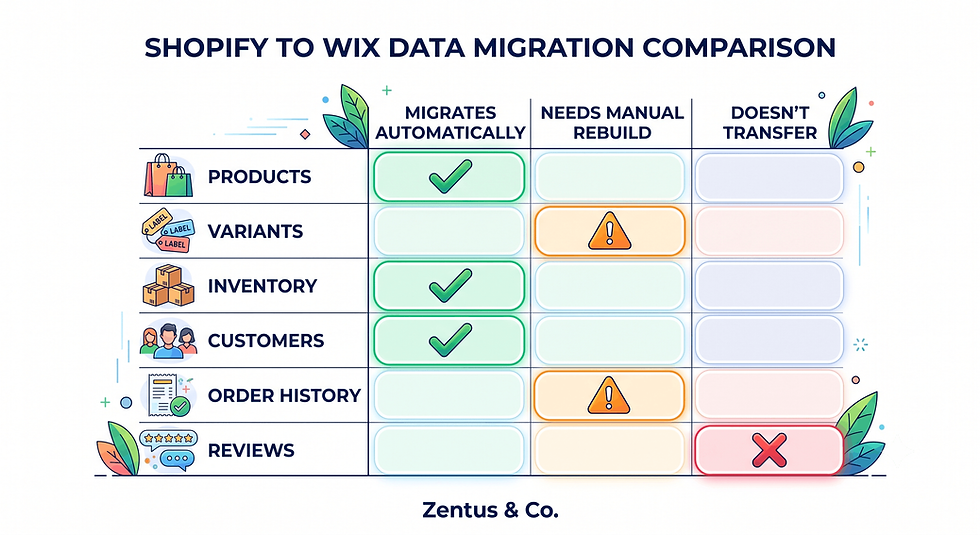
Products, orders and customers all migrate — but review history, app-specific metafields and complex multi-currency automation need manual rebuilding.
Search rankings can be preserved if every product URL is mapped to a 301 redirect before you switch off Shopify.
Stay on Shopify if you run wholesale/B2B channels, multi-warehouse fulfilment, or a catalogue over 2,000 SKUs with heavy variant complexity — Wix Stores isn't built for that scale yet.
Introduction
The common myth is that a "bigger" ecommerce platform is always the better one — so once a store launches on Shopify, owners assume leaving is a downgrade. In practice, when you migrate Shopify to Wix, you're rarely downgrading; you're removing a stack of enterprise-grade infrastructure and paid apps that a small catalogue never needed in the first place. Shopify was built to scale from 10 orders a month to 10,000, and that scale comes bundled with a plan fee, transaction-processing costs, and an app marketplace that quietly adds $50–$300 a month once you install reviews, email marketing, upsells and shipping tools. For a store selling 50–800 products with a straightforward checkout flow, Wix Stores now covers the same core job — catalogue, checkout, inventory, abandoned-cart recovery and basic marketing — natively, without stacking five subscriptions on top of the plan fee. This guide covers the honest version of the move: when it actually makes sense, how product, order and customer data really migrate, and what to check before your Shopify store goes offline for good.

When Shopify Becomes Overkill for a Small Store
Shopify becomes overkill the moment you're paying monthly for features tied to a scale you haven't reached and aren't planning to reach within 12 months. The platform's real strength — multi-warehouse logistics, wholesale channels, high-volume checkout throughput — is wasted on a single-warehouse store shipping under a few hundred orders a month.
At what point is Shopify overkill?
It's overkill once your app spend exceeds your plan spend, or once you're using under 20% of the automation and reporting features in your current plan tier. If you couldn't explain what three of your installed apps actually do, that's a strong signal.
Which stores are paying for scale they don't use?
Single-location stores with under 1,000 SKUs, no wholesale channel, and one currency are the most common candidates. Ecommerce migration decisions should always start by mapping current usage against plan cost, not brand reputation.
What are the signs it's time to simplify?
Rising app fees each renewal cycle, a checkout flow that hasn't changed in two years, and a support team fielding the same three configuration questions repeatedly are all signs the platform has outgrown the store's actual needs — not the other way round.
The App-Subscription Bloat Audit: Add Up What You Really Pay
Shopify's plan fee is rarely the real cost — the app marketplace is. Before deciding whether to switch from Shopify to Wix, add up every app subscription running on your store today.
What is Shopify app-subscription bloat?
It's the accumulated monthly cost of every third-party app installed to patch a gap in Shopify's native features — reviews, upsells, email flows, shipping rate calculators, SEO tools and loyalty programs — each billed separately on top of your plan.
How do you audit every app you pay for?
Open your Shopify admin's "Apps and sales channels" page, list every active app with its monthly fee, and mark whether it duplicates a feature Wix Stores includes natively (product reviews, basic email campaigns, abandoned-cart recovery, and simple upsell widgets are all built in).
What is the true monthly Shopify cost with apps?
For a mid-size store, the real number is usually 1.5–3x the plan price once apps are added.
App Category | Typical Monthly Cost (checked July 2026) | Native in Wix Stores? |
Product reviews | $19–$49 | Yes |
Email marketing (Klaviyo-tier) | $20–$100+ | Yes (built-in email marketing) |
Upsell/cross-sell | $29–$49 | Yes |
Shipping rate calculator | $19–$29 | Yes |
Basic SEO app | $9–$29 | Not needed — native SEO tools |
Loyalty/rewards | $29–$59 | Partial — via Wix apps |
Typical add-on total | $125–$315/month | — |
Prices checked for July 2026. Always verify current Wix and tool pricing before you buy — platform pricing can change.

Product Migration: Moving Your Catalogue to Wix Stores
Product data moves through a structured CSV export and import process, not a one-click sync, so plan for a manual cleanup pass.
How do you migrate Shopify products to Wix Stores?
Export your Shopify product catalogue as a CSV from Products > All Products > Export, then reformat the columns to match Wix Stores' import template before uploading it through the Wix Stores dashboard's bulk-import tool.
How do variants and inventory transfer?
Variants (size, colour, material) transfer through the CSV but need their option names matched exactly to Wix's variant structure; inventory counts transfer as static numbers, so stock levels should be frozen or re-synced on migration day to avoid overselling.
What product data needs manual cleanup?
SEO titles, meta descriptions, structured product descriptions with embedded HTML, and any metafields used by removed Shopify apps typically need manual rebuilding, since these don't map cleanly to Wix's field structure.
Order and Customer Migration: What Travels and What Doesn't
Order history has real limits on Shopify-to-Wix migrations, and setting expectations here avoids a messy launch week.
Can you migrate Shopify orders and customers to Wix?
Customer records (names, emails, addresses) migrate cleanly via CSV import into Wix's customer database, but full order history with line-item detail generally does not import natively and is usually kept as an exported archive rather than live data in Wix.
What historical data cannot move?
Full transaction-level order history, past refund records, and loyalty point balances typically stay behind in a Shopify export archive rather than transferring into Wix's live order system.
How do you handle customer accounts?
Import the customer list ahead of launch and send a one-time password-reset email after cutover, since customer passwords never transfer between platforms for security reasons.
The Payment Processor Switch: Shopify Payments to Wix Payments
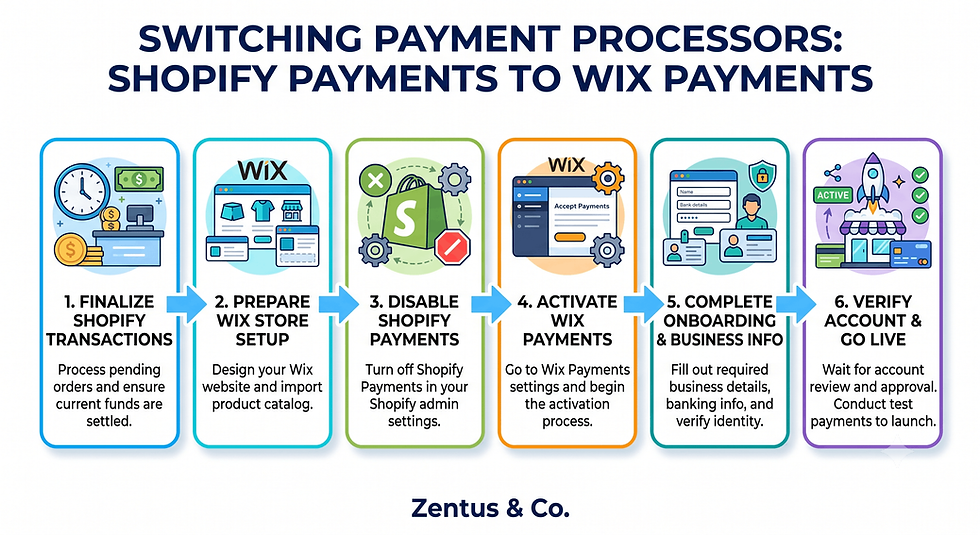
Switching processors is one of the most operationally sensitive parts of any shopify to wix migration guide, because a gap here directly interrupts revenue.
How does switching from Shopify Payments to Wix Payments work?
You set up a new Wix Payments account inside your Wix Stores dashboard, complete business verification, and run it in parallel with Shopify Payments until the new site is live, then redirect checkout traffic on cutover day.
What payout and fee differences should you expect?
Wix Payments' standard transaction fee is broadly comparable to Shopify Payments (roughly 2.9% + a fixed fee per transaction in the US, similar in the UK), but payout schedules and reserve holds can differ, so check your first payout cycle carefully.
Shipping and Tax Setup Rebuild on Wix Stores
Shipping and tax rules need to be rebuilt manually — nothing here migrates automatically from Shopify.
How do you rebuild shipping rules on Wix Stores?
Recreate your shipping zones, weight-based or price-based rate tables, and free-shipping thresholds inside Settings > Shipping & Pickup in Wix Stores, testing each zone with a sample cart before launch.
What configuration mistakes hit new Wix stores?
The most common errors are missing shipping zones for international customers, tax settings left on "automatic" without confirming nexus rules, and free-shipping thresholds set to the wrong currency for global stores.
Product URL Mapping: 301 Redirects to Preserve Product-Page Rankings
URL structure changes between platforms by default, which makes redirect mapping the single highest-leverage SEO task in the entire migration.
How do you map Shopify product URLs to Wix?
Export a full list of your live Shopify URLs (products, collections, and blog posts) using your XML sitemap, then build a one-to-one mapping table matching each old URL to its new Wix Stores equivalent before launch.
How do 301 redirects preserve product-page SEO?
A 301 redirect tells Google the page has permanently moved, passing the majority of that page's accumulated ranking signals to the new URL instead of forcing you to rebuild authority from zero — check our guide to Wix website speed for how load-time changes also affect post-migration rankings.
How many redirects does a store migration need?
Plan for one redirect per live indexed URL — for a 300-product store with collections and blog content, that's typically 350–500+ individual redirect rules.
SEO Preservation: Product Pages, Reviews and Schema
Beyond redirects, several SEO elements need active rebuilding rather than passive migration.
How do you preserve product-page SEO moving to Wix?
Carry over existing meta titles, meta descriptions, and header structure exactly where possible, and submit an updated XML sitemap in Google Search Console within 24 hours of launch.
What happens to Shopify product reviews?
Star ratings and review text don't migrate automatically between review apps on different platforms, so reviews usually need manual export/import through a Wix-compatible reviews app or a fresh collection period post-launch.
When You Should Stay on Shopify Instead of Moving
Not every store should move, and an honest migration guide says so directly.
When should a store stay on Shopify?
Stores running wholesale/B2B ordering, multi-warehouse or 3PL fulfilment integrations, or subscription-box logic tied to Shopify-specific apps should generally stay, since Wix Stores doesn't yet match that depth.
Which stores would lose by moving to Wix?
High-SKU-count catalogues (2,000+) with heavy variant matrices, and stores relying on deep ERP integrations built specifically for Shopify's API, would lose functionality moving today.
What scale triggers the move back?
If you outgrow Wix Stores later — hitting consistent five-figure monthly order volume with multi-channel wholesale demand — that's the point to reconsider Shopify or Shopify Plus, not before. For a broader platform comparison, see our full Wix vs Shopify comparison, and if you're weighing multiple migration paths, our guides to migrating Squarespace to Wix Studio and migrating WordPress to Wix Studio cover the other common switches. A practical Wix Studio ecommerce setup is outlined on our Wix Studio services page, with current packages on website design pricing.
When a Simpler Wix Store Beats Paying for Shopify Scale You Don't Use
A clean Wix Studio ecommerce build usually separates "features you use" from "features you're billed for" — and that gap is where the decision gets made.
Which stores benefit from simplifying to Wix?
Service-adjacent product stores, single-founder brands, and catalogues under 500 SKUs with domestic shipping typically see the fastest payback from simplifying, since they were paying Shopify-tier prices for Squarespace-tier usage.
When does lower overhead beat Shopify's features?
Once your monthly app-plus-plan spend exceeds your monthly Wix Stores equivalent by more than $100, the "extra features" argument stops holding up financially — you're paying for headroom you never use.
How does the switch change profitability?
For a store doing $8,000–$15,000 in monthly revenue, cutting $150–$250 in combined plan and app fees adds directly to margin without touching pricing or ad spend — a change that compounds every month, not just once.

The App-Subscription Bloat Audit Most Shopify Owners Never Run
The setup detail that surprises many store owners is that nobody at Shopify prompts you to audit app spend — subscriptions renew silently, and the bill only gets reviewed when it becomes uncomfortable.
Why do Shopify owners ignore app-bloat cost?
Individual app fees look small in isolation ($19 here, $29 there), so no single charge triggers a review — it's only when you total them against the plan fee that the real number becomes visible.
How does bloat compound over years?
An app stack that started at $60/month in year one commonly grows to $200–$300/month by year three as new apps get added to fix new problems, while old, unused apps rarely get removed.
What is the cost of never auditing subscriptions?
Over three years, an unaudited $200/month app stack costs $7,200 — often for functionality that a native Wix Stores setup would have covered for free within the plan fee. Running this audit before deciding to migrate turns an assumption into a number you can actually act on.
Product, Order and SEO Redirect Checks Before You Close Your Shopify Store
Before you shut down Shopify permanently, run a structured verification pass — this is the stage where rushed migrations lose orders or rankings.
What should you check before deleting your Shopify store?
Confirm every product is live with correct pricing and images on Wix, every redirect resolves to the correct new URL, and payment processing has completed at least one successful test transaction.
How do you verify redirects are live before cutover?
Test a sample of 20–30 old URLs across product, collection and blog pages to confirm each returns a 301 status to the correct new Wix URL, using a free redirect-checker tool before pointing your domain live.
Pre-Launch Checklist:
All products imported with correct pricing, images and variants
Inventory counts reconciled and frozen during cutover window
Customer list imported and password-reset email prepared
Wix Payments verified with one successful test transaction
Shipping zones and tax rules rebuilt and tested with sample carts
Full URL redirect map uploaded and spot-checked
Updated XML sitemap submitted in Google Search Console
DNS/domain pointed only after all above checks pass
How do you confirm orders and customer records imported correctly?
Spot-check 10–15 customer records against the original Shopify export for accuracy, and place one live test order end-to-end to confirm order data, email confirmations and inventory deduction all function correctly.

Frequently Asked Questions About Migrating From Shopify to Wix
How do I migrate from Shopify to Wix without losing products?
Export your full product catalogue as a CSV from Shopify, reformat it to match Wix Stores' import template, and upload it before deleting anything on the old platform. Keep Shopify live and unedited until you've confirmed every product appears correctly on Wix — this overlap window is what prevents lost listings.
When is Shopify overkill for a small store?
Shopify becomes overkill once your monthly app spend exceeds your plan fee, or you're using under 20% of your plan's automation features. Stores under 1,000 SKUs with single-warehouse fulfilment are the most common candidates for migrating Shopify to Wix.
How do I audit Shopify app subscription bloat?
List every active app in your Shopify admin under "Apps and sales channels" with its monthly cost, then mark which ones duplicate features Wix Stores includes natively, such as reviews, email marketing and upsells. Most stores find $125–$300 in monthly bloat once totalled.
Can I migrate Shopify orders and customers to Wix?
Customer records migrate cleanly via CSV, but full line-item order history generally doesn't transfer live into Wix — it's kept as an exported archive. Plan to start fresh order tracking in Wix from launch day forward.
How does the payment processor switch work moving to Wix?
You set up Wix Payments in parallel with Shopify Payments, verify your business details, and switch checkout traffic over on cutover day once a test transaction succeeds. Fees are broadly comparable, but payout schedules can differ in the first cycle.
What is the SEO risk of moving from Shopify to Wix?
The main risk is losing accumulated product-page rankings if URLs change without 301 redirects mapping old to new. With a complete redirect map and updated sitemap submission, most stores recover rankings within 4–8 weeks.
Should I move from Shopify to Wix?
Move if your catalogue is under 1,000 SKUs, you're paying for app features Wix includes natively, and you don't rely on wholesale/multi-warehouse logistics. Stay on Shopify if you need deep ERP integrations or high-volume B2B ordering.
How long does a Shopify to Wix migration take?
For a store with under 300 products, plan for 2–4 weeks including data export, cleanup, redirect mapping and testing. Larger catalogues with complex variants or app-dependent metafields can take 6–8 weeks.
Can I keep my domain moving from Shopify to Wix?
Yes — you can point your existing domain to your new Wix site by updating DNS records or transferring the domain into Wix, and this should only happen after every redirect and product check above has passed.
When should a store stay on Shopify instead of moving?
Stores with wholesale/B2B channels, multi-warehouse fulfilment, or catalogues over 2,000 SKUs with heavy variant complexity should stay, since Wix Stores doesn't yet match Shopify's depth at that scale.
How do I migrate Shopify product variants to Wix?
Export variants through the same product CSV, matching option names (size, colour, material) exactly to Wix's variant field structure, since mismatched naming is the most common cause of variant import errors.
Should I hire help for a Shopify to Wix migration?
Hire help if your catalogue exceeds 300 SKUs, you rely on several Shopify-specific apps, or your SEO traffic is a meaningful revenue source — a free consultation can confirm whether a DIY migration or a managed one fits your store.
Conclusion & This Week's Action Checklist
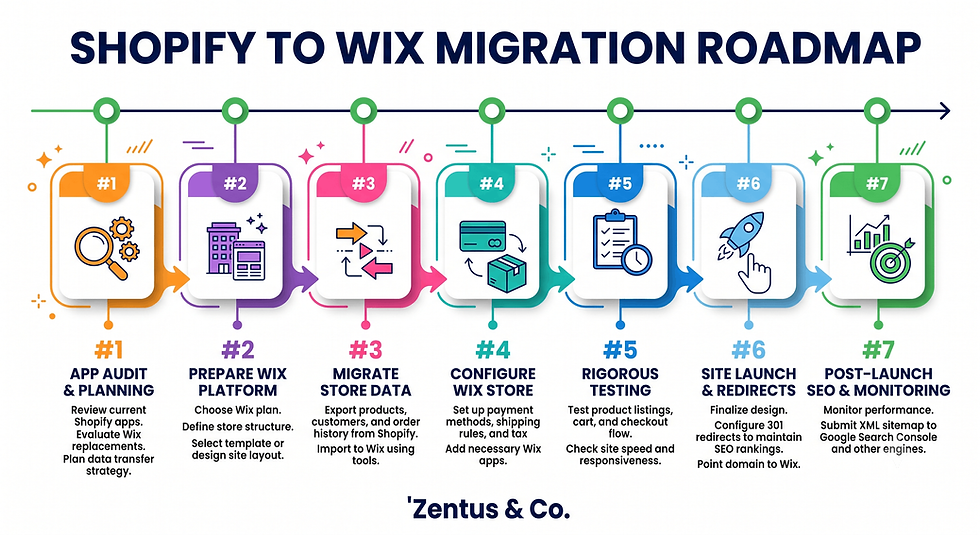
Migrating from Shopify to Wix isn't a downgrade decision — it's a right-sizing decision, and the app-bloat audit is the number that makes it obvious either way. This week: pull your Shopify app list and total the monthly cost, export your product CSV as a test run, and check whether your order volume genuinely needs Shopify-tier infrastructure. If the numbers point toward Wix, build your redirect map before touching DNS. If you'd rather have a Wix Studio team handle the product, order and redirect migration end-to-end, book a free consultation and we'll map out what a clean move would look like for your specific catalogue.


Comments