


How to Start an Online Store

QUICK ANSWER BOX
To start an online store, you need to:
(1) validate your product idea before building anything,
(2) choose an ecommerce platform that fits your budget and technical skill,
(3) set up your store with professional design, product pages, and payment proce
ssing, (4) handle the basic legal and tax requirements, and
(5) drive traffic through SEO, social media, or paid ads before expecting sales.
Most beginners fail not because they chose the wrong product — but because they skipped validation, underestimated the role of design in building trust, and had no traffic plan. This guide covers every step in order, including the ones other guides leave out.

Introduction
Starting an online store in 2026 has never been more accessible — and never been more competitive. The global ecommerce market is expected to surpass $7.9 trillion by 2027 (Statista), but the majority of new online stores never make their first sale. The gap between those that succeed and those that quietly shut down usually comes down to a handful of decisions made in the first few weeks.
This guide is written for beginners and first-time store owners. It covers every step — from choosing what to sell and which platform to use, to setting up payments, designing a store people trust, and actually getting customers to visit. It also covers the legal basics and the mistakes that silently kill new stores before they get a real chance.
Follow these steps in order. Do not skip ahead to the fun parts.
Step 1: Validate Before You Build
Most ecommerce guides jump straight to "pick your niche" and "choose a platform." That advice skips the most important question: does anyone actually want to buy what you are planning to sell?
Building a full online store — designing it, writing product descriptions, setting up shipping — takes weeks. Doing all of that for a product nobody wants is one of the most common and most expensive mistakes first-time store owners make. Validation costs you a few days. Skipping it can cost you months.
How to Validate a Product Idea Before Spending Money
Before you register a domain or pick a platform, test your product idea using free tools and real signals.
Search volume check: Use Google's free Keyword Planner or Ubersuggest to see how many people search for your product each month. If a product gets fewer than 500 monthly searches globally and has no paid competitors running ads, that is a warning sign. If it gets 5,000 or more searches with multiple sellers running ads, it means people are buying. Competition is a sign of demand, not a reason to avoid a market.
Marketplace check: Search your product on Etsy, eBay, and Amazon. Look at how many reviews the top sellers have. Lots of reviews means lots of buyers. Filter by new arrivals on Etsy to see if new sellers are entering the market and gaining traction.
Reddit and Facebook Groups: Search Reddit communities and Facebook groups related to your product category. Are people asking where to buy this? Complaining that they cannot find a good version of it? That is a real buying signal.
Pre-sell test: If you want to go further, set up a simple landing page describing your product and run $50 to $100 in Facebook or Instagram ads to it. Count how many people click the buy now button even if you are not ready to sell yet. This is how serious entrepreneurs validate without wasting months.
Only after you have confirmation that real people want what you are selling should you start building.

How to Choose Products to Sell Online as a Beginner
Once you have validated demand, apply these filters to decide whether a product is actually worth building a store around.
Margin check: Your product needs enough profit margin to survive after paying for shipping, platform fees, payment processing fees (typically 2 to 3 percent), and any advertising. As a rough guide, physical products should have at least a 3x markup on your cost. If you are buying something for $10 and selling it for $15, the math rarely works once all costs are added up.
Shipping complexity: Products that are heavy, fragile, or oversized cost significantly more to ship and lead to higher return rates. As a beginner, start with products that are lightweight, durable, and under $150 in price. That is the sweet spot for first-time ecommerce sellers.
Repeat purchase potential: Products people buy once and never need again are harder to build a business around. Products people buy repeatedly — consumables, refills, seasonal items, gifts — are easier to grow because existing customers come back.
Brand differentiation: Ask yourself why someone would buy this from you instead of Amazon. If you cannot answer that clearly, you need a stronger angle — better photography, a niche community, faster local shipping, a stronger brand story, or a product variation that nobody else offers.
How to Start an Online Store: Choosing Your Platform First
The platform you choose affects everything: how your store looks, how it performs in Google search, what your monthly costs are, and how easy it is to manage as you grow. This decision deserves more thought than most beginner guides give it.
There is no single best platform. The right platform depends on your budget, technical comfort level, product type, and how much control you want over your store's design and SEO.
Here is an honest breakdown of the main options.
Platform | Best For | Monthly Cost | SEO Strength | Design Flexibility | Ease of Use |
Wix Studio | Small to medium businesses wanting design control and SEO | $17 to $35/mo | Strong | Very High | Moderate |
Shopify | High-volume product stores and dropshipping | $39 to $105/mo | Moderate | Moderate | Easy |
WooCommerce | Tech-comfortable users wanting full control | $20 to $80/mo | Strong | Very High | Hard |
Squarespace | Creatives with simple product ranges | $23 to $49/mo | Moderate | Moderate | Easy |
BigCommerce | Scaling brands with large catalogs | $39 to $299/mo | Strong | Moderate | Moderate |
What most comparison guides do not tell you: Every platform has switching costs. If you start on Shopify and later want to move to a different platform, your product data, customer data, blog content, and SEO history are painful to migrate. Choose a platform you can grow with, not just start with.

Wix Studio for Ecommerce — What It Can and Cannot Do
Wix Studio has matured significantly as an ecommerce platform. For small to medium-sized online stores — particularly those selling fewer than 500 product SKUs — it offers a strong combination of design freedom, built-in SEO tools, and a manageable learning curve.
What Wix Studio does well for ecommerce:
Full design control without requiring code — you can build a genuinely custom-looking store.
Built-in SEO settings at page, product, and collection level.
Native payment processing through Wix Payments, PayPal, and Stripe integration.
Abandoned cart recovery, discount codes, and inventory management included.
Responsive mobile design tools built in.
Where Wix Studio has limitations:
Very large product catalogs with 1,000 or more SKUs can become harder to manage compared to Shopify or BigCommerce.
The app ecosystem is smaller than Shopify's, so some advanced integrations require workarounds.
Not the ideal choice if you need complex wholesale pricing tiers or B2B ecommerce features.
For most first-time store owners selling physical or digital products to consumers, Wix Studio is a legitimate, competitive choice — especially if strong design and SEO matter to you.
If you want a professionally designed ecommerce store built on Wix Studio rather than doing it yourself, take a look at our ecommerce website design services.
Shopify vs Wix for a Beginner Ecommerce Store
This is one of the most searched comparisons, and most answers online are written by Shopify affiliates. Here is an honest take.
Choose Shopify if you plan to sell a high volume of products, run a dropshipping operation, need advanced inventory features, or want access to a very large app marketplace. Shopify's transaction fees of 0.5 to 2 percent — if you do not use Shopify Payments — add up fast at volume.
Choose Wix Studio if you want full design control, care strongly about SEO, are selling a smaller range of products, and want your website and store to feel like a cohesive brand rather than a generic template. Wix's monthly cost is also lower at comparable feature levels.
The honest answer: For most beginners launching their first store with fewer than 200 products, both platforms work. The bigger factor is often the quality of the store design and how well-structured your product pages are — not which platform you are on.
Setting Up Your Online Store: The Technical Steps
Once you have validated your product and chosen your platform, you are ready to actually build. Here is what to do, in order, without skipping steps.
How to Set Up an Ecommerce Store Step by Step
Step 1 — Register your domain name:-
Your domain should be your business name — short, memorable, and ending in .com if possible. Avoid hyphens, numbers, and anything that is hard to spell when heard aloud. Register it through your platform or a separate registrar like Namecheap or Google Domains.
Step 2 — Set up your store structure:-
Before adding any products, set up your main navigation and page structure.
Homepage
Shop or All Products page
Product collections (categories)
About page
Contact page
Shipping and Returns page
Privacy Policy page (required by law)
Step 3 — Configure your payment gateway:-
This is where many beginners get stuck. You need a way to accept money. Your main options are:
Wix Payments (if using Wix): Built-in, no extra transaction fees, accepts cards, Apple Pay, and Google Pay.
PayPal: Widely trusted and easy to set up, but fees run at 2.9 percent plus $0.30 per transaction.
Stripe: Excellent for cleaner checkout experiences with the same fee structure as PayPal.
Klarna, Afterpay, or Sezzle: Buy-now-pay-later options that are important if your products are over $100, as BNPL can significantly increase conversion rates.
Set up at least two payment methods. Customers who cannot pay their preferred way abandon carts.
Step 4 — Set up shipping:-
Decide your shipping strategy before you start selling.
Free shipping on all orders (build the cost into your product price).
Free shipping over a threshold, for example free over $50, which increases average order value.
Calculated shipping based on weight and destination.
Flat rate shipping.
Free shipping consistently outperforms other strategies for conversion in the $20 to $150 product range. If your margins allow it, offer it.
Step 5 — Add your products:-
See the product page section below. Do not rush this step.
Step 6 — Set up your store's legal pages:-
Do not skip this. See the legal section below.
Step 7 — Test your checkout end to end:-
Before you go live, place a real test order on your own store. Go through the entire checkout flow. Make sure confirmation emails are sent. Make sure the order appears in your dashboard. This sounds obvious — but thousands of stores launch with broken checkouts because this step was skipped.
How to Write Product Descriptions That Convert Browsers into Buyers
Product descriptions are where most beginner stores fail silently. The default approach — listing specifications and features — does not sell products. Here is what actually works.
Lead with the outcome, not the object:-
Instead of writing "Stainless steel water bottle, 32oz, BPA-free," write "Stay hydrated all day without refilling — this 32oz bottle keeps drinks cold for 24 hours." The first describes the product. The second describes the customer's life with the product.
Answer the real buying questions:-
Before someone buys, they have objections and questions. Your product description should preemptively answer them.
Will this fit? Include size charts and dimensions.
Is this good quality? Mention materials, manufacturing notes, and care instructions.
Will it arrive in time? Include a shipping time estimate.
What if I do not like it? Link to your return policy.
Keep paragraphs short:-
Use three sentences maximum per paragraph in a product description. Use bullet points for specifications. Most people scan product pages — they do not read them like articles.
Use sensory language. Words like soft, smooth, crisp, sturdy, and lightweight activate the imagination in a way that clinical language does not. They help the customer mentally experience owning the product before buying it.
Legal Basics Before You Take Your First Sale
This is the section almost no beginner ecommerce guide includes, which is exactly why it needs to be here. You are legally required to handle certain things before you start selling — ignoring them creates real risk.
What Do You Need to Start an Online Store Legally
Business registration:
In most countries, if you are earning money, you need to be operating as a registered business entity. In the US, most solo store owners register as an LLC (Limited Liability Company). It is relatively cheap at $50 to $500 depending on state, it protects your personal assets, and it allows you to open a business bank account. Sole proprietorships are simpler but offer no liability protection. Consult an accountant or legal professional for your specific situation.
Sales tax in the US:
This is one of the most confusing areas for US-based ecommerce sellers. Since the 2018 South Dakota v. Wayfair Supreme Court decision, states can require out-of-state sellers to collect sales tax once they hit certain sales thresholds in that state, known as economic nexus. If you are selling to customers across multiple US states, you need to understand your obligations. Tools like TaxJar or Avalara automate sales tax calculation and filing — they are worth the monthly cost.
Required legal pages:
Every online store legally needs at minimum:
Privacy Policy — required by GDPR (EU), CCPA (California), and most global privacy laws.
Terms and Conditions — protects you from disputes.
Returns and Refunds Policy — legally required in many jurisdictions.
Shipping Policy — sets customer expectations and reduces disputes.
Payment processor requirements:
Stripe, PayPal, and Wix Payments all require you to provide business details, a valid ID, and bank account information. Some product categories — supplements, firearms accessories, and certain digital products — are restricted or prohibited. Check your payment processor's acceptable use policy before you build a store around a restricted product category.
What International Sellers Need to Know About Selling Online
If you are based in the UK, Canada, Australia, or Europe and selling online, the legal requirements differ by country.
UK: Register with HMRC if earning over the VAT threshold of £90,000 per year as of 2025. Ensure your Privacy Policy is GDPR-compliant and that you have cookie consent in place.
Canada: GST and HST registration is required once you exceed $30,000 CAD in revenue in four consecutive quarters.
Australia: ABN registration is recommended from day one. GST applies once you exceed $75,000 AUD in revenue.
EU: VAT obligations vary by country and sales volume. Non-EU sellers selling to EU customers may need to register for the OSS (One Stop Shop) VAT scheme.
Always consult a local accountant before you begin selling internationally. Tax law changes frequently.
Design, Trust, and Why Your Store's Look Is a Business Decision
Most beginner guides treat design as the pretty part — something you do once and then ignore. That is a costly misunderstanding. Design is a trust signal. Online shoppers decide in under 7 seconds whether a store looks legitimate enough to give their credit card number to. If your store looks amateur, people leave without buying — and they do not tell you why.
How to Design an Online Store That Builds Customer Trust
Here are the design elements that directly affect conversion rates — not just aesthetics.
Professional logo and consistent branding:-
A store with a low-quality or generic logo immediately signals "not a real business." You do not need to spend thousands. A clean, simple logo designed in Canva or by a freelance designer is enough. What matters is consistency — your logo, color palette, and fonts should be the same across every page.
High-quality product photography:-
This is the single highest-impact investment a product-based store can make. In a physical store, customers pick up products, feel them, and examine them from every angle. Online, photography does that job. Every product needs:
Clean white or contextual background shots.
Multiple angles — minimum 3 images per product.
At least one lifestyle image showing the product in use.
A size reference image if dimensions matter.
Poor photography kills conversion rates more reliably than almost any other factor.
Trust badges and social proof:-
Before a new visitor gives you their credit card number, they need to believe you are legitimate. Trust signals that help include:
A secure checkout badge showing the SSL padlock.
Payment logos — Visa, Mastercard, PayPal, and Apple Pay icons.
A money-back guarantee banner.
A clear return policy linked prominently.
Real reviews — even 3 to 5 genuine reviews are significantly better than zero.
Clear and fast navigation:-
If someone cannot find what they are looking for within two clicks, they leave. Keep your main navigation to 5 items or fewer. Use clear category names — not clever branding names that require explanation.
Mobile-first design:-
In 2026, approximately 68 to 72 percent of ecommerce traffic comes from mobile devices (Statista). If your store looks or works poorly on a phone, you are losing the majority of your potential customers. Test every page on a real phone, not just a browser simulator.
A professionally designed Wix Studio ecommerce store — built to convert on both desktop and mobile — is exactly what our team at Zentus & Co. builds. See our website design packages to find the right fit for your budget.
How to Get Traffic to a New Online Store
You can have the best-designed store in the world with great products and competitive pricing — and still make zero sales if nobody visits it. Traffic is not automatic. This is the part of the journey most beginner guides either skip entirely or cover in two vague sentences.
How to Drive Traffic to a New Online Store With No Audience
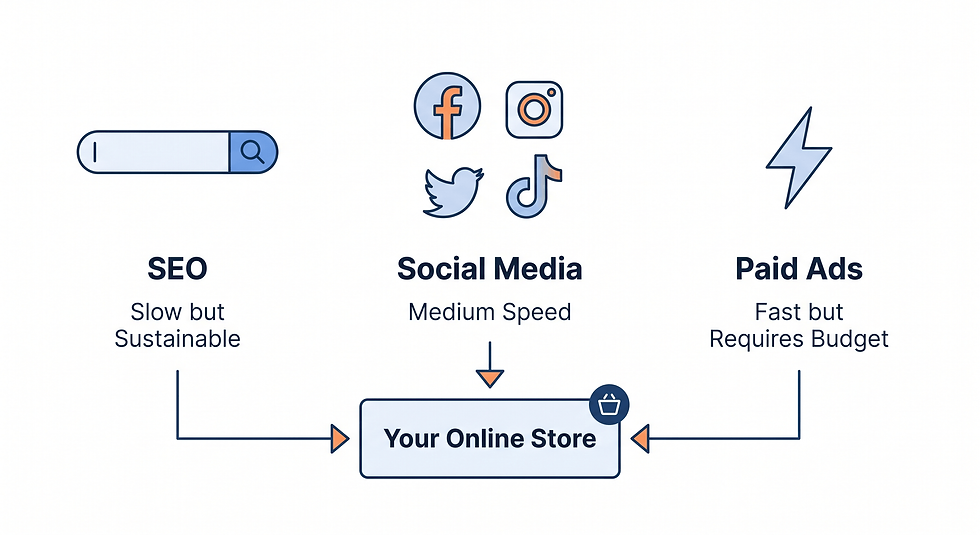
You have three realistic channels as a beginner with a new store and no existing audience.
1. Search Engine Optimization (SEO)
SEO is the most sustainable traffic channel for ecommerce, but the slowest to start. Expect 3 to 6 months before you see meaningful organic search traffic if you are starting from zero. What to prioritize:
Write product descriptions and category page text with real keywords — the words your customers type into Google when looking for your product.
Create a blog covering topics your customers care about. This attracts search traffic to your store over time.
Optimize every product page title, meta description, and image alt text.
Build backlinks by getting mentioned in relevant blogs, directories, and press.
For Wix Studio stores, the built-in SEO tools are solid. Every page has individual SEO settings, sitemap generation is automatic, and structured data can be added without code.
2. Social Media — Pick One Channel and Go Deep
The mistake most new store owners make is trying to be on every platform at once. You end up doing everything poorly. Pick one platform where your target customer actually spends time.
Instagram and TikTok: Best for visual products — fashion, beauty, home, and food.
Pinterest: Excellent for home décor, crafts, fashion, and gifts — high purchase intent.
Facebook Groups: Best for community-based products — local businesses, hobbies, and niche communities.
LinkedIn: Only relevant if you are selling B2B or professional products.
Post consistently for 60 days before judging results. Document your products being made, used, and delivered. Authenticity converts on social media better than polished content.
3. Paid Advertising — Start Small and Measure
Paid ads through Facebook, Instagram, or Google Shopping can generate traffic immediately — but without the right setup, they also burn money fast. Rules for beginners:
Do not run paid ads until your store is fully built and tested.
Start with a $10 to $20 per day budget maximum while you learn.
Send paid traffic to your single best-selling product or a curated collection — not your homepage.
Track conversions through your ad platform's pixel or tag before spending anything.
Give any ad campaign at least 7 to 14 days before making major changes.
If you are investing in paid ads, make sure your website is built to convert first. Sending paid traffic to a poorly designed store is expensive and discouraging.
Who This Guide Is Best For
You are in the right place if you are:
Launching your very first online store and want to understand every step before spending money.
A product-based business owner — selling physical or digital products — setting up your first online sales channel.
A brick-and-mortar business adding ecommerce to your existing operation.
A creative or maker who wants to sell directly to consumers rather than through marketplaces like Etsy.
This guide is less suited for:
Dropshippers building high-volume, low-margin product stores at scale — the Shopify ecosystem is more developed for that model.
Businesses needing B2B ecommerce features like tiered pricing or invoice billing.
Anyone expecting overnight results — honest ecommerce growth takes months of consistent effort.
Common Mistakes New Online Store Owners Make
Launching Before the Store Is Ready to Convert
The pressure to just launch it and fix things later is understandable — but it is a mistake. First impressions online are permanent. If a potential customer visits your store when it is half-finished, loading slowly, or missing key trust signals, they form a negative opinion and rarely return. Take the time to get the basics right before going public.
Ignoring Mobile Completely During the Build
Many store owners build their store on a desktop computer, test it on a desktop browser, and launch without ever looking at the mobile version. Given that most ecommerce traffic is mobile, this is like opening a physical store and never turning the lights on.
Setting Prices Without Accounting for All Costs
New store owners frequently price products to cover only the product cost and platform fee — forgetting payment processing fees at 2.9 percent plus $0.30 per transaction, packaging costs, shipping materials, returns, and ad spend. Run your numbers with every cost included before finalizing prices. A 40 percent gross margin sounds healthy until your net margin is 3 percent after real costs.
Writing Product Descriptions From a Seller's Perspective
Sellers think about their products. Buyers think about their problems and desires. Every product description should be written from the customer's point of view — what problem does this solve, what does it feel like to own it, and why should they trust that it will deliver on its promise.
Building Without an SEO Foundation From Day One
Many beginner store owners treat SEO as something to add later. But SEO decisions made at the build stage — URL structure, page hierarchy, category naming, and page titles — are painful to change later without breaking things. Set your SEO foundations correctly from the start. It costs no extra time during the build and it pays dividends for years.
Not Setting Up Google Analytics and Search Console Before Launch
You cannot improve what you do not measure. Set up Google Analytics 4 and Google Search Console before you launch — both are free. They give you data on how people find your store, what they do when they get there, and where they drop off. Without this data, you are flying blind.

Ecommerce Launch Checklist
Use this checklist before going live. If any item is incomplete, fix it before launching.
Store foundations:
☐ Domain registered and connected.
☐ SSL certificate active (https:// showing in browser).
☐ Business email set up using your domain — not Gmail.
☐ Logo and branding consistent across all pages.
Products:
☐ All products have at least 3 high-quality images.
☐ All product descriptions written — outcome-first, not feature-first.
☐ Prices include all real costs with acceptable margin.
☐ Inventory quantities accurate.
Payments and shipping:
☐ Payment gateway tested end-to-end with a real transaction.
☐ Shipping rates configured.
☐ Confirmation email tested and received.
Legal pages:
☐ Privacy Policy live on site.
☐ Returns and Refunds Policy live on site.
☐ Terms and Conditions live on site.
☐ Shipping Policy live on site.
SEO basics:
☐ Page titles and meta descriptions written for all key pages.
☐ Google Analytics 4 installed.
☐ Google Search Console set up and site submitted.
☐ All images have descriptive alt text.
Trust signals:
☐ Secure checkout badge visible.
☐ Payment method logos shown at checkout.
☐ Return policy linked from product pages.
☐ Contact details accessible on site.
Mobile:
☐ Every page tested on a real mobile device.
☐ Full checkout completed on mobile without issues.
Frequently Asked Questions About Starting an Online Store
How Much Does It Cost to Start an Online Store?
The startup cost of an online store varies widely depending on your platform and approach. At minimum, you will need a domain name at $10 to $20 per year, a platform subscription at $17 to $39 per month depending on the platform, and a business email. If you are building it yourself on a platform like Wix Studio, total first-year costs can be as low as $300 to $500 excluding product inventory. If you are hiring a professional agency to design your store, costs typically start from $1,500 to $5,000 for a custom-built ecommerce site. Add product inventory, packaging, and any initial advertising budget on top of these figures.
Do I Need a Business License to Sell Online?
In most countries and US states, yes — you need some form of business registration to sell online legally. In the US, most solo sellers register as an LLC or sole proprietor, obtain a sales tax permit in their home state, and may need to collect sales tax in other states once they exceed economic nexus thresholds. Requirements differ by country. Always consult with a local accountant or business lawyer before your first sale — the consequences of getting this wrong are more painful than the cost of getting advice upfront.
What Is the Easiest Platform to Start an Online Store On?
For absolute beginners, Shopify and Wix Studio are the two most beginner-friendly platforms. Shopify is easier for getting basic products live quickly. Wix Studio gives more design control and has strong built-in SEO tools. If design quality and SEO performance matter to your business — and they should — Wix Studio is worth the slightly steeper initial learning curve. WooCommerce is powerful but requires more technical knowledge and ongoing maintenance.
How Long Does It Take to Build an Online Store?
A basic DIY online store with 10 to 20 products can be built in 1 to 2 weeks if you already have product photos, descriptions, and branding ready. Most people underestimate how long content creation takes — photos, descriptions, and legal pages — compared to the actual platform setup. If you hire a professional web design agency, expect 3 to 6 weeks for a fully custom ecommerce store depending on complexity and how quickly you provide assets.
How Do I Get My First Sales on a New Online Store?
The most realistic path to first sales for a brand-new store with no audience: tell everyone you know personally — friends, family, and former colleagues. Post consistently on one social media platform where your target customer is. List your products on a complementary marketplace like Etsy or eBay temporarily to build reviews and validation while your main store gains traction. Run a small, targeted Facebook or Instagram ad campaign at $10 per day directly to your best product. Reach out to micro-influencers in your niche for a product collaboration or review.
Do I Need a Professional Website Designer for My Online Store?
Not necessarily — but design quality directly affects how much of your traffic converts into sales. Research by Stanford Web Credibility shows that 75 percent of users judge a business's credibility based on its website design. A poorly designed store with great products will consistently underperform a well-designed store with identical products. If you have the budget, a professionally designed store typically pays for itself in improved conversion rates within months. If budget is tight, use a clean minimal template and resist the urge to over-customize before you understand design fundamentals.
Is Wix Studio Good for Ecommerce SEO?
Yes — Wix Studio has significantly improved its SEO capabilities over the past few years. It includes individual SEO settings for every page, product, and collection; automatic XML sitemap generation; structured data support; mobile optimization tools; and fast loading performance when built correctly. For small to medium ecommerce stores, Wix Studio's SEO tools are competitive with most other major platforms. The key factor is how well the individual pages, product descriptions, and metadata are optimized — the platform provides the tools, but the strategy and execution matter more than the platform itself.
Can I Run an Online Store From Home?
Yes — running an online store from home is entirely feasible, especially for digital products or drop-shipped physical products. If you are holding physical inventory at home, check local zoning laws, as some residential areas have restrictions on business operations. You will also need a way to manage packaging and shipping — either doing it yourself or using a fulfillment service like ShipBob or Amazon FBA. As your store grows, a fulfillment service becomes increasingly worth the cost, freeing your time for marketing and product development.
Ready to Build an Online Store That Actually Converts?
Reading this guide gives you the knowledge — but building a high-converting ecommerce store still takes time, design skill, and technical setup to get right. At Zentus & Co., we design and build Wix Studio ecommerce stores for entrepreneurs and small business owners who want a professional result without spending months figuring it out themselves. From product page structure to checkout flow, SEO setup to mobile optimization — we handle it all.
No commitment required. We respond to all enquiries within 24 hours.


Comments