


Migrate WordPress to Wix Studio Without Losing SEO


Migrating From WordPress to Wix Studio: Quick SEO-Safety Verdict
Quick Verdict:
A safe migrate WordPress to Wix Studio project is never a 1:1 copy — it starts with a content-debt audit, not a page-builder.
Pull your GSC Coverage report before you touch design. It tells you which URLs are actually earning impressions and which are dead weight.
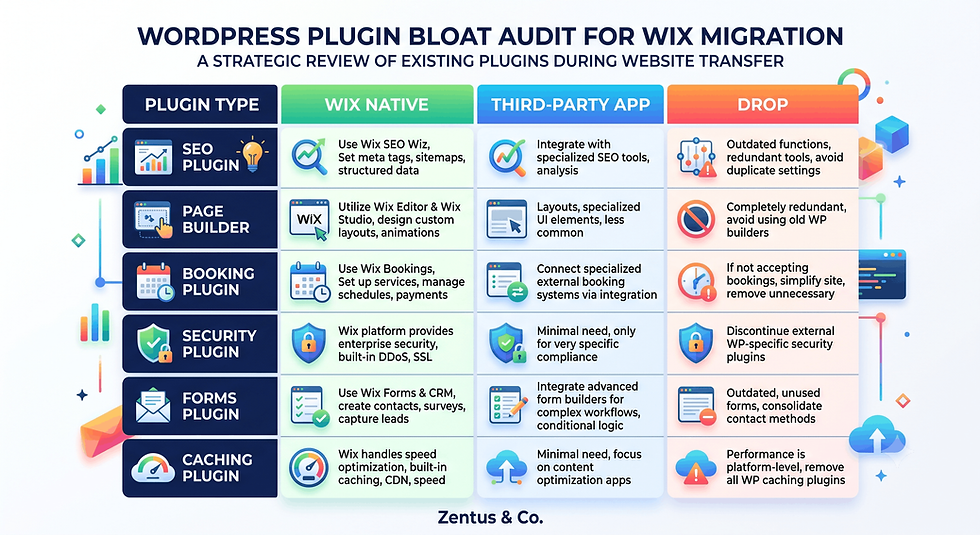
Every plugin your WordPress site relies on needs a decision: native Wix feature, third-party app, or delete.
Thin, duplicate or zero-click blog posts should be pruned or consolidated during migration — not carried over "just in case."
A mapped 301 redirect for every retained URL is non-negotiable. Skipping this is the single biggest cause of post-migration ranking loss.
If you treat this as a pruning project first and a rebuild second, most sites come out of a WordPress-to-Wix Studio migration lighter, faster, and ranking at the same level or better within 60–90 days.
Introduction
If you're planning to migrate WordPress to Wix Studio, the instinct is to treat it like a house move — pack everything up and put it down in the same shape on the new platform. That instinct is what causes traffic drops. A WordPress site that's been live for three, five, or eight years doesn't just have content — it has content debt: bloated plugins nobody remembers installing, blog posts that never earned a single click, broken internal links, and URL structures that made sense in 2019 but not now. Migrating that debt onto Wix Studio just moves the problem to a new address. This guide treats the switch as an audit-first process: what to keep, what to redirect, what to consolidate, and what to finally delete — before a single page gets rebuilt.

Content Debt: What 5 Years of WordPress Actually Leaves Behind
Content debt is the accumulated weight of pages, plugins, and links that no longer earn their keep but still sit on your site consuming crawl budget and diluting authority. A mature WordPress install rarely reflects a clean strategy — it reflects five years of quick decisions.
What is content debt on a WordPress site?
Content debt is the collection of outdated, thin, duplicate, or zero-traffic pages that accumulate on a long-running site. It includes old landing pages from abandoned campaigns, blog posts written for keywords that never converted, and category or tag pages generated automatically that add no value.
How does plugin bloat slow a site over years?
Every plugin adds its own scripts, stylesheets, and database calls, and most WordPress owners install plugins to solve one problem and never remove them. Over years, a site can carry 20–40 plugins, most doing overlapping jobs, which directly slows page speed and increases security risk.
Why is migration the best time to clear debt?
Migration is the only point where you're already touching every single page, so the marginal cost of auditing is close to zero. Doing the audit later, on a live site, is far more disruptive than doing it during a planned rebuild.
Before You Migrate: Run a GSC Coverage Report Audit
Before any design work starts, pull the Google Search Console Coverage report (now under Indexing > Pages) for the WordPress site. This report is the single most useful migration tool because it tells you the truth about what Google actually values on your site — not what you assume it values.
What does the GSC Coverage report tell you before migration?
It shows which pages are indexed and earning impressions, which are "Crawled – currently not indexed," and which return errors. This split is your starting map: indexed-and-performing pages must get a clean 301 redirect, while excluded pages are candidates for pruning.
How do you find indexed, excluded and error pages?
In GSC, filter the Pages report by status: Indexed, Not indexed (with sub-reasons like "Discovered – currently not indexed"), and check the Page indexing errors tab for 404s and server errors already affecting the WordPress site. Export all three lists to a spreadsheet.
Which pages should you map, merge or drop?
Indexed pages with real impressions get mapped to a live URL and redirected. Excluded pages with topical relevance but no traffic get merged into a stronger page. Pages with zero impressions over 12 months and no internal links pointing to them are strong drop candidates.
If your current WordPress site is already showing impressions but almost no clicks, the coverage report will usually reveal why — thin content or weak titles rather than a ranking problem.

Plugin-Bloat Audit: Which Plugins to Replace, Ditch or Rebuild
Every WordPress plugin needs a migration decision. There's no such thing as "just install the Wix equivalent for everything" — some plugin functions are native to Wix Studio, some need a third-party app, and some should simply disappear.
Which WordPress plugins have native Wix equivalents?
SEO plugins (Yoast, Rank Math), form builders, basic caching, and image optimisation are typically native to Wix Studio out of the box — meta tags, sitemaps, and structured data are built into the platform's SEO settings panel, so the plugin itself becomes unnecessary.
Which plugins should be dropped entirely?
Page builders (Elementor, Divi), most security plugins, and backup plugins should be dropped completely, since Wix handles hosting, security, and backups at the platform level. Carrying their configuration logic across is wasted effort.
How do you rebuild plugin features natively on Wix?
Booking, membership, and e-commerce plugin functions get rebuilt using Wix's native Bookings, Members Area, or Stores apps, which integrate directly with the CMS rather than sitting as a bolted-on layer. This typically results in fewer conflicts than the WordPress plugin-stack version.
Content Pruning: Keep, Redirect, Consolidate or Cut
Once the coverage audit is done, every URL gets sorted into one of four buckets. This is the step most migration guides skip entirely — and it's the step that determines whether the new Wix Studio site gains or loses organic traffic.
Which blog posts should you keep on the new site?
Keep posts with consistent impressions, at least some clicks over the last 12 months, and topical relevance to your current services — these get rebuilt as priority content on Wix Studio with the same target keyword intact.
Which pages should be redirected vs deleted?
Redirect any indexed URL that has ever earned a click or backlink, even if it's being merged into a broader page. Delete only URLs with zero historical performance, no backlinks, and no internal link equity — and even then, redirect to the closest topical match rather than returning a 404.
How do you consolidate thin content during migration?
Group multiple thin posts covering the same narrow topic into one comprehensive page, then 301 redirect the old URLs to the new consolidated page. This concentrates the ranking signals that were previously split across weak, competing pages.

Domain and DNS Handling: Keeping Your Domain Through the Switch
Your domain is the one asset that must survive the migration untouched — changing it alongside everything else compounds risk unnecessarily.
Can you keep the same domain on Wix Studio?
Yes, you keep the exact same domain when you switch from WordPress to Wix; you either connect an externally-hosted domain to Wix or transfer it into Wix's registrar, and neither option changes your URLs or your existing backlink profile.
How does DNS changeover work from WordPress hosting?
You update the domain's A record and CNAME to point to Wix's servers, which Wix's domain connection wizard walks you through, and propagation typically completes within a few hours to 48 hours depending on your registrar's TTL settings.
What happens to WordPress-hosted email?
If your email runs through the same hosting account as WordPress (common with cPanel setups), you need to migrate mailboxes to a separate provider like Google Workspace before changing DNS, since Wix does not host traditional email inboxes.
URL Mapping: Building the WordPress-to-Wix Redirect Map
A redirect map is a spreadsheet listing every old URL against its new destination — this single document is what prevents a migration from tanking your rankings.
How do you build a WordPress-to-Wix URL map?
List every URL from your GSC export in column A, and next to each one, assign the corresponding new Wix Studio URL in column B, marking "redirect," "consolidate," or "drop" in column C based on your content-pruning decisions.
How do you handle URL structure differences?
WordPress often uses /category/post-name/ structures while Wix Studio blogs typically use /post/post-name/ — you don't need to match the old structure, but every single old URL still needs an explicit redirect to its new equivalent.
How many redirects does a typical WordPress migration need?
A site with 50–150 indexed pages typically needs 40–120 individual 301 redirects once thin and duplicate pages are consolidated, though the exact count depends heavily on how aggressively you prune during the content-debt audit.

301 Redirects on Wix Studio: Setup Without SEO Loss
Redirects preserve the link equity and ranking signals your old URLs built up over years — done correctly, Google treats the new URL as a continuation of the old one within weeks.
How do 301 redirects work on Wix Studio?
A 301 redirect permanently forwards visitors and search engines from an old URL to a new one, passing the majority of the original page's ranking signals to the destination, which is why every retained page from the redirect map needs one set up before launch.
Where in the dashboard do you set them up?
In Wix Studio, redirects are managed under Settings > SEO Tools > URL Redirect Manager, where you paste the old path and the new destination path — bulk import via CSV is available for sites with dozens of redirects.
What is the SEO difference between 301 and 302?
A 301 tells Google the move is permanent and should transfer ranking value, while a 302 signals a temporary move and search engines may not pass equity — always use 301s for a permanent platform migration.
Blog Migration: Moving Posts Without Carrying Thin Content
The blog is usually where the most content debt lives, since years of "just post something" publishing schedules produce a long tail of weak posts.
Can you migrate a WordPress blog to Wix cleanly?
Yes, but only the posts that passed the content-pruning audit should be manually rebuilt on the Wix Studio blog — bulk-importing every historical post via RSS or CSV without auditing first simply relocates the content debt.
How do you avoid bringing thin posts with you?
Cross-reference your GSC export against your pruning spreadsheet before rebuilding anything, and treat any post with zero clicks in the last 12 months and no backlinks as excluded from the migration by default.
How do you preserve post URLs and indexing?
Keep the exact same slug (the final part of the URL) wherever possible when rebuilding a post on Wix, and set up the 301 redirect from the old full path regardless — slug preservation reduces redirect complexity but doesn't remove the need for it.
SEO Preservation: Title Tags, Meta, Schema and Internal Links
Rebuilding the technical SEO layer is where most of the ranking recovery timeline is decided — get this step lazy and even a well-pruned site will dip longer than necessary.
How do you preserve title tags and meta descriptions?
Export every retained page's existing title tag and meta description from Yoast or Rank Math before migrating, then paste them directly into Wix Studio's SEO panel for each page — don't let the platform generate new ones by default.
What schema needs rebuilding on Wix?
Article, FAQ, BreadcrumbList, and Organization schema all need to be rebuilt using Wix's built-in SEO settings or a custom code embed, since WordPress plugin-generated schema does not transfer automatically to the new platform.
How do you rebuild internal links after pruning?
Once thin pages are removed or consolidated, audit every remaining page for links pointing to now-defunct URLs and update them to point to the correct redirect destination directly — relying on the redirect chain for internal links slows crawl efficiency. For a broader read on this, see SEO for small business.
What a WordPress to Wix Studio Migration Actually Costs in Time and Money
Every migration has three cost layers: the Wix Studio plan itself, any migration tooling or help you bring in, and the time cost of the audit-prune-redirect process.
Plan / Service | Price (this month) | What it unlocks | Best for |
Wix Studio Light | $17/mo (~£14/mo) | Basic CMS, custom domain | Small brochure migrations |
Wix Studio Core | $29/mo (~£24/mo) | Full blog, SEO tools, analytics | Content-heavy WordPress sites |
Wix Studio Business | $36/mo (~£30/mo) | E-commerce, automations | Sites with WooCommerce |
Wix Studio Business Elite | $159/mo (~£132/mo) | Advanced automations, priority support | Large multi-author blogs |
DIY redirect setup | $0 (your time) | Full control | Sites under 50 URLs |
Agency-assisted migration | Varies — see /pricing | Audit, redirect map, rebuild | Sites over 100 URLs or content debt |
Prices checked for July 2026. Always verify current Wix and tool pricing before you buy — platform pricing can change.
How much does a WordPress to Wix Studio migration typically cost?
Beyond the Wix Studio plan itself, cost depends almost entirely on content volume — a 20-page brochure site is a few hours of work, while a 200-post blog with plugin-dependent features can require Wix Studio services support to audit and rebuild properly.
How long does a WordPress to Wix migration take?
A pruned, well-mapped migration for a small business site typically takes 2–4 weeks including the content-debt audit, redirect mapping, and rebuild — larger sites with heavy plugin dependencies can take 6–8 weeks.
When should you hire help for a WordPress to Wix migration?
Hire help once your redirect map exceeds roughly 75 URLs, your site depends on booking or membership plugins, or you don't have time to run the GSC coverage audit properly — a rushed DIY migration on a large site is where most ranking losses happen.
The Content-Debt Audit That Decides Whether Your Migration Gains or Loses Traffic
This is the section most WordPress-to-Wix guides skip entirely, and it's the difference between a migration that improves your rankings and one that quietly erodes them over the following quarter.
Why do migrations lose traffic when content debt is ignored?
Traffic loss happens when every URL — including thin, duplicate, and dead pages — gets a redirect or gets rebuilt as-is, which dilutes the new site's overall relevance signals in exactly the same way the debt was diluting the old one.
How does the coverage report prevent traffic loss?
The coverage report gives you a factual, page-by-page performance history instead of guesswork, so pruning decisions are based on what Google has actually rewarded — not on what you personally think is important content.
What is the cost of a lazy 1:1 migration?
A lazy migration typically shows a ranking dip in weeks 2–6 that never fully recovers, because the new site inherits the same thin-content signals as the old one, just on unfamiliar URLs that Google has to re-evaluate from a weaker starting position.
Redirect, Plugin and Cutover Checks Before You Flip the Switch
Before DNS changes and the old site goes dark, run through this pre-launch checklist — most avoidable migration failures happen because one of these steps gets skipped under launch-day pressure.
Pre-launch checklist:
Every URL from the coverage export is accounted for in the redirect map (keep, redirect, or documented drop)
All 301 redirects are tested on the Wix Studio staging domain before DNS changes
Plugin-dependent features (bookings, forms, membership) are rebuilt and tested on Wix
Title tags, meta descriptions and schema are copied across for every retained page
XML sitemap is generated on Wix and ready to submit to GSC immediately post-launch
What is the safest WordPress-to-Wix cutover sequence?
The safest sequence is: finish and test all redirects on the Wix site's temporary domain first, then switch DNS, then submit the new sitemap to GSC within the first hour of the domain resolving to Wix.
How do you minimise downtime during the switch?
DNS changes rarely cause true downtime since the old site typically stays live until propagation completes, but you should schedule the switch during low-traffic hours and lower your DNS TTL 48 hours in advance to speed up propagation.
What should you monitor in the first 48 hours?
Watch the GSC Coverage report for a spike in 404 errors, check that redirects are resolving correctly with a spot-check of 15–20 URLs, and confirm Google Analytics or Wix Analytics is tracking correctly on the new domain.

When a Wix Studio Migration Leaves You Lighter and Faster, Not Just Moved
A migration done properly should produce a smaller, faster, more focused site — not an identical copy with a new logo.
When does a migration improve speed and rankings?
Speed and ranking improvements show up when plugin bloat is genuinely removed rather than rebuilt, when thin pages are consolidated instead of carried over, and when the new site has fewer, stronger pages competing for the same keywords instead of many weak ones. For platform-level speed factors, see Wix website speed.
How does clearing debt help SEO post-migration?
Removing zero-value pages concentrates internal link equity onto your remaining priority pages, which typically shows up as a faster recovery curve — sites that prune aggressively often regain pre-migration rankings within 4–6 weeks instead of 10–12.
How do you recover if rankings dip after migrating?
Check the redirect map first for any missed or broken 301s, resubmit the sitemap in GSC, and request indexing manually on your 10–15 highest-priority pages — most dips are redirect gaps, not algorithmic penalties.
If you're weighing this move against the platform itself, our full Wix Studio vs WordPress comparison covers the underlying trade-offs, and if you're coming from a simpler builder instead, see migrate Squarespace to Wix Studio. For a scoped quote on an audit-first migration, our website design pricing page has current packages.
Frequently Asked Questions About Migrating From WordPress to Wix Studio
Can I migrate from WordPress to Wix without losing SEO?
Yes, if you redirect every retained URL with a 301, preserve title tags and meta descriptions, and prune thin content before rebuilding. Most SEO loss during migration comes from missing redirects or carrying over the same content debt, not from the platform switch itself.
What is content debt and why does it matter in migration?
Content debt is the buildup of outdated, thin, or duplicate pages on a long-running site. It matters during migration because carrying that debt onto Wix Studio unchanged means the new site inherits the same weak relevance signals as the old one.
Do I need 301 redirects moving from WordPress to Wix?
Yes, every indexed URL that has ever earned traffic or a backlink needs a 301 redirect to its new Wix destination. Skipping redirects is the single most common cause of ranking loss during a platform migration.
How do I use the GSC coverage report before migration?
Export the Pages report from Google Search Console's Indexing section and sort URLs by indexed status and impressions. This becomes your source of truth for which pages to keep, redirect, consolidate, or drop.
Should I delete thin blog posts when migrating?
Posts with zero clicks over 12 months and no backlinks are strong candidates for deletion, but always redirect the URL to a topically related page rather than returning a 404, to preserve any residual link equity.
How do I map WordPress URLs to Wix Studio?
Build a spreadsheet listing every old URL against its new Wix destination, using your GSC export and content-pruning decisions as the source data. This redirect map is the document your developer uses to configure 301s.
Can I keep my domain moving from WordPress to Wix?
Yes, your domain transfers or connects to Wix without changing your URLs, backlinks, or brand identity. You only need to update DNS records, not re-register or rebrand the domain itself.
What happens to my WordPress SEO when I switch?
Your existing rankings transfer gradually as Google re-crawls redirected URLs and recognises the new site structure. A well-executed migration with a complete redirect map typically sees rankings stabilise within 4–8 weeks.
How do I audit WordPress plugin bloat before migrating?
List every active plugin and categorise each as "native to Wix," "needs a Wix app," or "safe to drop entirely." Security, caching, backup, and page-builder plugins are almost always droppable since Wix handles those functions at the platform level.
How long does a WordPress to Wix migration take?
A small business site with a proper content-debt audit typically takes 2–4 weeks; larger sites with 150+ posts or plugin-dependent booking systems can take 6–8 weeks. Rushing this wordpress website development timeline is where most avoidable errors happen.
Should I hire help for a WordPress to Wix migration?
Consider hiring help once your redirect map exceeds roughly 75 URLs or your site relies on booking, membership, or e-commerce plugins. A scoped, audit-first migration is usually cheaper than fixing a ranking drop after a rushed DIY switch.
Will my website be down during the migration?
Typically no — the old WordPress site stays live until DNS fully points to Wix, and propagation usually completes within a few hours to 48 hours. Scheduling the DNS switch during low-traffic hours minimises any visible disruption.

Conclusion: Your Next Steps
A WordPress to Wix Studio migration succeeds or fails based on decisions made before any page gets rebuilt. Start with the GSC Coverage report, sort every URL into keep, redirect, consolidate, or cut, then audit your plugin stack against Wix's native features. Build your redirect map, preserve your title tags and schema, and test every 301 before DNS changes. Done this way, migration becomes a pruning opportunity that leaves you faster and more focused — not just relocated. If your content debt runs deep or your plugin stack is complex, book a free consultation and we'll scope an audit-first migration plan.



Comments