


Wix Payments Fees and Payouts Explained


Wix Payments: Quick Fee-Saving Verdict
Most Wix store and booking owners are paying more than they need to — not because Wix Payments is expensive, but because they don't realise a second, separate fee is stacked on top of processing on lower-tier plans.
Wix Payments charges two fees on some plans: a card processing fee (similar to Stripe or PayPal) AND a Wix transaction fee — the second one disappears entirely on higher-tier plans.
Payouts typically land in 2–5 business days once your account is verified; first payouts can take longer.
Wix Payments is usually cheaper than running Stripe or PayPal separately because it's built into checkout, bookings and invoicing without extra integration fees.
The upgrade break-even is closer than most owners think — businesses processing a moderate monthly volume often save more in removed transaction fees than the higher plan costs.
Chargebacks and disputes are handled inside the Wix dashboard, but response windows are tight and documentation matters.
If you only remember one thing: check which plan you're on before you assume Wix Payments' advertised rate is the only fee you're paying.
Introduction
If you've ever compared your Wix Payments payout to your actual sales total and found a bigger gap than expected, you're not imagining it. Wix payments fees and payouts work differently depending on which Wix plan you're subscribed to — and the plan detail is the part most pricing pages gloss over. Wix doesn't just charge a card processing fee like Stripe or PayPal does; on certain plans it also applies an additional transaction fee on top, quietly reducing your margin on every single sale or booking.
This guide breaks down exactly how the two-fee structure works, how Wix Payments compares to running Stripe or PayPal directly, how fast your money actually arrives, and — most usefully — the exact point at which upgrading your Wix plan starts paying for itself through removed transaction fees. If you run an online store, a bookings-based service business, or invoice clients through Wix, this is the section of your Wix subscription with the most hidden cost variance.

The Two-Fee Structure: Processing Fee Plus Transaction Fee
Wix Payments has two separate charges stacked on every transaction, and only one of them is a normal payment processing cost. The processing fee compensates the card networks and the payment gateway — that part is unavoidable no matter which platform you use. The second charge, the Wix transaction fee, is a platform-level fee that Wix applies only on lower-tier plans, and it is this second fee that most owners don't realise they're paying until they compare gross sales to net payout.
What is the processing fee on Wix Payments?
The processing fee is the card-network cost, typically around 2.9% + a small fixed fee per transaction for domestic cards in the US, with slightly different domestic rates in the UK (commonly closer to 1.9–2.9% + a fixed fee depending on card type). International and premium cards (Amex, non-domestic issuers) usually cost more. This fee exists on every plan and every payment processor — it isn't unique to Wix.
What is the extra transaction fee on lower plans?
On Wix's entry ecommerce and bookings tiers, Wix adds a platform transaction fee on top of processing, often in the region of 1–2% of the sale value. This fee funds the platform's lower monthly price — you're trading a lower subscription cost for a higher per-sale cost. It is removed automatically once you're on a plan tier that includes "no added transaction fees" as a listed feature.
How do the two fees stack per sale?
On a lower plan, a $100 sale might see roughly $2.90–$3.20 taken as processing plus another $1–$2 as the platform transaction fee — meaning your real cost per sale is closer to 4–5% rather than the advertised 2.9%. On a higher plan, that same sale only loses the processing fee, bringing your real cost back down near 2.9%.
Which Wix Plans Remove the Extra Transaction Fee
Removing the second fee is a plan decision, not a settings toggle — you can't turn it off manually. Explore the Wix Bookings pricing and memberships breakdown for how this interacts with booking-based businesses specifically, and see Wix Pricing Plans UK 2026 for the full plan ladder.
Which Wix plans remove the transaction fee?
Wix removes the additional platform transaction fee once you reach its higher Business/Commerce-tier plans — generally the plans marketed as unlocking full ecommerce or unlimited bookings without added fees. Entry-level plans that technically allow selling or booking usually still carry the extra percentage.
How much does removing the fee save per sale?
If the extra fee is roughly 1.5% on your current plan, removing it saves $1.50 for every $100 in sales — which sounds small per transaction but compounds quickly across dozens or hundreds of monthly transactions.
At what volume does the upgrade pay off?
If the plan upgrade costs an extra $10–$20 per month and you save 1.5% per sale, you typically only need $700–$1,300 in additional monthly sales volume for the saved fees to cover the plan difference — many small stores and bookings businesses cross that threshold quickly.

Wix Payments vs Stripe vs PayPal: Fee and Feature Comparison
Here's how the three main options compare on a like-for-like transaction, checked for July 2026:
Processor | Processing Fee (approx.) | Extra Platform Fee | Payout Speed | Built Into Wix Checkout |
Wix Payments (lower plan) | ~2.9% + fixed fee | +1–2% platform fee | 2–5 business days | Yes, native |
Wix Payments (higher plan) | ~2.9% + fixed fee | None | 2–5 business days | Yes, native |
Stripe (direct integration) | ~2.9% + $0.30 | None (Stripe's own fee only) | 2 business days rolling | Requires separate integration |
PayPal (Checkout) | ~2.9–3.49% + $0.49 | None (PayPal's own fee only) | Instant to PayPal balance, 1–3 days to bank | Available as add-on |
Prices checked for July 2026. Always verify current Wix and tool pricing before you buy — platform pricing can change.
How do Wix Payments fees compare to Stripe?
On a higher Wix plan, Wix Payments' processing rate is very close to Stripe's standard rate, so the real difference comes down to convenience — Wix Payments needs no separate integration, while Stripe requires connecting an app or embedding checkout code.
How do they compare to PayPal?
PayPal's checkout fee is usually slightly higher than Wix Payments or Stripe, particularly for card transactions processed through PayPal rather than a PayPal balance, and PayPal also adds currency conversion costs for international buyers.
Which is cheapest at scale?
At high monthly volume, Stripe direct integration is often marginally cheaper because some businesses negotiate custom rates with Stripe directly — something not available inside Wix Payments regardless of plan.

Payout Speed: How Fast You Actually Get Your Money
Cash flow planning depends on knowing exactly when funds clear, not just that they "will arrive eventually."
How fast are Wix Payments payouts?
Once your Wix Payments account is fully verified, payouts typically arrive within 2–5 business days of the transaction, deposited directly to your linked bank account on a rolling schedule.
What affects payout speed for new accounts?
New accounts often face a longer first payout, sometimes 7–14 days, while Wix completes identity and business verification checks — this is standard across most payment processors, not a Wix-specific delay.
How does payout speed compare to Stripe?
Stripe's standard payout schedule is also 2 business days on a rolling basis for established accounts, meaning payout speed is roughly comparable once both accounts are fully verified — the difference is negligible for most small businesses.

The Upgrade Break-Even: When a Higher Plan Saves Money
This is the calculation most Wix pricing content skips entirely.
How do you calculate the upgrade break-even?
Take the monthly cost difference between your current plan and the higher plan, then divide it by the platform transaction fee percentage you'd remove — the result is the sales volume at which the upgrade pays for itself.
At what sales volume does upgrading save money?
For example, if upgrading costs an extra $15/month and removes a 1.5% fee, you need $1,000 in monthly sales to break even ($1,000 × 1.5% = $15). Anything above that volume is pure savings.
How does the saving compound over a year?
A store doing $3,000/month in sales, saving 1.5% after covering the plan increase, keeps roughly $25–$35 extra per month, or $300–$420 per year — money that would otherwise disappear silently into the fee structure.

Native vs Third-Party: Should You Use Wix Payments or Stripe
The decision isn't only about fees — it's about workflow fit. See the Wix Bookings deposits guide for how payment processor choice affects deposit collection specifically.
Should you use Wix Payments or Stripe?
For most small businesses, Wix Payments is the simpler choice because it's pre-integrated with Wix Stores, Bookings and Invoices with zero setup beyond verification — Stripe requires more manual configuration for the same result.
Can you run Wix Payments and PayPal together?
Yes — Wix allows you to offer both Wix Payments and PayPal Checkout as options at checkout, giving customers a choice, though this means monitoring two separate payout schedules and fee structures.
When does third-party beat native?
Third-party processors make more sense when a business already has an established Stripe account with custom negotiated rates, or needs specific fraud tools and reporting that Wix's native dashboard doesn't provide.
Chargebacks, Disputes and Fraud Protection on Wix Payments
Disputes are where fee awareness meets operational risk.
How do chargebacks work on Wix Payments?
When a customer disputes a charge with their bank, Wix notifies you inside the dashboard with a deadline to submit evidence — proof of delivery, communication records, or service completion — before the case is decided by the card network.
What fraud protection does Wix provide?
Wix Payments includes basic fraud screening on transactions, flagging unusual patterns, but it does not replace dedicated fraud tools that some third-party processors offer at higher processing tiers.
How should you reduce dispute risk?
Keep clear order confirmations, delivery tracking, and service records attached to every transaction — the businesses that win chargeback disputes are the ones with the most complete paper trail, not necessarily the ones in the right.
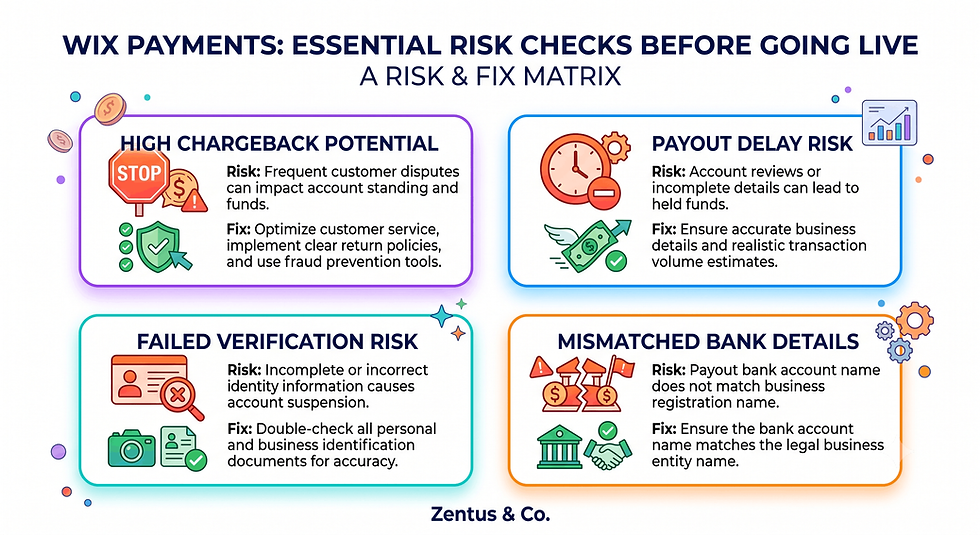
Payout, Chargeback and Fee Checks Before You Go Live With Payments
Before turning on live payments, a short pre-launch check prevents most of the problems owners run into in month one.
What should you check before going live with Wix Payments?
Confirm your bank account details, business verification documents, and tax information are fully submitted and approved — an incomplete profile is the single most common reason first payouts get delayed.
How do you test payout accuracy before launch?
Run a small test transaction and manually reconcile the payout against the processing fee and any platform transaction fee shown in your dashboard, so you know your real net margin before scaling up sales volume.
What common setup mistakes delay Wix Payments approval?
Mismatched business names between your bank account and Wix profile, missing tax ID information, and unverified email addresses are the most frequent causes of approval delays — check all three before your launch date.
Setup: How to Activate and Verify Wix Payments
Activation happens inside your Wix dashboard, not through a separate app.
How do you activate Wix Payments?
Go to your Wix dashboard → Accept Payments → Wix Payments, then follow the prompts to enter business details, bank information, and identity verification documents.
What verification does Wix require?
Wix typically asks for proof of business identity (registration documents or personal ID for sole traders), a linked bank account, and confirmation of your business address and tax details.
How long does setup and approval take?
Most accounts are approved within 1–3 business days, though verification can extend if submitted documents are incomplete or the business type requires additional review.
What Wix Payments Costs a Real Business in 2026
Wix Plan Tier | Processing Fee | Extra Transaction Fee | Monthly Plan Cost (approx.) | Best For |
Entry ecommerce/bookings tier | ~2.9% + fixed fee | ~1.5–2% added | $27–$36/mo | Very low sales volume, testing the market |
Mid-tier commerce plan | ~2.9% + fixed fee | ~1% added | $32–$59/mo | Growing stores, moderate volume |
Higher Business/Elite tier | ~2.9% + fixed fee | 0% (removed) | $59–$159/mo | Established stores, higher monthly volume |
Prices checked for July 2026. Always verify current Wix and tool pricing before you buy — platform pricing can change.
What does Wix Payments cost a typical store per month?
A store doing $2,500 in monthly sales on an entry tier might pay roughly $72–$125 in combined processing and transaction fees, compared to $72–$80 on a higher tier where the extra fee is removed.
How do fees affect profit margins?
On low-margin products, a 1.5% extra fee can represent a meaningful share of net profit — for a product with a 20% margin, an extra 1.5% fee reduces effective margin by roughly 7.5%.
What is the total payment cost over a year?
Across a full year at $2,500/month, the difference between paying and not paying the extra transaction fee is roughly $450, which in most cases fully covers the annual cost difference between plan tiers and then some.
For businesses handling recurring online orders, the Wix Restaurant Online Ordering setup guide shows how payment fees interact with delivery and pickup order volume specifically.
When Upgrading Your Wix Plan Pays for Itself in Removed Transaction Fees
This is the decision matrix most businesses need but rarely see laid out clearly.
Which businesses benefit most from upgrading?
Businesses processing more than roughly $1,000–$1,500 per month through Wix Payments typically save more in removed fees than the plan upgrade costs, making the switch a straightforward financial decision rather than a "nice to have."
When does the fee removal pay back fastest?
High-transaction, lower-margin businesses — cafes, small retailers, quick bookings — see the fastest payback, because the fee savings scale directly with transaction count rather than transaction size.
How does the saving scale with volume?
Every additional $1,000 in monthly sales at a 1.5% fee difference adds roughly $15 in monthly savings, meaning the financial case for upgrading strengthens automatically as the business grows — there's no need to recalculate constantly.
The Two-Fee Structure Most Wix Owners Never Realise They're Paying
In a Wix Studio build, the setup detail that changes the outcome is checking the plan's fee structure before launch, not after the first month of payouts arrive lower than expected.
Why do owners miss the two-fee structure?
Wix's plan comparison pages list the processing rate prominently but often describe the platform transaction fee in smaller print or as a footnote, so business owners assume the advertised rate is the total cost.
What is the cost of staying on a lower plan?
The platform behaviour that surprises many business owners is discovering, after months of sales, that the extra 1–2% fee has quietly cost more than the plan upgrade would have — often by a wide margin once totalled across a year.
How does fee awareness change plan choice?
Once owners calculate their actual monthly sales volume against the break-even threshold, most find the decision is purely mathematical — the plan that "costs more" on paper is frequently the cheaper option once real transaction fees are included. A practical Wix Studio setup would normally include this fee comparison as a standard step before choosing a plan, not an afterthought.
Frequently Asked Questions About Wix Payments
How much does Wix Payments charge per transaction?
Wix Payments typically charges around 2.9% plus a small fixed fee per transaction for standard domestic card payments, with rates varying slightly by country and card type. International cards and premium cards usually cost more. This is the base processing rate before any additional platform fee.
Does Wix charge extra transaction fees on top of processing?
Yes — on lower-tier Wix plans, Wix adds a separate platform transaction fee, typically 1–2%, on top of the standard processing fee. This extra charge is removed automatically once you upgrade to a higher Business or Commerce-tier plan.
How do Wix Payments fees compare to Stripe and PayPal?
On higher Wix plans, Wix Payments' processing rate is very close to Stripe's standard rate and generally slightly lower than PayPal's checkout fee. The main advantage of Wix Payments is native integration, avoiding the setup effort Stripe requires.
How fast are Wix Payments payouts?
Established, verified accounts typically receive payouts within 2–5 business days on a rolling basis. New accounts often experience a longer first payout, sometimes up to 7–14 days, while verification completes.
Can you avoid Wix transaction fees on higher plans?
Yes — upgrading to a plan tier that includes "no added transaction fees" as a listed feature removes the extra platform charge entirely, leaving only the standard card processing fee on each sale.
What is the difference between Wix Payments and Stripe?
Wix Payments is built directly into Wix's checkout, bookings and invoicing tools with no separate setup, while Stripe is a third-party processor that requires manual integration but can offer more advanced reporting and custom rate negotiation at scale.
How do chargebacks work on Wix Payments?
When a customer disputes a charge, Wix notifies you through the dashboard with a deadline to submit supporting evidence, such as delivery confirmation or service records, before the card network makes a final decision on the dispute.
Which Wix plan removes transaction fees?
Wix removes the additional platform transaction fee on its higher Business and Commerce-tier plans — the ones explicitly marketed as including full ecommerce or unlimited bookings without extra per-sale charges.
Should I use Wix Payments or Stripe?
For most small businesses, Wix Payments is the more practical choice because it requires no separate integration and works immediately with Wix Stores, Bookings and Invoices. Stripe suits businesses that already have an existing account or need advanced custom features.
How do I set up and verify Wix Payments?
Activate Wix Payments from your dashboard under Accept Payments, then submit your business identity documents, bank account details and tax information. Most accounts are approved within 1–3 business days once documentation is complete.
What is the Wix Payments payout schedule?
Payouts generally follow a rolling 2–5 business day schedule once your account is verified, meaning each transaction is deposited separately rather than in one lump monthly sum.
Does Wix Payments support PayPal and Apple Pay?
Yes — Wix allows you to enable PayPal Checkout and Apple Pay alongside Wix Payments, giving customers multiple payment options at checkout while you manage each processor's fees and payout schedule separately.

Conclusion: What to Do This Week
Before your next billing cycle, pull your last three months of Wix Payments transaction history and check two things: your current plan's fee structure, and your actual monthly sales volume. If your volume is anywhere near or above the break-even threshold calculated in this guide, request a plan comparison and run the math yourself. For businesses handling bookings alongside ecommerce, pair this with a review of your Wix Studio services setup to make sure payments, bookings and checkout are configured together rather than layered on separately. If you'd like a second opinion on your current fee structure, book a free consultation and we'll walk through your specific numbers.


Comments