


How Long to Build a Website in 2026:

Updated: Jun 15
Realistic Timeline Breakdown by Project Type

Quick Article Summary:
Platform Used: Built exclusively on the Wix Studio architecture for maximum scalability.
Target Audience: Local business owners looking to capture high-intent search traffic.
Core Focus: Custom design, fast loading speeds, and automated lead generation.
📋 QUICK ANSWER
How long to build a website in 2026 depends on three factors: website type, platform choice, and client readiness. A simple 5-page business website built on Wix Studio takes 2-4 weeks with an agency.
A custom-coded ecommerce site can take 3-6 months. DIY website builders can deliver a basic site in 1-2 weeks if you have content ready. The biggest timeline killer isn't design or development—it's waiting for client content, feedback, and approvals, which can add 2-6 weeks to any project.
Introduction
You're planning a new website, and the first question on your mind is probably: How long is this going to take?
The answer isn't simple, because "building a website" in 2026 can mean anything from launching a one-page landing site in three days to developing a custom ecommerce platform over six months. What most timeline guides won't tell you is that the biggest variable isn't the designer or developer—it's you, the client.
In this guide, we'll break down realistic website timelines by project type, platform, and scope. You'll learn what affects how long it takes to build a website, how Wix Studio compares to WordPress and custom development, and most importantly, how to avoid the common mistakes that turn a 4-week project into a 4-month nightmare.
Whether you're hiring an agency, working with a freelancer, or building it yourself, this timeline breakdown will help you set realistic expectations and plan your launch date with confidence. wix agency usa
How Long to Build a Website: Realistic Timeline Ranges
Let's start with the numbers you actually want to know. Here's what to expect in 2026 based on project type and who's building it.
The 2026 Website Timeline Spectrum
Website Type | DIY (Website Builder) | Freelancer | Agency (Wix Studio) | Agency (Custom Code) |
Landing Page | 1-3 days | 1-2 weeks | 1-2 weeks | 2-4 weeks |
Small Business Site (5-10 pages) | 1-2 weeks | 2-4 weeks | 2-4 weeks | 4-8 weeks |
Business Site with Booking/Forms | 2-3 weeks | 3-5 weeks | 3-5 weeks | 6-10 weeks |
Ecommerce Site (under 50 products) | 2-4 weeks | 4-8 weeks | 4-6 weeks | 8-16 weeks |
Ecommerce Site (50-500 products) | 3-6 weeks | 6-12 weeks | 6-10 weeks | 12-24 weeks |
Custom Web Application | Not feasible | 8-16 weeks | Not typical | 16-40 weeks |
Key insight: Modern no-code platforms like Wix Studio have collapsed traditional development timelines. What took 12 weeks in 2019 now takes 4-6 weeks—if content and strategy are ready from day one.
How Long Does It Take to Build a Simple Business Website in 2026?
A simple 5-10 page business website (Home, About, Services, Contact, plus a few content pages) takes 2-4 weeks with a Wix Studio agency in 2026. That includes:
3-5 days for planning, strategy, and sitemap
5-7 days for design mockups and revisions
3-5 days for development and content integration
2-3 days for testing, SEO setup, and launch prep
But here's the catch: This assumes you have your branding, written content, and images ready on day one. If the agency has to wait for you to write your About page or send your logo files, add 1-3 weeks.
Can You Build a Professional Website in One Week?
Yes—but only under specific conditions:
✅ You're using a template (not custom design)✅ Content is 100% ready (copy, images, branding)✅ Scope is locked (no mid-project feature additions)✅ You're available for same-day feedback (no 3-day approval delays)✅ Platform is Wix Studio, Squarespace, or similar (not custom code)
One-week builds are possible for landing pages, simple brochure sites, or template-based projects. They're not realistic for ecommerce, custom functionality, or projects requiring original copywriting and brand strategy.
Before committing to a build, we recommend reviewing transparent website design pricing to understand exactly what features your budget covers.

Website Timeline Breakdown by Project Type
Let's go deeper into what each type of website project actually involves—and where the time goes.
1. Landing Page or Single-Page Website
Total Timeline: 1-2 weeks
Landing pages are the fastest website project type because they're focused on a single conversion goal (sign up, buy, contact).
Timeline breakdown:
Day 1-2: Messaging, offer structure, and wireframe
Day 3-5: Design and copywriting
Day 6-8: Development and integration (forms, tracking, CTA buttons)
Day 9-10: Testing and launch
What speeds it up: Pre-written copy and clear conversion goal
What slows it down: Multiple stakeholder approvals, A/B testing different layouts
2. Small Business Website (5-10 Pages)
Total Timeline: 2-4 weeks
This is the most common website project in 2026—a professional business site with Home, About, Services, Portfolio/Gallery, Blog, and Contact pages.
Timeline breakdown:
Week 1: Discovery and Planning
Kickoff meeting and goal-setting (1 day)
Competitor research and sitemap (2 days)
Content gathering and brand asset collection (2 days)
Week 2: Design
Homepage design mockup (2-3 days)
Internal page templates (2 days)
Client review and revisions (2-3 days)
Week 3: Development
Page building and content integration (3-4 days)
Mobile responsiveness and cross-browser testing (1-2 days)
SEO setup (meta tags, alt text, URL structure) (1 day)
Week 4: Final Review and Launch
Client review and final edits (2 days)
Pre-launch testing (forms, links, speed) (1 day)
Launch and post-launch monitoring (1 day)
Reality check: This 4-week timeline assumes you respond to requests within 1-2 business days. Every 3-day delay in feedback adds a week to the project.
3. Business Website with Booking, Forms, or Member Areas
Total Timeline: 3-5 weeks
Add interactive features like appointment booking, contact forms with automation, member login areas, or client portals, and you're adding 1-2 weeks to the standard business site timeline.
Why it takes longer:
Booking systems need calendar integration, payment processing, and email confirmations
Forms require automation setup (CRM integration, auto-responders)
Member areas need user role configuration and access control
All interactive features require thorough testing across devices
Timeline breakdown:
Week 1: Discovery, planning, and feature specification
Week 2: Design (includes user flow mapping for interactive features)
Week 3-4: Development and feature integration
Week 5: Testing, revisions, and launch
4. Ecommerce Website (Under 50 Products)
Total Timeline: 4-6 weeks
What is the Average Timeline for an Ecommerce Website Build?
For a small ecommerce site (under 50 products) built on Wix Studio or Shopify, expect 4-6 weeks. Here's where the time goes:
Week 1-2: Ecommerce Planning and Setup
Product categorization and site structure (3 days)
Payment gateway and shipping setup (2 days)
Tax configuration and legal pages (Terms, Privacy, Refund Policy) (2 days)
Product photography review and optimization (2 days)
Week 3: Design
Homepage and product collection page design (3 days)
Product page template design (2 days)
Cart and checkout page design (2 days)
Week 4-5: Development and Product Upload
Page building and ecommerce integration (4 days)
Product upload and categorization (3 days)
Mobile optimization and testing (3 days)
Week 6: Testing and Launch
Test transactions and payment processing (2 days)
Email notification setup and testing (1 day)
SEO and analytics setup (1 day)
Launch and monitoring (1 day)
What slows down ecommerce projects:
Product data is incomplete (missing descriptions, pricing, or images)
Product categorization keeps changing mid-project
Custom shipping rules or complex tax requirements
Integration with inventory management or accounting software
5. Ecommerce Website (50-500 Products)
Total Timeline: 6-10 weeks
Larger product catalogs add complexity in categorization, filtering, search functionality, and data migration.
Additional time required:
Product data cleanup and CSV preparation: +1 week
Advanced filtering and search setup: +1 week
Bulk product upload and troubleshooting: +1-2 weeks
More extensive testing across product variations: +1 week
6. Large-Scale or Custom Websites
Total Timeline: 3-6 months
Enterprise websites, custom web applications, membership platforms, or sites requiring custom API integrations typically take 12-24 weeks with traditional development.
With Wix Studio (for projects that don't require custom code), some of these timelines can be compressed to 8-12 weeks, but complex functionality always requires more time for planning, development, and testing.
What Affects How Long It Takes to Build a Website?
Now that you know the baseline timelines, let's talk about the hidden factors that can add weeks—or even months—to your website project.
How Long Does Website Planning and Strategy Take Before Design?
Answer: 1-3 weeks—and this is the phase most clients don't budget time for.
Before any design work begins, a professional website project includes:
Goal and audience definition (1-2 days)
Competitor and market research (1-2 days)
Sitemap and page structure planning (1-2 days)
Content strategy and messaging framework (2-3 days)
Wireframing key pages (2-3 days)
Content gathering (3-10 days, depending on client readiness)
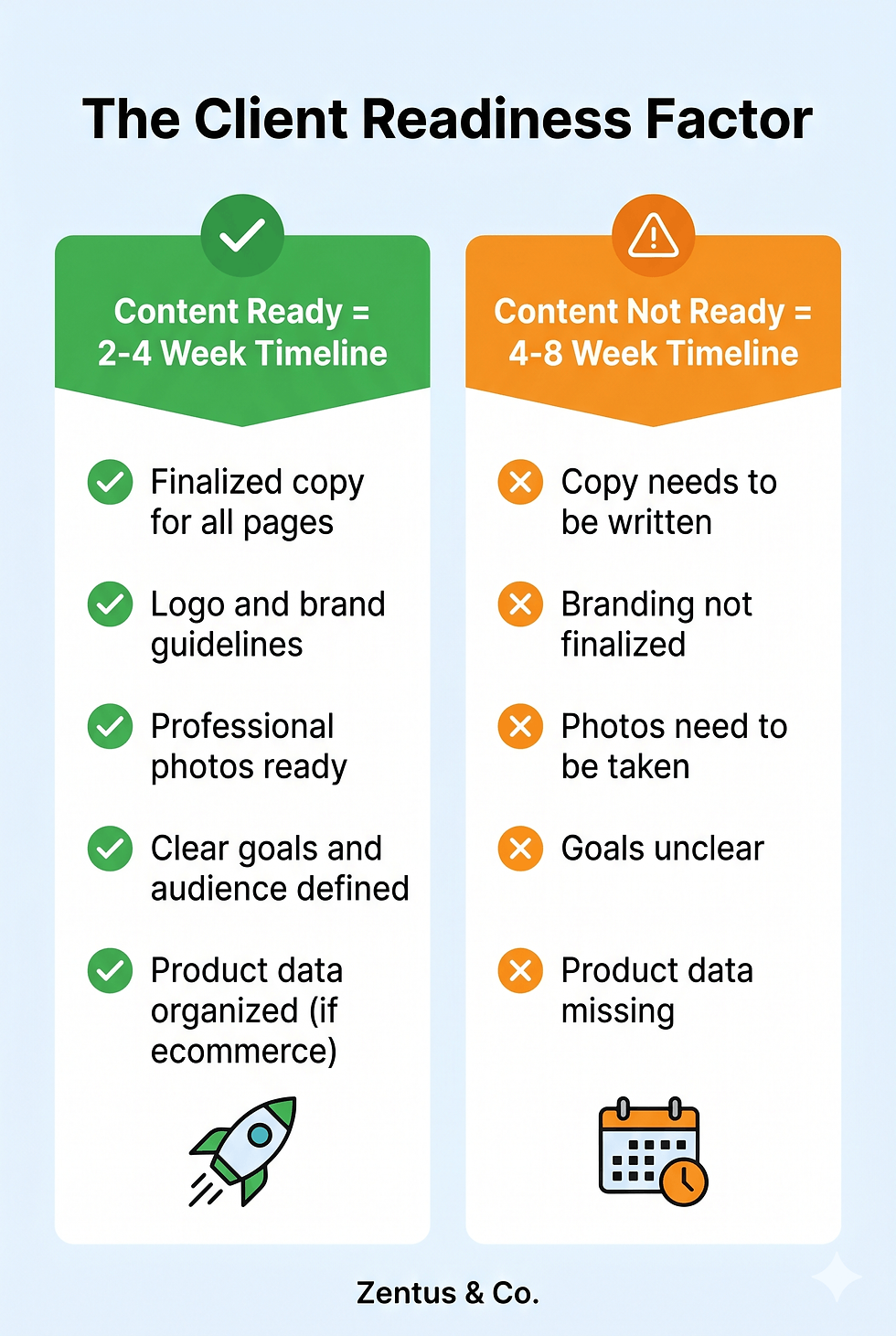
The Client Readiness Factor
If you already have:
✅ Clear brand guidelines and logo files✅ Professional photos or budget for stock images✅ Written copy for all pages (or hired a copywriter)✅ A clear understanding of your goals and audience
...then planning takes 3-5 days.
If you need to:
❌ Finalize your branding❌ Write all your website copy from scratch❌ Take product photos❌ Decide what pages you even need
...then planning takes 2-4 weeks, because the agency is waiting on you.
This is the single biggest timeline variable in 2026. Agencies can design and build fast—but they can't move forward without content and decisions from you.
How Much Does Client Feedback Slow Down Website Development?
Short answer: Each round of revisions adds 3-7 days.
Here's the typical revision cycle:
Agency delivers design mockup → sends to client
Client reviews (1-3 days if fast, 5-7 days if multiple stakeholders)
Agency implements revisions (1-2 days)
Client reviews again (1-3 days)
Agency makes final tweaks (1 day)
One round of revisions = 4-7 days. Most projects include 2-3 revision rounds, which is already built into the timeline.
What adds weeks:
Feedback arrives in dribs and drabs instead of consolidated lists
New stakeholders appear mid-project with conflicting opinions
Revisions include scope changes ("Can we add a blog section?")
Approval bottlenecks (waiting for the CEO who's traveling)
Pro tip: Agencies can move fast if you provide feedback in one organized list within 48 hours of each review milestone.
What Is the Fastest Platform to Build a Website On?
In 2026, Wix Studio and Squarespace are the fastest platforms for professional business and ecommerce websites, followed by Shopify (for ecommerce-only).
Platform speed comparison:
Platform | Speed | Why |
Wix Studio | ⚡⚡⚡⚡⚡ Fastest | Drag-and-drop with designer control, built-in SEO, hosting, and business tools. No code required for most projects. |
Squarespace | ⚡⚡⚡⚡ Very Fast | Beautiful templates, easy setup, but less flexibility than Wix Studio. |
Shopify | ⚡⚡⚡⚡ Very Fast | Purpose-built for ecommerce, fast to launch, but limited for non-store pages. |
WordPress | ⚡⚡⚡ Moderate | Requires plugin research, theme customization, security setup, and hosting configuration. More powerful but slower to build. |
Webflow | ⚡⚡⚡ Moderate | Powerful design control, but steeper learning curve. Fast for experienced designers, slow for beginners. |
Custom Code | ⚡⚡ Slow | Maximum flexibility, but every feature is built from scratch. Takes 2-3x longer than no-code platforms. |
Why Wix Studio is faster in 2026:
No plugin hunting or compatibility issues
Hosting, security, and backups are automatic
Built-in SEO tools and mobile optimization
Ecommerce, booking, and forms are native (no third-party integrations)
One platform for design, development, and client management
When custom code is worth the extra time:
You need features no platform supports (rare in 2026)
Your site is a software product, not a marketing website
You're building something like Airbnb, not a business website
For 95% of businesses, no-code platforms like Wix Studio deliver professional results in half the time of custom development.

Wix Studio vs WordPress vs Custom Development: Timeline Comparison
Let's put real numbers to this. Here's how long the same 10-page business website with contact forms and a blog takes on different platforms:
Phase | Wix Studio | WordPress | Custom Code |
Planning | 3 days | 3 days | 5 days (more technical scope) |
Design | 5 days | 5 days | 7 days (design system creation) |
Development | 5 days | 10 days (theme customization, plugins) | 20 days (build from scratch) |
Content Integration | 2 days | 3 days | 4 days |
Testing | 2 days | 4 days (cross-plugin testing) | 5 days |
SEO Setup | 1 day (built-in tools) | 2 days (plugin configuration) | 3 days (manual setup) |
Launch Prep | 1 day | 2 days (hosting, security, backups) | 3 days |
Total | 19 days (3-4 weeks) | 29 days (5-6 weeks) | 47 days (9-10 weeks) |
Key difference: Wix Studio eliminates the "setup tax" of WordPress (hosting, security, plugin compatibility) and the "build tax" of custom code (creating everything from scratch).
When WordPress makes sense: You need very specific third-party integrations or are building a content-heavy publication with multiple authors and complex workflows.
When custom code makes sense: You're building software, not a website—think SaaS app, custom marketplace, or web-based tool.
For most businesses, Wix Studio offers the best balance of speed, cost, and professional results.
Who This Is Best For: Choosing the Right Timeline for Your Business
Not every business needs a 6-week custom website. Here's how to choose the right timeline based on your situation.
⚡ You Need a 1-2 Week Timeline If:
You're launching a new product, service, or event and need a landing page fast
You have a template or clear design direction in mind
Your content and branding are 100% ready
You're willing to use a website builder or work with an agency that uses Wix Studio
You don't need ecommerce or complex functionality
Best approach: Hire a Wix Studio agency or use a template-based website builder yourself.
📅 You Need a 3-5 Week Timeline If:
You're launching a professional small business website
You want custom design, but not custom code
You have (or can quickly gather) content and images
You need forms, booking, or basic interactivity
You want SEO setup included from day one
Best approach: Work with a Wix Studio agency that specializes in business websites.
🛒 You Need a 4-8 Week Timeline If:
You're launching an ecommerce store
You have up to 100 products and clear product data
You want a professional design that reflects your brand
You need payment processing, shipping, and tax setup
You want marketing tools (email, abandoned cart, discounts)
Best approach: Hire an agency experienced in ecommerce on Wix Studio or Shopify.
🏢 You Need a 2-4 Month Timeline If:
You're a larger business with 20+ pages and complex structure
You have multiple stakeholders and a formal approval process
You need advanced features (membership areas, custom integrations, large product catalog)
You want comprehensive SEO strategy, content writing, and brand consulting included
You're willing to invest in a fully custom experience
Best approach: Work with a full-service agency that offers strategy, design, development, and content creation.
🚀 You Should Build It Yourself If:
You have a very limited budget (under $1,000)
You're comfortable learning new tools and troubleshooting issues
Your timeline is flexible (you can work on it over several weeks)
You have time to write your own content and source images
You're okay with a template-based design
Best approach: Use Wix, Squarespace, or Shopify's DIY plans and invest time instead of money.
All of our builds include a solid technical foundation as part of our core wix website design services.
Common Mistakes That Delay Website Projects
Even with the right platform and a skilled designer, website projects can drag on for months due to avoidable mistakes. Here are the most common timeline killers—and how to prevent them.
1. Starting Design Before Content Is Ready
How much time this adds: 2-4 weeks
The #1 mistake clients make is saying "We'll figure out the content later—let's start with design."
Why this kills timelines:
Designers create beautiful layouts for placeholder text
When real content arrives, it doesn't fit the design
Pages need to be redesigned to accommodate actual content
Client is frustrated because "we already approved the design"
Solution: Gather at least 80% of your content before design starts. If you don't have final copy, provide detailed outlines and approximate word counts so designers can plan layouts accurately.
2. Changing Scope Mid-Project
How much time this adds: 1-4 weeks
Common mid-project requests:
"Can we add a blog section?"
"Actually, we want to sell products—can we add ecommerce?"
"We need a member login area"
"Can we add 10 more pages?"
Why this kills timelines:
Each new feature requires new planning, design, and development
Changes affect site structure, navigation, and page layouts
Budget and timeline were based on the original scope
Solution: Lock your scope before signing a contract. If you think you might want a feature, include it in the initial proposal—it's faster and cheaper to add it from the start than to retrofit it later.
3. "Design by Committee" Without a Final Decision Maker
How much time this adds: 2-6 weeks
The scenario:
Three partners all review the design
Each has conflicting feedback
Designer implements Partner A's changes
Partner B rejects those changes next round
Designer is stuck in an endless revision loop
Solution: Designate one point person with final approval authority. Others can provide input, but one person makes the final call. This single change can cut your timeline in half.
4. Slow Feedback and Approval Cycles
How much time this adds: 1-3 weeks
The pattern:
Agency sends mockup for review on Monday
Client is busy, reviews on Friday
Sends incomplete feedback
Agency asks clarifying questions the following Monday
Client responds Wednesday
Two weeks have passed for one revision round
Solution: Block specific review dates on your calendar when the project starts. Treat them like important meetings—non-negotiable.
5. Choosing a Platform That Doesn't Match Your Timeline or Budget
How much time this adds: 4-12 weeks
The mistake:
Client wants a 2-week timeline and $2,000 budget
Developer recommends custom WordPress or custom code
Project takes 3 months and costs $8,000
Client is shocked
Why it happens:
Some developers only know one platform (WordPress or code)
Custom development sounds more "professional"
Client doesn't understand platform differences
Solution: If you have a tight timeline or budget, ask specifically about no-code options like Wix Studio. Custom code should be reserved for truly custom needs, not standard business websites.
6. Skipping the Discovery and Planning Phase
How much time this adds: 2-4 weeks in rework
The scenario:
Client wants to "save time" by skipping strategy
Designer starts building immediately
Halfway through, client realizes the site structure doesn't match their customer journey
Major pages need to be restructured
Solution: Invest 3-5 days in proper planning. It feels slow upfront, but prevents weeks of backtracking later.
7. Expecting a Website to Be "Finished" at Launch
How much this affects: Ongoing satisfaction and realistic expectations
Here's an uncomfortable truth: a website is never truly "finished."
Launch day is the beginning, not the end:
Week 1-2 after launch: Monitor analytics, fix any bugs users discover
Month 1-3: Add blog posts, optimize for SEO based on real search data
Month 3-6: Refine messaging based on user behavior and conversion rates
Ongoing: Update content, add new products/services, refresh design every 2-3 years
Solution: Plan for a post-launch optimization phase. Budget time and/or money for tweaks in the first 30-60 days after launch. The best websites evolve based on real user data.

How to Speed Up Your Website Timeline (Without Sacrificing Quality)
Want to launch faster without cutting corners? Here's how.
1. Have Your Content 100% Ready Before Day One
Timeline savings: 2-4 weeks
Provide your agency with:
✅ Finalized copy for every page✅ High-resolution images and brand assets (logo, colors, fonts)✅ Product photos and descriptions (for ecommerce)✅ Approved brand guidelines
The single fastest way to speed up a website project is to hand your agency a complete content folder on day one.
2. Use Wix Studio (or Another No-Code Platform)
Timeline savings: 2-8 weeks
No-code platforms eliminate:
Server setup and hosting configuration
Security and backup setup
Plugin research and compatibility testing
Custom code for standard features (forms, galleries, sliders)
Reality check: A 10-page business website that takes 10 weeks in custom code takes 3-4 weeks in Wix Studio—with the same professional result.
3. Consolidate Feedback and Approvals
Timeline savings: 1-3 weeks
Instead of:
❌ Sending feedback in 5 separate emails over a week❌ Remembering new changes every time you look at the site❌ Having stakeholders review individually at different times
Do this:
✅ Schedule a single review meeting with all stakeholders✅ Send one consolidated feedback document with all changes✅ Approve or request revisions within 48 hours
4. Choose a Template or Semi-Custom Design
Timeline savings: 1-2 weeks
Starting from a professionally designed template and customizing it with your branding is 3-5x faster than designing from scratch.
You still get:
Custom colors, fonts, and branding
Your content and images
Professional, modern design
Mobile optimization
You skip:
Building every layout element from zero
Multiple design concept rounds
Extensive revisions to find "the right look"
5. Limit Revision Rounds
Timeline savings: 1-2 weeks
Most agency contracts include 2-3 rounds of revisions. Each round takes 3-5 days.
To minimize rounds:
Review thoroughly each time (don't save feedback for later)
Get all stakeholder input before sending feedback
Prioritize changes (critical vs nice-to-have)
6. Launch with a Minimum Viable Website, Then Expand
Timeline savings: 2-4 weeks
Instead of launching with:
15 service pages
50 blog posts
200 products
Membership area
Customer portal
Launch with:
5 core pages (Home, About, Services overview, Portfolio, Contact)
5 starter blog posts
20 best-selling products
Plan to add more post-launch
Benefits:
Get online faster
Start collecting analytics and user feedback
Refine your approach based on real data
Avoid over-building features no one uses
How Long Should Website Revisions and Testing Take?
Revisions: 3-5 days per round (assumes 48-hour client feedback turnaround)Testing: 2-4 days before launch
What gets tested:
✅ All links work (internal and external)✅ Forms submit correctly and send notifications✅ Mobile responsiveness on iPhone, Android, iPad✅ Cross-browser compatibility (Chrome, Safari, Firefox, Edge)✅ Page load speed (target: under 3 seconds)✅ SEO basics (meta tags, alt text, URL structure)✅ Ecommerce transactions (if applicable)
Pro tip: Don't skip testing to launch faster. A broken contact form or slow mobile site will cost you more in lost leads than a few extra days of testing.
When Is a Website Actually Finished After Launch?
The honest answer: Never—but here's a more useful framework.
Phase 1: Initial Launch (Week 0)
Core pages are live
All features work
SEO basics are in place
Site is mobile-friendly and fast
Phase 2: Optimization Period (Weeks 1-8)
Monitor analytics and user behavior
Fix any bugs or usability issues users discover
Refine messaging based on bounce rates and conversion data
Add blog content and optimize for SEO
Phase 3: Ongoing Maintenance (Months 3+)
Regular content updates (blog posts, new products, news)
Seasonal design refreshes (holiday promotions, event pages)
Performance monitoring and speed optimization
Security and platform updates
Phase 4: Major Refresh (Every 2-3 years)
Redesign to keep up with current design trends
Add new features as your business evolves
Update content and imagery
The takeaway: Plan for a website to be "functionally complete" at launch, but budget time and resources for ongoing updates. The most successful websites are living projects, not set-and-forget.

Red Flags: How to Spot Unrealistic Timeline Promises
Not all timeline estimates are honest. Here's how to spot red flags from agencies or freelancers.
🚩 Red Flag #1: "We Can Build Your Custom Ecommerce Site in One Week"
Reality check: A professional ecommerce site with custom design, product setup, payment processing, and testing takes a minimum of 4 weeks—even on fast platforms like Wix Studio.
What this promise usually means:
They're using a basic template with minimal customization
They're not including product upload (you'll do it yourself)
They're not including testing or SEO setup
They're overpromising to win the project, then will extend the deadline later
🚩 Red Flag #2: "Timeline Doesn't Depend on You—We'll Handle Everything"
Reality check: No agency can write your About page, photograph your products, or approve designs without your input. Every website project requires active client participation.
What this promise usually means:
They'll use generic placeholder content (hurting your SEO and credibility)
They'll make design decisions without your input (leading to dissatisfaction)
They don't have a realistic process
🚩 Red Flag #3: "We Don't Need a Planning Phase—We'll Start Designing Tomorrow"
Reality check: Professional projects include discovery, goal-setting, and strategy before design. Skipping this phase leads to rework and missed expectations.
What this promise usually means:
They're rushing to get started without understanding your business
They build the same site for every client (no strategy, just templates)
You'll end up with a pretty website that doesn't match your goals
🚩 Red Flag #4: Vague Milestones Like "Design Phase: 2-4 Weeks"
Reality check: Professional proposals include specific milestones with dates:
Week 1: Discovery call and content gathering
Week 2: Sitemap approval and homepage design
Week 3: Internal page design and first review
Week 4: Development and content integration
What vague timelines usually mean:
They don't have a clear process
They're managing too many projects and can't commit to specific dates
They'll deprioritize your project when something "urgent" comes up
✅ Green Flags: Signs of a Realistic, Trustworthy Timeline
Look for these signs of a professional, honest timeline estimate:
Asks detailed questions about your content readiness before quoting a timeline
Explains what they need from you and when (content, feedback, approvals)
Breaks down the timeline by phase with specific deliverables
Includes buffer time for revisions and feedback cycles
Mentions the platform they'll use and why it fits your timeline/budget
Sets clear expectations about what happens if you delay feedback or change scope

Frequently Asked Questions About Website Timelines
How long does it take to build a website with Wix Studio?
A simple 5-10 page business website built on Wix Studio takes 2-4 weeks with a professional agency, assuming content is ready upfront. An ecommerce site with under 50 products takes 4-6 weeks. Wix Studio is one of the fastest platforms for professional website development in 2026 because it eliminates server setup, plugin management, and custom coding for standard features. The timeline can extend to 6-10 weeks for larger projects or if content gathering and client approvals are slow.
Can I build a website myself faster than hiring an agency?
It depends on your skill level and available time. A DIY website using Wix or Squarespace can be built in 1-2 weeks if you have content ready and are comfortable with website builders. However, most business owners underestimate the time required for design decisions, content writing, image sourcing, and learning the platform—often taking 4-8 weeks of part-time work. An agency can deliver a more polished result in the same or less time because they work full-time and have established processes. Choose DIY if you have time but limited budget; choose an agency if you have budget but limited time.
What takes the longest when building a website?
Content gathering and client approvals are the longest phases in most website projects, often taking 2-4 weeks combined. Many clients underestimate how long it takes to write compelling copy, gather high-quality images, and make decisions about messaging and design. The actual design and development work (once content is ready) typically takes 2-3 weeks for a standard business site. To speed up your project, prepare all content—copy, images, branding assets—before the project officially starts.
How long does it take to build a website on WordPress vs Wix?
The same 10-page business website takes approximately 5-6 weeks on WordPress vs 3-4 weeks on Wix Studio. WordPress requires additional time for hosting setup, theme customization, plugin installation and configuration, security setup, and cross-plugin compatibility testing. Wix Studio includes hosting, security, and core features (forms, galleries, SEO tools) natively, eliminating these setup steps. WordPress makes sense for complex content publishing sites or specific integrations; Wix Studio is faster for most business and ecommerce websites.
How can I speed up my website timeline without sacrificing quality?
The fastest way to accelerate your website timeline is to have 100% of your content ready before the project starts—including written copy, images, branding assets, and product information. Second, choose a no-code platform like Wix Studio instead of custom development, which cuts development time by 50-70%. Third, consolidate feedback and approvals into single review sessions with all stakeholders present, rather than collecting piecemeal feedback over several days. Finally, commit to 48-hour feedback turnaround times when the agency sends work for review—slow client responses are the #1 timeline killer.
Is a one-week website timeline realistic?
A one-week timeline is realistic only for landing pages or simple template-based sites where content is 100% ready, scope is locked, and you're available for same-day feedback. It's not realistic for custom-designed business websites, ecommerce sites, or any project requiring content creation, strategy work, or complex functionality. Be cautious of agencies promising one-week timelines for full websites—they're likely using generic templates with minimal customization, or they'll extend the deadline once the project starts. A realistic timeline for a professional custom business website is 3-4 weeks minimum.
What happens if I delay sending content or feedback?
Every delay in content delivery or feedback approval directly extends your website timeline. Each 3-5 day delay adds approximately one week to the project, because agencies schedule work in sprint cycles and will move to other client projects when waiting on your input. Most agency contracts include a clause that the timeline is contingent on timely client participation. To avoid delays, block review sessions on your calendar in advance, assign someone to gather content before the project starts, and designate one decision-maker to provide consolidated feedback.
How long does it take to migrate from WordPress to Wix?
A WordPress to Wix migration typically takes 3-6 weeks, depending on site size and complexity. This includes content migration (copying pages, blog posts, images), design recreation in Wix Studio (since WordPress themes don't directly transfer), URL redirect setup (to preserve SEO), and testing. Simple 5-10 page sites can migrate in 3 weeks; larger sites with 50+ pages, custom features, or large blog archives may take 6-8 weeks. Content migration is often the longest phase—manually transferring and reformatting posts, optimizing images, and setting up proper URL redirects to maintain search rankings.
How much does timeline affect website cost?
Faster timelines often cost more because they require dedicated resources and prioritized scheduling. A standard 4-week business website project costs 10-20% more if rushed to 2 weeks, because the agency must dedicate more designers and adjust other project schedules. Conversely, extended timelines (8-12 weeks) for the same scope don't usually reduce cost—you're paying for the same deliverables, just spread over more time. The most cost-effective approach is a realistic timeline (3-4 weeks for business sites) with content ready upfront. Very slow timelines can actually increase costs if the project drags on due to client delays, as some agencies charge monthly retainer fees or rush fees when restarting stalled projects.
Do website builders like Wix really save time compared to hiring a developer?
Yes, if you're comparing DIY Wix to hiring a developer for custom code—you'll launch faster with Wix. But no, if you're comparing DIY Wix to hiring a Wix Studio agency. Building your own website on Wix takes most business owners 4-8 weeks of part-time work (10-20 hours per week) because you're learning the platform, making design decisions, writing content, and troubleshooting issues. A Wix Studio agency can deliver the same result in 3-4 weeks of calendar time with a more polished outcome. Choose DIY if you have more time than budget; choose an agency if you have more budget than time.
How long after launch until my website ranks on Google?
Initial indexing takes 3-7 days after launch if you submit your sitemap to Google Search Console. Ranking for competitive keywords takes 3-6 months of consistent content creation, technical SEO optimization, and backlink building. New websites go through a "sandbox period" where Google evaluates content quality and relevance before ranking them prominently. You can speed up ranking by: launching with 5-10 high-quality blog posts, optimizing all pages for target keywords from day one, setting up proper technical SEO (meta tags, alt text, mobile optimization), and starting a consistent content publishing schedule (1-2 posts per week). Most Wix Studio agencies include basic SEO setup, but ongoing SEO requires either in-house effort or monthly SEO services
Should I wait until everything is perfect before launching?
No—launch with a "minimum viable website" and improve post-launch. Waiting for perfection adds weeks or months to your timeline and delays the business value of being online (lead generation, credibility, sales). Launch when you have: core pages complete (Home, About, Services, Contact), at least 3-5 blog posts or portfolio pieces, properly configured contact forms and CTAs, mobile optimization and basic SEO setup, and professional design (even if not 100% "perfect"). Add post-launch: additional service pages, more blog content, advanced features (membership areas, booking systems), product catalog expansion, and design refinements based on user behavior. The most successful websites launch at 80% and improve to 100% based on real user feedback.
How do I know if an agency's timeline estimate is realistic?
Ask these questions to evaluate timeline realism:
"What do you need from me, and when, to meet this timeline?" (Realistic agencies will list specific content/approval deadlines)
"What happens to the timeline if I need an extra week to provide feedback?" (Honest agencies will explain delays)
"What's included in each phase of the timeline?" (Professional agencies provide milestone breakdowns)
"What platform will you use and why?" (Agencies using Wix Studio or similar no-code tools can genuinely deliver faster than custom code)
"How many rounds of revisions are included, and how long does each take?" (This reveals if revision time is built into the estimate)
Red flags include: "We'll handle everything, you don't need to do anything" (impossible), vague phases like "design: 2-4 weeks" (unprofessional), or promises of complex sites in 1 week (unrealistic).
Can I launch my website in phases to go live faster?
Yes, and this is often the smartest approach. Launch Phase 1 with core pages (Home, About, Services, Contact) and basic functionality in 2-3 weeks. Then add Phase 2 features post-launch: blog section, additional service pages, case studies, and portfolio work over the next 4-8 weeks. Finally, implement Phase 3 advanced features: ecommerce, membership areas, booking systems, or custom integrations in months 2-4. Benefits of phased launches: you get online faster, start collecting leads and analytics immediately, can test messaging and design with real users, avoid over-building features you might not need, and spread costs over time. This works best when Phase 1 includes everything needed to generate business value—functional contact forms, clear services, and professional design.
How long does ongoing website maintenance take after launch?
Plan for 2-5 hours per month for basic maintenance: software and security updates (if on WordPress), content updates (blog posts, new services, team member bios), image and product additions, performance monitoring, and analytics review. Wix Studio requires less maintenance time (1-2 hours monthly) because platform updates, security, and hosting are automatic. Plan for 5-10 hours monthly if you're actively publishing blog content, running seasonal promotions, or frequently updating products. Most businesses either handle maintenance in-house or hire monthly maintenance services from agencies (typically $100-$300/month for basic maintenance). The most time-consuming ongoing task is content creation—if you're serious about SEO and blogging, budget 4-8 hours per blog post including research, writing, editing, and optimization.
How long does it take to add ecommerce to an existing website?
Adding ecommerce to an existing website takes 3-6 weeks, depending on product catalog size and platform. This includes: ecommerce platform integration or setup (3-5 days), product page design and template creation (3-5 days), payment gateway and shipping configuration (2-3 days), tax setup and legal pages (Terms, Privacy, Returns) (2 days), product upload and categorization (3-14 days depending on catalog size), and testing transactions and checkout flow (2-3 days). If your existing site is on Wix Studio, ecommerce integration is faster (3-4 weeks) because Wix includes native ecommerce functionality. If your site is on WordPress, expect 4-6 weeks to install and configure WooCommerce, payment plugins, and shipping extensions. The timeline bottleneck is usually product data—gathering descriptions, pricing, photos, and inventory details takes longer than the technical setup.
Get Your Custom Website Timeline—No Guessing, Just a Real Plan
Every business has different content readiness, scope requirements, and launch goals. Instead of generic timeline ranges, let's create a specific timeline for your project—with clear milestones, content deadlines, and a realistic launch date.
Share your project details, and we'll provide a detailed timeline breakdown within 24 hours, customized to your website type, platform choice, and business goals.
For more insights on how the platform performs in different scenarios, read our breakdown of real estate website design.
No commitment required. We respond within 24 hours with a clear timeline, milestone breakdown, and honest expectations.


Comments