


Wix Website for Home Inspection Businesses USA: Online Booking, Report Delivery and Local Trust Signals

Updated: Jul 2

Wix Website for Home Inspection Businesses USA: Quick Setup Guide
A Wix website built specifically for home inspection gives you more than a digital brochure — it becomes your booking engine, report delivery hub and trust-building tool, working 24 hours a day without you answering a phone.
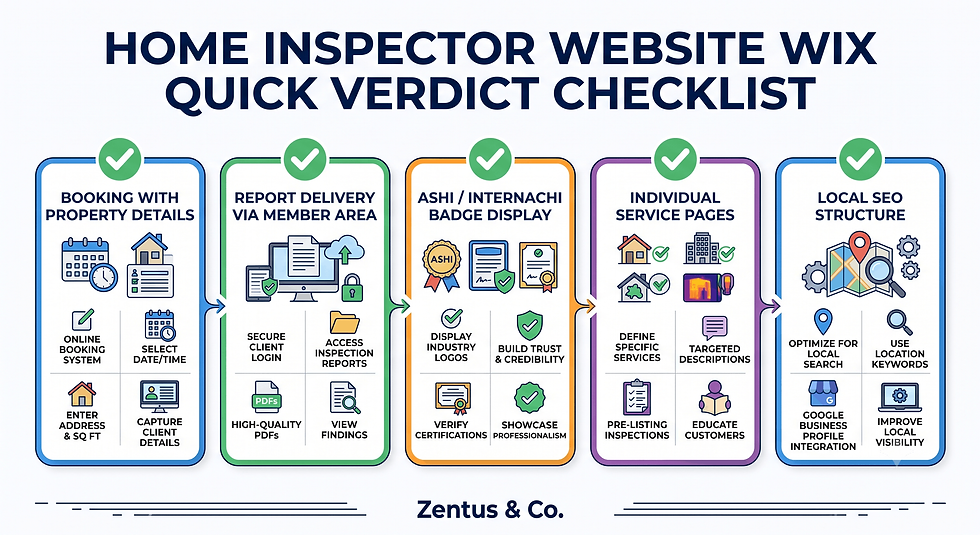
Quick verdict for home inspectors considering Wix:
Booking with property details: Wix Bookings captures inspection type, property address and preferred date in one form — no extra software required for most inspection businesses
Report delivery: Wix can host downloadable reports in a password-protected member area or via secure download links sent post-inspection
Trust signals: ASHI and InterNACHI certification badges, state licence numbers and E&O insurance details all display cleanly in Wix Studio layouts
Service pages: Buyer inspections, seller pre-listing, radon, mold, pest and commercial inspections each deserve a dedicated page — Wix handles this architecture easily
Local SEO: A well-structured Wix site with optimised service pages ranks for "home inspector near me" and city-level searches without third-party plugins
This guide covers every element a working home inspection website needs — from the initial booking flow through to report access, certification display, local SEO and realistic cost and timeline expectations. Wix Website for Property Management Companies USA
Introduction
If you run a home inspection business in the USA, your website has one job: turn a searching home buyer or referring real estate agent into a booked inspection. A wix website for home inspection businesses USA does this differently from a generic business site — it needs property address collection inside the booking form, service-type differentiation, clear certification display and some form of report delivery or client access. Most generic web design advice skips every one of those requirements. This guide does not. Whether you inspect single-family homes, handle commercial building surveys, test for radon and mold, or offer pre-listing inspections for sellers, the structure of your site matters as much as the content on it. Wix Studio gives home inspectors a capable, flexible platform when it is configured with the right pages, booking logic, local SEO structure and trust signals — and this guide shows you exactly how.
Online Booking for Home Inspectors: Property Details and Inspection Types
Every home inspection booking needs information that a standard appointment form does not collect. The property address, inspection type, square footage, age of the property and preferred access time are all critical for scheduling and quoting — and your booking system must capture them cleanly.
How to set up inspection booking with property address collection on Wix?
Wix Bookings does not collect property address by default, but this is solved cleanly using a custom intake form attached to each service. Inside your Wix dashboard, navigate to Wix Bookings → Manage Bookings → Services, then edit each service and add custom fields: Property Address, Property Type (single-family, condo, multi-unit, commercial), Approximate Square Footage and any special access notes. These fields appear in your booking confirmation and dashboard summary, giving you everything needed to prepare for the inspection before you arrive.
For inspectors who quote by square footage, pair the booking form with a contact form that collects details first and sends a manual quote — then the client books after receiving pricing. This two-step flow works well for commercial inspections where pricing varies significantly.
Can Wix Bookings handle different inspection types with different durations?
Yes. Each inspection type — buyer inspection, pre-listing seller inspection, radon test, mold assessment, pest inspection, commercial walk-through — is set up as a separate service inside Wix Bookings with its own duration, price, description and availability window. A buyer inspection might be set to three hours, a radon-only test to one hour and a commercial inspection to a half-day block. Wix Bookings manages these independently, so your calendar never double-books incompatible service types. See our Wix Bookings deposits guide for how to structure deposit collection at the time of booking.
Should home inspectors collect payment at booking or after inspection?
Collecting a deposit at booking — typically $50–$100 — reduces no-shows significantly and is standard practice among independent inspectors. Wix Payments or Stripe handles this inside Wix Bookings without additional software. Full payment at booking works well for residential buyer inspections where the price is fixed. For commercial and specialty inspections where the final price depends on scope, collect the deposit at booking and invoice the balance after the inspection using Wix Invoices or a connected accounting tool like QuickBooks.

Report Delivery and Client Access: Making Reports Easy to Get
Report delivery is the step where most inspection websites fail completely. The inspector emails a PDF manually, the buyer fumbles through their inbox days later and the professional experience ends abruptly. A structured Wix setup eliminates this friction.
How to deliver inspection reports to clients through a Wix website?
The most practical Wix setup for report delivery uses Wix Members combined with a private page. After completing the inspection, you upload the report PDF to a password-protected page in your Wix dashboard and send the client a direct link with their login credentials. The client logs in, views the report and downloads it — all inside your branded website. This keeps the client inside your digital experience rather than sending them to a third-party file-sharing service. For inspectors using third-party report software such as HomeGauge or Spectora, you can embed the report link inside a Wix member page and wrap it with your branding.
See our guide on Wix Forms vs Jotform vs Typeform for how different form tools compare when building client intake workflows that feed into your report delivery process.
Can Wix host downloadable sample inspection reports?
Yes, and this is one of the highest-converting pages a home inspector website can have. Upload a redacted sample inspection report as a PDF inside your Wix Media Library. Create a dedicated page titled "Sample Inspection Report" and embed the download link behind a simple lead capture form — name, email, property city. The visitor gets the sample report, you get a qualified lead. The platform behaviour that surprises many business owners here is that Wix file downloads are trackable through Wix Analytics, so you can see exactly how many visitors downloaded your sample and from which pages they arrived.
Should inspectors offer a client login area for report access?
For solo inspectors or small teams doing under 50 inspections per month, a simple members area with manual upload is sufficient and takes under two hours to set up. For larger operations doing 100+ inspections monthly, consider whether a dedicated inspection report platform like HomeGauge or ISN (Inspection Support Network) is worth integrating — these platforms generate reports automatically and can be linked from your Wix client portal. Wix handles the front end; the specialist platform handles the report generation. Both work together cleanly.
ASHI, InterNACHI and Trust Signals for Home Inspector Websites
Home buyers and real estate agents evaluate inspection businesses differently from other service providers. Certification is a primary trust signal — and how you display it on your website directly affects whether a visitor books or leaves.
How to display ASHI or InterNACHI certification on a Wix website?
Create a dedicated credentials section on your homepage and About page. In Wix Studio, add a strip section with your ASHI or InterNACHI member badge (download official badge assets from each organisation's member portal), your state licence number displayed in plain text, your years of experience and the number of inspections completed. Place this section above the fold on your homepage — not buried in a footer. ASHI and InterNACHI both permit badge display on member websites when used correctly; verify current usage guidelines on each organisation's website.
What state licensing information should a home inspector show?
Display your state licence number prominently on your homepage, contact page and each service page. Many states — including Texas, California, Florida, New York and Georgia — require licensed inspectors to display their licence number in advertising, which legally includes websites. Include the issuing state authority name (for example, "Licensed by the Texas Real Estate Commission, Licence No. XXXXX"). A clean Wix Studio setup places this in the site footer so it appears on every page automatically, satisfying both legal requirements and trust-building goals simultaneously.
Should inspectors display insurance and E&O coverage details?
Yes. Errors and Omissions (E&O) insurance and General Liability coverage are the two insurance types home buyers and real estate agents ask about most frequently before booking. Display your coverage amounts or simply state "Fully Insured — E&O and General Liability coverage held" on your homepage and About page. You do not need to display the policy document itself — the statement of coverage is sufficient. For commercial inspection clients, coverage details are often a prerequisite before an inspection is confirmed, so include this on your Commercial Inspection service page specifically.

Service Pages: Buyer Inspections, Seller Pre-Listing, Radon, Mold, Pest and Commercial
A single "Services" page listing everything in bullet points is not a strong SEO or conversion strategy. Each inspection type your business offers deserves its own dedicated page.
How many inspection service pages should a website have?
Build one page per distinct inspection service you offer. A typical home inspector website needs a minimum of four to six service pages: Buyer Home Inspection, Seller Pre-Listing Inspection, Radon Testing, Mold Assessment or Air Quality Testing, Pest Inspection and Commercial Property Inspection. Each page targets a different search query — "radon testing home inspector [city]" pulls different traffic from "home buyer inspection [city]" — and gives Google a clear, specific page to index for each intent.
Buyer inspection vs seller pre-listing: separate pages or combined?
Always separate pages. The buyer inspection and seller pre-listing inspection serve different audiences with different motivations. A buyer wants reassurance and protection; a seller wants to avoid deal-killing surprises before listing. The language, the process description and the conversion goal differ on each page. Combining them into one page forces you to write vague copy that converts neither audience. In Wix Studio, duplicating a service page template and customising the copy takes under 30 minutes — there is no reason to combine them.
Should specialty inspections like radon and mold have dedicated pages?
Yes, and this is where many inspection websites leave significant organic traffic uncaptured. "Radon testing near me," "mold inspection [city]" and "commercial building inspection [city]" are all distinct searches with their own competition levels. A dedicated page for each specialty inspection lets you rank for each query independently. Include the inspection process, what the report covers, typical turnaround time, pricing guidance and a booking button on every specialty page.
Sample Report Showcase: Converting Visitors with Proof of Quality
How to showcase sample inspection reports on a Wix website?
Create a dedicated Sample Report page in your Wix navigation. Upload a redacted sample report (remove the client's address and personal details) as a downloadable PDF and embed a preview image showing two or three pages of the report layout. Use a Wix lightbox to display enlarged preview images. Add explanatory text describing what the report covers: photo documentation, deficiency categories, summary sections, narrative descriptions and repair priority classifications. This page answers the unspoken question every home buyer has: "What am I actually paying for?"
What makes a sample report page convert visitors into booked inspections?
The highest-converting sample report pages do three things: they show report quality visually, they explain what a quality report includes that a cheap competitor's report does not and they place a booking button immediately after the preview. Add two or three sentences explaining your reporting software (HomeGauge, Spectora, Horizon, iNspect) and why digital reports with embedded photos are superior to hand-written checklists. Then make booking the logical next step. See our guide on Wix Studio for service businesses for how to structure conversion-focused page layouts in Wix Studio.
Should inspectors show report excerpts or full sample reports?
Excerpts with a download option work better than showing the full report openly. Displaying two to four pages of the report gives the visitor enough to assess quality without overwhelming them. Gate the full sample behind a lead form — name, email, city — to capture contact details. The conversion principle is straightforward: the visitor who downloads a sample report has shown far more intent than the visitor who just browsed your homepage. Follow up that download with an automated email from Wix Automations offering a booking link.
Local SEO for Home Inspectors: Ranking When Buyers and Agents Search
How do home inspectors rank for "home inspector near me"?
Ranking for "home inspector near me" requires three parallel efforts: an optimised Google Business Profile (GBP), consistent NAP (Name, Address, Phone) across directories and locally relevant content on your Wix website. On your GBP, select "Home Inspector" as your primary category. Add a detailed business description, upload photos of your equipment and report samples and collect reviews from past clients by sending a review request link through Wix Automations after each completed inspection. Your Wix website supports this by including your city and service area in page titles, meta descriptions, H1s and body content — not keyword-stuffed, but naturally integrated.
Should inspectors target city-level or ZIP-code-level keywords?
For most solo inspectors and small teams, city-level keywords are the correct starting point: "home inspector [city]," "radon testing [city]," "pre-listing inspection [city]." Once those pages are established and ranking, ZIP-code pages add granularity for densely populated metros. In a market like Houston, Dallas, Atlanta or Chicago where competition is higher, ZIP-code landing pages give you a layer of specificity that city-level pages cannot match. Wix Studio handles multi-location page structures cleanly without requiring custom code.
What GBP categories and optimisation work for home inspectors?
Use "Home Inspector" as your primary GBP category. Secondary categories can include "Building Inspector," "Environmental Health Service" (for mold and radon inspectors) and "Commercial Real Estate Inspector" if you offer commercial services. Complete every GBP field: service list with prices where applicable, service area ZIP codes, business hours, Q&A section with your most common pre-booking questions answered, and a weekly post schedule highlighting completed inspection types or seasonal inspection tips. GBP posts linked back to your Wix service pages create additional indexable signals.
Cost of Building a Home Inspection Website on Wix
What does a Wix home inspection website cost?
Cost Component | DIY Estimate | Agency Build (Zentus) |
Wix Business Plan (monthly) | $17–$36/month | $17–$36/month |
Domain name | $15–$20/year | $15–$20/year |
Design and build time | 20–40 hours of your own time | 8–15 business days |
Agency design fee | $0 | Contact for pricing |
Booking system setup | Included in Wix | Included in build |
Report delivery setup | 2–4 hours DIY | Included in build |
Local SEO page structure | 4–8 hours DIY | Included in build |
Estimated first-year total (DIY) | $220–$450 | Agency fee + plan cost |
Verify current Wix plan pricing at Wix.com before publishing, as platform pricing changes periodically.
Wix plan comparison for home inspectors
The Wix Business Plan is the minimum recommended plan for a home inspection website. It includes Wix Bookings without transaction fees on the Core plan and above, Wix Payments integration, and the ability to accept deposits at booking. The Wix Business Elite plan adds priority customer support and removes Wix branding from emails — useful if you want fully branded booking confirmations. The free Wix plan is not suitable for a professional inspection business; it displays Wix ads and does not support custom domains cleanly.
DIY vs agency build cost for inspection websites
A DIY Wix inspection website is achievable for an inspector comfortable with technology who can invest 20–40 hours into the build, but the most common DIY outcome is a site that looks acceptable but is missing the booking customisation, service page architecture and local SEO structure that drive actual enquiries. An agency build with Zentus USA services costs more upfront but delivers a fully configured system — booking forms, member area, service pages, local SEO structure and trust signal layout — ready to generate leads from day one. For full website design pricing, visit the Zentus pricing page.

Timeline: From Blank Wix Site to First Inspection Booking
How long does an inspection website take to build on Wix?
A basic inspection website — homepage, about page, services overview and a booking form — can be live in three to five days with focused effort. A complete inspection website — individual service pages, sample report page, member area for report delivery, local SEO structure, GBP-connected NAP details and optimised meta data — takes eight to fifteen business days when built by an agency or four to six weeks DIY when balanced against a working inspection schedule. See our Wix Studio services page for how a professional build is structured and delivered.
Can an inspector launch a booking-ready site in under 10 days?
Yes, if the content is prepared in advance. The build speed bottleneck for most inspection websites is not Wix — it is collecting the content: licence number, insurance details, certification badges, service descriptions, service area list, sample report PDF and profile photos. If you prepare all of that before the build starts, a booking-ready Wix inspection site launches in seven to ten business days through an experienced Wix Studio agency.
What's the fastest path to a lead-generating inspection site?
The fastest path: homepage + two service pages + booking form + GBP optimisation, live within five days. This minimum viable site captures direct searches and GBP click-throughs immediately. Add specialty inspection pages, the sample report page and the member report delivery area in the following two to three weeks. Launching in phases lets you start generating leads while the full site is being completed in the background — you do not need to wait for perfection before going live.
When a Wix Inspection Website Beats Relying on Agent Referrals Alone
Real estate agent referrals are valuable and should never be abandoned — but building your entire inspection business on agent relationships creates a structural vulnerability that a website directly addresses.
Wix website vs real estate agent referrals: what's the ROI?
Agent referrals cost nothing per lead but everything in relationship maintenance — dinners, golf events, follow-up calls, holiday gifts and years of goodwill-building before a consistent referral flow is established. A Wix inspection website generates direct buyer enquiries — home buyers who search "home inspector [city]" and book without an agent recommendation. These direct bookings are not shared revenue, not subject to agent preference changes and not lost when a referring agent retires or switches brokers. The ROI calculation is straightforward: if your average inspection fee is $400–$600 and your Wix Business plan costs $36 per month, a single additional booking per month from direct search more than covers the platform cost.
When should a home inspector invest in a proper website?
Invest in a proper website when any of the following apply: you have been in business for more than six months and are ready to grow beyond your personal network; you have lost bookings to competitors who appeared online when you did not; you want to add specialty inspection services and need a platform to promote them; or you are moving into a new service area and cannot rely on existing agent relationships there.
Which inspectors benefit most from a website alongside agent relationships?
Inspectors who benefit most from a website are those offering specialty services — radon, mold, commercial, pest — where buyers search independently rather than always following agent recommendations. Specialty searches are less agent-mediated, meaning the buyer finds the inspector directly. A website capturing those searches adds a second revenue channel without disrupting the agent relationship strategy at all. The website and the agent network work in parallel, not in competition. See how Wix website for real estate agents USA approaches the agent-facing digital strategy if you also build websites for agents in your referral network.
The Report Delivery and Rebooking Loop Most Inspector Sites Skip
Most home inspection websites end the digital experience at the booking confirmation. The client books, shows up, gets the inspection and eventually receives a PDF via email. That is where the inspector's digital relationship with the client stops — and it is a significant missed opportunity.
Why do most inspector websites stop at booking and ignore the report experience?
The report delivery experience is invisible in most web design advice because generic small business website guides do not understand what inspection businesses actually deliver. The report is the product — the inspection is the process. When the report arrives through a branded Wix member area rather than a generic file-sharing link or an email attachment, the client's final impression of the business is professional, organised and trustworthy. That impression is what drives Google review requests to be answered, referrals to be made and repeat contact (for future property purchases) to feel natural.
How does the booking-to-report-to-review loop build repeat business?
The loop works in sequence: booking → inspection → report delivery via client portal → automated review request → Google review posted → higher GBP ranking → more direct bookings. Each step is automatable inside Wix. Wix Automations sends the report-ready notification when you upload the file. A second automation triggers three days later with a review request linking to your GBP listing. The review improves your local ranking. The improved ranking drives the next direct booking. When configuring this workflow in Wix, the practical issue is that the automation trigger for "file uploaded to member area" is not native — use a manual trigger or a form submission as the automation start point instead.
What's the post-inspection digital experience that creates referrals?
The post-inspection experience that generates referrals has three components: a branded report delivery page with your logo and contact details visible, a clear next-steps message ("Questions about your report? Call or email us directly — we respond same day") and a review request sent at the right moment — three days after delivery, when the client has had time to read the report but the experience is still fresh. Inspectors who implement this loop report that Google reviews accumulate significantly faster than those who rely on clients remembering to leave a review organically.

Booking, Report Access and Compliance Checks Before Your Inspector Site Goes Live
What booking flow tests should an inspector run before launch?
Before your Wix inspection website goes live, run the complete booking journey as a test client. Create a test booking for each inspection type, verify that the property address custom field appears and saves correctly, confirm that the booking confirmation email arrives with all booking details included and check that the deposit payment processes through Wix Payments or Stripe without errors. Test the cancellation and rescheduling flow — clients will use both — and confirm that the calendar blocks the time correctly after each test booking. Delete test bookings from your dashboard after testing.
How to test the full client journey: search → website → booking → report access?
Test every stage as a new visitor would experience it. Open an incognito browser window and search your business name — verify that your GBP appears correctly. Click through to your website and navigate to your most important service page. Attempt to book, complete the form with test data, process a test payment and then access the member area using a test client account to verify that the report download page loads correctly. This end-to-end test catches broken links, payment errors, missing confirmation emails and member area access problems before a real client experiences them.
What state-specific compliance checks matter for inspection websites?
Before launch, verify four compliance items specific to your state: (1) your state licence number appears on every service page and in the site footer; (2) your advertising compliance matches your state licensing board's requirements — some states specify exactly how inspectors must identify themselves in online advertising; (3) your E&O and liability insurance statement is accurate and current; and (4) your inspection agreement or contract link (or download) is available on the website if your state requires it to be provided in advance of inspection. States with strict inspection licensing requirements — Texas, California, Florida, New York — should check their respective real estate commission or inspector licensing board websites for current advertising requirements.

Frequently Asked Questions About Wix Website for Home Inspection Businesses USA
Is Wix good for home inspection websites?
Wix is well-suited for home inspection websites when configured correctly. It handles online booking with custom property detail fields, downloadable report delivery through a member area, individual service pages for each inspection type, ASHI and InterNACHI certification display and local SEO structure. The platform does not require code for any of these features. The limitation is that Wix Bookings is not purpose-built for inspection businesses, so custom form fields and service setup require deliberate configuration rather than out-of-the-box functionality.
How much does a home inspection website cost on Wix?
A DIY Wix inspection website costs $17–$36 per month for the Business plan plus $15–$20 per year for a domain — approximately $220–$450 in the first year excluding your own time. An agency-built site through Zentus adds a one-time design and development fee on top of platform costs. Visit our pricing page for current Zentus package costs. Verify Wix plan pricing directly at Wix.com, as pricing changes periodically. The ROI on a properly built inspection site typically comes from one to two additional direct bookings per month.
Can Wix handle home inspection booking with property details?
Yes. Wix Bookings supports custom intake fields added to each service booking form. You can collect the property address, inspection type, property size, year built and access instructions during the booking process. These fields are visible in your Wix booking dashboard and included in confirmation emails. This is set up through the service editing panel in the Wix Bookings dashboard — no coding required. Each inspection type (buyer, pre-listing, radon, commercial) can have its own custom field set appropriate to that inspection type.
Do Wix inspection websites rank on Google?
Yes, Wix inspection websites rank on Google when built with proper on-page SEO: individual service pages per inspection type, city and service area keywords in titles and meta descriptions, an optimised Google Business Profile linked to the website, and consistent NAP details across directories. Wix's built-in SEO tools — meta title and description editors, canonical URL controls, structured data support and sitemap generation — are sufficient for local inspection business SEO without third-party plugins.
Can I show sample inspection reports on a Wix website?
Yes. Upload a redacted sample report PDF to your Wix Media Library and embed it on a dedicated Sample Report page. You can display preview images of the report layout using Wix's image gallery or lightbox feature and offer the full PDF download behind a lead capture form. This page is one of the highest-converting pages a home inspection website can have — visitors who want to see what they are paying for are highly likely to book after seeing a quality sample report.
Should a home inspector use Wix or WordPress?
For solo inspectors and small inspection teams, Wix is the stronger choice: no hosting to manage, no plugin updates to maintain, built-in booking and payments, and a visual editor that makes page updates fast. WordPress with a booking plugin is more flexible for very large inspection companies with complex multi-inspector scheduling needs, but it requires ongoing technical maintenance that most inspection business owners do not want to manage. If your focus is on running inspections rather than managing a website, Wix's all-in-one platform removes a significant layer of technical overhead.
What pages does a home inspection website need?
A complete home inspection website needs: Homepage, About (with credentials), individual service pages (Buyer Inspection, Pre-Listing Inspection, Radon Testing, Mold Inspection, Pest Inspection, Commercial Inspection), a Sample Report page, a Contact and Booking page, and a Blog or Resources section for local SEO content. The About page and service pages are the highest-priority builds for a new site. The sample report page often converts better than any other page on the site when set up correctly.
How do home inspectors get more clients from their website?
The highest-impact actions are: (1) Build individual service pages targeting city-level keywords for each inspection type. (2) Optimise your Google Business Profile and link it to your Wix website. (3) Add a sample report download page with a lead capture form. (4) Set up automated post-inspection review requests through Wix Automations. (5) Add real estate agent-specific content — an "Agent Resources" page or a dedicated section for agents — so that both direct buyers and referral sources can find what they need on your site.

Conclusion and Next Steps
A wix website for home inspection businesses USA is not a simple business card site — it is a complete lead generation, booking and client experience system when built correctly. The inspectors who benefit most are those who configure their site with property-specific booking fields, individual service pages, trust signal displays for ASHI and InterNACHI credentials, and a structured report delivery experience that continues the professional relationship after the inspection is complete.
If you are ready to build an inspection website that handles booking, local SEO and client report access from day one, book a free consultation with Zentus and we will map out exactly what your site needs. We work remotely with home inspection businesses across the USA and can have a fully configured Wix Studio inspection website ready in eight to fifteen business days. WIX WEBSITE FOR AUTO REPAIR SHOPS AND CAR DEALERSHIPS (USA)


Comments