


Wix Studio for Beauty Salons — Online Booking, Design, and Growth in the USA

Updated: Jun 13

Most salon owners who build a Wix website focus on how it looks. The design matters — but it is not what determines whether a client books an appointment or clicks away. The operational setup underneath the design is what converts visitors into booked clients, and that setup inside Wix Studio is more involved than most guides admit.
This post is written for beauty salon owners and spa managers in the USA who want a website that does real work: takes online bookings, shows a clear service menu with pricing and duration, collects deposits, and ranks in Google when someone searches "hair salon near me" in their city. If you are deciding whether Wix Studio is the right platform — or trying to get more out of a site you already have — this covers the decisions that actually matter in 2026. wix agency usa
📋 Bottom Line — What You Need to Know
A professional Wix website for beauty salons in the USA costs between $1,500 and $6,500 to design and build through an agency, depending on complexity and booking setup
Wix Bookings is built into Wix Studio — but collecting deposits and payments requires the Business plan at $36/month (billed annually), not the Core plan
Wix Studio runs on Google Cloud infrastructure with 99.9% uptime and a global CDN — the platform handles the hosting so you focus on the business
Mobile accounts for over 60% of beauty-related searches according to Google's published data — Wix Studio's responsive editor handles mobile breakpoints natively, but they must be configured per design, not assumed
The single most important operational setup decision for salon websites is how services, staff members, and availability calendars are linked inside Wix Bookings — this determines whether your booking system actually works or frustrates clients
Wix Studio is a strong fit for independent salons, multi-stylist studios, and day spas — but enterprise-level franchise booking systems are better served by dedicated salon software like Vagaro or Mindbody

Is Wix Studio Good for Beauty Salons and Spas?
Yes — Wix Studio is a strong platform for beauty salons and spas in the USA, provided the setup is done correctly. The platform includes Wix Bookings natively, which means no third-party plugin installation, no separate subscription to a booking app, and no iframe embed that breaks the mobile experience. For a single-location salon with up to 10 staff members and a service menu of 20-50 items, Wix Studio handles the full operation without requiring additional software.
The qualification is important: "done correctly" is not the default. A Wix website for beauty salons in the USA that uses the basic setup — a calendar widget dropped onto a contact page — will underperform a properly configured Wix Bookings system where services are mapped to individual staff, availability windows are set per provider, buffer times are assigned between appointments, and the confirmation email sequence is customized to the salon brand. wix website design services
What Wix Bookings Actually Includes for Salons
Wix Bookings is a full appointment scheduling system that handles service listing, staff calendars, client self-booking, automated email confirmations, and — on the Business plan — payment and deposit collection at the time of booking. Salon owners can list individual services with duration, price, and the specific staff members who offer each one. Clients select a service, choose their preferred stylist, pick an available time slot, and confirm the booking — all without leaving the website.
The system syncs with Google Calendar, which most staff members already use. Appointment reminders go out automatically based on timing rules you set in the Wix Bookings dashboard under "Notifications". This reduces no-shows without requiring manual follow-up.
What Wix Bookings Does Not Handle Natively
Wix Bookings does not include a waitlist function natively as of 2026. If your salon runs at capacity during peak hours — Friday afternoons, Saturday mornings — clients who cannot find an open slot have no way to join a waitlist through the Wix interface. For salons where this is a real operational need, Acuity Scheduling integrates via Wix's embed tools and includes waitlist management, though this adds a subscription cost of $20-$45/month.
Additionally, Wix Bookings does not support multi-location booking management under a single interface at the Business plan level. If you operate two or more salon locations as separate entities, each requires its own Wix site and Bookings setup. This is a meaningful consideration for group spa owners evaluating the platform.
How Does Wix Studio Compare to Dedicated Salon Software?
Wix Studio is a website platform with booking built in — not a salon management system. Dedicated salon platforms like Vagaro ($30-$90/month), Fresha (commission-based), and Mindbody ($129-$349/month) include inventory management, point-of-sale integration, staff payroll tracking, and loyalty programs that Wix does not offer. If your salon needs all of those features in one system, a dedicated platform may be the right core tool — and your website can embed a booking widget from that platform.
The advantage of Wix Studio is that your website, booking system, SEO, and content marketing all live in one place. You are not splitting your online presence between a salon software booking page and a separate website. For most independent salons and day spas in the USA, the integrated approach performs better for Google rankings and client conversion.
How to Set Up Wix Bookings for a Salon — The Setup That Actually Works
Setting up Wix Bookings for a beauty salon takes 4 key configuration steps beyond the initial installation. Most tutorials cover step one and stop there, which is why so many salon Wix sites have a booking system that technically exists but operationally frustrates clients.
Step 1 — Build the Service Catalog Correctly
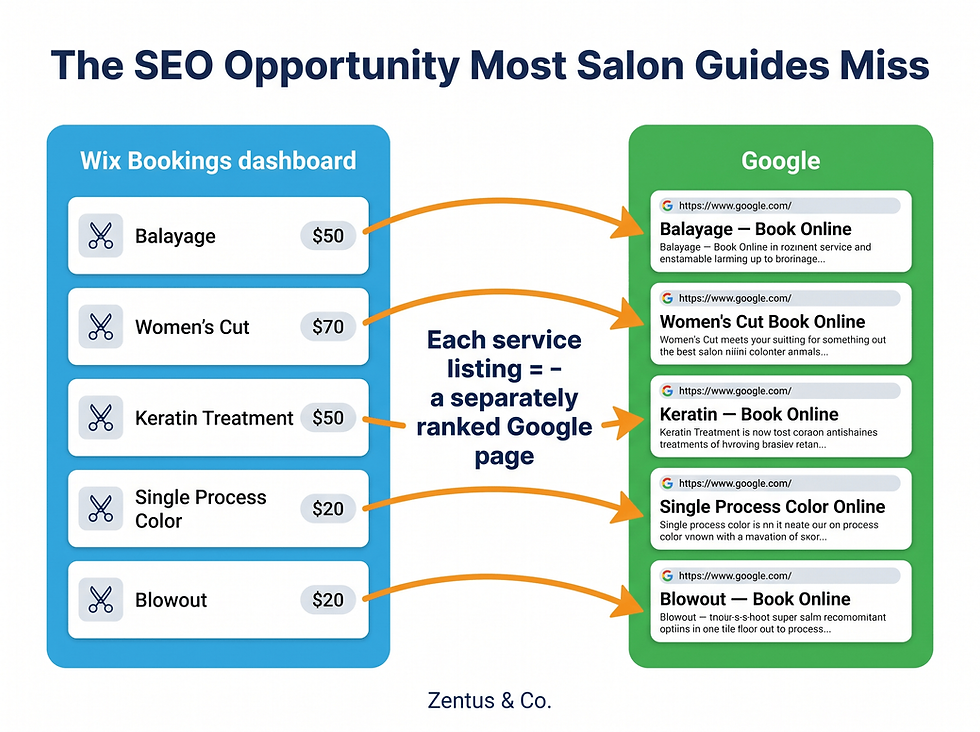
The Wix Bookings service catalog is where every service your salon offers is listed — each with a name, description, duration, price, and the staff members who provide it. This catalog is not just a booking tool. It is also a set of individual web pages that Google indexes separately.
Each service listing in Wix Bookings generates its own URL. A service named "Balayage — Full Head" at a price of $185 for 180 minutes becomes a page that can rank when someone searches "balayage salon [city]." Most salon owners treat the service catalog as an internal admin task and write one-line descriptions. The salons that win local SEO write 80-120 word descriptions for their highest-value services, include the duration and starting price, and answer the question "what does this service include?" directly in the description text.
Step 2 — Assign Staff to Services Individually
Inside the Wix Bookings dashboard, navigate to "Staff" → "Staff Members" and assign each team member to the specific services they offer. Do not assign all staff to all services unless every person on your team performs every service. Incorrect staff assignment creates double-booking problems and shows clients availability that does not actually exist.
Working inside Wix Studio, the staff assignment configuration is the single most common setup error in salon builds. A client books a keratin treatment on Tuesday at 2pm — but that service was assigned to a staff member who does not work Tuesdays, so the time slot should never have appeared as available. This happens when staff service assignments are left at the default "all services" setting.
Step 3 — Set Buffer Times Between Appointments
Buffer time is the gap between the end of one appointment and the start of the next. In Wix Bookings, this is set per service under "Service Settings" → "Duration and Pricing" → "Add Buffer Time." A 90-minute color service may need a 15-minute buffer for cleanup and client checkout. Without buffer time configured, the next client can book immediately after, which creates schedule collisions in practice.
The buffer time setting is separate from the service duration. A service listed as 60 minutes with a 10-minute buffer blocks 70 minutes on the staff calendar — the client sees the 60-minute appointment but the stylist has the 10-minute gap protected. This is the setup detail that determines whether your scheduling system works in real salon conditions or creates daily friction.
Step 4 — Configure Deposit Collection (Requires Business Plan)
Collecting a deposit at the time of booking — to reduce no-shows — requires the Wix Business plan at $36/month (billed annually). This is not available on the Core plan ($29/month). Inside Wix Bookings, go to "Payment Settings" and enable partial payment. You can set the deposit as a fixed dollar amount or a percentage of the service price.
Wix Payments processes the deposit transaction at a rate of 2.9% + $0.30 per transaction — the standard US payment processing rate. The remaining balance is collected at the appointment. This is one of the most impactful operational setups for reducing no-shows, and it requires the right plan tier from the start.

What a Wix Beauty Salon Website Needs — Essential Pages and Features
A beauty salon website on Wix Studio needs more than a home page and a booking button. The page structure of the site determines both the client experience and the SEO performance simultaneously. These are the pages every salon website in the USA should have configured correctly.
What Pages Does a Salon Website Need?
A complete salon website needs seven core pages: Home, Services, Team, Gallery, Booking, Contact, and a Blog (optional but valuable for local SEO). Each page has a specific job. The Services page is where clients confirm you offer what they need. The Team page builds trust and allows clients to request their preferred stylist. The Gallery demonstrates the quality of work. The Booking page converts intent into a confirmed appointment.
Many salon websites combine Team and Gallery into one page, or skip the Team page entirely. This is a missed conversion opportunity — clients who can see a stylist's face, name, and specialty before booking show a higher rebooking rate than those who book blind. Wix Studio's CMS allows you to build a Team member repeater grid that pulls from a CMS dataset, so adding new staff members requires only one data entry point, not a full page redesign.
How to Add a Service Menu to a Wix Website
Adding a service menu to a Wix website is done through Wix Bookings (for bookable services) or through the Wix CMS (for a static display menu). For most salons, Wix Bookings is the right approach — the service menu and the booking system are the same object, so there is no duplication. Go to Wix Bookings → "Services" → "Add New Service" and fill in the name, description, duration, price, and staff assignment.
For salons that offer both bookable services and non-bookable retail products or add-ons, a secondary CMS collection can display a static menu on a Services page while Wix Bookings handles the appointment scheduling. This two-layer approach keeps the booking calendar clean while giving clients a full picture of everything the salon offers.
Why Mobile Design Determines Whether Clients Book
Google's published data indicates that mobile devices account for the majority of local search queries — and beauty-related searches skew higher toward mobile than most service categories. A client searching "blow dry bar near me" on Saturday morning at 9am is on a phone. If your Wix site's booking flow requires pinching, scrolling sideways, or loading slowly, that client leaves.
Wix Studio's responsive editor handles mobile breakpoints natively through the Editor's Mobile View — but responsive does not mean automatic. Every design decision made on the desktop view needs to be checked and adjusted in the mobile view. Stack order of elements, font size, button tap target size, and image crop all need individual attention. The default mobile layout Wix generates from a desktop design is a starting point, not a finished product.

Beauty Salon Website Cost in the USA — Real Prices for 2026
A professional Wix website for beauty salons in the USA costs between $1,500 and $6,500 through a web design agency in 2026, depending on the number of pages, booking complexity, staff size, and whether SEO setup is included.
Package | What's Included | Typical Cost (USD) |
Starter | 4-5 pages, basic Wix Bookings setup, 1 staff member, mobile-optimized | $1,500 – $2,500 |
Standard | 6-8 pages, full Wix Bookings with 3-6 staff, deposit setup, SEO basics, gallery | $2,500 – $4,000 |
Premium | 8-12 pages, full CMS service catalog, multi-staff booking, SEO setup, blog, Google Analytics | $4,000 – $6,500 |
Enterprise/Multi-Location | Multiple site builds, custom integrations, ongoing management | $6,500+ |
All prices are estimates. Final cost depends on scope, agency location, and timeline.
What Does a Wix Plan Cost for a Beauty Salon?
As of 2026, a beauty salon running Wix Studio needs the Business plan at $36/month (billed annually) to accept online payments and deposits through Wix Bookings. The Core plan at $29/month supports the booking calendar but does not enable payment collection at booking. The Business Elite plan at $159/month is not necessary for most single-location salons.
In addition to the Wix plan, budget for: a custom domain ($14-$18/year if purchased through Wix), any third-party apps you add from the Wix App Market (costs vary by app), and professional photography if you do not have an existing gallery. A professional brand photoshoot for a salon typically costs $300-$800 in most US cities.
What Are the Ongoing Costs After Launch?
Ongoing costs for a Wix salon website after launch include the monthly Wix plan subscription, domain renewal, and any agency maintenance or SEO retainer. If you hire an agency to maintain the site, update service menus, and manage SEO, budget $150-$500/month depending on the scope.
Wix handles hosting, SSL certificate renewal, and platform security updates automatically — these are included in the subscription cost. You are not paying separately for a hosting provider, which simplifies the ongoing cost structure compared to a WordPress site where hosting, security plugins, and maintenance are separate line items.
Before committing to a build, we recommend reviewing transparent website design pricing to understand exactly what features your budget covers.

What Most Salon Website Guides Get Wrong About Wix Bookings
Every comparison post and "best website builders for salons" article covers the surface-level features: "Wix has online booking, Squarespace has online booking, GoDaddy has online booking." None of them explain the operational architecture inside Wix Bookings that determines whether the system works in a real salon environment or creates daily scheduling chaos.
This is the section every salon owner should read before building — or rebuilding — their booking system.
Why the Plan Tier Decision Is Made at the Wrong Time
The most expensive mistake salon owners make when building a Wix website is starting on the Core plan ($29/month) and assuming they can add payment collection later. They set up their service catalog, design the booking flow, and then discover that accepting deposits requires the Business plan — which means upgrading mid-build, reconnecting payment settings, and in some cases reconfiguring services that were set up under the wrong payment model.
The plan tier decision should be made before design begins. If your salon wants to: (a) collect a deposit at booking, (b) sell gift cards through the website, or (c) offer package deals or memberships — you need the Business plan from day one. The $7/month difference between Core and Business ($29 vs $36 billed annually) is not the issue. The issue is discovering the limitation after the site is already built.
The Service Catalog SEO Opportunity Nobody Mentions
Inside Wix Bookings, every service listing is a separately indexed web page with its own URL. When a client types "eyelash extensions Houston" into Google, they are not necessarily looking for a salon homepage — they may be looking for a page that specifically describes that service, shows the price, lists the duration, and has a direct booking button.
Salons that write 80-150 word descriptions for each high-value service in their Wix Bookings catalog — including the service name, what the process involves, how long it takes, what the starting price is, and what aftercare is recommended — are building 20-50 individually indexable SEO pages without creating separate content. This is a structural SEO advantage specific to Wix Bookings that competitors using Squarespace Scheduling (which does not generate individual service URLs) do not have.
As of 2026, this is one of the most underused features of Wix Studio for salons. Most salon owners write "Balayage — from $150" in the service description and leave it at that. The salons that write a proper service description for every high-value offering have a significant local SEO advantage that compounds over time.
Common Mistakes Beauty Salons Make With Their Wix Website
These are the specific setup and design mistakes that cause salon Wix websites to lose bookings — not generic web design errors, but salon-specific decisions that have concrete consequences.
Mistake 1 — Not Configuring Staff Calendars Before Going Live
Going live with Wix Bookings before configuring individual staff calendars means the system shows availability based on business hours, not actual staff schedules. A client books a 10am Sunday appointment. Your salon is open Sunday, but the stylist they selected works Tuesday through Saturday. The booking goes through. The appointment conflict happens. The client is frustrated. The reputation damage is real.
Inside Wix Bookings, each staff member has an individual calendar under "Staff" → "Working Hours." Set the specific days and hours for each team member before the booking system goes live. This is a 10-minute task per staff member that prevents a category of operational errors entirely.
Mistake 2 — Ignoring the Mobile Booking Flow
Building a beautiful desktop design and publishing it without checking every step of the mobile booking flow is the most common design error in salon websites. The test is simple: go through the entire booking process on your phone — from landing on the home page, to selecting a service, choosing a stylist, picking a time, and completing the booking confirmation. Time how long it takes. Count how many taps are required. Check whether any text is too small to read without zooming.
If the mobile booking journey takes more than 4 steps or requires any zooming, clients are dropping off. Wix Studio's mobile editor allows you to independently adjust element size, spacing, and stack order for the mobile view without affecting the desktop layout. This step is not optional for a salon — it is the primary interface for the majority of your clients.
Mistake 3 — Using the Wrong Pricing Display Strategy
Salons frequently list services with "from $X" pricing on their Wix website without explaining what determines the final price. Clients who see "balayage from $150" and then receive a $320 quote at consultation feel misled — even if the price difference is entirely justified by hair length and complexity.
The more effective approach is to display a starting price with a clear qualifier: "Balayage — starting at $150 for short hair, $185 for medium, $220+ for long. Final price confirmed at consultation." This single change reduces pre-appointment price shock and increases the likelihood that clients show up to consultations rather than ghosting after seeing the quote. In Wix Bookings, you can set a service to show "starts at" pricing and add a description that explains the pricing tiers in plain language.
Mistake 4 — Not Setting Up Google Business Profile Integration
A Wix website for a beauty salon in the USA is significantly more effective when it is connected to a fully optimized Google Business Profile. The website and the Google Business listing work together — the website provides depth, and the Google Business Profile provides local visibility in map results and the local pack.
Wix Studio includes a Site Booster tool that assists with submitting your business information to directories, but the Google Business Profile connection is manual. Add your website URL to your Google Business Profile, ensure the business name, address, and phone number (NAP) on your Wix website exactly match what is on the Google Business Profile, and enable booking functionality if your salon uses a compatible booking provider. Inconsistent NAP information between the website and the Google listing is one of the most common local SEO errors salon owners make.

Who This Is Best For — Wix Studio Fit for Salons and Spas
This table gives an honest breakdown of which beauty businesses are the right fit for Wix Studio and which are not.
Strong Fit ✅ | Less Ideal Fit ⚠️ |
Independent hair salons with 1-8 stylists who need online booking, a service menu, and a gallery | Franchise chains requiring centralized multi-location management under one system |
Day spas offering a fixed menu of 10-30 services with clear pricing and appointment-based scheduling | High-volume blow-out bars with walk-in-first models that need real-time queue management |
Beauty studios (lash, brow, PMU) with specialist services and a portfolio-driven client acquisition model | Salons running complex loyalty programs with points, redemption tracking, and gift card ecosystems |
Solo estheticians or nail technicians running their own brand who need a professional web presence with booking | Multi-location spa groups where all locations need to share a single booking calendar and staff roster |
Boutique massage and wellness studios with appointment-based services and a local SEO growth strategy | Salons deeply integrated into Vagaro or Mindbody who want to keep their existing salon management system as the booking hub |
New salons building their web presence from scratch with a budget of $2,000-$5,000 | Enterprise wellness brands needing custom API integrations with CRM or ERP systems |

Wix Studio vs Alternatives for Beauty Salon Websites in the USA
Wix Studio is not the only option for salon websites in the USA. Here is an honest comparison of the four platforms salon owners most commonly consider.
Feature | Wix Studio | Squarespace | GoDaddy | WordPress + Bookly |
Booking system included | ✅ Native (Wix Bookings) | ✅ Native (Acuity) | ✅ Basic | ❌ Plugin required |
Staff-specific booking | ✅ Yes | ✅ Yes | ⚠️ Limited | ✅ With plugin |
Deposit collection | ✅ Business plan | ✅ Business plan | ⚠️ Limited | ✅ With plugin |
Service SEO pages | ✅ Individual URLs | ⚠️ Limited | ❌ No | ✅ Yes |
Mobile booking UX | ✅ Strong | ✅ Strong | ⚠️ Average | ⚠️ Depends on theme |
Design flexibility | ✅ High | ⚠️ Medium | ⚠️ Low | ✅ High |
Hosting included | ✅ Yes | ✅ Yes | ✅ Yes | ❌ Separate |
Monthly platform cost | $36/month (Business) | $33/month (Business) | $21/month (Commerce) | $15-50/month (hosting + plugins) |
Technical skill required | Low | Low | Very Low | High |
For most beauty salons in the USA, Wix Studio and Squarespace are the two strongest standalone options. Squarespace's Acuity Scheduling integration is excellent — arguably ahead of Wix Bookings in terms of waitlist and package management features. Wix Studio's advantage is in design flexibility and the fact that service pages are individually indexed, which creates a meaningful local SEO edge over time.
WordPress with Bookly is the most powerful technically but requires the most maintenance. GoDaddy's website builder is the easiest to set up but the weakest for SEO and booking flexibility. For a salon owner who wants a professional result without managing technical complexity, Wix Studio at the Business plan is the most balanced choice in 2026.

How to Get a Wix Website Built for Your Salon — Timeline and Process
Getting a professional Wix website for your beauty salon built through an agency takes 4 to 8 weeks from initial brief to launch, depending on how quickly content is provided and how many revision rounds are required.
What Is the Timeline for Building a Salon Website?
A standard 4-6 week Wix salon website build follows this sequence:
Week 1 — Discovery and planning: service list, staff profiles, brand assets, booking preferences, target clients
Week 2 — Site structure, page wireframes, and Wix Bookings configuration planning
Weeks 3-4 — Design and build: all pages designed, Wix Bookings configured with services and staff, mobile view adjusted
Week 5 — Content population, image upload, SEO meta setup, Google Analytics connection
Week 6 — Client review, revisions, testing of full booking flow on mobile and desktop, launch
The most common delay is content provision — salon owners who have not prepared a service list with prices and durations, high-resolution photos, or staff bios slow the build by 1-3 weeks. Preparing this content before the build starts is the single biggest timeline accelerator.
What Do You Need Ready Before the Build Starts?
Before a Wix salon website build begins, prepare: a complete service menu with service names, descriptions, durations, and starting prices; professional photos of the salon interior, team members, and work examples; staff bios and headshots; your logo in vector or high-resolution format; your business address, phone number, and existing social media links. If you have a Google Business Profile, ensure the login credentials are accessible.
If you do not have professional photography, a phone shoot in good natural light is a workable starting point — but plan to replace it within 3-6 months. Professional photography is one of the highest-ROI investments for a salon website because visual quality directly affects the perceived price point of the services.
How Do You Get Started With Zentus & Co.?
If you are a salon owner or spa manager in the USA who wants a Wix Studio website that handles online bookings, ranks in local search, and converts visitors into clients, Zentus & Co. designs and builds specifically in Wix Studio. You can review our Wix website design services to see what is included at each build level, or get in touch directly to discuss your salon's specific requirements. We respond within 24 hours.
For context on what USA businesses across different industries are investing in professional Wix websites in 2026, the Wix web design for US businesses page covers the broader landscape.
Frequently Asked Questions About Wix Websites for Beauty Salons
Does Wix have a booking system for salons?
Yes — Wix includes a native booking system called Wix Bookings that is built into Wix Studio at no additional app cost. Salons can list services with individual durations, prices, and staff assignments; clients self-book through the website and receive automatic confirmation emails. Collecting deposits at booking requires the Business plan at $36/month (billed annually). Wix Bookings syncs with Google Calendar and sends automated appointment reminders.
How much does a salon website cost in the USA?
A professionally built salon website in the USA costs between $1,500 and $6,500 through a web design agency in 2026, depending on the number of pages, staff size, and whether full Wix Bookings configuration and SEO setup are included. DIY on Wix costs $36/month for the Business plan plus time. The most common mid-range build for a 5-8 stylist salon with full booking setup falls between $2,500 and $4,000.
What is the best website builder for a hair salon?
Wix Studio and Squarespace are the two strongest website builders for hair salons in 2026. Wix Studio has an advantage in design flexibility and the fact that each Wix Bookings service page is individually indexed by Google — a meaningful local SEO benefit. Squarespace's Acuity Scheduling is slightly more advanced for waitlists and package management. For most independent hair salons in the USA, Wix Studio at the Business plan is the most balanced choice for design, booking, and SEO combined.
Can I take deposits through Wix Bookings?
Yes — Wix Bookings supports deposit collection, but only on the Business plan ($36/month, billed annually). On the Core plan ($29/month), the booking calendar works but payment collection at the time of booking is not available. Deposits are processed through Wix Payments at 2.9% + $0.30 per transaction. You set the deposit as a fixed dollar amount or a percentage of the service price inside the Wix Bookings Payment Settings dashboard.
How do I add a service menu to my Wix website?
Add services directly inside Wix Bookings by navigating to Wix Bookings → Services → Add New Service. Each service gets its own name, description, duration, price, and staff assignment. Each service listing also becomes an individually indexed web page — so writing a clear 80-150 word description for each service improves both client clarity and local SEO. For non-bookable menu items (retail, add-ons), use the Wix CMS to build a separate display menu on your Services page.
How long does it take to build a beauty salon website on Wix?
A professional beauty salon website on Wix Studio takes 4 to 6 weeks to design, build, and launch through an agency. This includes service catalog setup, staff booking configuration, mobile optimization, SEO meta setup, and Google Analytics connection. The most common reason builds run longer is delayed content delivery — having your service list, photos, and staff bios ready before the build starts reduces the timeline significantly.
Is Wix good for spa websites?
Yes — Wix Studio is well suited for spa websites that operate on an appointment-based model with a defined service menu. Day spas, massage studios, and wellness centers benefit from Wix Bookings' native scheduling, the ability to assign services to specific therapists, and the design flexibility to create the calm, visual-first aesthetic that spa clients expect. For spas that need complex loyalty programs, multi-location management, or deep POS integration, a dedicated platform like Mindbody may be more appropriate as the operational core.
Ready to Build Your Salon's Wix Website the Right Way?
If you have read this far, you understand that a salon website that actually converts is not just a design project — it is a Wix Bookings configuration project, a mobile experience project, and a local SEO project running simultaneously. Getting those three things right from the start is what separates a website that sits there from one that brings in clients.
Zentus & Co. designs and builds exclusively in Wix Studio. If your salon is in the USA and you want a website that handles online bookings, ranks in local search, and looks as good on a phone as it does on a desktop — we can help you get there.
Whether you are targeting local neighborhoods or expanding state-wide, this strategy is just as critical for a wix website for insurance agency usa.
No commitment required. We respond within 24 hours.


Comments