


Wix Website for Dental Practice USA

Updated: Jul 8

A wix website for dental practice usa needs to do more than list office hours — it has to convert searches into booked consultations for both routine cleanings and high-value treatments like implants or Invisalign. Most dental websites lose patients at three points: unclear insurance information, generic intake forms that skip the right health history questions, and treatment pages that bury pricing under vague service descriptions.
A properly configured Wix Studio site fixes all three by separating new-patient and returning-patient booking flows, displaying accepted insurance clearly, and giving implants, veneers and whitening dedicated pages with pricing context. This guide covers the booking, insurance, HIPAA-aware forms, treatment pages, galleries, local ranking, and cost structure a USA dental practice needs on Wix in 2026 — plus the checks to run before launch.
Wix Website for Dental Practice USA: Quick Setup Verdict
Quick verdict: Yes — Wix Studio can run a complete dental practice website in the USA, including online booking, insurance display, HIPAA-aware intake forms, and treatment-specific landing pages, provided booking rules and data handling are configured correctly.
Use Wix Bookings with separate scheduling flows for new patients versus returning patients
Display accepted insurance on a dedicated page, split by PPO, HMO, out-of-network and self-pay — not buried in a footer line
Build separate treatment pages for implants, Invisalign, veneers and whitening instead of one generic "services" page
Route health history intake through a HIPAA-aware form process, not a public open-text contact form
Budget $1,200–$4,500 for a professional Wix Studio dental build depending on booking and treatment-page complexity (verify current Wix pricing before publishing)

Patient Booking Flow: New Patient vs Returning Patient on Wix
Dental booking on Wix works best when new patients and returning patients follow different paths, because a first visit typically requires more time, more forms, and a consultation slot — while a returning patient just needs a cleaning or follow-up.
How to set up new patient vs returning patient scheduling on Wix?
Create two separate service listings in Wix Bookings — "New Patient Exam" and "Returning Patient Cleaning" — each with its own duration, staff assignment, and pre-booking form. This prevents a 90-minute new-patient exam from being booked into a 30-minute cleaning slot.
Should dental practices require intake forms before first appointment?
Yes. Attach a required intake form to the new-patient booking service so the form must be completed before the slot is confirmed. This reduces no-shows and gives the front desk health history ahead of the visit, rather than a rushed form-fill in the waiting room.
Can Wix Bookings handle different appointment durations for different treatments?
Yes — each service in Wix Bookings can have its own duration, buffer time, and provider assignment. A whitening consultation, an implant consultation, and a routine cleaning can each run on different time blocks without manual calendar management.
In a Wix Studio build, the setup detail that changes the outcome is linking each treatment page's booking button to its correct service, not a single generic "Book Now" button — this is what keeps the calendar accurate as the practice grows. For deposit and cancellation-fee configuration, see the Wix Bookings deposits guide.
Insurance Display: PPO, HMO, Out-of-Network and Payment Plans
Insurance clarity is one of the biggest conversion factors on a dental website — patients frequently abandon a booking if they cannot quickly confirm whether their plan is accepted.
How to display accepted dental insurance on a Wix website?
Build a dedicated "Insurance & Payment" page listing accepted PPO networks by name, noting HMO participation separately, and explaining the process for out-of-network and self-pay patients. Avoid a single vague line like "we accept most insurance."
Should you list PPO and HMO plans separately?
Yes — PPO and HMO plans work differently for patients, and mixing them in one list creates confusion. Use two clearly labeled sections or a simple table so patients can scan their plan type quickly.
How to handle out-of-network and self-pay patients on your dental site?
Add a short, honest explanation of estimated reimbursement, in-house payment plans, or third-party financing (like CareCredit) directly on the insurance page, with a clear next step to book a consultation.
Insurance Type | Display Approach | Booking Impact |
PPO | List major carriers by name | Highest conversion — patients book directly |
HMO | Note participation and referral requirements | Requires clarity on primary care dentist status |
Out-of-network | Explain reimbursement process | Needs financing/payment plan mention |
Self-pay | Show membership/discount plan options | Often converts with transparent pricing |

HIPAA-Compliant Patient Forms: Health History and Consent on Wix
Patient forms are the highest-risk element of a dental website because they collect protected health information, and this is where generic contact forms create real compliance exposure.
Are Wix patient forms HIPAA-compliant for dental practices?
Wix forms are not automatically HIPAA-compliant out of the box — a Business Associate Agreement (BAA) and the correct plan/app configuration are required before collecting health history data through the site. Practices should verify current HIPAA-eligible settings directly with Wix before launch.
What health history fields does a dental intake form need?
A standard dental intake form should collect medical history, current medications, allergies, prior dental work, and insurance details, structured in short sections rather than one long text field, to reduce abandonment.
How should dental practices store patient form data on Wix?
Form submissions containing health information should route to a secure, access-controlled system rather than a shared inbox, with clear internal policy on who can view submissions and how long they are retained.
The platform behaviour that surprises many business owners is that form compliance is a configuration decision, not a default setting — it has to be checked before the intake form goes live, not after the first submission arrives.
High-Value Treatment Pages: Implants, Invisalign, Veneers and Whitening
Cosmetic and restorative treatments carry the highest patient value, and they convert far better when each has its own page rather than sharing a single "cosmetic dentistry" paragraph.
How to create dedicated treatment pages for implants, Invisalign and veneers?
Build one page per high-value treatment with a clear structure: what the treatment fixes, the process timeline, candidacy factors, and a direct booking button — mirroring the approach used across Wix Studio for service businesses builds.
Should each high-value treatment have its own landing page?
Yes. Implants, Invisalign, veneers and whitening each attract different search intent and different patient questions, so a single combined page dilutes both SEO relevance and patient clarity.
How to structure pricing and financing on treatment pages?
Show a realistic price range rather than "contact for pricing," paired with financing options (in-house plans, CareCredit, or similar), since cost transparency is a major factor in consultation bookings for elective treatments.

Before-and-After Galleries: Smile Transformations Within Advertising Rules
Visual proof of results is persuasive for cosmetic treatments, but dental galleries carry both compliance and advertising considerations that generic business photo galleries do not.
Can dental practices show before-and-after photos on a Wix website?
Yes, with written patient consent for marketing use, and images should avoid any identifying health information beyond the smile itself.
What HIPAA and advertising rules govern smile transformation galleries?
Photos require documented patient consent specifically for website/marketing use, separate from treatment consent, and claims near the images should avoid guaranteed-outcome language that state dental advertising rules commonly restrict.
Should before-and-after images be in a gallery or on treatment pages?
Place transformation photos directly on the relevant treatment page (implants, veneers, whitening) rather than a single generic gallery — this keeps the visual proof next to the booking decision.
How Dental Practices Rank for "Dentist Near Me" in Competitive Markets
Local dental search is dominated by map-pack results, which means the website's job is to convert the click after the map pack, not just chase organic position 1.
How do dental practices rank for "dentist near me" in competitive cities?
Consistent NAP (name, address, phone) across the website and Google Business Profile, a fast-loading homepage, and genuine patient reviews linked from the site all support map-pack and organic visibility together.
Should a dental website target procedure keywords or general terms?
Target both — general terms ("dentist in [city]") on the homepage, and specific procedure keywords ("dental implants [city]," "Invisalign [city]") on individual treatment pages, since these long-tail terms face far less competition.
What GBP categories work for dental practices?
Select the most specific primary category available (e.g., "Cosmetic Dentist" or "Orthodontist" rather than generic "Dentist") when it accurately reflects the practice's focus, since this affects which searches trigger map-pack visibility.
What a Dental Practice Website Costs on Wix in 2026
Budget expectations vary based on booking complexity, number of treatment pages, and whether HIPAA-aware form workflows are required.
Element | Wix Studio (Agency Build) | DIY Wix | Specialist Dental Platform |
Setup cost | $1,200–$4,500 | $0–$300 | $3,000–$10,000+ |
Booking system | Wix Bookings included | Wix Bookings included | Often proprietary/limited |
Treatment pages | Custom per treatment | Template-based | Template-based |
Ongoing cost | Wix plan + maintenance | Wix plan only | Monthly platform fee, often higher |
Design flexibility | High | Moderate | Low |
For most small-to-mid dental practices, a Wix Studio build sits well below specialist dental platforms on both setup and ongoing cost while offering comparable booking functionality. Verify current Wix pricing before publishing, as platform plans can change. See USA Wix Studio services and website design pricing for current package structures.

When a Wix Dental Website Fills Your Schedule Better Than Insurance Directory Listings
When does a dental website outperform insurance directory listings?
An insurance directory listing shows a name and a phone number — it does not show treatment pages, financing options, or a booking calendar. A well-built website outperforms the directory listing the moment a patient wants more than "is this dentist in-network," because that's where directory listings stop answering questions.
Which dental practices benefit most from a strong web presence?
Practices offering cosmetic or high-value restorative work (implants, Invisalign, veneers) benefit most, since these patients research extensively before booking a consultation — far more than a routine-cleaning patient who may pick from an insurance list alone.
Can a Wix dental site reduce dependency on referral networks?
Yes, over time. A site with strong treatment pages and local SEO visibility creates a second acquisition channel alongside referrals and insurance directories, which matters most for growing implant and cosmetic caseloads where referral volume alone often can't keep the schedule full.
Decision guide: if your patient mix is mostly insurance-driven routine care, a lean booking-focused site is sufficient. If cosmetic or implant cases are a growth priority, invest in full treatment-page architecture and local SEO from day one.
The Insurance Display and Treatment Acceptance Gap Most Dental Sites Miss
Why do most dental websites display insurance poorly or not at all?
Most practices treat insurance as an afterthought — a single sentence in the footer — because the site was built around office information rather than the patient's actual decision process, which almost always starts with "do you take my insurance."
How does insurance clarity affect patient booking conversion?
When insurance status is unclear, patients frequently call to ask rather than book online, which adds front-desk workload and creates a drop-off point where some callers simply don't follow up. Clear insurance pages remove that friction and push more patients directly into the booking calendar.
What is the insurance-to-booking-to-treatment acceptance path?
The full patient journey runs: search → insurance confirmation → booking → consultation → treatment acceptance. Most dental websites only build for the first two steps and leave treatment acceptance to an in-person conversation with no digital support — no financing information, no treatment page detail, nothing reinforcing the decision after the consultation. Closing that gap with detailed treatment pages and financing transparency is what separates a booking-only site from one that actively supports case acceptance.
For a small business owner, the important setting is not the label on the "Services" tab — it is whether each treatment has enough detail on its own page to move a hesitant patient toward booking without another phone call.
HIPAA, Booking and Insurance Checks Before Your Dental Site Goes Live
What HIPAA checks should a dental website pass before launch?
Confirm a Business Associate Agreement is in place for any form or booking tool collecting health information, and confirm form data routes to a secure, access-limited destination rather than a general team inbox.
How to test the patient intake and booking flow end-to-end?
Book a test new-patient appointment through the live site exactly as a patient would, complete the intake form, and confirm the confirmation email, calendar entry, and form data all arrive correctly before the site goes public.

What privacy policy requirements apply to USA dental websites?
A dental website needs a privacy policy disclosing what health-adjacent information is collected through forms and how it is used, in addition to standard website privacy disclosures — this is separate from general small-business privacy policy templates.
Pre-launch checklist:
BAA confirmed for any form/booking tool handling health data
New-patient and returning-patient booking flows tested separately
Insurance page reviewed by front-desk staff for accuracy
Before-and-after photos have documented marketing consent
Treatment page pricing/financing reviewed for compliance with state advertising rules
Privacy policy updated to reflect form data handling

Frequently Asked Questions About Wix Website for Dental Practice USA
Is Wix good for dental practice websites?
Wix is a solid platform for dental practice websites when configured correctly, offering booking, forms, and design flexibility comparable to specialist dental platforms at a lower ongoing cost. It works best when treatment pages, insurance display, and intake forms are built specifically for dental workflows rather than a generic template.
How much does a dental website cost on Wix?
A professional Wix Studio dental build typically costs $1,200–$4,500, depending on the number of treatment pages and booking complexity. This is generally lower than specialist dental website platforms, which often run $3,000–$10,000+ with ongoing monthly fees. Always verify current Wix pricing before publishing.
Can Wix handle dental patient booking and intake forms?
Yes, Wix Bookings supports separate service listings for new and returning patients with attached intake forms. Each service can have its own duration and required pre-booking form, which covers most standard dental scheduling needs.
Do Wix dental websites rank on Google?
Yes, Wix websites can rank well for dental searches when built with proper on-page SEO, treatment-specific pages, and consistent local business information. Ranking depends more on content structure and local SEO signals than the platform itself.
Are Wix forms HIPAA-compliant for dental practices?
Not by default — a Business Associate Agreement and correct configuration are required before collecting health information through Wix forms. This should be verified directly with Wix and reviewed with compliance guidance before launch.
Should a dental practice use Wix or WordPress?
Wix Studio is generally faster to launch and easier to maintain for most dental practices, while WordPress offers deeper customization at the cost of more technical maintenance. For most small-to-mid practices without in-house dev support, Wix reduces ongoing technical risk.
What pages does a dental practice website need?
At minimum: homepage, general services, individual high-value treatment pages (implants, Invisalign, veneers, whitening), insurance and payment, about/team, patient forms, and contact/booking. Skipping individual treatment pages is the most common gap.
Can I show dental insurance on a Wix website?
Yes — build a dedicated insurance page listing PPO plans, HMO participation, and out-of-network/self-pay options clearly, rather than a single vague mention. This directly improves booking conversion.
How do dental practices get new patients from their website?
New patients typically arrive through local search visibility, clear insurance information, and treatment pages that answer specific procedure questions — implants, Invisalign, whitening — before they ever call the office.
Can I display before-and-after smile photos on Wix?
Yes, provided written patient consent for marketing use is documented and images avoid identifying health details beyond the smile itself. Place these directly on relevant treatment pages for best conversion impact.
How long does it take to build a dental website on Wix?
A standard Wix Studio dental build typically takes 3–6 weeks, depending on the number of treatment pages, booking configuration, and content/photo readiness from the practice.
Does Wix support online payment for dental services?
Yes, Wix supports online payment collection for deposits, consultation fees, or treatment plans through its payment and booking tools, which can reduce no-shows when tied to the booking flow.
Conclusion: Next Steps for Your Dental Practice Website
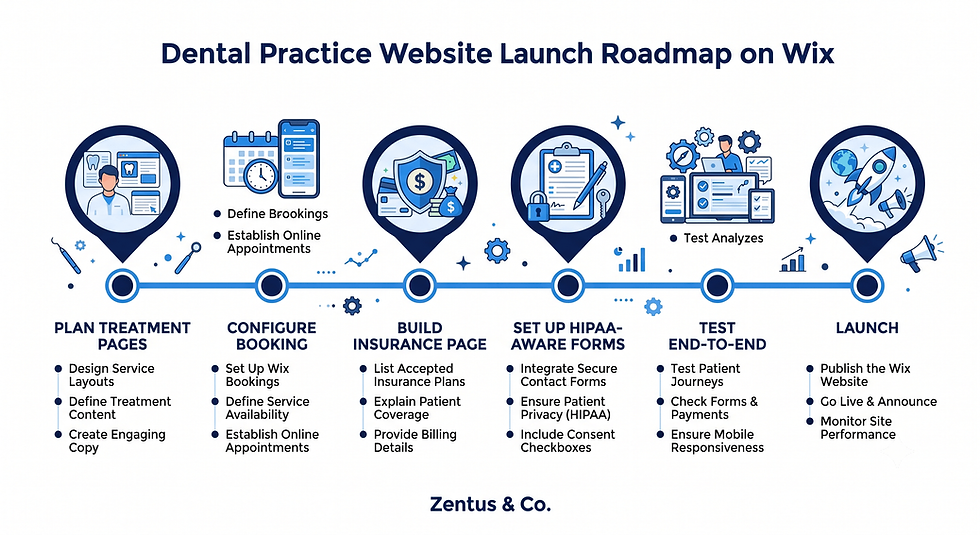
A wix website for dental practice usa works best when it's built around the actual patient decision path — insurance confirmation, booking, intake, and treatment acceptance — rather than a generic template with a contact form. Practices that separate new and returning patient booking, display insurance clearly, and give high-value treatments their own pages consistently see fewer front-desk phone calls and more direct bookings.
If you're ready to build or rebuild your dental practice's Wix Studio website with proper booking, insurance display, and HIPAA-aware forms, book a free consultation to review your current setup and next steps.


Comments