


WIX WEBSITE FOR COACHES USA


Wix Website for Coaches USA: Quick Setup Verdict
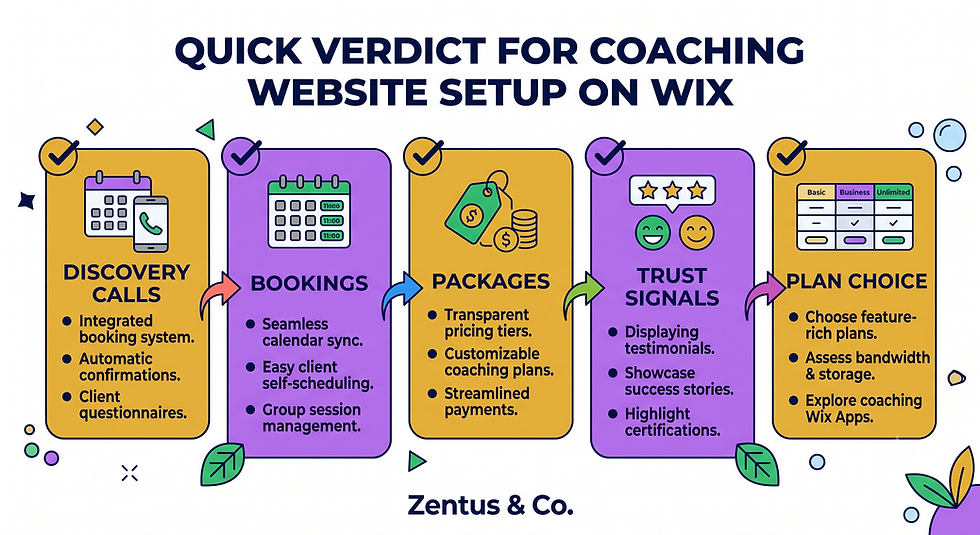
If you are building or rebuilding a coaching website in 2026, the short answer is: yes, Wix Studio can support a wix website for coaches usa built around discovery calls, tiered packages and credibility — but only if the structure matches how coaching clients actually buy.
Quick Verdict:
Discovery calls, not direct checkout, should be your primary conversion action — coaches sell trust before they sell a package
Wix Bookings handles discovery call scheduling natively without needing a separate Calendly subscription
Session package pages need comparison-style layouts, not single pricing tables, because clients compare 3/6/12-month commitments
ICF credentials and client results build more trust than testimonials alone — display both
A Wix Business & eCommerce plan (or higher) is usually the practical minimum once you add payments and package sales
This setup works for life coaches, business coaches, executive coaches, career coaches, health coaches and relationship coaches operating across the USA, whether working with local clients or fully remote.
Introduction
Most coaches searching for a wix website for coaches usa are not looking for a digital business card — they are looking for a system that turns a stranger into a discovery call, and a discovery call into a paying client. That distinction changes everything about how the site should be structured.
Generic small-business templates fail coaches because they assume the sale happens on the page. Coaching sales happen on the call. Your website's only job is to get qualified people onto that call, then support the decision afterward with package clarity, results and credibility. This post covers exactly how to build that structure on Wix Studio — from discovery call booking through to session package display, testimonial frameworks, ICF trust signals, specialization pages and realistic 2026 pricing.
Discovery Call Booking: The Primary Conversion Point for Coaching Websites
Unlike service businesses that sell directly from a website, coaching businesses convert through conversation first. The entire site should be engineered to move a visitor toward one action: booking a discovery call.
How to set up discovery call booking on Wix?
Use Wix Bookings to create a dedicated "Discovery Call" service with a fixed duration (typically 20–30 minutes), a buffer period before and after, and an intake form attached at the point of booking. This keeps scheduling, reminders and calendar sync inside one system rather than bouncing visitors to a third-party tool.
Should coaches use Wix Bookings or embed Calendly?
Wix Bookings is generally the stronger choice because it keeps the visitor on your domain, matches your brand design, and feeds booking data into the same dashboard as your packages and payments. Calendly works but creates a visual and tracking break at the exact moment a lead is most engaged. For deposit or pre-call payment logic, see our Wix Bookings deposits guide for configuration detail.
What happens after a discovery call: how to automate follow-up?
Automated follow-up should trigger the moment a discovery call is booked and again after it concludes. Use Wix Automations to send a pre-call intake form, a calendar confirmation, and — after the call — a package proposal email. Intake forms matter here too; if you're deciding on form tooling, our comparison of Wix Forms vs Jotform vs Typeform covers which option handles coaching intake data best.

Session Package Pages: 3-Month, 6-Month and 12-Month Programme Display
Coaching clients rarely buy a single session. They buy a commitment period, and your website needs to present that commitment as a structured choice, not a price list.
How to display coaching package pricing on a Wix website?
Build package pages as comparison cards rather than a plain pricing table. Each card should show programme length, session frequency, what's included (calls, messaging support, materials) and the outcome the package is designed to produce — not just the price.
Should coaches show prices or "apply to work with me" buttons?
This depends on your positioning. Life and health coaches often benefit from transparent pricing because it pre-qualifies budget-fit leads before the call. Executive and high-ticket business coaches more often use an "apply to work with me" flow, which routes into a discovery call application form instead of instant pricing.
How to structure 3/6/12-month programme pages?
Structure each tier around a milestone, not a duration label. A 3-month package should map to a specific early outcome, 6-month to a mid-stage transformation, and 12-month to full behaviour or business change. This framing helps clients self-select the right commitment level instead of defaulting to the cheapest option.

Client Results and Testimonials: Building Trust Without Before-and-After Photos
Coaching results are rarely visual, which means trust has to be built through language, structure and specificity rather than imagery.
How to present client results without before-and-after photos?
Use outcome statements paired with a short context line: the client's starting situation, the specific shift, and the measurable or observable result. Three or four of these presented as a scroll-style section outperform a single generic testimonial wall.
What testimonial format converts best on coaching websites?
Named, specific testimonials that reference a concrete moment ("after our third session, I finally...") convert better than vague praise ("great coach, highly recommend"). Specificity signals authenticity because generic praise is what visitors expect to be fabricated.
Should coaching websites include video or written testimonials?
Video testimonials carry more trust weight when available, but written testimonials with a name, role, and specific detail are sufficient for most coaching niches. A mix of both, placed near the package selection point rather than only on a dedicated testimonials page, performs best.

ICF Credentialing, Certifications and Trust Signals for Coach Websites
Coaching is an unregulated industry in most of the USA, which makes visible credentialing one of the strongest trust differentiators available.
How to display ICF and coaching certifications on Wix?
Place ICF (International Coaching Federation) credentials and any specialty certifications in three locations: the homepage header area, the about page, and directly beside the discovery call booking button. Visibility at the point of decision matters more than a single credentials page buried in navigation.
What credentials matter most to potential coaching clients?
ICF credentialing (ACC, PCC, MCC) carries the most recognised weight, followed by niche-specific certifications relevant to the coaching type — for example, nutrition certifications for health coaches or HR/leadership credentials for executive coaches. General "certified coach" badges without an issuing body carry limited trust value.
Should coaches list training and supervision experience?
Yes, particularly for executive and business coaches working with corporate clients who often vet credentials before booking. A short "training and supervision" section, even 100–150 words, signals professional accountability that testimonials alone cannot establish.
Specialization Pages: Life, Business, Executive, Career and Health Coaching
A single generic "coaching services" page dilutes both SEO visibility and conversion clarity when a coach works across more than one specialization.
Should each coaching specialization have its own page?
Yes, if you serve more than one distinct audience. A business coach also offering career coaching should build separate pages because the search intent, language and objections differ significantly between a startup founder and someone changing careers.
How do specialization pages improve SEO and conversion?
Dedicated pages let each URL target its own medium-tail keyword variant (business coach website usa vs career coaching usa) rather than competing against itself with one diluted page. Conversion also improves because visitors see language specific to their exact situation rather than generic coaching copy. For a comparable specialization-page structure in a different service niche, see our Wix website for personal trainers UK breakdown.
Can a single coach offer multiple specializations on one website?
Yes — the website structure supports this through a hub-and-spoke model: one homepage introducing the coach, with specialization pages branching from it, each linking back to a shared discovery call booking flow.
Personal Brand Design: Why Your Coaching Website Needs to Look Like You
Coaching is a relationship-based service, which means the website's design language carries more weight than in most other small-business categories.
Why does personal brand design matter for coaching websites?
Clients are evaluating whether they want to spend months working closely with this specific person. A generic stock-photo template undermines that evaluation before the discovery call even happens. Personal brand elements — your own photography, your voice in the copy, your specific philosophy — do the pre-qualifying work that a generic layout cannot.
Should coaches invest in professional photography?
Yes, professional photography is one of the highest-return investments for a coaching website. It appears on the homepage, about page, package pages and testimonial sections, meaning poor photography compounds across the entire site rather than affecting a single page.
How to make a coaching website feel personal without looking amateur?
Balance personal voice with professional structure: use first-person copy and authentic photography, but keep layout, spacing and navigation consistent with professional design standards. The personality should live in the words and imagery, not in inconsistent fonts or cluttered page structure.
How Coaches Rank for Their Specialization in Competitive Markets
Coaching is a saturated search category nationally, which means ranking strategy has to lean on specificity rather than competing on broad terms.
How do coaches rank for their specific coaching niche?
Target compound keywords that combine specialization, audience and format — for example, "executive coach for first-time founders" rather than "executive coach." These narrower phrases have lower competition and higher buying intent than single-word niche terms.
Should a coach target niche or general coaching keywords?
Niche keywords almost always outperform general ones for a new or growing coaching website. General terms like "life coach" are dominated by directories and established platforms; a specific angle gives a new site a realistic path to page 1.
What content strategy helps coaches rank in competitive markets?
A small set of specialization pages supported by a handful of in-depth blog posts answering real client questions (not generic "what is coaching" content) builds topical authority faster than a large volume of thin posts. Depth on a narrow topic set beats breadth across generic ones.
What a Coaching Website Costs on Wix in 2026
Coaching website costs vary based on how much booking, payment and automation infrastructure is built in, not just page count.
For most independent coaches, a Wix Business & eCommerce or higher plan is the practical minimum once discovery call booking, package payments and automated follow-up sequences are involved — verify current Wix pricing before publishing because platform pricing can change. A professionally built site with discovery call booking, 2–3 specialization pages, package pages and testimonial sections typically takes 3–5 weeks to design and launch when working with a Wix Studio partner.
Compared to specialist coaching platforms (which often bundle scheduling, courses and payments at a higher monthly cost with less design flexibility), Wix Studio usually works out more cost-effective for coaches who want a distinct brand identity rather than a templated look. If you're evaluating Wix Studio services for a full build, most coaching packages fall within a mid-range service tier — see current website design pricing for detail. Coaches operating across the USA can also review our USA Wix agency services for country-specific setup considerations like payment processing and tax handling on package sales.

When a Wix Coaching Website Outperforms Calendly-Only and Social Media Profiles
Decision Matrix: Website vs Calendly-Only vs Social Profile
Situation | Best Setup |
Just started, testing demand | Calendly link + social profile |
Building a client base, one specialization | Simple Wix site + Wix Bookings |
Multiple specializations or packages | Full Wix Studio site with specialization pages |
Corporate/executive clients requiring credibility checks | Full site with credentials, results, ICF signals |
Selling packages, not single sessions | Wix site with payment-integrated package pages |
A Calendly-only setup works only in the earliest testing phase of a coaching business, before packages or specializations exist. Once you're selling tiered programmes or targeting corporate clients, a Calendly link alone cannot display the credibility signals a buying decision requires.
A social media profile alone caps growth because algorithmic reach is inconsistent and package information gets buried in post history. A wix website for coaches usa consolidates booking, credibility and package selection into one owned asset that doesn't depend on platform algorithms. For coaches evaluating the same decision in a different market, our Wix website for coaches UK post covers the equivalent comparison with UK-specific credentialing bodies.
Can a Wix site replace multiple tools (Calendly + Stripe + Email)? In most cases, yes — Wix Bookings, Wix Payments and Wix Automations together cover scheduling, package payment and follow-up email sequencing without needing three separate subscriptions.
The Discovery Call to Package Selection Path Most Coach Websites Skip
Most coaching websites optimize heavily for getting the discovery call booked, then leave everything after that call to chance. This is the gap that costs conversions.
Why do most coach websites stop at the discovery call? Because the discovery call is treated as the finish line rather than the midpoint. In a properly structured wix website for coaches usa, the call is step two of a three-step path: discovery call, package selection, onboarding — each with its own supporting page and automated touchpoint.
The discovery call → package selection → onboarding cycle should work like this: after the call, an automated email delivers a personalized package recommendation page (not a generic pricing page) built specifically for what was discussed. This page should include the relevant testimonial cluster, the specific package details, and a direct payment or contract link — removing the need for a second sales call in many cases.
What automated touchpoints convert discovery calls into paying clients? A same-day follow-up email, a package comparison link tailored to the conversation, and a scarcity or timeline nudge (such as limited monthly client capacity) placed 48–72 hours after the call. In a Wix Studio build, the setup detail that changes the outcome is connecting the Wix Bookings completion trigger directly to an automation sequence — most coaches build the booking flow but never connect what happens after the call ends, leaving a fully warm lead to go cold without a system prompting the next step.
Discovery Call Booking, Payment and Client Intake Checks Before Your Coaching Site Goes Live
Before publishing, run these checks on the exact flow a real prospect will follow.
Pre-Launch Testing Checklist:
Book a test discovery call end-to-end and confirm the confirmation email and calendar invite both send correctly
Confirm intake form data lands somewhere you actually check (not buried in a default inbox)
Test package payment checkout on mobile, not just desktop
Confirm automated follow-up emails trigger on schedule, not just on manual test
Check that specialization pages don't compete against each other for the same keyword
Verify testimonials display correctly on mobile without layout breaking
Confirm buffer times between discovery calls prevent back-to-back overbooking
What booking flow tests should a coach run before launch? Book yourself in as a test client using a personal email, and walk through every step a stranger would experience — this exposes gaps that are invisible when you're logged into your own dashboard.
What intake and payment checks protect a coaching website? Confirm your Wix Payments account is fully verified (not pending) before launch, since a payment page that fails at checkout after a successful discovery call is one of the most damaging failure points a coaching business can have. The platform behaviour that surprises many business owners is that Wix Payments verification can take several business days, so this should be started well before your planned launch date, not the week of.

Frequently Asked Questions About Wix Website for Coaches USA
Is Wix good for coaching websites?
Yes, Wix Studio is a strong fit for most coaching businesses because it combines design flexibility with native booking (Wix Bookings) and payment tools (Wix Payments) in one system. It works particularly well for coaches who need discovery call scheduling, package sales and testimonial display without stitching together several separate subscriptions.
How much does a coaching website cost on Wix?
Costs depend on scope, but most professionally built coaching sites with booking and package payments fall into a mid-range service tier — verify current Wix pricing before publishing because platform pricing can change. Timeline typically runs 3–5 weeks for a full build including specialization pages and automation setup.
Can Wix handle discovery call booking for coaches?
Yes, Wix Bookings was built for exactly this use case — service-based scheduling with buffers, reminders, intake forms and calendar sync, all without needing a third-party tool like Calendly layered on top.
Do Wix coaching websites rank on Google?
Yes, when built with specific specialization pages and genuine content depth rather than generic templated copy. Ranking depends far more on content specificity and site structure than on the platform itself.
Should I use Wix or Calendly for my coaching business?
Wix Bookings is generally the stronger long-term choice because it keeps scheduling on your own branded domain and connects directly to package payments and automations, whereas Calendly operates as a disconnected third-party layer.
Can I sell coaching packages on a Wix website?
Yes, through Wix Payments integrated directly into package pages, allowing clients to select a 3, 6 or 12-month programme and pay in full or via instalments depending on your setup.
What pages does a coaching website need?
At minimum: homepage, about/credentials page, one page per specialization, a packages page, a testimonials/results section, a discovery call booking page, and a contact page — each serving a distinct step in the client journey.
How do coaches get more clients from their website?
By treating the discovery call as the primary conversion goal rather than trying to sell packages directly from the homepage, and by following up automatically after each call with a tailored package recommendation rather than a generic pricing page.
Should a coaching website show prices or use an application process?
This depends on positioning — transparent pricing suits life and health coaching, where budget-fit qualification helps, while an application process suits executive and high-ticket business coaching, where perceived exclusivity supports the pricing.
Can I add client testimonials to a Wix coaching website?
Yes, testimonials can be added as a dedicated section, embedded within package pages, or displayed as a scrolling proof strip — placement near the booking or package selection point typically performs better than a standalone testimonials page alone.
How long does it take to build a coaching website on Wix?
A focused build with discovery call booking, 2–3 specialization pages and package pages typically takes 3–5 weeks when working with an experienced Wix Studio partner, longer if extensive custom automation sequences are required.
Is Wix better than Squarespace for coaching websites?
Wix Studio generally offers stronger native booking and payment integration for service-based coaching businesses, while Squarespace is often chosen for aesthetic-first portfolio-style sites — the better choice depends on whether booking functionality or visual templates matter more to your build.

Conclusion & Next Steps
A wix website for coaches usa only works when it's built around how coaching is actually sold — through a discovery call, supported by credibility signals, and followed by a clear package selection path. Templates that skip this sequence leave qualified leads stuck with no next step after the call ends.
If you're planning a new coaching website build or fixing a site that gets bookings but not paying clients, our team works remotely with coaches across the USA on exactly this kind of setup. Book a free consultation to walk through your current booking flow and packages before your next launch or relaunch.


Comments