


Wix Website for Fitness Studios USA


Wix Website for Fitness Studios USA: Quick Setup Verdict
If you run a yoga studio, CrossFit box, pilates space, or boutique fitness brand, a Wix website for fitness studios USA works well when it's built to handle class capacity, recurring memberships, and trial-class conversion — not just as a digital brochure.
Quick Verdict:
Yes, Wix Bookings can manage class scheduling, capacity limits, and waitlists for most single-location studios.
Yes, recurring memberships, class packs, and drop-ins can run through Wix's native payment and membership tools.
No, Wix does not fully replace Mindbody's back-end reporting or ClassPass marketplace exposure — most studios run both.
Trial class booking, not the homepage, is the real conversion point that most studio websites get wrong.
Budget $25–$75/month in Wix plan costs plus a one-time build, not per-class booking fees.
A Wix Studio build gives you control over branding, trial-class funnels, and SEO — areas Mindbody's templated sites rarely handle well.
Introduction
Most fitness studios in the USA are choosing between building a Wix website for fitness studios USA or relying entirely on Mindbody and ClassPass listings. That choice affects how many trial students you convert into paying members. A studio website isn't there to replace your booking software — it's there to control your brand, rank for local searches, and turn a curious visitor into a booked trial class. This guide covers class scheduling with capacity limits, membership structures, trial-class conversion loops, and where Mindbody and ClassPass still fit into the picture, so you can build a site that actually fills classes instead of just looking good.

Class Scheduling on Wix: Capacity Limits, Waitlists and Drop-Ins
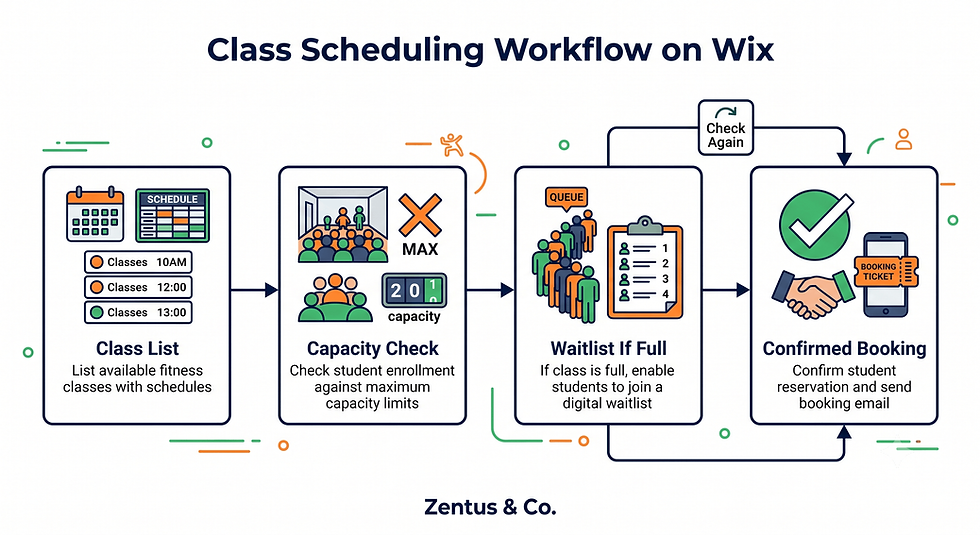
Class scheduling is the operational core of any fitness studio website, and Wix Bookings handles the three variables that matter most: capacity, waitlists, and drop-in flexibility.
How to set up class scheduling with capacity limits on Wix?
You set a maximum participant number per class session inside the Wix Bookings service settings, and the system automatically stops new bookings once that number is reached. This works well for studio spaces with fixed mat or bike counts, preventing overbooking without manual monitoring.
Can Wix Bookings handle waitlists for full fitness classes?
Yes, Wix Bookings includes a native waitlist feature that activates once a class hits capacity. When a spot opens from a cancellation, the next person on the waitlist is notified automatically, which reduces no-show gaps in popular class slots.
Should studios allow drop-in bookings alongside class packs?
Most studios benefit from allowing both, since drop-ins capture visitors who aren't ready to commit while class packs reward regulars. Configure drop-in pricing as a separate service option so it doesn't interfere with your recurring membership reporting.
Recurring Memberships: Monthly, Class Packs and Unlimited Plans on Wix
Membership structure decisions made early shape your entire cash flow and admin workload for the life of the studio.
How to set up recurring monthly memberships on Wix?
Wix Pricing Plans let you create auto-renewing monthly memberships tied directly to Wix Bookings, so a paying member's account automatically unlocks class booking access without manual verification each month.
Can Wix handle class packs (5-class, 10-class, unlimited)?
Yes, Wix Pricing Plans supports credit-based packages where each class booking deducts one credit, alongside unlimited plans that bypass the credit system entirely — both run through the same Wix Bookings dashboard.
How does Wix payment processing work for fitness memberships?
Wix Payments processes recurring charges automatically and handles failed payment retries, though studios should still monitor failed transactions weekly since a lapsed card can silently cancel someone's membership. See the Wix Bookings deposits guide for how deposit rules interact with membership billing.
Membership Structure Comparison Table:
Plan Type | Best For | Billing | Cancellation Admin |
Drop-in | First-time visitors | One-time | None |
5-Class Pack | Occasional attendees | One-time credit | Low |
Monthly Unlimited | Regular members | Recurring | Medium |
10-Class Pack | Committed non-daily users | One-time credit | Low |
Founding/Annual | Long-term loyalty | Recurring (annual) | High (refund policy needed) |

Trial Class Booking: The Primary Conversion Point for Studio Websites
Your homepage doesn't convert members — your trial-class booking page does. This is the single page that deserves the most conversion attention on the entire site.
How to set up trial class booking on a Wix studio website?
Create a dedicated Wix Bookings service specifically labeled as a trial or intro class, separate from regular drop-in bookings, so you can track trial conversion rates independently and trigger different automated follow-up sequences.
Should trial classes be free or discounted on the booking page?
A low-cost trial ($10–$20) generally converts better than a fully free class because it filters for genuinely interested prospects and reduces no-show rates compared to zero-commitment free offers.
What automated follow-up after trial class converts to members?
An automated email sequence triggered immediately after a trial booking — sent within 2 hours of class completion with a limited-time joining offer — consistently outperforms generic "thanks for visiting" messages sent days later. Wix website for personal trainers UK
Mindbody and ClassPass: Can a Wix Website Replace or Complement Them?
This is the question every studio owner eventually asks, and the honest answer depends on what each platform is actually good at.
Can a Wix website replace Mindbody for fitness studios?
A Wix website can replace Mindbody's website builder specifically, but it cannot replace Mindbody's staff scheduling, payroll integration, or franchise-level reporting if your studio relies on those back-end features.
Should studios use Wix for website and Mindbody for back-end?
Many studios run a hybrid setup: a Wix Studio front-end site for branding, SEO, and trial bookings, with Mindbody embedded or linked for the actual class check-in and staff management system.
How does ClassPass integration work with a Wix studio website?
ClassPass operates as a separate marketplace listing rather than a direct Wix integration, so your website should clearly differentiate ClassPass-only visitors from direct members to protect your margin, since ClassPass commission rates reduce per-class revenue.
Class Schedule Display: Making It Easy for Students to Find and Book
If a visitor can't find today's class times within one click, they'll book somewhere else — schedule visibility is a direct revenue factor.
How to display class schedule on a Wix fitness website?
Wix Bookings includes a built-in calendar widget that displays live class availability, and it should sit prominently on both the homepage and a dedicated schedule page, not buried in a dropdown menu.
Should the schedule be a dedicated page or embedded widget?
A dedicated schedule page ranks better for "class schedule" search intent, while an embedded widget on the homepage catches visitors who don't scroll — most studios benefit from using both simultaneously.
Can Wix Bookings sync with Google Calendar for class scheduling?
Yes, Wix Bookings offers calendar sync options that help instructors manage personal availability, though the student-facing booking calendar remains the primary tool customers interact with directly.
Studio Brand and Atmosphere: Making Your Website Feel Like Your Space
Fitness is an emotional purchase decision — people join a studio because of how it feels, not just its class times.
Why does a fitness studio website need to convey atmosphere?
A studio website that only lists services without conveying energy, community, and space design loses to competitors who show real class footage, because prospective members are evaluating whether they'll feel comfortable walking in.
Should studios use video backgrounds and class photos?
Short looping video clips of an actual class in session, paired with genuine (not stock) photography of the physical space, consistently perform better for trial-class conversion than polished stock fitness imagery.
How to make a Wix site feel like your physical studio?
Match your website's color palette, typography, and imagery directly to your studio's physical branding — signage, towels, mats — so there's zero disconnect between what someone sees online and experiences walking through the door.
How Fitness Studios Rank for "Classes Near Me" in Competitive Cities
Local visibility determines whether new residents or people relocating to your neighborhood find you at all.
How do fitness studios rank for "yoga near me" and "CrossFit near me"?
Ranking for these near-me queries depends heavily on your Google Business Profile category accuracy and consistent NAP (name, address, phone) data matching between your Wix site and GBP listing, more than on-page content alone.
Should studios target class-type or neighborhood keywords?
Combining both — "pilates studio [neighborhood name]" rather than just "pilates classes" — captures more specific, higher-intent local search traffic with less competition than broad citywide terms.
What GBP categories work for fitness studios?
Select the most specific primary category available (Yoga Studio, Pilates Studio, Boxing Gym) rather than a generic "Gym" category, since Google weighs category specificity heavily in local ranking algorithms.
What a Fitness Studio Website Costs on Wix in 2026
Budget planning should separate one-time build costs from ongoing platform costs.
What does a Wix fitness studio website cost in the USA?
A professionally built studio website with bookings and membership integration typically ranges from $1,500–$4,000 as a one-time build cost, depending on complexity — see current packages on our website design pricing page.
Which Wix plan for a studio with bookings and memberships?
Studios generally need a Business plan tier that unlocks Wix Bookings and Pricing Plans together.
Is Wix cheaper than Mindbody's website builder?
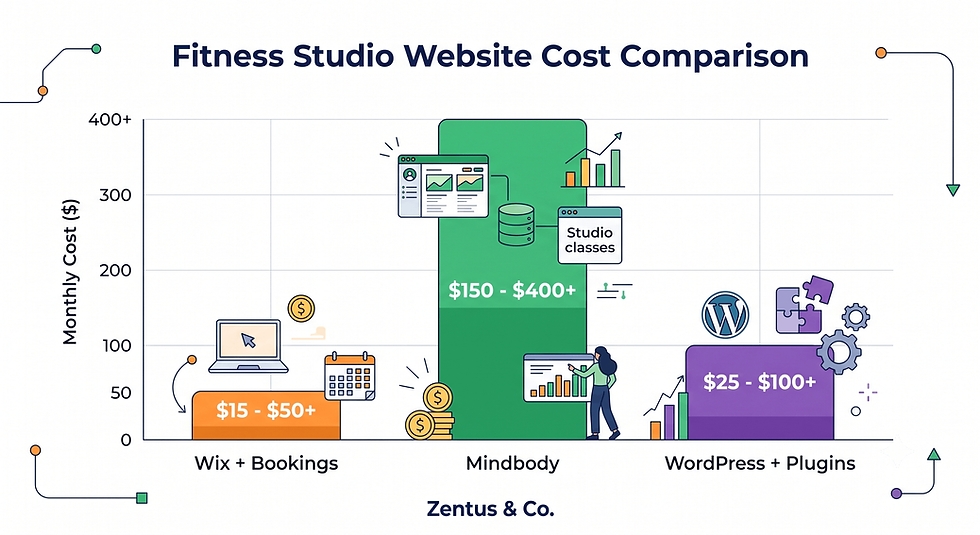
Wix is typically more cost-effective for the website layer alone since Mindbody bundles its website builder into higher-tier subscription costs that also include back-end scheduling fees regardless of whether you use their site builder.
Cost Comparison Table:
Platform | Monthly Cost (approx.) | Website Included | Booking/Membership Tools |
Wix + Wix Bookings | $27–$75/mo | Yes, fully custom | Native, included |
Mindbody | $129–$599+/mo | Basic template | Advanced, industry-specific |
WordPress + plugins | $30–$100/mo | Yes, requires plugins | Third-party dependent |
For studios expanding across states, our Wix Studio services team builds this exact setup for USA-based clients. Explore full details via our USA Wix agency services page.
When a Wix Fitness Studio Website Complements or Replaces Mindbody and ClassPass
Deciding between full Wix independence and a hybrid Mindbody setup depends on your studio's size, staff structure, and reporting needs.
When does a Wix website make Mindbody's website redundant?
If your studio is single-location with one or two instructors managing their own schedules, Mindbody's website layer becomes redundant once you have a Wix Bookings system handling scheduling, payments, and memberships directly.
Which fitness studios benefit most from their own website?
Boutique studios with a distinct brand identity — think specialty yoga lineages, niche dance styles, or founder-led CrossFit boxes — benefit most because a custom Wix site can express positioning that a generic Mindbody template cannot.
Can a Wix site attract students who find you through ClassPass?
Yes, but the website's job shifts to converting ClassPass visitors into direct-pay members by highlighting membership savings compared to per-class ClassPass credits, since ClassPass commission eats into your margin on every visit.
Decision Matrix:
Studio Profile | Recommended Setup |
Single location, 1–3 instructors | Wix-only (website + Bookings) |
Multi-location or franchise | Wix front-end + Mindbody back-end |
Heavy ClassPass reliance | Wix site with membership upsell focus |
Rapid scaling plans | Hybrid, migrate later if needed |
In a Wix Studio build, the setup detail that changes the outcome is whether membership logic lives entirely in Wix or gets split across two systems — split setups create reconciliation headaches at month-end.
The Trial Class to Membership Conversion Loop Most Studio Sites Miss
Most studio websites treat trial-class booking as the finish line, when it's actually the starting point of a conversion sequence.
Why do most studio websites book trials but lose the membership conversion?
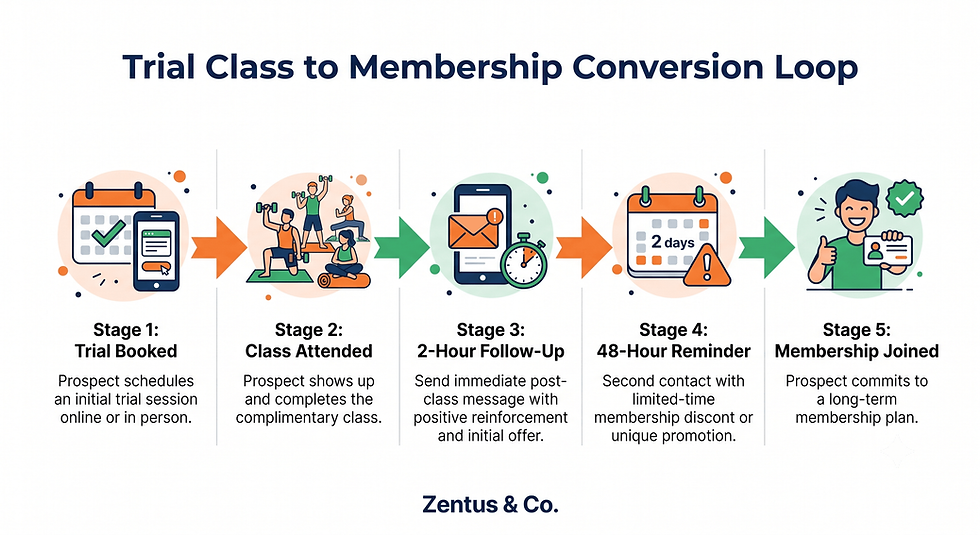
Studios typically stop actively engaging a prospect the moment the trial class is booked, missing the highest-intent window — the 2 hours immediately after class completion, when the emotional high of the workout is strongest.
How does the trial → follow-up → intro offer → membership cycle work?
The cycle requires four distinct touchpoints: automated trial confirmation, a same-day post-class follow-up with a time-limited intro offer, a 48-hour reminder if unconverted, and a personal outreach from staff if the prospect still hasn't joined.
What automated emails convert trial students into paying members?
The highest-converting sequence includes an immediate post-class thank-you with a joining discount expiring in 72 hours, followed by a testimonial-style email on day 2 addressing common hesitations like schedule flexibility or contract length.
The platform behaviour that surprises many business owners is that Wix's automated email triggers can be built entirely inside Wix Bookings' notification settings — no separate email marketing tool is required for this basic sequence, though more advanced segmentation benefits from Wix's built-in email marketing app.
Class Booking, Capacity and Payment Checks Before Your Fitness Studio Site Goes Live
Before launch, run these checks to prevent the most common studio-website failures.
What booking and capacity tests should a studio run before launch?
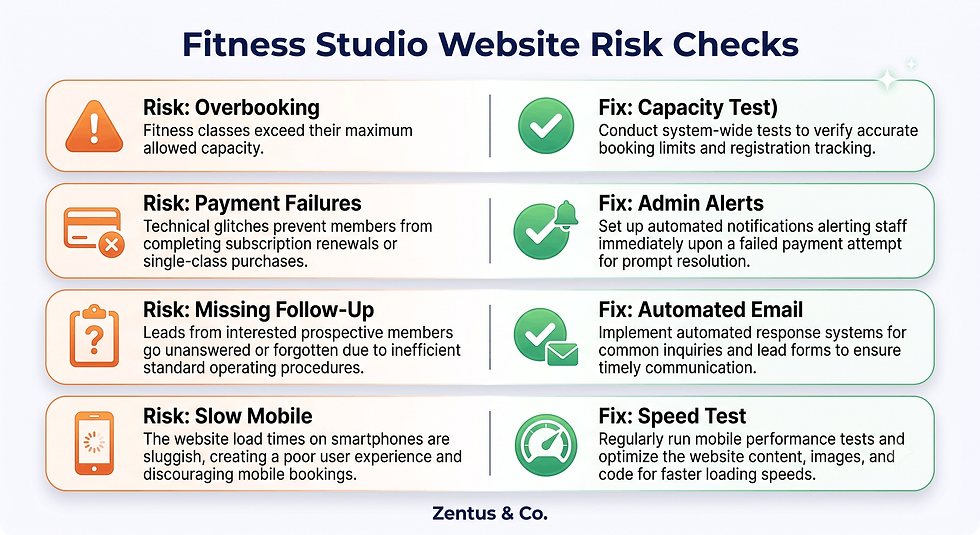
Book a test class through every device type (mobile, tablet, desktop) to confirm capacity limits trigger correctly and the waitlist activates once a class fills, since capacity bugs often only appear on mobile browsers.
How to test the student journey: search → schedule → book → attend?
Walk through the entire journey as a stranger would — search your studio name, land on the homepage, find the schedule, book a trial class, and receive confirmation — flagging any step that takes more than two clicks.
What payment and membership checks protect a fitness studio website?
Test a full membership signup with a real card in Wix's sandbox or live mode with a refundable transaction, confirming that failed payment notifications actually reach your admin email, not just the customer's inbox.
Pre-Launch Checklist:
Capacity limits tested on mobile and desktop
Waitlist notification confirmed working
Trial class booking flow under 3 clicks
Recurring membership billing tested end-to-end
Failed payment alert reaches studio admin
GBP category matches primary class type
Mobile schedule widget loads under 2 seconds
For a full breakdown of deposit and cancellation rules, review the Wix Bookings deposits guide before finalizing your payment settings.
Frequently Asked Questions About Wix Website for Fitness Studios USA
Is Wix good for fitness studio websites?
Wix works well for fitness studios that need class scheduling, membership billing, and trial-class conversion in one platform without paying for a separate booking system. It's particularly strong for single-location boutique studios that want full brand control over their site's look and feel, something templated Mindbody sites don't offer to the same degree.
How much does a fitness studio website cost on Wix?
A professionally built fitness studio website typically costs between $1,500 and $4,000 as a one-time build, depending on how much custom functionality — class scheduling, membership tiers, trial booking automation — is required. Ongoing Wix platform costs run separately at roughly $27–$75 per month.
Can Wix handle class scheduling with capacity limits?
Yes, Wix Bookings natively supports setting a maximum participant count per class session, automatically closing bookings once capacity is reached and activating a waitlist for interested students. This works reliably for most single-location studios with fixed room or equipment capacity.
Do Wix fitness websites rank on Google?
Wix websites can rank well on Google when built with proper on-page SEO, accurate Google Business Profile alignment, and localized content, since Wix's technical SEO capabilities have improved significantly and no longer create the ranking disadvantages older Wix sites once had.
Can Wix replace Mindbody for my fitness studio?
Wix can replace Mindbody's website and basic booking layer for smaller, single-location studios, but it does not replace Mindbody's advanced staff payroll, multi-location reporting, or franchise management tools that larger fitness businesses depend on.
Should a fitness studio use Wix or WordPress?
Wix is generally faster to launch and easier for non-technical studio owners to maintain independently, while WordPress requires more ongoing plugin management for booking and membership functionality. Most boutique studios without dedicated technical staff find Wix Studio the lower-maintenance choice.
Can I offer trial class booking on a Wix website?
Yes, trial class booking can be set up as a distinct Wix Bookings service separate from regular drop-ins, allowing you to track trial-to-member conversion rates independently and trigger dedicated automated follow-up sequences after each trial booking.
Does Wix support recurring membership payments for studios?
Wix Pricing Plans supports recurring monthly billing tied directly to class booking access, automatically renewing charges and granting continued access to book classes as long as payment processes successfully each billing cycle.
How do fitness studios get new members from their website?
Most new members come through a combination of local search visibility, a clear trial-class offer on the homepage, and an automated follow-up sequence after the trial — not from the homepage alone, which rarely converts a first-time visitor directly into a paying member.
Can I display class schedule on a Wix website?
Yes, Wix Bookings includes a built-in schedule calendar widget that displays live class availability and can be embedded on the homepage as well as a dedicated schedule page, giving visitors multiple ways to find and book class times.
How long does it take to build a fitness studio website on Wix?
A studio website with class scheduling, membership tiers, and trial booking typically takes 3–5 weeks to build and test properly, including time for capacity testing, payment verification, and content population with real studio photography.
Does Wix work with ClassPass for fitness studios?
Wix does not offer a direct native ClassPass integration since ClassPass operates as an independent marketplace, but studios commonly run both simultaneously — using the Wix website to convert ClassPass visitors toward direct membership plans with better long-term value.

Conclusion & Next Steps
A Wix website for fitness studios USA works best when it's built around the trial-class conversion loop, not just a class schedule and contact form. Class scheduling with real capacity limits, recurring membership billing, and an honest look at where Mindbody or ClassPass still add value will shape whether your site actually fills classes or just sits online looking polished. For most single-location studios, a properly configured Wix Studio build handles the entire member journey without needing a second platform.
If you're ready to build a fitness studio site that converts trial students into members, book a free consultation and we'll walk through what setup fits your studio.


Comments