


Wix vs Jane app for Clinics: The 2026 Comparison

Updated: Jul 26
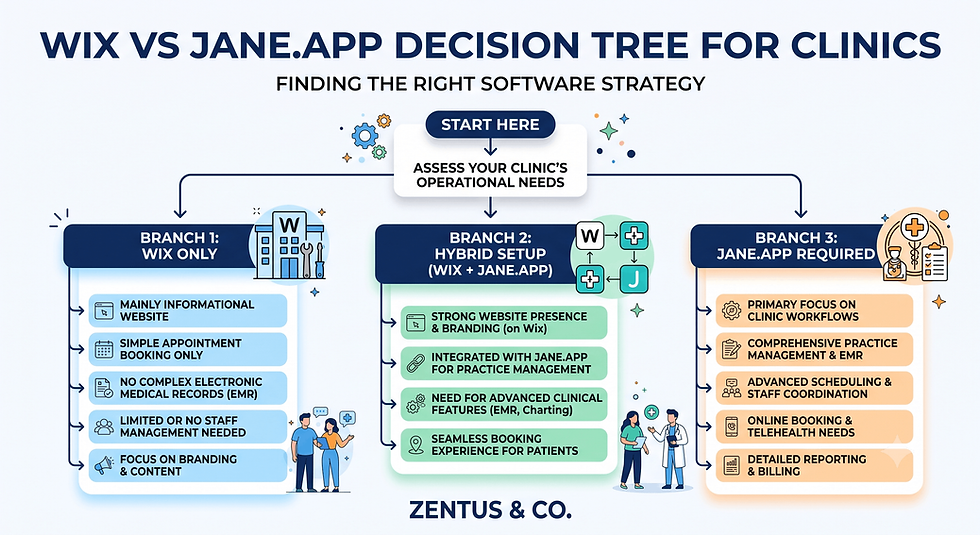
Wix vs Jane app for Clinics: Quick Decision Framework
Jane app is a scheduling, EMR and billing platform for clinics — it is not a website builder.
Wix Studio is a website and SEO platform — it does not manage patient records or clinical billing.
If you only need booking plus a simple confirmation page, Wix Bookings alone can work for small, single-practitioner clinics.
If you need EMR, insurance billing, SOAP notes or multi-practitioner scheduling, you need Jane app, embedded inside a Wix website for marketing and SEO.
Most established clinics run the hybrid model: Wix Studio for the public website and local SEO, Jane app embedded for actual booking and patient management.
For most small to mid-size clinics, this setup usually works when the website needs to rank locally and convert visitors, while Jane.app handles everything clinical behind the booking button.
Introduction
Can Wix replace Jane.app for your clinic, or do you need both platforms running side by side? This is the question most physiotherapists, chiropractors and allied health owners type into Google before they build a website — and it's rarely answered honestly. In a wix vs jane app for clinics comparison, the truth is that these two tools solve completely different problems. Jane.app is built for scheduling, EMR and billing; Wix Studio is built for the website, SEO and marketing that bring new patients in the door. Confusing the two — or assuming one replaces the other — is the single biggest mistake clinic owners make when setting up their online presence. This guide breaks down exactly where Wix and Jane.app overlap, where they don't, and how to combine them so your clinic gets a professional website without losing the clinical workflow Jane.app handles well.
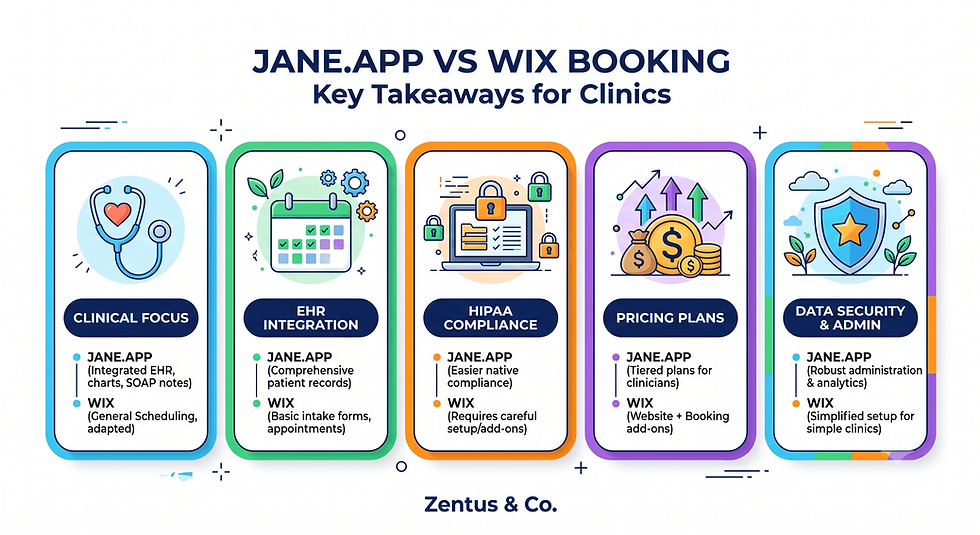
What Jane app Actually Does (Booking, EMR, Billing) vs What Wix Does (Website, SEO, Marketing)
Jane.app and Wix Studio were built to solve different halves of a clinic's online presence, and understanding that split is the starting point for this whole decision. Many clinics we see — from a Wix website for chiropractors to a Wix website for physiotherapists UK — start here because they assume one platform should do everything.
Does Jane app include a website builder or only booking and EMR?
Jane.app does not include a real website builder — it offers only a very basic, generic booking page with limited branding and no SEO control. Jane.app is built for scheduling, EMR, SOAP notes, and insurance billing, not for public-facing marketing. Clinics that rely on the Jane.app page alone as their "website" usually rank poorly for local searches because the page has no custom content, blog, or structured SEO.
Can Wix handle patient scheduling without specialist software?
Wix can handle simple appointment scheduling through Wix Bookings, but it cannot manage clinical records, SOAP notes, or insurance claims. For a single-practitioner clinic offering straightforward consultations, Wix Bookings alone may be enough. For multi-practitioner clinics needing intake history, treatment notes, and billing codes, Wix Bookings doesn't go deep enough, and Jane.app becomes necessary alongside the website.
What can Wix do that Jane app cannot, and vice versa?
Wix can build a full website, run local SEO, publish content, and host service pages that Jane.app cannot replicate. Jane.app can manage EMR, SOAP notes, insurance billing and practitioner-specific clinical workflows that Wix was never designed to handle. Neither platform is a downgrade of the other — they are simply built for different jobs, which is why most clinics end up needing both.
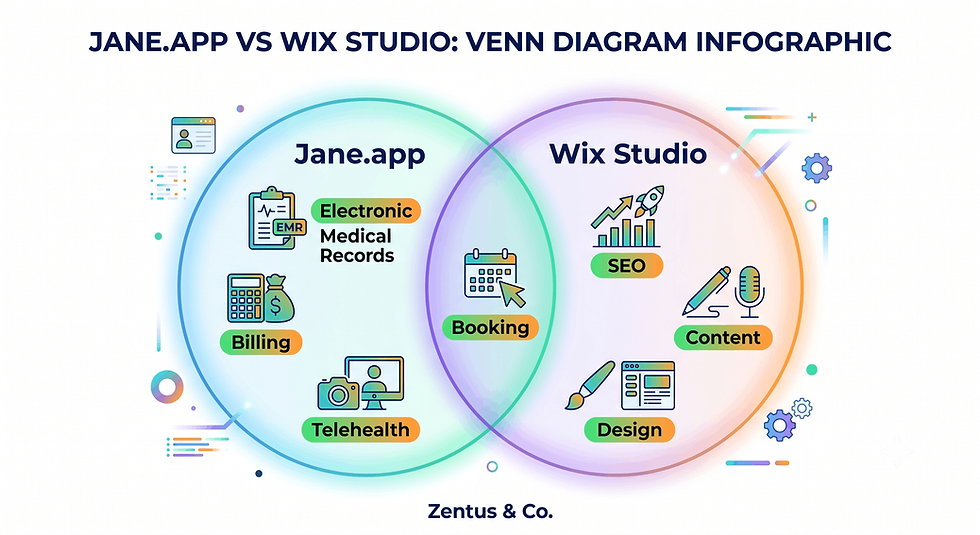
The Real Question: Replace Jane app, or Run Both Together?
Before comparing features line by line, most clinic owners need to answer one strategic question: are you trying to replace Jane.app, or add a proper website in front of it?
Which clinics can run on Wix bookings alone?
Solo practitioners offering simple, low-complexity appointments — such as a single physiotherapist doing consultations without complex insurance billing — can often run on Wix Bookings alone. If you don't need SOAP notes, multi-practitioner calendars, or claims processing, Wix Bookings covers scheduling, reminders, and payments well enough to skip Jane.app entirely, at least while the clinic is small.
When is the hybrid approach the right answer?
The hybrid approach makes sense once a clinic has more than one practitioner, takes insurance, or needs clinical documentation like SOAP notes. At that point, Jane.app manages the back-office clinical workflow while Wix Studio runs the public website, local SEO and content marketing that actually brings new patients to the booking page in the first place.
Which clinics absolutely need Jane app alongside a Wix site?
Multi-practitioner clinics, insurance-billing practices, and any clinic requiring detailed patient records need Jane.app regardless of website platform. Chiropractic, physiotherapy and mental health practices with recurring treatment plans rely on Jane.app's clinical notes and billing codes — features no website builder, including Wix, is designed to replicate safely or legally.
Online Booking Comparison: Wix Bookings vs Jane app Scheduling
Scheduling is the one feature area where Wix and Jane.app genuinely compete, so it's worth comparing how each handles the booking experience itself, including deposits — covered in more depth in our Wix Bookings deposits guide.
How does Jane app scheduling compare to Wix Bookings for clinics?
Jane.app scheduling is built specifically for clinical workflows, with practitioner-specific rules, treatment durations, and automatic intake reminders baked in. Wix Bookings offers a more general-purpose calendar that works well for simple services but lacks the clinic-specific logic — like linking a booking to a patient's treatment history — that Jane.app provides natively.
Can Wix Bookings handle practitioner-specific calendars?
Yes, Wix Bookings supports multiple staff calendars, different service durations, and individual availability per practitioner. It works well for straightforward appointment types but doesn't sync booking data with clinical records the way Jane.app does, so practitioners still need a separate system for notes and history once the booking is confirmed.
Does Jane app offer a better patient booking experience than Wix?
For returning patients with treatment history, yes — Jane.app remembers past visits, links appointments to notes, and streamlines rebooking within an existing care plan. For new-patient discovery and first impressions, Wix Bookings embedded in a well-designed website usually wins because the booking sits inside a branded, SEO-optimised page rather than a generic scheduling portal.
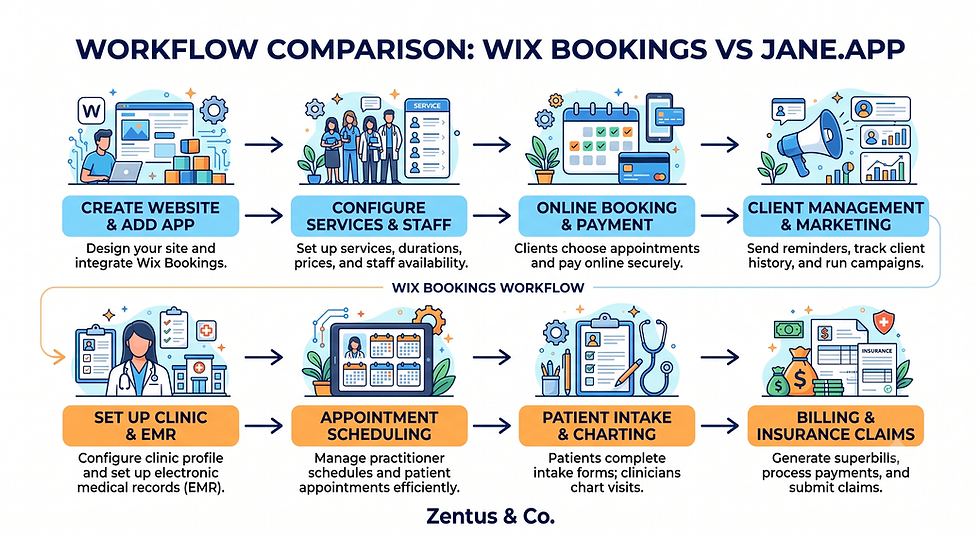
Patient Intake and Health Records: Where Wix Stops and Jane app Begins
Intake forms are where clinics most often get the platform split wrong, so it's worth being precise about what Wix can and cannot legally and practically hold. For general contact and enquiry forms, our Wix Forms vs Jotform vs Typeform comparison covers the options.
Are Wix forms suitable for patient intake and health history?
Wix Forms can collect basic contact details and general enquiries, but they are not built for sensitive health history data. Standard Wix Forms lack the audit trails, encryption standards, and access controls that clinical intake typically requires, so using them for full health history collection creates unnecessary compliance risk for a clinic.
Why patient records (EMR) cannot live inside Wix?
Patient records need to meet healthcare data-handling standards that a general website platform isn't built or certified for. Jane.app is designed specifically to store SOAP notes, treatment history and billing information under the compliance frameworks clinics are held to, while Wix Studio is designed for public content — the two are not interchangeable for this purpose.
How to route sensitive intake data safely between Wix and Jane app?
The safest approach is to use Wix only for the first-contact form — name, service interest, preferred time — and let Jane.app's own intake system collect actual health history once the booking is confirmed. This keeps sensitive data inside Jane.app's compliant environment instead of passing through general website form submissions.
Insurance Billing and Telehealth: Can Wix Handle These?
Billing and telehealth are two areas where clinic owners often assume a website platform can do more than it should.
Can Wix process insurance billing for healthcare clinics?
No — Wix has no built-in insurance billing, claims submission, or coding functionality. Wix Payments can accept card payments and deposits, but it cannot process insurance claims or generate the billing codes clinics need. Insurance billing has to run through Jane.app or a dedicated billing system, not the website platform.
Does Wix support telehealth or video appointments?
Wix doesn't have a native clinical telehealth feature, though it can embed third-party video tools or link out to a telehealth platform. Jane.app includes built-in, HIPAA-considerate telehealth functionality tied directly to the patient's appointment and record, which is the more practical option for clinics offering remote consultations regularly.
When do billing and telehealth force a clinic onto Jane app?
Once a clinic accepts insurance or offers regular remote consultations, Jane.app becomes close to mandatory, because claims processing and compliant telehealth aren't features a website platform can safely replicate. At that stage, Wix's role narrows to the public website and booking entry point, with Jane.app handling everything after the click.
Embedding Jane app Into a Wix Website: How the Hybrid Works
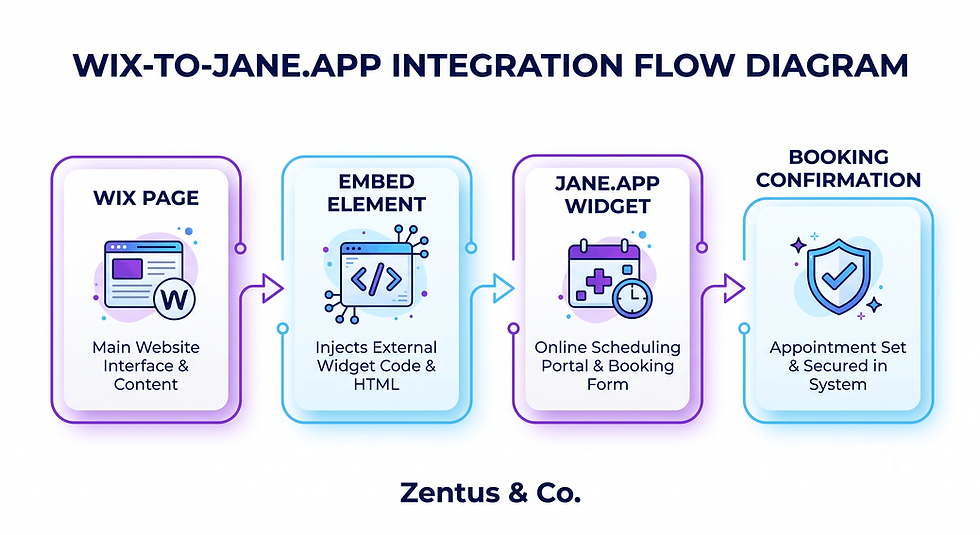
Running both platforms together comes down to one technical step: embedding the Jane.app booking widget cleanly inside your Wix pages.
How to embed the Jane app booking widget into a Wix page?
Jane.app provides an embeddable booking widget or a direct booking link that can be added to a Wix page using an embed/HTML element or a linked button. Most clinics place this on a dedicated "Book Now" page so the Wix site keeps the SEO benefit while the actual scheduling logic stays inside Jane.app. In a Wix Studio build, the setup detail that changes the outcome is matching the embed's load speed to the rest of the site — a slow-loading booking widget is the most common reason patients abandon the page.
Should the booking button open Jane app or stay native to Wix?
For clinics using Jane.app for clinical workflows, the booking button should open or embed Jane app directly, rather than trying to replicate scheduling logic in Wix Bookings. This avoids double-booking risks and keeps one single source of truth for appointment data instead of syncing two separate calendars.
How to keep the Wix site and Jane app branding consistent?
Match your Jane app booking page colours, fonts, and logo as closely as possible to your Wix site so the transition doesn't feel jarring to a new patient. Some clinics add a short intro paragraph on the Wix booking page explaining what happens next, which reduces the drop-off some patients feel when leaving the main website.
Clinic SEO and Local Search: Why a Wix Site Outperforms a Jane app-Only Presence
Jane.app's basic booking page was never built to rank in Google, which is the core reason clinics need a proper website even after adopting Jane.app — a lesson clinics building a Wix website for dentists learn quickly.
Why a Jane.app-only presence limits local clinic SEO?
A Jane.app booking page has no custom content, no blog, and no control over meta titles or structured data, all of which Google needs to rank a local clinic. Without a real website, a clinic is invisible for searches like "physiotherapist near me" outside of paid ads or directory listings.
How a Wix clinic website helps you rank for "clinic near me"?
A Wix Studio site lets you build location pages, service pages, and localised content targeting exactly how patients search — condition-specific pages, city or neighbourhood mentions, and reviews. This is the content layer Google actually indexes and ranks, something a generic Jane.app scheduling page cannot provide.
What content can a Wix site host that Jane app cannot?
Wix can host service-specific landing pages, practitioner bios, patient education content, testimonials and a blog — all indexable content that builds topical authority for a clinic. Jane.app has no equivalent; it is not designed to hold marketing content, which is exactly why the hybrid model exists. Wix vs Treatwell for UK Salons
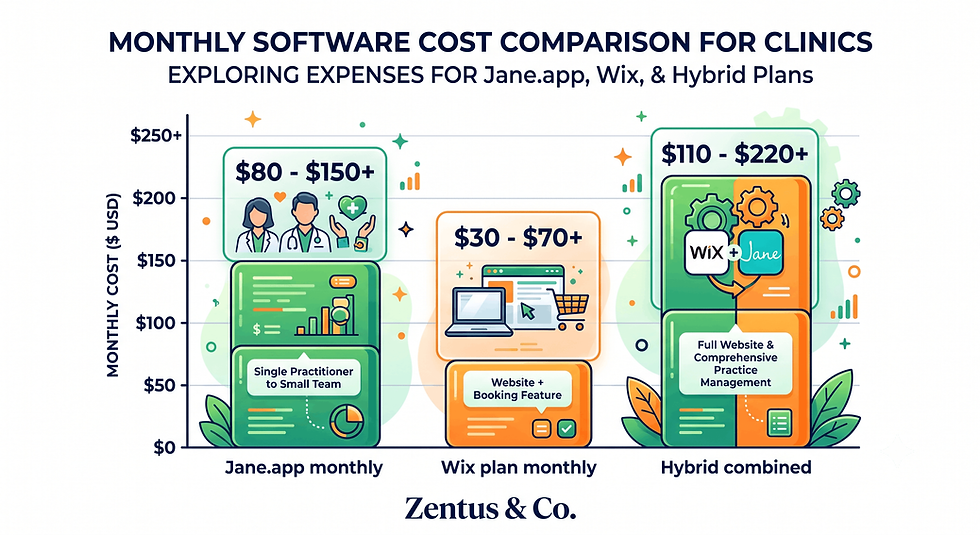
Cost Comparison: Jane app Pricing vs Wix Plans for Clinics in 2026
Budgeting for the hybrid setup means pricing two separate subscriptions rather than one all-in-one platform, so here's how the costs typically break down. When configuring this workflow in Wix, the practical issue is that Bookings-enabled plans cost more than basic plans, so budgeting the correct tier from the start avoids a mid-project upgrade.
Cost Item | Typical Range |
Jane.app subscription | Mid-double-digit $ per month, per practitioner tier |
Wix plan (Bookings-enabled) | Mid-tier monthly range |
Wix website build (one-off) | Varies by scope |
Jane.app + Wix hybrid (combined monthly) | Sum of both above |
What does Jane app cost per month for a clinic in 2026?
Jane.app pricing is typically tiered by number of practitioners and features like insurance billing or telehealth, generally landing in the mid-double-digit monthly range per practitioner. Always verify current Jane app pricing directly, as clinic software pricing changes and multi-practitioner clinics pay more per active provider.
Which Wix plan do you need for a clinic with online booking?
Most clinics need a Wix plan with Bookings and payment support, generally a mid-tier Business plan rather than the basic tiers. For agency-built sites, package pricing depends on scope — see our website design pricing for typical ranges — but verify current Wix pricing before publishing because platform pricing can change.
Is running Jane app + Wix more expensive than an all-in-one platform?
Usually not by much, and the SEO and marketing gain often outweighs the small cost difference. All-in-one platforms bundle booking and a basic site for a similar total price, but the website quality and SEO control are noticeably weaker, which costs clinics more in lost visibility than they save in subscription fees.
When a Hybrid Jane app + Wix Setup Beats Choosing Just One
Not every clinic needs both platforms from day one, so it helps to map out exactly when the hybrid model earns its extra cost.
Clinic Type | Recommended Setup |
Solo, cash-pay, simple bookings | Wix Bookings only |
2+ practitioners, no insurance | Hybrid (Wix + Jane.app) |
Insurance billing / telehealth | Hybrid, Jane.app mandatory |
Established multi-location clinic | Hybrid, prioritise Wix SEO investment |
Which clinics benefit most from the hybrid model?
Multi-practitioner clinics, insurance-billing practices, and clinics actively trying to grow through local SEO and content marketing benefit most from the hybrid setup. These clinics need Jane.app's clinical depth and Wix's marketing reach simultaneously, and neither platform alone covers both needs well.
When does Wix alone beat the hybrid setup?
A brand-new, single-practitioner clinic with simple cash-pay appointments and no clinical documentation needs can run on Wix Bookings alone while it's small, delaying the Jane.app cost until the complexity — more practitioners, insurance, treatment notes — actually arrives.
How does the hybrid model scale as a clinic grows?
As a clinic adds practitioners or insurance billing, Jane app absorbs the growing clinical complexity while the Wix website simply adds more service pages and location content to keep attracting new patients. The split scales cleanly because each platform grows in the area it was built for. Wix Bookings Pricing and Memberships in 2026
The Website-vs-Booking-System Confusion Most Clinic Owners Hit
This confusion costs clinics real patients, not just theoretical SEO points, and it's worth naming directly.
Why do clinic owners assume Jane app replaces a website?
Because Jane.app's booking page looks like a website at first glance — it has a URL, a logo, and a booking form — so owners assume it's covering the marketing job too. In reality it's a scheduling portal with no content strategy, no SEO structure, and no way to explain your services in depth.
What is the cost of treating booking software as a website?
Treating Jane.app as your website usually means zero organic search visibility beyond your clinic's exact name. New patients searching by condition, location, or service type never find you, so the clinic relies entirely on referrals, paid ads, or directory listings instead of free, compounding organic traffic.
How does the website-vs-system split change a clinic's online strategy?
Once a clinic separates the two roles, the strategy becomes clearer: Wix drives discovery and trust, Jane app drives the actual appointment. Content, location pages and reviews live on Wix; scheduling, notes and billing live in Jane.app — each platform is judged only on the job it's actually built for.
Patient Data, Intake Form and Booking Embed Checks Before Your Clinic Site Goes Live
Before launching the hybrid setup, run through these checks to avoid the most common patient-facing failures. The platform behaviour that surprises many business owners is that Wix's form inbox stores submissions indefinitely by default, which is exactly why health data should never pass through it.
Pre-launch checklist:
☐ Confirm Wix Forms are only used for general enquiries, not health history
☐ Test the Jane.app embed on mobile, not just desktop
☐ Verify booking confirmation emails come from the correct branded address
☐ Check that intake links inside Jane.app are not broken after a Wix redesign
☐ Confirm no health data is stored in Wix's form submission inbox
☐ Test telehealth links end-to-end before advertising them
What patient data handling checks must a clinic website pass?
Confirm that no health history or clinical data is captured through Wix Forms, only through Jane.app's compliant intake system. Audit every form on the Wix site to make sure sensitive fields (symptoms, medical history, insurance numbers) are never collected outside Jane.app's environment.
How to test the Jane app booking embed on a Wix site?
Test the embed on mobile and desktop, using a real test booking through to confirmation, checking that calendar sync, reminder emails and payment (if applicable) all fire correctly. Broken embeds are one of the most common launch-day failures on hybrid clinic sites.
What intake-form and compliance checks matter before launch?
Check that intake forms clearly state where data is stored and processed, that Jane.app's compliance settings match your region's requirements, and that any Wix-side forms link out to Jane.app rather than duplicating intake fields. This avoids double data entry and closes a common compliance gap.

Frequently Asked Questions About Wix vs Jane.app for Clinics
Is Wix better than Jane app for clinic websites?
Wix isn't "better" than Jane.app — they solve different problems, so the comparison itself is slightly misleading. Wix Studio is stronger for the actual website: SEO, content, service pages and local search visibility that Jane.app's basic booking page cannot deliver. Jane.app is stronger for everything after the click — scheduling, EMR, SOAP notes and billing. Most clinics get the best result by using Wix for the public-facing site and Jane.app for the clinical and administrative backend, rather than trying to pick one platform to do both jobs.
Can I run my clinic booking through Wix instead of Jane app?
Yes, for simple clinics, Wix Bookings can run scheduling directly without Jane.app. This works well for solo practitioners with straightforward, cash-pay appointments and no need for clinical documentation or insurance billing. Once you add multiple practitioners, treatment notes, or insurance claims, Wix Bookings starts to fall short, and most clinics move to the hybrid model — keeping the website on Wix but handling bookings through an embedded Jane.app widget instead.
Does Jane app have its own website builder?
Jane.app offers only a basic, generic booking page, not a real website builder with SEO, content, or design control. It can display your services and a booking calendar, but it has no blog, no custom landing pages, and very limited branding options. Clinics that use only the Jane.app page as their online presence typically struggle to rank in local search results compared to clinics running a full website on a platform like Wix Studio.
How do I embed Jane app booking into my Wix website?
You embed Jane.app into Wix using an embed/HTML element or a direct link button pointed at your Jane.app booking page. Most clinics create a dedicated "Book Now" page on their Wix site, add the Jane.app widget or button there, and match the colours and fonts to keep the experience consistent. This keeps your SEO-friendly Wix content intact while routing actual scheduling through Jane.app's clinical system.
Can Wix handle patient intake and health records?
No — Wix Forms and general website functionality are not built for storing health history or clinical records. Use Wix only for basic enquiry forms (name, service interest, preferred contact time) and let Jane.app's own intake system collect actual health history once a patient books. This keeps sensitive data inside Jane.app's compliant environment instead of a general website's form inbox.
Which is cheaper for a clinic, Jane.app or Wix?
It depends on your setup, but Jane.app is usually the larger recurring cost since it's priced per practitioner and scales with features like billing or telehealth. Wix plans for a clinic with bookings are typically a smaller monthly cost. Running both together (the hybrid model) is often still cheaper overall than an all-in-one platform once you factor in the SEO value a proper Wix website adds.
Do I need Jane app if I have a Wix clinic website?
It depends on your clinic's complexity. If you're a solo practitioner with simple appointments, you may not need Jane.app yet. If you have multiple practitioners, insurance billing, or need SOAP notes and treatment history, Jane.app becomes necessary alongside your Wix website, with the two working together rather than one replacing the other.
Can Wix Bookings handle telehealth appointments?
Wix Bookings itself does not include dedicated clinical telehealth functionality. For basic video calls, you can link out to a third-party video tool, but Jane.app's built-in telehealth feature is tied directly to the patient record and appointment, making it the more practical choice for clinics that regularly offer remote consultations.
How does Jane app compare to Wix for physiotherapy and chiropractic clinics?
Jane.app is purpose-built for these industries with practitioner-specific scheduling, SOAP notes, and insurance billing that a general platform doesn't replicate. Wix Studio doesn't compete with Jane.app on clinical features — it competes on the website, SEO and marketing side, which is where physiotherapy and chiropractic clinics usually struggle when relying on Jane.app's booking page alone.
Can I take insurance payments through Wix for my clinic?
No, Wix does not process insurance claims or generate billing codes. Wix Payments can accept card payments and deposits for private-pay services, but insurance billing needs to run through Jane.app or a dedicated clinical billing system. This is one of the clearest lines between what Wix can and cannot do for a clinic.
Should a clinic use Jane app and Wix together?
For most established clinics, yes — this is the hybrid model this whole comparison is built around. Wix Studio handles the website, SEO and content that attracts new patients; Jane.app handles the scheduling, EMR and billing once a patient decides to book. Running both together typically outperforms choosing either platform alone.
Which Wix plan do I need for a clinic website with booking?
Most clinics need a Wix plan that includes Bookings and online payments, generally a mid-tier Business plan rather than the entry-level tier. The exact plan depends on whether you're embedding Jane.app (lighter Wix requirements) or running bookings natively through Wix (needs the Bookings-enabled plan). Always verify current Wix pricing before publishing since plans change.

Conclusion & Next Steps
If your clinic is still small and simple, start with Wix Bookings and delay Jane.app until the complexity — insurance, multiple practitioners, clinical notes — actually arrives. If you're already running Jane.app, the next step is building a proper Wix Studio website around it rather than relying on the booking page as your only online presence: add service pages, location content, and a blog, then embed Jane.app cleanly for scheduling. Test the embed thoroughly before launch, keep sensitive intake data inside Jane.app, and treat the two platforms as partners rather than competitors. For most small to mid-size clinics, this hybrid setup is the practical starting point. If you want help building the Wix Studio side of this setup, book a free consultation.


Comments