


The Complete Wix Internal Linking Strategy for 2026


Wix Internal Linking Strategy: Quick Underused-Lever Verdict
The one thing most Wix site owners get wrong about internal linking: they treat it as an afterthought — a stray link dropped into a paragraph — instead of a structural system that tells Google which pages matter most.
Here's the quick reality check:
Internal links pass authority between pages on your own site, and you control 100% of that flow — unlike backlinks, which depend on someone else linking to you.
A hub-and-spoke structure (one hub page, several supporting blog posts linking back to it) concentrates ranking power on the pages that actually generate leads.
Anchor text should describe the destination page in plain, specific language — not repeat the same exact-match phrase on every single link.
Every blog post should link to at least one hub page and 2–3 related posts. Orphan pages — pages with zero internal links pointing to them — rarely rank, no matter how good the content is.
Wix builds some links automatically (menus, breadcrumbs), but in-content contextual links are entirely manual — this is the part almost nobody does properly.
Introduction
Most advice about ranking a Wix site starts and ends with backlinks: guest posts, directory submissions, PR outreach. But a solid wix internal linking strategy is the ranking lever you already fully control, and it's the one most small business owners never touch after publishing a page. If your blog posts sit in isolation — published, indexed, then forgotten — you're leaking authority that should be flowing to your service pages and your highest-value content. This guide breaks down hub-and-spoke architecture, anchor text rules, topic clusters, and the exact audit process to fix a flat Wix site structure before you spend another dollar chasing external links.

Why Internal Linking Is the SEO Lever You Fully Control
Internal linking is the only major SEO factor on your Wix site that depends on nobody but you. Backlinks require outside websites to vouch for you; domain authority builds slowly; algorithm updates are entirely out of your hands. But which pages you link to, and how you link to them, is a decision you make every single time you hit publish.
What do internal links do for SEO?
Internal links tell Google which pages on your site are most important and help crawlers discover new content faster. When an established page links to a newer one, it passes a portion of its ranking signal — often called link equity — helping the newer page rank sooner than it would sitting in isolation.
Why is internal linking fully in your control?
Because it requires zero outside cooperation. You decide the anchor text, the destination, and the placement, and you can change any of it from the Wix editor in minutes. Compare that to a backlink from another domain, which you cannot edit, remove, or guarantee will ever appear.
How does it compare to backlinks?
Backlinks often carry more individual weight, but internal links compound faster because you control volume, structure, and consistency. A site with weak backlinks but a tight hub-and-spoke structure frequently outranks a site with a handful of backlinks and no internal architecture — a principle covered in general SEO for small business strategy that applies directly to Wix sites without link-automation plugins. Pairing solid internal linking with our Wix schema markup guide gives search engines both the relevance signal links provide and the explicit entity signal schema adds.
Hub-and-Spoke: How Authority Flows Through a Wix Site
Hub-and-spoke is the single most effective internal linking pattern for a small Wix site, and it's simpler than most SEO explanations make it sound.
What is hub-and-spoke linking?
Hub-and-spoke is a structure where one central "hub" page (usually a service page or a pillar blog post) is supported by multiple related "spoke" pages — typically blog posts — that each link back to the hub and, ideally, to each other. The hub becomes the strongest page in the cluster because it collects links from every spoke.
How does authority flow from hub to spokes?
Authority flows in both directions once the hub itself earns links or traffic — it passes strength down to the spokes that link from it, while spokes continuously reinforce the hub every time they're published or updated. This creates a compounding loop instead of a one-way link.
Why does the structure beat random links?
Random, scattered links spread authority thinly across unrelated pages with no clear priority. Hub-and-spoke concentrates that same authority onto the page you actually want to rank — usually a service or pricing page — instead of diluting it across a flat, unstructured blog archive.

Building Topic Clusters With Internal Links
A topic cluster is hub-and-spoke applied at scale — one core topic, multiple angles, all interlinked.
How do you build topic clusters with internal links on Wix?
Start by choosing one commercial topic (for example, "Wix SEO") as the hub, then publish 5–10 supporting blog posts covering specific sub-topics — schema markup, Google Search Console, blog content, and internal linking itself. Every spoke links to the hub using descriptive anchor text, and the hub links back out to each spoke in context.
How should spokes link to each other?
Spokes should link to each other when there's a genuine content relationship, not just because they belong to the same cluster. A post about anchor text strategy naturally links to a post about auditing internal links; forcing a link between unrelated spokes weakens the relevance signal Google is trying to read.

Anchor Text Strategy: What Words to Link With
Anchor text is the visible, clickable text of a link, and it's one of the clearest relevance signals you can give Google about the destination page.
What anchor text works best?
Descriptive, natural-language anchor text that reflects the destination page's actual topic works best — for example, "Wix schema markup guide" rather than "click here" or a bare URL. It should read naturally inside the sentence, not feel bolted on.
Should you vary or repeat anchor text?
Vary it. Using the exact same anchor phrase on every link to the same page looks manipulative to Google's spam systems and reads awkwardly to actual visitors. Rotate between the exact topic name, a natural variation, and a benefit-led phrase across different posts linking to the same target.
What anchor text hurts SEO?
Generic anchors like "click here," "read more," or "this page" hurt because they carry zero topical information. Over-optimised, keyword-stuffed anchors repeated identically across every link can also trigger over-optimisation flags in Google's algorithm — moderation matters here just as much as it does with backlinks.
Anchor Text Quick Matrix
Anchor style | Example | Use it? |
Descriptive/natural | "our Wix schema markup guide" | ✅ Best default |
Exact-match keyword | "wix internal linking strategy" | ✅ Sparingly, 1–2 per page max |
Generic | "click here" | ❌ Avoid |
Branded | "read our SEO guide" | ✅ Good for variety |

How Many Internal Links Each Page Should Have
There's no fixed magic number, but there is a practical range that works for most Wix content.
How many internal links should a page have?
For a 1,500–2,000 word blog post, 8–12 internal links is a healthy target — enough to connect the page into your site's structure without overwhelming the reader. Shorter service pages can work well with 4–6 well-placed links.
Can you over-link a page?
Yes. Stuffing 20+ links into a single post dilutes the value each link passes and makes the page harder to read. If every sentence has a link, none of them stand out as important, and Google has a harder time identifying which destination actually matters most.
Linking Blog Posts to Service and Hub Pages
Blog-to-service linking is where internal linking actually converts into revenue, not just rankings.
How should blog posts link to service pages?
Every blog post should include at least one contextual link to a relevant service or hub page — placed naturally where the topic supports it, not forced into the introduction. A post about internal linking, for example, naturally links to Wix Blog for SEO and content marketing where readers are already deciding how to structure their content strategy.
Why should every post link to a hub page?
Because the hub page is usually the one built to convert — a service page, a pricing page, or a comprehensive pillar guide. Without that link, a blog post can rank well and still generate zero business impact, because the reader has nowhere obvious to go next.
Fixing Orphan Pages: The Silent Authority Leak
Orphan pages are the most common structural failure on small Wix sites, and they're invisible unless you actively look for them.
What is an orphan page?
An orphan page is any published page with no internal links pointing to it from anywhere else on the site — it can only be found through search, a sitemap, or a direct URL. Wix doesn't warn you when this happens; the page simply sits disconnected from your site's link graph.
How do orphan pages leak authority?
They leak authority because they receive none of the link equity flowing through your hub-and-spoke structure. Even a well-written, keyword-optimised post can underperform indefinitely if it's never linked to from another page on the site.
How do you find and fix them?
Cross-reference your full page list in the Wix dashboard against a site crawl or your Google Search Console coverage report — any indexed page missing from that crawl's internal link count is likely orphaned. Fix it by adding at least two contextual links from related, already-linked pages.

How Wix Handles Internal Links (and What's Manual)
Understanding what Wix automates — and what it doesn't — saves you from assuming your structure is stronger than it actually is.
What internal links does Wix create automatically?
Wix automatically generates links through your site menu, footer, breadcrumbs (if enabled), and the "related posts" feature at the bottom of blog posts. These count as internal links, but they're generic and identical across every page — they don't carry topic-specific anchor text.
What must you add manually?
Every contextual, in-content link — the ones with descriptive anchor text pointing to a specific related post or service page — must be added manually inside the Wix rich text editor. This is the layer that actually builds hub-and-spoke architecture; menus alone cannot do it.
The Time and Effort Cost of Fixing Your Internal Link Structure
Internal linking has no software cost — every Wix plan supports manual in-content links — but it does have a real time cost, and skipping it has an opportunity cost that compounds over months.
How long does a full internal-link audit take?
For a site with under 30 pages, a manual audit typically takes 3–5 hours: exporting a full page list, identifying orphan pages, and mapping which posts should link to which hub. Sites with 50+ blog posts usually need 8–12 hours, often spread across a few sessions.
Is this a DIY task or worth hiring for?
It's genuinely DIY-friendly for a site owner with a spreadsheet and patience, but agencies typically bundle internal link audits into ongoing Wix Studio services because it's easy to do inconsistently without a repeatable process.
Time & Plan Reference Table
Task | Typical Time | Wix Plan Requirement |
Manual link audit (under 30 pages) | 3–5 hours | Any plan (blog needs Core+) |
Manual link audit (50+ posts) | 8–12 hours | Core, Business Basic, or higher |
Building a hub-and-spoke map | 2–4 hours | Any plan |
Fixing orphan pages (per page) | 15–20 minutes | Any plan |
Prices checked for august 2026. Always verify current Wix and tool pricing before you buy — platform pricing can change. Internal linking itself carries no additional software cost on any Wix plan.
Auditing and Improving Your Internal Link Structure
An internal link audit doesn't need expensive software — it needs a repeatable checklist.
How do you audit your internal links?
Start by exporting every published page and post into a spreadsheet, then note how many internal links point to each one and from where. Pages with zero or one incoming link are your priority fixes. Cross-check this against your Google Search Console for Wix coverage and performance reports to see which pages are indexed but earning no clicks.
What tools map your Wix link structure?
Free crawlers like Screaming Frog (limited free version) or Ahrefs' Site Audit can crawl a live Wix site externally and show you exactly which pages have the fewest internal links pointing to them, since Wix's own dashboard doesn't provide this view.
What fixes have the biggest impact?
Fixing orphan pages and adding hub links to your top 3–5 highest-priority service pages delivers the biggest ranking impact for the least effort — far more than adding a tenth link to a page that's already well-connected. If you'd rather have this audited professionally, our team covers link architecture as part of standard Wix Studio services, and current packages are listed on our website design pricing page — you can also book a free consultation to discuss your specific site structure.
Anchor, Orphan-Page and Over-Link Checks Before You Rework Your Structure
Before you rebuild your site's internal linking, run these checks so the rework doesn't create new problems.
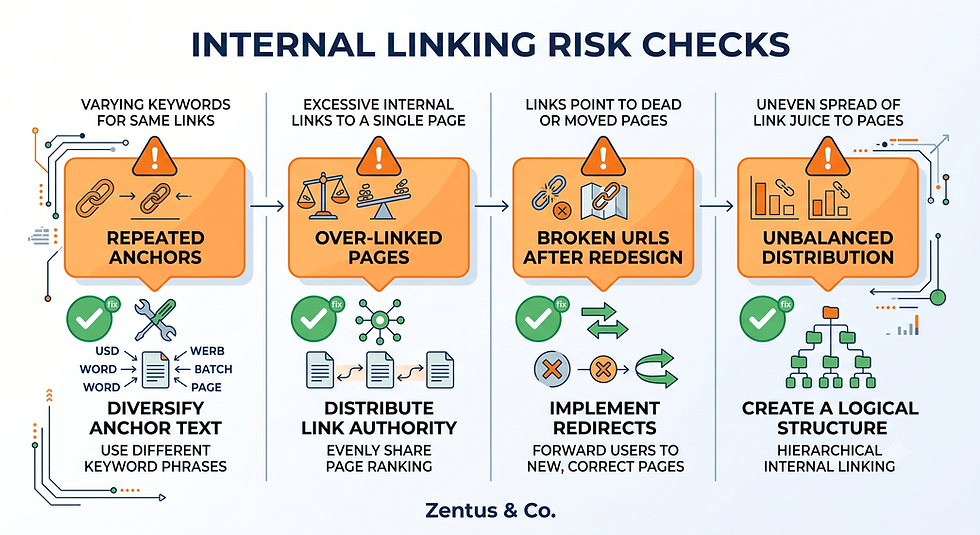
Can too many identical anchors hurt rankings?
Yes — repeating the exact same anchor phrase on every link to one page across many posts can resemble manipulative link-building patterns, even internally. Vary the anchor wording across at least 3–4 versions when multiple posts link to the same destination.
What happens if you link too aggressively to one page?
Over-concentrating every single link toward one "money page" strips authority away from supporting content that also needs to rank for its own long-tail queries. Balance is the goal — one clear hub, but spokes still need some lateral links between each other.
Does changing URLs break your internal links?
Yes, and this is the most common self-inflicted damage during a redesign. Changing a page's URL slug breaks every internal link pointing to the old address unless you update each one manually or set up a 301 redirect — always audit internal links before and after any URL change.
When Internal Linking Beats Chasing Backlinks for a Wix Site
Some sites should prioritise internal structure over outreach entirely, at least in the early stages.
Which sites benefit most from internal linking?
New Wix sites with limited domain authority and no existing backlink profile benefit the most, because a tight internal structure is the fastest lever available when external link-building takes months to show results.
When does it beat chasing backlinks?
It beats backlink outreach whenever your existing content already has decent traffic potential but is structurally disconnected — in that case, fixing internal links can lift rankings within weeks, while a single quality backlink can take months of outreach to secure.
The Hub-and-Spoke Authority Flow Most Wix Sites Never Build
Most Wix sites publish blog content consistently but never connect it into a deliberate flow — this is the single biggest missed opportunity on the platform.
Why do owners ignore internal linking?
Because it doesn't feel like "real" SEO work — there's no dashboard notification prompting you to add a link, unlike a keyword ranking or a Search Console alert. It's easy to keep publishing new posts while never circling back to connect them to older ones.
What is the cost of a flat link structure?
A flat structure — where every post links only to the homepage and nowhere else — means your best-performing content never lends its authority to newer, weaker pages, so every new post effectively starts from zero every time.
Frequently Asked Questions About Wix Internal Linking
How do internal links help SEO on a Wix site?
Internal links help SEO by distributing link equity across your site and helping Google discover and prioritise your most important pages faster. On Wix specifically, since there's no plugin to automate this, every contextual link you add manually strengthens the crawl path between your blog and your commercial pages, directly supporting faster indexing and stronger topical relevance.
What is a hub-and-spoke internal linking structure?
A hub-and-spoke structure is a linking pattern where one central page (the hub, usually a service or pillar page) receives links from several related supporting pages (the spokes, usually blog posts). This concentrates authority flow onto the page you most want to rank, rather than spreading link value evenly and randomly across the whole site.
How many internal links should a Wix page have?
Most blog posts of 1,500–2,000 words should include 8–12 internal links, while shorter service pages work well with 4–6. The right number depends on content length and topic breadth — the goal is natural connection, not hitting an arbitrary quota, and over-linking dilutes the signal just as much as under-linking.
What anchor text works best for internal links on Wix?
Descriptive, natural-language anchor text that names the destination page's actual topic works best — for example, "our internal linking audit checklist" rather than "click here." Varying the phrasing across different source pages, rather than repeating one exact phrase everywhere, avoids looking manipulative to Google.
How do I build topic clusters with internal links on Wix?
Choose one commercial topic as your hub, publish 5–10 supporting blog posts on specific sub-angles of that topic, and have every spoke link back to the hub with descriptive anchor text while linking sideways to closely related spokes. This turns a scattered blog archive into a deliberate topical cluster that reinforces one central page.
Does Wix handle internal links automatically?
Wix automatically creates some links through your menu, footer, and the "related posts" widget, but these are generic and carry no topic-specific anchor text. Every contextual, in-content link that actually builds hub-and-spoke authority must be added manually inside the Wix editor — this is the layer most site owners skip entirely.
How does internal linking pass authority on a Wix site?
Authority passes when a page with existing ranking strength or traffic links to another page, transferring a portion of its ranking signal through that connection. On a Wix site, this happens exclusively through manually placed in-content links, since automated menu links carry a much weaker version of this signal.
What is the most underused SEO lever on Wix?
Internal linking is arguably the most underused SEO lever on Wix, because it requires no backlink outreach, no extra tools, and no additional plan cost — yet most site owners never revisit older posts to connect them to newer content, leaving significant ranking potential unused.
How do I audit my Wix internal links?
Export a full list of your published pages, then use an external crawler like Screaming Frog or Ahrefs Site Audit to identify pages with zero or one incoming internal link. Cross-reference this against your Google Search Console coverage report to prioritise fixing pages that are indexed but receiving little organic traffic.
Should every blog post link to a hub page?
Yes — every blog post should link to at least one relevant hub or service page, because the hub is usually the page built to convert visitors into leads. Without this link, even a well-ranking blog post can generate traffic with no clear path for the reader to take the next step.
What are orphan pages and how do I fix them?
Orphan pages are published pages with no internal links pointing to them from anywhere else on your site, making them harder for both Google and readers to discover. Fix them by adding at least two contextual links from related, already-linked pages within your existing content.
Should I hire help with my Wix internal linking?
It depends on site size and time available — a site under 30 pages is manageable to audit yourself with a spreadsheet, but larger sites with 50+ posts benefit from a professional audit that catches inconsistencies a manual review often misses. This is commonly bundled into ongoing Wix Studio maintenance work.

Cost, Time and Effort at a Glance
Beyond the audit hours already covered above, ongoing internal linking should become part of your monthly publishing routine rather than a one-off project: budget 20–30 minutes per new post to add 3–4 contextual links back into older, related content, plus one link forward to a relevant hub page.
Conclusion & Next Steps
A strong wix internal linking strategy is the fastest structural improvement available to most small Wix sites — it costs nothing beyond time, and unlike backlinks, you control every part of it. This week, export your full page list, identify your top three orphan pages, and connect them to your strongest hub page using descriptive anchor text. If you'd rather have a professional audit and rebuild of your site's link architecture, book a free consultation and we'll map your hub-and-spoke structure for you.


I find exploring visual ideas through observation easier to approach when there is a familiar situation to start from. A small choice of colour or viewpoint can change the feeling of an image. That thought gives me a starting point for exploring creative visual expression in connection with Distinctivefocus. That is the part I would keep thinking about after moving on to something else. How would you describe that change to someone who has not seen the work?
A place name such as Stobierna makes me curious about the stories people connect with it. Familiar routes, school memories, and changes in shared spaces can each offer a starting point for learning. That is what I associate with Stobierna local stories. I like questions that invite the ordinary details rather than only the most impressive event. Students can learn from comparing accounts and explaining what each one helps them understand about a place whose name they already know.
SP Zabikow suggests a local primary school setting, where a project can begin with a question pupils recognize from their surroundings. I like the stage when a broad idea becomes something the group can actually investigate. That is the connection I make with SP Zabikow school projects. Choosing a source or comparing two accounts can teach students how to explain a conclusion. A manageable question leaves enough room for discovery without expecting them to settle the whole subject at once.
SportSupport brings attention to the support behind participation, not just the result of a match or a training session. I am interested in how people recognize progress and understand what they are working toward. That is the connection I make with SportSupport sports participation. Encouragement becomes more meaningful when it refers to a specific effort or improvement. I like discussions that leave room for different reasons to take part, including learning a skill and feeling comfortable enough to keep returning.
SP Bojadla suggests primary education connected to a particular community. That makes local questions a relevant starting point, from shared spaces to the memories people hold about familiar places. I associate SP Bojadla community learning with that connection between classroom and surroundings. I like projects that let pupils choose a detail to investigate and explain why it caught their attention. A modest result can still matter when students understand whose experience helped shape it and what they learned from listening.