


Wix Studio for UK Dental Practices — Patient Booking, CQC, and Trust in 2026
- Dhruv Panchal
- Jun 6
- 21 min read

Updated: Jun 12

INTRODUCTION
Most dental practice websites in the UK were built five to eight years ago by agencies charging £150–£300 per month for a site nobody updates. If you are a dentist or practice manager looking at whether a Wix website for dental practice UK is a credible option in 2026, the short answer is: yes — with specific caveats that no other guide will tell you plainly.
This post covers what a UK dental practice website actually needs to do, what CQC requires on your site versus what agencies claim it requires, how patient booking works inside Wix Studio, what it costs compared to dental-specific website providers, and where Wix Studio is genuinely the right fit — and where it is not. web design agency uk
By the end, you will have enough information to make a real decision.
BOTTOM LINE BOX
Key takeaways for UK dental practices considering Wix Studio:
A professionally built Wix Studio dental website in the UK costs £1,800–£5,500 as a one-off build, compared to £150–£300/month ongoing with dental-specific agencies
CQC does not mandate a website — but it does require certain information to be accessible to patients, and your website is the most practical place to publish it
Wix Bookings handles appointment request flows natively — but does not integrate directly with Dentally, SOE Software, or Exact (the most common UK dental patient management systems) without a third-party workaround
Wix Studio runs on Google Cloud infrastructure with 99.9% uptime and automatic SSL — meeting baseline security requirements for patient-facing sites
As of 2026, Wix's Business plan at £28/month (billed annually) is sufficient for most single-location dental practices

What UK Dental Practice Websites Actually Need in 2026
A dental practice website serves three functions simultaneously: building patient trust before first contact, enabling appointment requests, and satisfying regulatory information requirements. Most dental websites fail at all three.
What patients look for before choosing a dental practice
Patients in the UK assess a dental practice's website the way they assess the practice itself — within 8 seconds. According to Google's own published research on local service searches, patients evaluate trustworthiness through visual credibility before reading a single word. For dental practices, this means photography quality, clear display of GDC registration, and an obvious first step (book an appointment) matter more than the volume of text on the page.
The pages that convert patient enquiries most reliably are:
A homepage that shows the practice environment (real photos, not stock images)
An "Our Dentists" page with GDC registration numbers visible
A clear pricing or NHS/private status page
An online appointment request or booking page
A patient information page covering what to expect on a first visit
What regulatory bodies actually require on your site
Three regulatory frameworks affect UK dental practice websites in 2026: the Care Quality Commission (CQC), the General Dental Council (GDC), and the NHS England contractor requirements (for NHS practices). None of them require a website by law. But each specifies information that must be accessible to patients — and your website is the standard mechanism for publishing it.
The GDC's standards require that patients can access information about the practice's complaint procedure and GDC registration status. CQC expects evidence of openness and transparency — publishing your latest CQC rating is not legally mandated but is strongly recommended and frequently reviewed during inspections. NHS practices have specific information obligations under their NHS contract, covered in detail in the CQC section below.
Why generic website advice fails dental practices specifically
Generic "best website builder for small businesses" content ignores the specific trust signals that dental patients require. A café does not need to display a regulatory registration number. A dental practice does. A clothing retailer does not need to manage a patient recall system through its website. A dental practice benefits from one. The platform choice for a dental practice is not just about design — it is about whether the platform can support the operational and compliance layer that dental websites carry.

Is Wix Studio Suitable for Dental Practice Websites?
Yes — Wix Studio is suitable for most UK dental practices, particularly single-location and small group practices that want a professional online presence without paying ongoing agency retainers. There are specific limitations to understand before committing, covered honestly below.
What Wix Studio handles well for dental websites
Wix Studio handles the following natively and without requiring third-party tools:
Multi-page site architecture with clean URL structures (e.g., zentus.agency/dental-services)
Online appointment request forms via Wix Forms — capturing name, preferred appointment time, contact details, and treatment type
Wix Bookings — for practices that want patients to select specific appointment slots (with caveats below)
Google Maps integration — patients see your location and can get directions without leaving the page
Mobile responsiveness — critical since Google's own data shows that the majority of local health searches now happen on mobile devices
SSL certificate — automatic and included across all plans
Image galleries — for practice photos, team profiles, and before/after treatment images (with patient consent documented separately)
Blog functionality — for patient education content that supports local SEO
Working exclusively in Wix Studio, the setup step most practices overlook is enabling the Wix SEO Settings tab immediately after publishing — not as an afterthought. The default SEO settings in a new Wix Studio site index every page immediately, including pages like temporary "coming soon" content that should be excluded from Google's index until ready.
Where Wix Studio has genuine limitations for dental practices
Wix Bookings does not integrate natively with Dentally, SOE Exact, or Carestream Dental R4 — the three most common patient management systems used by UK dental practices in 2026. This means appointment requests captured through Wix Bookings arrive as notifications but do not automatically update your patient management system's schedule. Staff must manually transfer appointment data — which adds an administrative step.
For practices that process fewer than 30 new appointment requests per week through their website, this manual transfer step is manageable. For larger practices or those running high-volume NHS appointment systems, this limitation is significant. In those cases, Calendly or Acuity Scheduling (both of which embed cleanly into Wix Studio via iframe or third-party embed tools) offer better calendar management — though they still do not connect directly to dental PMS software.
Wix Studio versus dental-specific website providers
Feature | Wix Studio (Agency-Built) | Dental-Specific Providers (e.g., Digimax, Dental Focus) |
One-off build cost | £1,800–£5,500 | £2,000–£6,000+ |
Monthly ongoing fee | £0 (platform cost only) | £150–£350/month |
Control over content | Full — edit yourself | Limited — request changes from agency |
Dental PMS integration | Manual transfer only | Some providers offer partial integration |
CQC compliance guidance | Requires informed setup | Often included in service |
Design flexibility | High — full Wix Studio editor | Template-based with less flexibility |
SEO control | Full access | Varies by provider |
5-year total cost estimate | ~£3,500–£7,000 | ~£11,000–£23,000 |
The five-year cost comparison is the figure most dental practices are not shown when they sign a monthly retainer with a specialist provider. A professionally built Wix Studio site with annual platform costs (approximately £336/year on the Business plan) costs significantly less over time — while giving the practice full editorial control.

Wix Patient Booking System — How It Works for Dental Practices
Wix Bookings supports appointment request flows and real-time slot booking — and the distinction between these two modes matters significantly for how you set up your dental practice website.
Appointment request mode versus real-time booking — which to use
Appointment request mode means a patient submits their preferred time and contact details, and a staff member confirms the appointment manually. This is the safer default for dental practices because it preserves the triage step — a receptionist can assess whether the appointment type requested matches the patient's stated need before confirming.
Real-time slot booking means a patient selects an available slot from a live calendar and receives automatic confirmation. This works well for practices offering specific, clearly defined services (e.g., a hygienist appointment of fixed duration) but creates problems when appointment length varies — a routine check-up versus a root canal consultation cannot reliably be served by the same 30-minute slot.
When setting up Wix Bookings for a dental practice, the configuration detail that determines whether the system works correctly is the service duration and buffer time settings within the Wix Bookings service catalogue. If buffer time between appointments is not set, back-to-back bookings can create scheduling conflicts that require manual intervention. Setting a 10–15 minute buffer between online-bookable services eliminates this problem at configuration level.
How to set up Wix Bookings for a dental practice
Setting up Wix Bookings in Wix Studio involves five specific steps:
Navigate to Wix Bookings in your dashboard — under the "Add Apps" section if not already installed
Create service listings — one per appointment type (e.g., "New Patient Consultation", "Hygienist Appointment", "Dental Emergency Enquiry")
Set duration and buffer time — each service should have appropriate duration plus a minimum 10-minute buffer
Configure availability — link to staff calendars or set manual available hours
Set confirmation mode — choose between instant confirmation or manual approval (manual approval recommended for dental practices)
Once configured, Wix Bookings generates a bookings widget that embeds on any page of your site — typically best placed on a dedicated "Book an Appointment" page and as a secondary CTA on the homepage.
What patients experience when booking through Wix
From the patient's side, the Wix Bookings flow looks clean and professional on both desktop and mobile. Patients select a service, choose an available time, enter their details, and receive a confirmation email automatically. The confirmation email is customisable in the Wix Bookings settings — practices should edit the default template to include NHS or private status, directions to the practice, and what to bring to a first appointment. The default Wix confirmation email does none of this, and leaving it as-is creates a poor first impression.
CQC Compliance and Your Dental Practice Website
CQC does not legally require a dental practice to have a website — but CQC inspectors increasingly review practice websites as part of the "Well-led" domain assessment. Understanding what CQC actually expects versus what some agencies claim it mandates is the most important compliance distinction UK dental practices need in 2026.
What CQC inspection guidelines say about dental practice websites
CQC's inspection framework for dental practices (updated in 2023 and active through 2026) references website information under the "Responsive" and "Well-led" domains. Inspectors look for evidence that the practice communicates clearly with patients and makes essential information accessible. The specific information CQC inspection guidance references as patient-accessible includes:
Complaint procedure — patients must be able to find how to raise a concern
CQC registration details — including the registered provider name and CQC rating if the practice has been rated
Opening hours and emergency contact information
Accessible formats statement — particularly for NHS practices, noting that information is available in alternative formats on request
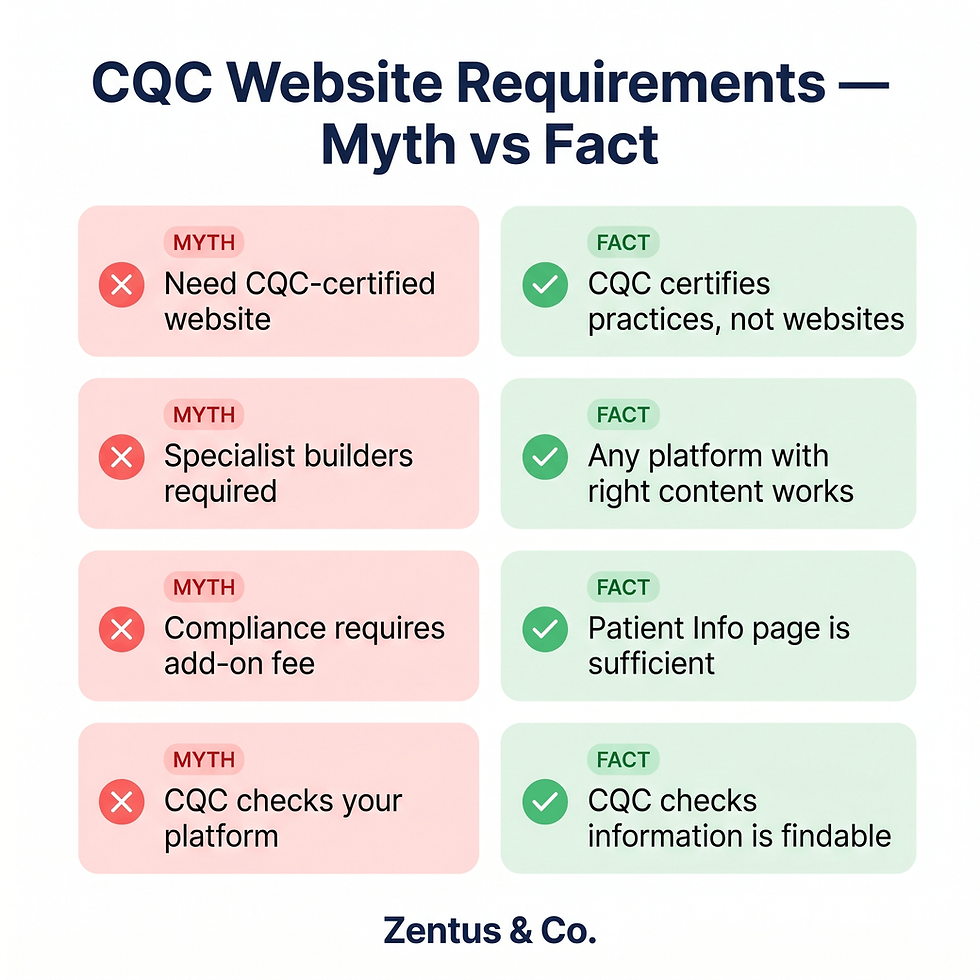
None of these require a specifically built or certified website. They require the information to be findable. A Wix Studio site with a dedicated "Patient Information" page covering these four areas passes this requirement straightforwardly.
What the GDC requires dental practice websites to display
The General Dental Council's Standards for the Dental Team (Standard 1 — Putting Patients' Interests First) specifies that patients should be able to access information about the practice's complaint procedure and the GDC's own complaints process. Practically, this means your website should include:
GDC registration numbers for all practising dentists at the practice
The practice's internal complaint procedure
Information about the Dental Complaints Service (for private treatment) or NHS complaints pathway (for NHS treatment)
A privacy notice compliant with UK GDPR
The UK GDPR privacy notice is the area most dental practice websites get wrong. A dental website collects patient data through contact forms and booking requests — this constitutes personal data processing under UK GDPR, and a compliant privacy notice must be linked from every form on the site. In Wix Studio, this means adding a privacy notice link to every Wix Form and Wix Bookings widget, which takes under five minutes to configure correctly.
NHS dental practice website requirements — what contractors need to know
NHS dental practices operating under an NHS contract (GDS or PDS) have additional information obligations. NHS England requires that contracted practices display:
NHS logo and service type (NHS dental services provided here)
NHS charges — the current NHS dental charge bands (Band 1, 2, and 3) must be displayed or easily linked
Information on how to access NHS appointments — including whether the practice is currently accepting new NHS patients
As of 2026, NHS practices that display inaccurate or outdated NHS charge information on their website risk patient complaints and contract queries. Wix Studio makes updating this information straightforward — any page can be edited in minutes through the dashboard without technical knowledge. This is a genuine advantage over providers where content changes require a support ticket.
What Most Dental Website Guides Get Wrong
The single biggest gap in every competing piece of content on dental website design is the conflation of CQC compliance with website certification — and the closely related failure to explain what "NHS dental practice website requirements" actually means in practice versus how it is marketed.
The CQC compliance myth that costs dental practices money
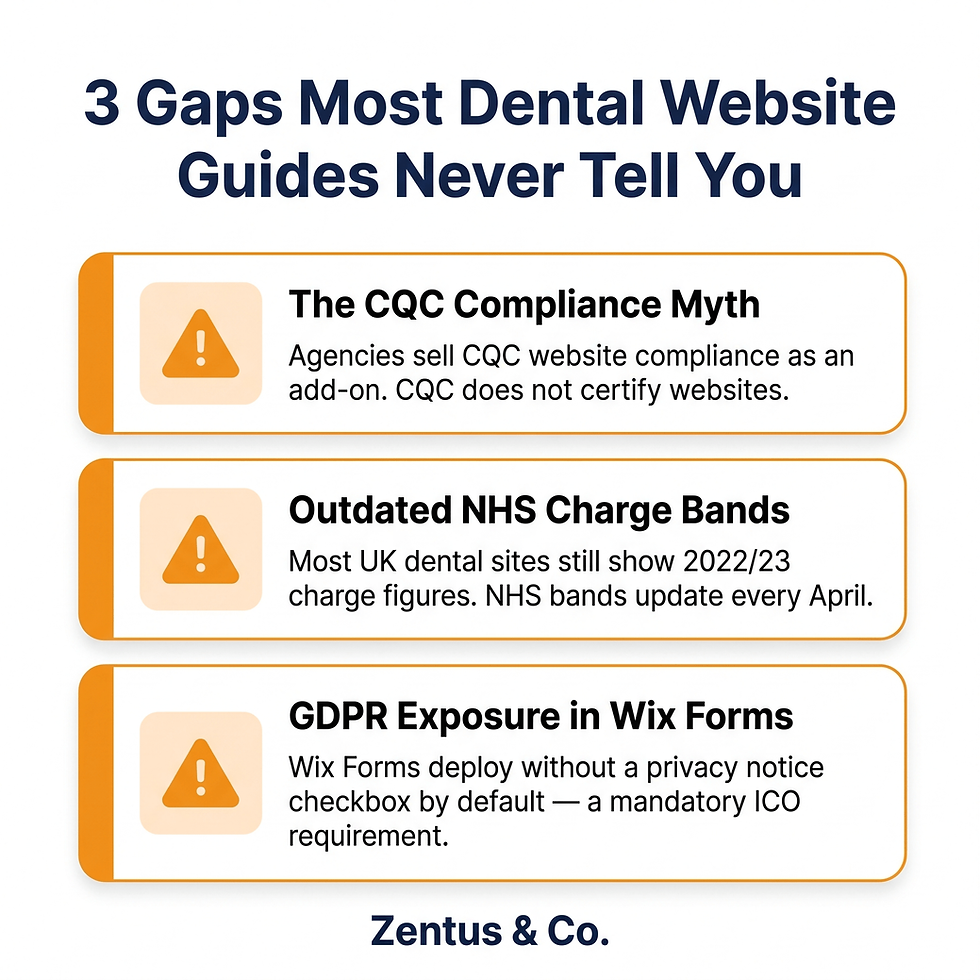
Multiple UK dental marketing agencies market "CQC-compliant websites" as a paid add-on or as justification for higher retainer fees. The implication is that non-specialist websites fail a compliance standard. This is misleading. CQC does not certify or accredit websites. There is no CQC website compliance checklist, no CQC website audit process, and no CQC penalty for website structure or design.
What CQC assesses is whether your practice communicates clearly with patients and makes required information accessible. A well-structured Wix Studio page titled "Patient Information" that contains your complaint procedure, GDC registration details, opening hours, and UK GDPR privacy notice achieves full compliance with what CQC inspection guidance actually references — at zero additional certification cost.
The detail that no other guide makes explicit: CQC inspectors look at whether information exists and is findable — not at the platform it was built on or whether it was built by a dental-specific agency.
The NHS charges display requirement most practice websites ignore
Here is the specific requirement that the majority of NHS dental practice websites in the UK currently fail: NHS charge bands must be displayed with the current year's figures. NHS dental charges are updated annually — as of 2026, Band 1 is £26.80, Band 2 is £73.50, and Band 3 is £319.10 (England). Practices that built their website three years ago and have not updated these figures are displaying incorrect NHS charge information to patients.
This is not a Wix-specific issue — it affects all platforms. But it illustrates why dental practice website owners need direct editorial control over their site content. With Wix Studio, updating NHS charge figures takes 90 seconds. With a locked-down agency-hosted CMS, it requires raising a support ticket and waiting.
The patient data gap that creates UK GDPR exposure
Every dental practice website that uses a contact form or booking system processes patient personal data. Under UK GDPR (the post-Brexit framework governed by the ICO), this requires a published privacy notice that specifically covers website-collected data — separate from your clinical practice's broader privacy notice. Most dental website guides either ignore this entirely or reference GDPR in a single sentence.
In Wix Studio specifically, the Wix Forms privacy settings must be configured to include a checkbox linking to the practice's privacy notice before form submission. This is not automatic — it requires enabling the "Custom Checkbox" field in the Wix Forms editor and linking it to your privacy notice page URL. Without this, every form submission on your site technically constitutes unconsented personal data collection under UK GDPR.
Cost of a Dental Practice Website in the UK — 2026 Breakdown
A professional dental practice website in the UK built on Wix Studio costs £1,800 to £5,500 as a one-off build fee in 2026, depending on the complexity of the site, the number of services offered, and whether advanced booking functionality is included.
Dental website cost breakdown by tier
Tier | What Is Included | Typical Cost (One-off Build) | Ongoing Platform Cost |
Essential | 5-8 pages, contact form, basic SEO setup, mobile-responsive | £1,800–£2,800 | ~£28/month (Wix Business plan) |
Professional | 8-14 pages, Wix Bookings, team profiles, NHS/private pricing page, patient info page, blog setup | £2,800–£4,200 | ~£28/month |
Premium | 14+ pages, multiple practitioner profiles, treatment galleries, multi-location setup, full SEO structure | £4,200–£5,500 | ~£28–£46/month |
All figures are estimates for a Wix Studio build by a professional agency. DIY builds cost less but require significant time investment.
Before committing to a build, we recommend reviewing transparent website design pricing to understand exactly what features your budget covers.

What is NOT included in these costs
These build costs do not include:
Photography — professional dental practice photography typically costs £300–£800 in the UK. Stock images significantly reduce patient trust signals and are not recommended
Copywriting — if you want professionally written treatment descriptions and patient-facing content, expect an additional £500–£1,500
Third-party app subscriptions — if you add tools like Calendly, Acuity, or a live chat plugin, these carry their own monthly costs (typically £8–£30/month per tool)
Ongoing SEO services — the build includes SEO setup, but ongoing blog content and local SEO work is a separate service
How Wix Studio costs compare to dental-specific providers
Dental-specific website providers in the UK typically charge:
Setup fee: £1,500–£3,000
Monthly retainer: £150–£350/month (often with a 12-month minimum contract)
5-year total cost: £10,500–£24,000 for a mid-tier package
A Wix Studio build from an agency at the Professional tier, with five years of Business plan costs (£28 × 12 × 5 = £1,680), runs approximately £4,480–£5,880 total over five years — roughly a third of the dental-specific provider cost, with full editorial control throughout.

Key Pages Every UK Dental Practice Website Needs
A dental practice website in 2026 needs a specific page architecture — not a generic small business layout. The pages below are the minimum viable structure for a UK dental practice that wants to build patient trust, satisfy regulatory requirements, and generate appointment enquiries.
The essential page structure for dental practice websites
Minimum 8-page architecture for a UK dental practice:
Homepage — practice overview, key trust signals (GDC registration, CQC rating), primary CTA (book appointment)
About the Practice / Meet the Team — individual dentist profiles with GDC registration numbers, qualifications, and photos
NHS Services / Private Services — clearly separated, with current NHS charge bands displayed for NHS practices
Treatment Services — individual treatment pages for high-search-volume services (teeth whitening, orthodontics, dental implants, Invisalign if offered)
New Patients — what to expect, first appointment process, how to register
Book an Appointment — Wix Bookings widget or appointment request form, contact details, map
Patient Information — complaint procedure, GDC information, CQC rating, accessibility statement, UK GDPR privacy notice
Contact — address, phone, email, Google Maps embed, hours
Individual treatment pages (item 4) are the most overlooked SEO asset for dental practices. A page titled "Teeth Whitening in [City]" on a dental practice website can rank in local search results for patients actively seeking that specific treatment — generating organic new patient enquiries without ongoing advertising spend.
Why treatment-specific pages matter for local SEO
Each treatment page creates an additional entry point into your site from Google search. A dental practice in, say, Bristol that has individual pages for teeth whitening, Invisalign consultations, dental hygiene appointments, and dental implants has four additional pages that can appear in local search results — each targeting a different patient at a different stage of their decision.
Working exclusively in Wix Studio, the configuration that determines whether these treatment pages rank locally is whether each page has a unique, keyword-rich page title set in the Wix SEO Settings tab — not just a generic page name in the navigation. The default Wix page title inherits the site name unless manually overridden. Every treatment page must have its own title tag set explicitly (e.g., "Teeth Whitening in Bristol | [Practice Name]") for local SEO to function correctly.
What the "Book an Appointment" page must include
The appointment page is where patient trust is converted into action. Beyond the Wix Bookings widget or contact form, this page should include:
Phone number displayed prominently — some patients, particularly older demographics, prefer to call
Expected response time — e.g., "We aim to respond to all online enquiries within 2 working hours"
Google Maps embed — linked to the practice's verified Google Business Profile
Parking or transport information — a minor detail that significantly reduces pre-appointment anxiety for new patients
What happens next — a brief description of what the patient should expect after submitting the form
Common Mistakes UK Dental Practices Make With Their Websites
Dental practices consistently make the same five website mistakes in the UK — most of which are more costly in lost patients than the cost of fixing them.
Using stock images instead of real practice photography
Stock dental images actively reduce patient trust. Patients who visit a dental practice website and see generic stock photography of teeth, dental chairs, and smiling models form an immediate (often subconscious) impression that the practice is impersonal or dated. Real photography of your actual practice, your actual team, and your actual treatment rooms builds the trust that converts a browsing patient into a booked patient.
Practices that resist photography investment because of cost (typically £300–£800 for a professional session) rarely consider the cost of not investing: a single new patient who books implant treatment represents £2,000–£4,000 in revenue. If stock images cost you one such patient per year, the photography paid for itself many times over.
Displaying outdated NHS charge information
This is the most common factual error on UK dental practice websites. NHS dental charges change annually — and a website showing Band 1 at £23.80 (the 2022/23 figure) rather than the current 2026 rate creates a patient expectation that cannot be met at the desk. This triggers complaints and erodes trust before treatment begins.
If you are on a platform where updating a single figure requires contacting your web agency and waiting days for a change, this error will recur every April. Wix Studio allows any team member with editor access to update this figure in under two minutes — a genuine operational advantage.
Setting up Wix Forms without a GDPR-compliant privacy notice link
As covered in the compliance section, any contact form or booking widget that collects patient name, email, phone number, or health information processes personal data under UK GDPR. Every form on a dental practice website must include a checkbox linking to the practice's privacy notice before the form can be submitted. Deploying Wix Forms without this configuration is not a theoretical risk — it is an ICO complaint waiting to happen.
The most common platform behaviour that surprises dental practice clients is that Wix Forms do not include a privacy notice checkbox by default. It must be manually added as a custom checkbox field in the Wix Forms editor, set to "required", and linked to the privacy notice page URL. This takes under five minutes to configure and is non-optional for any UK patient-facing form.
Ignoring Google Business Profile alignment
Your Wix Studio website and your Google Business Profile must display identical information: practice name, address, phone number, and opening hours. Discrepancies between these two sources — even minor differences like "St." versus "Street" in the address — suppress local search rankings. Google's algorithm treats inconsistency between a website and Google Business Profile as a trust signal failure for local search.
Every dental practice that builds a new Wix Studio website should immediately audit their Google Business Profile for consistency with the new site content. This is a five-minute task that directly affects local search visibility.
Building without a blog or patient education content
A dental practice website without a blog or patient education section misses the highest-volume SEO opportunity available to local dental practices. Patients search for answers to dental questions before they search for a dentist. Content that answers questions like "how long does teeth whitening last UK" or "what to expect at a dental hygienist appointment" pulls patients into the practice's digital ecosystem before they are ready to book — and keeps the practice top of mind when they are.
Wix Studio's blog functionality is native and requires no third-party tools. For a dental practice, publishing one 600-word patient education post per month is sufficient to build local search visibility over a 12-month period without significant time investment.

Who This Is Best For — Wix Studio for UK Dental Practices
Is Wix Studio the right choice for your dental practice?
✅ Strong Fit | ❌ Less Ideal Fit |
Single-location practices that want a professional, manageable website without a monthly agency retainer | Large multi-site dental groups with complex cross-location scheduling needs — a custom CMS solution offers more scalability |
Private dental practices where appointment types are well-defined and bookable in fixed slots | High-volume NHS practices processing 100+ online appointment requests per week — manual PMS transfer becomes a bottleneck |
Practices currently paying £150–£350/month to a dental web agency for a site they cannot edit themselves | Practices that require direct Dentally, SOE Exact, or R4 integration — Wix Studio does not offer this natively |
Newly established practices that need a professional presence quickly (4–6 week build timeline) | Practices needing a custom patient portal with login functionality, treatment history access, or complex form workflows |
Practice managers who want editorial control — updating NHS charges, adding a new dentist, publishing a blog post without raising a support ticket | Practices whose existing patient communications rely on specific third-party tools that do not have Wix embed compatibility |
Practices focused on cosmetic and private dentistry where patient journey and aesthetics are central to conversion | Corporately owned practices with IT governance requirements mandating specific hosting environments or security certifications |

How to Get a Wix Studio Dental Practice Website Built in the UK
Getting a dental practice website built on Wix Studio follows a defined process — and understanding this process helps practices avoid the timeline overruns that most guides never explain.
What to prepare before briefing a Wix Studio agency
Before approaching a Wix Studio agency for a dental website build, gather the following:
GDC registration numbers for all practising dentists at the practice
Current NHS charge band figures (or confirmation that the practice is fully private)
CQC registration details — registered provider name, provider ID, and most recent rating if applicable
Practice photography — or a budget allocated for a photography session before launch
Services list — a complete list of treatments offered, whether NHS or private, and any treatment categories the practice wants to rank for locally
UK GDPR privacy notice — your clinical privacy notice may need a website-specific supplement prepared by your data protection advisor
Practices that approach an agency without these materials routinely add 3–4 weeks to their build timeline while gathering content. The Wix Studio build itself takes 4–6 weeks for a professional-tier dental site once all content is received.
How to find and evaluate a Wix Studio agency for your dental practice
When evaluating a Wix Studio agency to build your dental practice website, ask the following specific questions:
Do you have experience building patient-facing websites that include appointment booking? (The answer reveals platform depth)
How do you handle CQC information requirements? (The correct answer is: a dedicated patient information page, not a certification or add-on fee)
Will I be able to edit my own content after launch? (On Wix Studio, the answer should always be yes)
What plan do you recommend for my practice? (For most single-location practices, the Wix Business plan at approximately £28/month is correct — Business Elite at £159/month is rarely necessary)
How do you handle the handover of the Wix account to us? (Your Wix site should be in your own Wix account — not the agency's — from day one)
For UK dental practices considering working with a specialist Wix Studio agency, our wix website design services page covers how we approach patient-facing website builds — including compliance page structure and booking setup.
If you are ready to discuss your dental practice website, you can request a quote through our contact page — we respond within 24 hours.
Frequently Asked Questions About Wix Websites for UK Dental Practices
Do dental practices need a website in the UK?
Dental practices in the UK are not legally required to have a website. However, a dental practice website is effectively mandatory for patient acquisition in 2026, since the majority of patients search for dental services online before making contact. GDC standards and CQC inspection frameworks also reference patient-accessible information, which a website is the standard mechanism for providing. Operating without a website limits new patient reach and creates a gap in regulatory information access.
Is Wix good for medical and dental practice websites?
Yes — Wix Studio is well-suited for dental practice websites in the single-location and small group category. It handles appointment request flows, patient information pages, treatment listings, team profiles, and local SEO natively. Its primary limitation is the absence of direct integration with UK dental patient management systems (Dentally, SOE Exact, Carestream R4), which means online appointment requests require manual transfer to the PMS. For practices where this step is manageable, Wix Studio is a cost-effective and professionally capable platform.
How much does a dental website cost in the UK?
A professionally built dental website in the UK costs £1,800–£5,500 as a one-off build fee in 2026, depending on size and features. Ongoing costs are approximately £28/month for the Wix Business plan. This compares favourably to dental-specific website providers, which typically charge £150–£350/month on ongoing retainer contracts. Over five years, a Wix Studio build from a professional agency costs approximately £4,500–£7,000 total, versus £11,000–£23,000 with specialist dental providers.
What does CQC require on a dental practice website?
CQC does not require a certified or specially built website. CQC inspection guidance under the "Well-led" and "Responsive" domains looks for evidence that the practice makes required information accessible to patients. In practice, this means having a clearly findable page covering your complaint procedure, CQC registration details and rating, opening hours, emergency contact information, and an accessibility statement. A Wix Studio "Patient Information" page covering these areas meets the relevant CQC inspection expectations without any specialist certification.
How do I add online booking to my dental website on Wix?
You add online booking through Wix Bookings, installed via the Wix dashboard under "Add Apps." Create individual service listings for each appointment type, set duration and buffer time (minimum 10-minute buffer recommended between appointments), choose between instant confirmation and manual approval (manual recommended for dental practices), and embed the Wix Bookings widget on your appointment page. The configuration detail that most practices miss is setting manual approval mode — this preserves the triage step that allows reception staff to confirm appointments are appropriate before confirming.
What is the best website builder for dental practices in the UK?
The best website builder depends on your practice size and operational needs. For single-location and small group private practices that want editorial control and lower long-term costs, Wix Studio built by a professional agency is the most cost-effective option in 2026. For high-volume NHS practices needing direct PMS integration, a custom CMS solution or specialist dental provider may be more appropriate. For practices that want to manage everything themselves without technical knowledge, Wix's own interface is more accessible than WordPress or Squarespace equivalents.
What NHS information must a dental practice display on its website?
NHS dental practices must display their NHS status, current NHS charge bands, and information on accessing NHS appointments. As of 2026, NHS dental charge bands in England are: Band 1 — £26.80 (examination, diagnosis, and preventive care), Band 2 — £73.50 (fillings, extractions, root canal), Band 3 — £319.10 (crowns, dentures, bridges). These figures must be current — NHS charges update annually and outdated information on a practice website can trigger patient complaints and NHS contract queries. Whether or not the practice is currently accepting new NHS patients must also be clearly stated.
Get Your Dental Practice Website Built on Wix Studio
If your practice is paying a monthly retainer for a website you cannot edit, showing NHS charges that have not been updated since 2022, or running on a platform that takes a week to make a text change — there is a better option available in 2026.
A professionally built Wix Studio dental website gives your practice full editorial control, a CQC-compliant information structure, functional patient booking, and a platform cost of approximately £28 per month. The build takes 4–6 weeks from content receipt to launch.
If you are based anywhere in the UK and want to discuss what your dental practice website needs,
We apply this exact same local SEO and compliance framework when building a wix website for estate agents uk.
No commitment required. We respond to all enquiries within 24 hours.


Comments