


Wix vs Jobber for Trades


Most plumbers, electricians, HVAC engineers and cleaning companies don't actually need to choose between Wix and Jobber — they need to know which one should be running which part of the business. Wix vs Jobber for trades isn't really a head-to-head fight, because the two tools were never built to do the same job. Jobber runs the back office: quoting, scheduling, dispatch, GPS tracking and invoicing for a mobile field team. Wix runs the front office: the website that captures the lead, builds trust with a homeowner who has never used your business before, and ranks in local search when someone types "emergency plumber near me." Trades businesses that treat this as an either/or decision usually end up either paying for field-service software with no real website behind it, or building a beautiful Wix site with no operational backbone underneath it. This guide breaks down exactly where each tool's job starts and ends — including the recurring-contract layer most comparisons never mention.
Wix vs Jobber: The Front-Office vs Back-Office Decision for Trades
The short answer: Jobber and Wix are not competitors — they sit on opposite sides of the same trades business.
Jobber runs your back office — quoting, scheduling, dispatch, GPS routing, job invoicing and recurring billing for a mobile field team.
Wix runs your front office — the website that captures the lead, shows proof (reviews, licences, service areas) and ranks locally.
Neither tool replaces the other once a trades business is doing more than a handful of jobs a week.
The winning setup for most plumbers, electricians, HVAC firms and cleaning companies is a Wix front door feeding a Jobber back office, connected through embedded forms or a linked "Request a Quote" flow.
Recurring service contracts (boiler cover, HVAC maintenance plans, pest control subscriptions) are the one area where the split needs deliberate planning — covered later in this guide.
Is Jobber a website builder or operations software?
Jobber is operations software, not a website builder. It offers a basic "work request" web form and a simple hosted page, but it was built to manage quoting, scheduling, dispatch and invoicing — not to rank in Google or convert cold local search traffic into leads.
What part of a trades business should live on the website?
The website should own everything before the job is booked: local search visibility, service-area pages, trust signals (licences, insurance, reviews), pricing guidance and the initial quote request. Once a lead becomes a job, it hands off to Jobber.
Why do trades owners confuse the two tools?
Trades owners confuse them because both tools have a "get a quote" button and both can send an invoice. The real difference is depth: Wix's forms capture a lead, while Jobber's workflow turns that lead into a scheduled, tracked, invoiced job.

What Jobber Actually Runs (Dispatch, GPS, Quoting, Invoicing)
Jobber is built around the daily mechanics of running a mobile field team, not around marketing.
What does Jobber handle day-to-day for a trades business?
Jobber manages the full operational loop: creating a quote, converting it to a job, scheduling a technician, tracking their location via GPS, and generating the invoice once the job is complete. It's the screen a dispatcher opens every morning.
Can a trades business survive on Jobber alone?
A trades business can run its operations on Jobber alone, but it cannot generate consistent new leads from it. Jobber's client hub and basic request form aren't built for local SEO, so a Jobber-only presence typically has close to zero organic search visibility.
What does Jobber give trades that a website cannot?
Jobber gives trades businesses real-time GPS tracking, automated job reminders, route optimisation and recurring job scheduling — none of which a website, including Wix, is designed to handle on its own.
What Wix Actually Runs (Website, Lead Capture, Trust, SEO)
A Wix Studio site is built to do the one thing Jobber's client-facing page cannot — win the click in Google and convert a stranger into a lead.
What does a Wix trades website actually do for the business?
A Wix trades website handles local SEO, service-area pages, trust content (licences, insurance, guarantees, before/after photos) and the first-contact quote request form — everything that happens before a job exists in Jobber.
Can Wix handle quoting and booking for trades?
Wix can capture a quote request through forms or Wix Bookings, and can take a deposit for simple jobs, but it cannot build a line-itemised trade quote with materials, labour and tax the way Jobber's quoting workflow does.
What can a Wix site do that Jobber cannot?
A Wix site can rank organically for local search terms, host location and service pages, publish reviews and case studies, and build long-term domain authority — none of which Jobber's hosted request page is designed to achieve.
The Core Split: Where Wix Ends and Jobber Begins
The cleanest way to think about this split is a single handoff point: the moment a visitor submits a quote request.
Where does the website's job end and Jobber's begin?
The website's job ends the moment a visitor submits a quote request or enquiry. From that point, Jobber takes over — converting the enquiry into a quote, job, schedule and invoice.
Which trades tasks should never live on the website?
Dispatch, technician routing, GPS tracking, recurring job scheduling and detailed invoicing should never live on the website. These require the operational depth of dedicated field-service software like Jobber.
How do lead capture and job handoff connect?
Lead capture and job handoff connect through a form, embedded widget, or a linked Jobber "Request a Quote" page. The cleanest setups automatically create a Jobber lead the moment a Wix form is submitted, using Jobber's own integrations or a connector like Zapier.
In a Wix Studio build, the setup detail that changes the outcome is how cleanly that handoff is automated — a manual "we'll email you the form" process loses far more leads than an automatic sync into Jobber's lead list.

Quoting and Invoicing: Can Wix Replace Jobber's Job Workflow?
For simple one-visit jobs, Wix invoicing can work. For anything with multiple line items, materials and staged payments, it can't.
Can Wix create and send trade quotes?
Wix can create a simple quote or estimate through its invoicing tools, but it lacks Jobber's job-costing structure — labour hours, materials markup, multiple technician rates and automatic quote-to-job conversion.
How does Wix invoicing compare to Jobber's?
Wix invoicing is designed for straightforward products or services paid in one transaction. Jobber's invoicing is built around jobs: partial payments, progress billing, materials tracking and automatic reminders tied to a scheduled visit.
When does quoting force a trades business onto Jobber?
Quoting forces a move to Jobber once a business regularly needs multi-line quotes, staged payments, or quotes that update automatically as a job's scope changes — something a static Wix invoice cannot do.
For deposits on simpler bookable services, see our Wix Bookings deposits guide — useful for cleaning or maintenance-plan style services. For automatically pushing a new lead into your pipeline the moment it lands, our Wix Automations lead follow-up guide covers the connector setup.
Dispatch, Routing and GPS: The Back-Office Reality Wix Lacks
No website platform, including Wix, is built to manage a moving fleet of technicians — and it shouldn't try to be.
Can Wix handle dispatch and technician routing?
Wix cannot handle dispatch or technician routing. It has no scheduling logic for assigning jobs to specific staff based on location, skill or availability across a working day.
Does Wix support GPS tracking for field staff?
Wix does not support GPS tracking. Tracking a technician's live location, drive time and job status requires dedicated field-service software such as Jobber, which builds this into its mobile app.
Which platform manages a mobile field team better?
Jobber manages a mobile field team better in every operational sense — scheduling, routing, tracking and time logging. Wix's role is making sure that field team has jobs to be dispatched to in the first place.
Recurring Service Contracts: Boiler Cover, HVAC Plans and Subscriptions
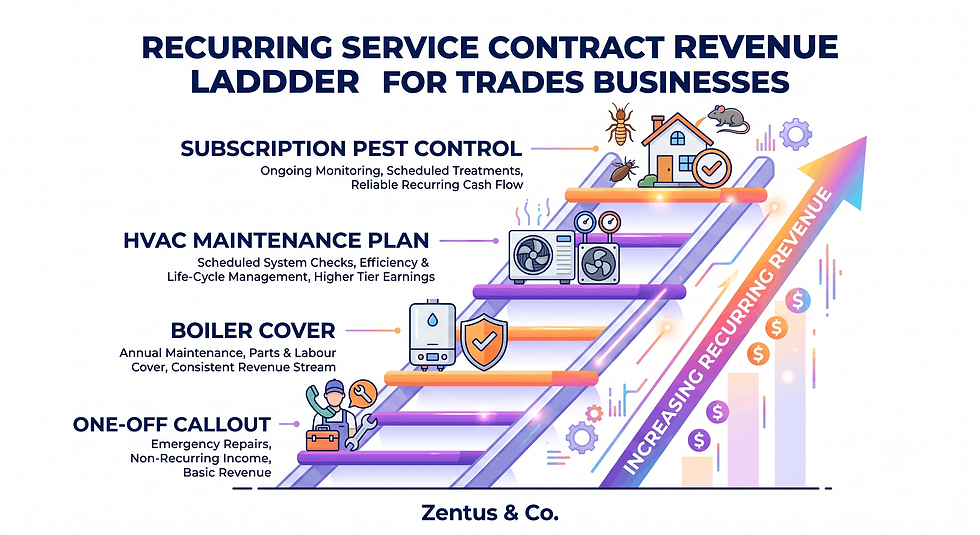
Recurring service contracts are where most trades comparisons stop paying attention — and where the real revenue often sits.
Can Wix sell recurring service contracts like boiler cover?
Wix can sell a recurring plan using its subscription and recurring-payments feature, making it possible to sell something like an annual boiler-cover plan directly from the website with automatic renewal billing.
How do HVAC maintenance plans work on a website vs Jobber?
On a Wix site, a maintenance plan can be sold and billed as a subscription product. In Jobber, that same plan needs to trigger recurring jobs — scheduled visits, technician assignment and service history — which Wix cannot generate.
Where should recurring revenue billing live?
Recurring revenue billing should live wherever the customer signs up — usually Wix for the initial sale — but the recurring job creation and technician scheduling that plan triggers must live in Jobber.
For HVAC firms specifically, see our Wix website HVAC company USA guide for how maintenance-plan pages are typically structured.
Embedding Jobber Into a Wix Trades Website: How the Hybrid Works
The hybrid setup works when the website feels like one connected business — not two separate tools bolted together.
How do you embed Jobber quotes and forms into a Wix site?
Jobber's request-a-quote form can be embedded into a Wix page using an iframe or linked as a styled button, or replicated as a native Wix form that pushes data into Jobber via Zapier or Jobber's API.
Should the "get a quote" button open Jobber or stay on Wix?
In most setups, the "get a quote" button should stay on Wix, using a branded Wix form, then sync that submission into Jobber automatically — this keeps the visitor on your site and your branding consistent through the whole enquiry.
How do you keep branding consistent across both?
Branding stays consistent by matching Jobber's client-facing emails, quote PDFs and payment pages to the same logo, colours and tone as the Wix site, so a homeowner never feels like they've left your business.

Local SEO for Trades: Why an Owned Wix Site Beats a Software-Only Presence
A Jobber request page can take a lead — it cannot win the search that produces one.
Why does a Jobber-only presence limit trades local SEO?
A Jobber-only presence limits local SEO because Jobber's client-facing pages aren't built with the page architecture, content depth or backlink potential search engines reward — there's no blog, no service-area pages, no control over metadata.
How does an owned Wix site help rank for "plumber near me"?
An owned Wix site helps rank for "plumber near me" by supporting dedicated service-area pages, local business schema, Google Business Profile alignment and content that answers the exact questions local searchers type.
What trades content can a Wix site host that Jobber cannot?
A Wix site can host service-area pages, pricing guides, before/after project galleries, reviews and blog content addressing local search intent — none of which live on a field-service platform's client portal.
For real examples of this structure, see our guides on Wix website for tradesmen UK, Wix website for plumbers UK and Wix website for electricians UK.
What Jobber + Wix Costs a Trades Business in 2026
Running both tools costs less than most trades owners expect — and considerably less than switching to a single all-in-one platform built for larger operations.
Plan / Tool | Price (July 2026) | What It Unlocks | Best For |
Wix Light | from $17/mo (~£13/mo) | Business site, contact forms, basic booking | Solo tradesperson needing a professional web presence |
Wix Core | from $29/mo (~£23/mo) | Online booking, invoicing, more automation | Small trades team taking quote requests online |
Wix Business Basic | from $36/mo (~£29/mo) | Recurring payments/subscriptions, advanced automations | Selling maintenance plans or boiler-cover subscriptions |
Jobber Core | from ~$39/mo (1 user) | Quoting, scheduling, client invoicing | Solo operator managing their own jobs |
Jobber Connect | from ~$119/mo | Team scheduling, GPS tracking, client hub | Crew of 2–5 technicians |
Jobber Grow | from ~$199/mo | Automated recurring billing, advanced reporting | Multi-crew business with recurring contracts |
Prices checked for July 2026. Always verify current Wix and tool pricing before you buy — platform pricing can change.
What does Jobber cost a trades business per month in 2026?
Jobber's pricing scales with team size and features, running from roughly $39/month for a solo operator on the entry plan up to around $199/month for multi-technician businesses needing recurring billing and advanced reporting.
Which Wix plan does a trades business need?
Most trades businesses need at least Wix Core for online booking and basic automations; businesses selling recurring maintenance plans or subscriptions should budget for Wix Business Basic to unlock recurring payments.
Is Jobber + Wix cheaper than an all-in-one field-service platform?
Running Jobber and Wix together is typically cheaper than an all-in-one platform like ServiceTitan, which is priced for larger operations and often requires custom quotes well above what a small trades business needs for a website alone.
For a full breakdown of what a Wix Studio build typically costs, see our Wix Studio services page, and check current website design pricing before budgeting your setup.

When a Wix Front Door Plus a Jobber Back Office Beats One Tool for Trades
For most plumbers, electricians, HVAC engineers and cleaning companies doing more than a handful of jobs a week, running a Wix front door alongside a Jobber back office beats trying to force one tool to do both jobs. This split wins clearly for a few identifiable business types.
Trades with a strong local search opportunity — plumbers and electricians in competitive towns and cities, where "near me" search volume is high — win the most from this split, because an owned Wix site can compound in search rankings over years in a way a Jobber-only presence never will.
Trades with mixed job types — a mix of one-off emergency callouts and scheduled maintenance visits — benefit because Wix can market both offers with dedicated pages, while Jobber handles the very different scheduling logic each job type requires.
Growing crews (2+ technicians) get the most operational value from Jobber's dispatch and GPS features, which only start paying for themselves once there's more than one van on the road to coordinate.
The split makes less sense for a genuinely single-person operation doing under 10 jobs a month from repeat customers and referrals — in that case, a simpler Wix site with a basic contact form, paired with Jobber's entry plan, may be enough until the business grows.
The pattern that separates trades businesses that get real value from this hybrid setup from those that don't isn't the tools themselves — it's whether the handoff between them is automated. A Wix site generating leads that get manually copied into Jobber loses time and leads. A connected setup doesn't.
The Recurring-Service-Contract Layer Most Trades Websites Completely Ignore
Most Wix-vs-field-service comparisons focus entirely on one-off jobs: a customer has a problem, requests a quote, gets it fixed, pays an invoice. That model ignores the recurring-revenue layer that many of the most profitable trades businesses — HVAC maintenance, boiler cover, pest control subscriptions, gutter-cleaning contracts — are built around.
Recurring contracts change the split in a way most guides never mention. The sale of a recurring plan is a website job: it needs a landing page explaining what's covered, a price, and a sign-up flow with recurring payment collection — something Wix's subscription tools can genuinely handle well. But the fulfilment of that plan — scheduling the twice-yearly boiler service, dispatching a technician, logging what was done — is entirely a Jobber job, using its recurring job scheduling to automatically generate visits on a set cadence.
The gap most trades businesses fall into is selling a maintenance plan on the website with no connected recurring job schedule behind it. The customer pays, but nothing in Jobber knows to book their service visit six months later — so the visit gets missed, the customer feels forgotten, and the retention advantage of a recurring plan disappears.
The practical fix is to treat the recurring plan sale on Wix as the trigger for a recurring job template in Jobber, set up once and reused for every subscriber. A clean Wix Studio setup usually separates the sale page from the fulfilment workflow for exactly this reason — because a homeowner signing up for boiler cover shouldn't experience it as two different companies.
Dispatch, Quoting and Recurring-Contract Checks Before Your Trades Site Goes Live
Before connecting a Wix front-office site to a Jobber back office, run through these checks to avoid the most common failure points trades businesses hit after launch.
Sync and double-entry checks
Confirm every Wix quote-request form actually creates a lead or client record in Jobber — test with a real submission, not just a preview.
Check whether form fields (name, address, job type) map correctly into Jobber's fields, so nothing needs manual re-typing.
Quoting and invoicing checks
Make sure any pricing shown on the Wix site matches what Jobber generates in a quote — mismatched numbers erode trust fast.
Confirm deposit or payment collection on Wix doesn't create a duplicate invoice inside Jobber.
Recurring-contract checks
Test that a recurring plan sign-up on Wix actually triggers a recurring job template in Jobber — this is the single most commonly missed connection.
Confirm renewal billing dates on Wix align with the service visit cadence set up in Jobber, so customers aren't billed without a scheduled visit.
Dispatch and visibility checks
Verify that a new lead from Wix is visible to whoever handles scheduling, with a clear notification — not sitting unread in an inbox.
Check that service-area pages on Wix match the actual coverage area configured in Jobber, so the site never promises coverage the team can't dispatch to.
The platform behaviour that surprises many business owners is that skipping these checks — not the tools themselves — is the most common reason a website and operations software feel like they're "fighting" each other after launch.

Frequently Asked Questions About Wix vs Jobber for Trades
Can Wix replace Jobber for a trades business?
Wix cannot replace Jobber for a trades business doing more than occasional jobs. Wix handles the front office — the website, lead capture and local SEO — while Jobber handles quoting, scheduling, dispatch and invoicing. Businesses trying to run dispatch or GPS tracking through Wix alone quickly hit a ceiling.
Can I use Jobber's built-in website instead of a full Wix site?
Jobber's built-in web page can work for a very early-stage, single-operator business, but it's not designed to compete in local search. A Wix Studio site offers proper SEO structure, service-area pages and content depth that Jobber's basic hosted page cannot match.
How do I connect my Wix quote form to Jobber without manual data entry?
The cleanest method is connecting a Wix form to Jobber through Zapier or a similar automation tool, so every submission automatically creates a lead in Jobber. Manual copy-paste between the two systems is the most common source of lost leads for trades businesses.
Can Wix handle quoting and invoicing for a growing trades team?
Wix can handle simple, single-line invoicing for a small team, but as a trades crew grows, multi-line quotes, staged payments and job-costing quickly outgrow Wix's tools, making Jobber's dedicated quoting workflow necessary.
What does Jobber's mobile app do that a Wix website never will?
Jobber's mobile app gives field technicians live GPS routing, job status updates, on-site invoicing and schedule changes pushed directly to their phone — functionality a website, by design, was never built to deliver to a moving field team.
Should a plumber use Jobber and Wix together, or pick one?
Most plumbers doing more than a handful of jobs weekly should use both: Wix for lead generation and trust, Jobber for quoting, dispatch and invoicing. Picking only one usually means either strong marketing with weak operations, or the reverse.
Can Wix bill customers automatically for a boiler-cover or HVAC plan?
Yes — Wix's subscription and recurring-payments tools can automatically bill a customer for a boiler-cover or HVAC maintenance plan on a set schedule. The billing itself works well on Wix; the scheduled service visits it should trigger need to live in Jobber.
Does switching to Jobber's GPS features mean I don't need Wix Bookings?
No — GPS and dispatch features in Jobber manage technicians once a job exists, while Wix Bookings manages the customer-facing appointment request before that job is created. They solve different problems and typically work best used together.
Which is cheaper for a trades business, Jobber or Wix?
Wix is generally the cheaper of the two on its own, with entry plans starting around $17/month versus Jobber's roughly $39/month minimum. Most trades businesses need both, so the real comparison is the combined cost against an all-in-one alternative.
How much Wix plan budget does a two-person trades team actually need?
A two-person trades team typically needs Wix Core at minimum for booking and automation features, budgeting more for Wix Business Basic if the business plans to sell recurring maintenance plans or subscriptions online.
Is Wix or Jobber better for a brand-new trades business with no website yet?
A brand-new trades business needs Wix first to establish local search visibility and capture its first leads, then add Jobber once job volume justifies dedicated quoting, scheduling and dispatch software — usually once jobs exceed a handful per week.
What is the difference between front office and back office for a trades business?
The front office is everything that happens before a job exists — the website, lead capture, trust content and local SEO. The back office is everything after — quoting, scheduling, dispatch, GPS tracking and invoicing. Wix and Jobber map directly onto this split.

Making the Call: Wix, Jobber, or Both
For nearly every trades business beyond a one-person operation, the answer isn't Wix or Jobber — it's Wix feeding a connected Jobber back office. The website should own local search, trust and lead capture; Jobber should own quoting, dispatch, GPS and recurring job fulfilment. The businesses that struggle with this setup almost always have a broken or manual handoff between the two, not the wrong tools. If you're weighing this decision for your own trades business, review your current lead flow first — if quote requests aren't automatically reaching your scheduling system, that's the fix to make before anything else. Ready to build the front-office side properly? Book a free consultation and we'll walk through what a Wix Studio setup would look like for your trade.


Comments